Vscode-markdown: Table of contents - ordered list - initial spacing of sub-items for parent item 10 and above
What is the problem?
I have "markdown.extension.toc.orderedList": true and "markdown.extension.toc.levels": "2..6".
The document with inserted (auto-generated) toc is as follows:
# Dummy

1. [Dummy1](#dummy1)
2. [Dummy2](#dummy2)
3. [Dummy3](#dummy3)
   1. [Dummy3.1](#dummy31)
   2. [Dummy3.2](#dummy32)
   3. [Dummy3.3](#dummy33)
4. [Dummy4](#dummy4)
5. [Dummy5](#dummy5)
6. [Dummy6](#dummy6)
7. [Dummy7](#dummy7)
8. [Dummy8](#dummy8)
9. [Dummy9](#dummy9)
   1. [Dummy9.1](#dummy91)
   2. [Dummy9.2](#dummy92)
10. [Dummy10](#dummy10)
   1. [Dummy10.1](#dummy101)
   2. [Dummy10.2](#dummy102)
11. [Dummy11](#dummy11)
12. [Dummy12](#dummy12)
   1. [Dummy12.1](#dummy121)
   2. [Dummy12.2](#dummy122)

## Dummy1

## Dummy2

## Dummy3

### Dummy3.1

### Dummy3.2

### Dummy3.3

## Dummy4

## Dummy5

## Dummy6

## Dummy7

## Dummy8

## Dummy9

### Dummy9.1

### Dummy9.2

## Dummy10

### Dummy10.1

### Dummy10.2

## Dummy11

## Dummy12

### Dummy12.1

### Dummy12.2
The issue is that toc when saving and auto-updating itself aligns all the sub-items with the same spacing. Which works just fine for all sub-items with parents up to 9. However all sub-items with parent items 10 and above should have an extra space. Is there some way to configure this?
Additionally, the default initial spacing for sub-items is 3 spaces. Would be nice to be able to change this (to say, 4).
Is there any error message in the console?
No.
 manastalukdar
All 9 comments
However all sub-items with parent items 10 and above should have an extra space.
I agree.
Additionally, the default initial spacing for sub-items is 3 spaces. Would be nice to be able to change this (to say, 4).
Please try setting markdown.extension.list.indentationSize to inherit. Then the tab size can be configured per document (at the right bottom corner).
 yzhang-gh
on 30 Oct 2019
yzhang-gh
on 30 Oct 2019
Then the tab size can be configured per document (at the right bottom corner).
@yzhang-gh Can you be a bit more specific here?
That's my right bottom corner in VS Code:

I've tried setting the Spaces: 2 thing to Spaces: 1 with no effect: reprinting my Markdown to HTML afterwards still showed misformatted sublists (as described in the OP here).
Also, I am not sure to what extent manually setting something is a solution. In my (possibly naive) understanding, the vscode-markdown plugin simply outputs invalid Markdown. Why isn't that fixed?
 ComFreek
on 14 Feb 2021
ComFreek
on 14 Feb 2021
@ComFreek Please try Spaces: 4 which means (always) indenting with 4 spaces.
the vscode-markdown plugin simply outputs invalid Markdown. Why isn't that fixed?
Based on the feedback, it has a higher priority now 😉.
yzhang-gh
on 14 Feb 2021
It should be fixed in the dev build.
yzhang-gh
on 16 Feb 2021
@yzhang-gh Using the debug.vsix from the latest dev build, the command "Update TOC" seems to be broken: it doesn't have any effect.
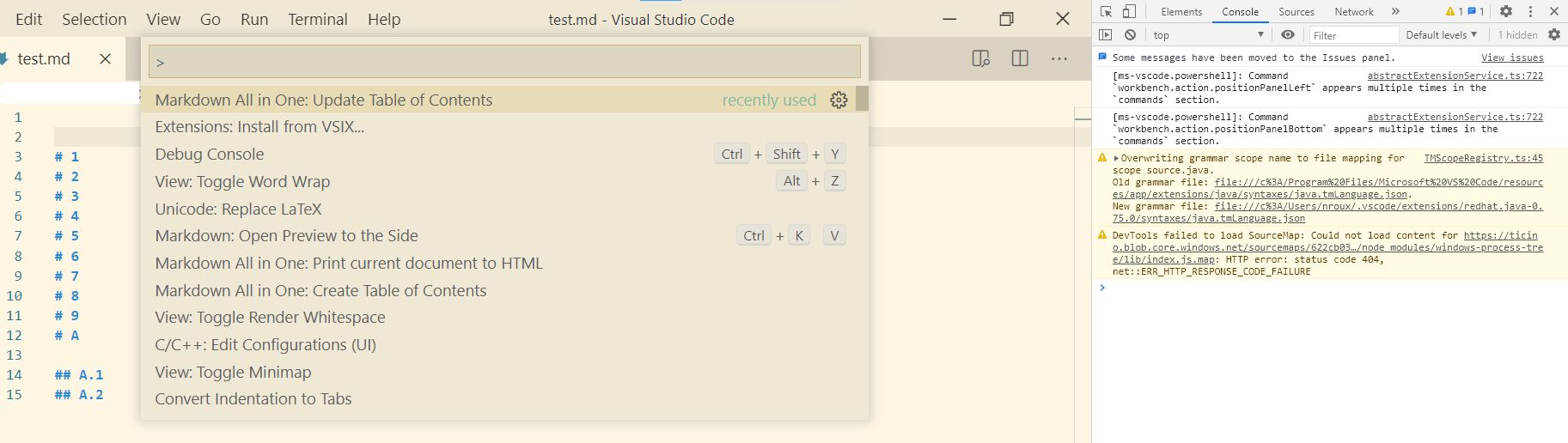
I tried issuing this command several times. Nothing happens. No errors in the console either.
ComFreek
on 17 Feb 2021
You need to "create" a TOC first 😅
yzhang-gh
on 17 Feb 2021
Oh my bad :smile:
The indentation for TOC now works for me! However, I think the generated indentation is one space too deep (even if that doesn't cause any issues):
1. [1](#1)
2. [2](#2)
3. [3](#3)
4. [4](#4)
5. [5](#5)
6. [6](#6)
7. [7](#7)
8. [8](#8)
9. [9](#9)
10. [A](#a)
     1. [A.1](#a1)    <--------- here there is one superfluous space before "1."
     2. [A.2](#a2)    <--------- here too
11. [B](#b)
     1. [B.1](#b1)    <--------- here too
     2. [B.2](#b2)    <--------- here too
12. [C](#c)


# 1
# 2
# 3
# 4
# 5
# 6
# 7
# 8
# 9
# A
## A.1
## A.2
# B
## B.1
## B.2
# C
Did you forget to restore list.indentationSize to adaptive?
yzhang-gh
on 17 Feb 2021
Indeed, it was still on inherit. Removing the configuration for list.indentationSize worked!
So overall, I can confirm TOC generation (wrt. indentation) works for me now like a charm! Thanks for fixing.
ComFreek
on 17 Feb 2021
Related issues
 lackovic
·
4Comments
lackovic
·
4Comments
 deanishe
·
4Comments
deanishe
·
4Comments
 baby5
·
5Comments
baby5
·
5Comments
 FrancesCoronel
·
4Comments
FrancesCoronel
·
4Comments
 akshaybabloo
·
3Comments
akshaybabloo
·
3Comments
Most helpful comment
I agree.
Please try setting
markdown.extension.list.indentationSizetoinherit. Then the tab size can be configured per document (at the right bottom corner).