Vscode-markdown: Need add link shotcut
I can't find add link shotcut key in readme.md, Thank you!
 SunOddman
All 7 comments
Please see more information at #20.
 yzhang-gh
on 23 Jul 2018
yzhang-gh
on 23 Jul 2018
My environment is VS Code 1.23.1,Mac 10.13.6, I either try 'Command + L' or 'Control + L',it dosn't work. Is this feature dosn't support Mac? Could you add a whole key-shotcut list for mac and windows in readme.md?
SunOddman
on 23 Jul 2018
Because of a limitation of vscode extension, we cannot register such a keybinding for you. You need to press ctrl/cmd?+shift+p and execute command Preference: Open Keyboard Shortcuts File. And then copy this
{
    "command": "editor.action.insertSnippet",
    "args": {
        "snippet": "[$TM_SELECTED_TEXT]($0)"
    },
    "key": "ctrl+l", // or "cmd+l" on Mac
    "when": "editorTextFocus && editorLangId == 'markdown'"
}
into the file keybindings.json in the right side.
Then it will work.
yzhang-gh
on 23 Jul 2018
Thank you!Got it!👍
SunOddman
on 23 Jul 2018
This was super helpful, thanks! I'll suggest one change a friend recommended to me (@dwells). If you have a link copied to the clipboard first then this version will paste the link in, saving a little more time:
{
   "command": "editor.action.insertSnippet",
   "args": {
       "snippet": "[$TM_SELECTED_TEXT]($CLIPBOARD)"
   },
   "key": "ctrl+l", // or "cmd+l" on Mac
   "when": "editorTextFocus && editorLangId == 'markdown'"
}
Only change $0 to $CLIPBOARD. Thanks again.
 Mehul
on 29 Apr 2019
Mehul
on 29 Apr 2019
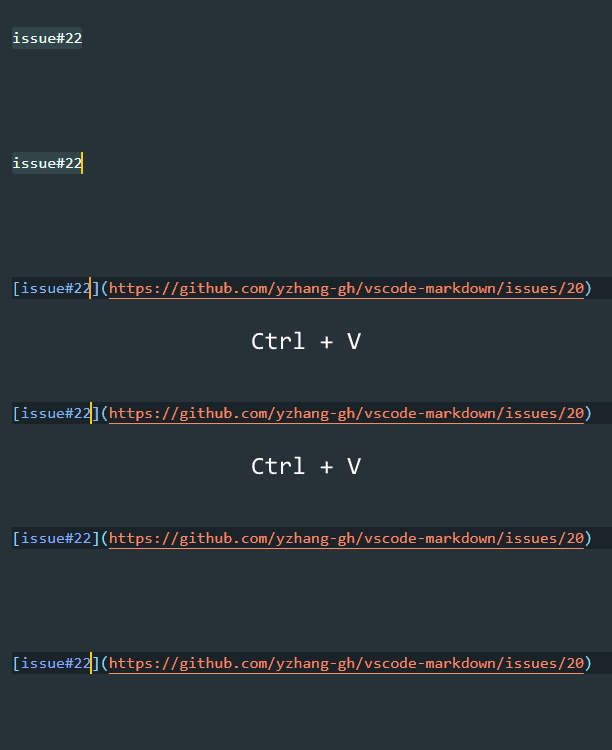
Thanks for the information. Actually, it is now a built-in feature since v2.1.0.
yzhang-gh
on 30 Apr 2019
Excellent, thanks!
Mehul
on 30 Apr 2019
Related issues
 lackovic
·
4Comments
lackovic
·
4Comments
 MonsieurMan
·
3Comments
MonsieurMan
·
3Comments
 deanishe
·
4Comments
deanishe
·
4Comments
 MisterY
·
3Comments
MisterY
·
3Comments
 maoturing
·
4Comments
maoturing
·
4Comments
Most helpful comment
Because of a limitation of vscode extension, we cannot register such a keybinding for you. You need to press
ctrl/cmd?+shift+pand execute commandPreference: Open Keyboard Shortcuts File. And then copy thisinto the file
keybindings.jsonin the right side.Then it will work.