Vscode-markdown: Use custom markdown list indentation configuration (e.g. from markdown lint) over global editor.tabSize
It would be nice if vscode-markdown could use a markdown specific tab setting over the global editor.tabSize one, for instance the one from markdownlint.
I tried the per-file setting as per https://github.com/neilsustc/vscode-markdown/issues/77#ref-commit-fd60143, but clicking on the "spaces: 4" does not allow me to change that.
Problem
When installing, https://github.com/DavidAnson/vscode-markdownlint it will throw MD007
Reproduce
Install https://github.com/DavidAnson/markdownlint/blob/master/doc/Rules.md#md007, edit some markdown with lists, indent part of the lists, observe the MD007 errors to appear.
Console error messages
None
Proposed solution
It would be really nice if vscode-markdown could use a markdown specific indentation setting over the editor.TabSize, for instance vscode-markdown.config/lists/indent:
    "vscode-markdown.config": {
        "lists": { "indent": 2 }
    }
Or even nicer: if markdownlint is installed, vscode-markdown could use the markdownlint.config/MD007/indent indentation setting for lists (and the global editor.tabSize for all other indentation).
Notes
Related: https://github.com/neilsustc/vscode-markdown/issues/77
markdownlint has a markdown specific tab setting for lists:
    "markdownlint.config": {
        "MD007": { "indent": 2 }
    }
Of course one could change this to 4, but the vast majority of online markdown is using an indentation of 2, hence different proposed solutions.
 jpluimers
All 9 comments
Thanks for the detailed description.
I guess the suggested indentation option only applies to _unordered list_, right?
Personally, I prefer to use 4 spaces partially because the 2 spaces convention doesn't apply to _ordered list_.
Of course we can default to 3 spaces for ordered list. But there are other disadvantages, such as vscode won't render indent guides for them.
Another interesting example is MD029. It was one before and I tried to be consistent with that although it is kind of unnatural (#54). (of course, we were back to ordered later)
Just now I found it was already changed to one_or_ordered (commit).
So convention is a hard thing. If I add such a setting, I have to add another one for ordered list. For now, I am not persuaded.
 yzhang-gh
on 28 Apr 2018
yzhang-gh
on 28 Apr 2018
One of my motivations for this suggestion is that I am moving from atom.io to vscode (which is far more responsive than atom.io and is a lot easier for doing .NET and PowerShell based projects).
In atom.io, markdown editing lists feels a lot more natural than vscode, hence the suggestion (more might follow as I recently started to make the switch and it takes time to get a proper feel for the differences).
I know how hard it is to write editors and plugins, so I understand your hesitation. Being a n00b at atom plugins, but willing to learn, maybe you do have some energy to help me guide and understand possible approaches? That way I could try to come up with pull requests to get a better feel for how hard it actually is and maybe get a bit closer.
Markdown, reStructured text and plantUML are the text formats I write almost all my documentation in, so I am willing to put energy in making life as easy as possible for me editing them.
I am also aware that no tool is perfect (for instance atom.io has an issue with https://github.com/remarkjs/remark-lint/tree/master/packages/remark-lint-list-item-bullet-indent incorrectly flagging valid unordered lists), so I try to put in issue reports where appropriate and help where I can.
jpluimers
on 28 Apr 2018
Suggestions are always welcome since we all hope to make Markdown editing easier.
The reason of my hesitation is not the difficulty of implementing it. I just would like to keep this extension simple (I mean do not add a feature if it is not necessary) (e.g. Markdown dialects except for GFM)
Trust me, you can get used to 4 spaces indentation in a few days if you choose to adopt it. 😂
If you really like the 2 spaces convention, then here is some information.
When you press Tab key, this onTabKey function is called,
In list environment, the vscode built-in command indentLines will be called then (the tab size is showed at the bottom right corner). You can replace it with your code which will read your configured tab size and add them in the front of the line.
BTW, why doesn't the per-file setting work for you?
Please try again following these steps,
Click Space: 4,
then select Indent Using Spaces,
then select 2,
press Tab after a list marker
yzhang-gh
on 28 Apr 2018
@neilsustc I was probably confused by this pop-up menu thinking it would convert all space indents to tabs or vice versa, or use spaces/tabs from now in stead of changing the number of characters to use for indentation:
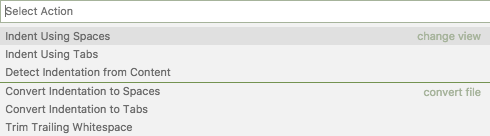
Where is that setting persisted?
jpluimers
on 28 Apr 2018
"Indent Using Spaces/Tabs" is "start use spaces/tabs from now"
"Convert Indentation to Spaces/Tabs" is "convert indentation to spaces/tabs in current doc"
And as it is a per-file setting, I guess it is cached by vscode just like "recently opened files".
And FYI, the indent guides issue I mentioned above
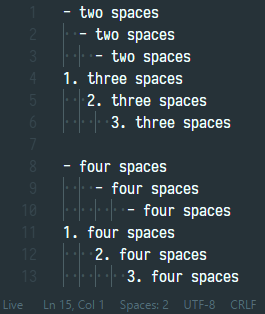
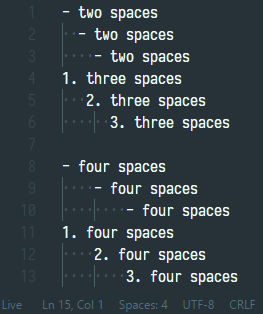
Even though you can config unordered list indentation to 2, ordered list to 3, the indent guides don't know this behavior.
yzhang-gh
on 29 Apr 2018
An update, we can have a self-adaptive indentation scheme option. See #241-comment.
yzhang-gh
on 23 Jul 2018
I guess we can close this issue 👍
 maelvls
on 1 Dec 2018
maelvls
on 1 Dec 2018
Uh, PR#319 does solve the indentation problem of TOC. But the indentation on backspace/tab keys are still not changed.
I will work on it soon.
yzhang-gh
on 1 Dec 2018
You can now try out the dev build.
yzhang-gh
on 1 Dec 2018
Related issues
 MonsieurMan
·
3Comments
MonsieurMan
·
3Comments
 smallprogram
·
3Comments
smallprogram
·
3Comments
 jerry-sky
·
4Comments
jerry-sky
·
4Comments
 rdhar
·
4Comments
rdhar
·
4Comments
 lotapp
·
3Comments
lotapp
·
3Comments
Most helpful comment
You can now try out the dev build.