Vscode-markdown: command 'markdown.extention.onEnterKey' not found
Enter, backspace, tab is not working. Space is working

///////////CONSOLE MESSAGE////////////

 Ayush-Bhowmick
All 15 comments
SOMEBODY PLEASE HELP ME, I USE THIS FEATURE WITH VS CODE - INSIDERS ON A REGULAR BASIS... SO ITS CAUSING INCONVENIENCE....
Ayush-Bhowmick
on 24 Feb 2018
This is because the official markdown extension was renamed in vscode insider build.
Please go to C:\Users\[username]\.vscode-insiders\extensions\yzhang.markdown-all-in-one-1.0.5 (or similar path in Mac)
Open the folder with vscode
Use global search to replace Microsoft.vscode-markdown with vscode.vscode-markdownvscode.markdown-language-features
(There should be 4 files, package.json, .vsixmanifest, print.js and toc.js)
 yzhang-gh
on 25 Feb 2018
yzhang-gh
on 25 Feb 2018
@neilsustc that worked for me. thank you!
 orangemooncreative
on 26 Feb 2018
orangemooncreative
on 26 Feb 2018
This worked for me in git bash.
cd "/c/Users/vicber/.vscode-insiders/extensions/yzhang.markdown-all-in-one-1.0.5"
grep -Rl 'Microsoft.vscode-markdown' ./ | xargs -n 1 -I % sh -c "ls %; sed -i 's/Microsoft.vscode-markdown/vscode.vscode-markdown/g' %";
 VictorioBerra
on 1 Mar 2018
VictorioBerra
on 1 Mar 2018
It appears to have been renamed again, now it appears to be vscode.markdown-language-features
 avatarwin
on 3 Mar 2018
avatarwin
on 3 Mar 2018
Another rename. I just pulled the latest Insiders build and it's been renamed to just markdown-language-features
 glek
on 6 Mar 2018
glek
on 6 Mar 2018
This just hit VSCode stable with the 1.21 update. Can we expect an update for this extension to address the issue? 😇
 eramdam
on 7 Mar 2018
eramdam
on 7 Mar 2018
v1.1.0 released 😎
yzhang-gh
on 8 Mar 2018
I'm having the same problem using _Markdown All in One 1.5.0 (2018.06.24)_
When typing the following keys I get the error command 'markdown.extension.on***Key' not found
- Backspace
- Enter
- Tab
On typing Ctrl+m i get command 'markdown.extension.editing.toggleMath' not found
I reinstalled the extention, restart vscode a few times, doesn't seem to fix it.
Small note: selecting text and pressing backspace does work
 mcbloch
on 23 Jun 2018
mcbloch
on 23 Jun 2018
@maximebloch Are you using an insider build of VSCode? Given how often it updates and the changes that get made to it, that error often shows up when using it after updating VSCode itself.
glek
on 23 Jun 2018
I'm running an open source build. I'm including the 'About' of vscode, not sure if this clarifies it?
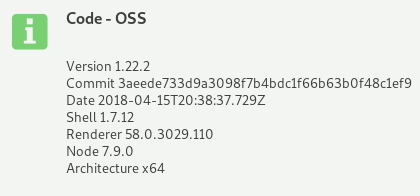
mcbloch
on 23 Jun 2018
@maximebloch You're a couple of versions out of date. It's possible the extension is depending on features that were added a version or two ago (1.23 or 1.24). I know that, for me, it's working fine on the latest insider build (on Linux) and version 1.24 (on Windows).
glek
on 24 Jun 2018
@glek Thank you.
@maximebloch vscode is actively developed, we need to catch up with it 😉.
yzhang-gh
on 24 Jun 2018
Updating was quite the struggle (some nodejs conflict). I reinstalled vscode to the newest version and everything works fine now, thanks for the help.
mcbloch
on 26 Jun 2018
This is caused by markdown-all-in-one. Uninstall the extension were help.
 maoxiaoke
on 28 Jun 2018
maoxiaoke
on 28 Jun 2018
Related issues
 MonsieurMan
·
3Comments
MonsieurMan
·
3Comments
 lackovic
·
4Comments
lackovic
·
4Comments
 rdhar
·
4Comments
rdhar
·
4Comments
 deanishe
·
4Comments
deanishe
·
4Comments
 akshaybabloo
·
3Comments
akshaybabloo
·
3Comments
Most helpful comment
This is because the official markdown extension was renamed in vscode insider build.
Please go to
C:\Users\[username]\.vscode-insiders\extensions\yzhang.markdown-all-in-one-1.0.5(or similar path in Mac)Open the folder with vscode
Use global search to replace
Microsoft.vscode-markdownwithvscode.vscode-markdownvscode.markdown-language-features(There should be 4 files,
package.json,.vsixmanifest,print.jsandtoc.js)