Vscode-markdown: command 'markdown.extension.onEnterKey' not found
Today all of a sudden, when I edit a markdown document and try to press enter, I get the following warning:
command 'markdown.extension.onEnterKey' not found
Reinstalling the extension doesn't help
Open a markdown document, click anywhere on it and press enter.
Nothing:

 luispabon
All 38 comments
A few more questions
- Are you using vscode insider build?
- Does "waiting for a few seconds after opening a MD file" help?
 yzhang-gh
on 15 Feb 2018
yzhang-gh
on 15 Feb 2018
👍
No, I'm using whatever's the current stable at the snap repository:
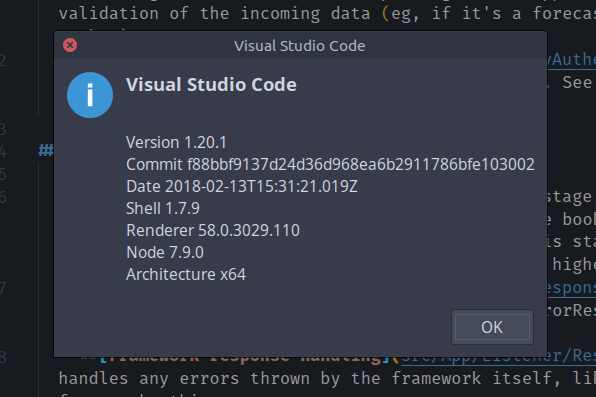
No, it doesn't help at all I'm afraid
luispabon
on 15 Feb 2018
Receiving the same - this has been recurring since I installed the extension on my windows pc (the past 30 days) - this behavior does not happen on my osx computer.
To add an additional item - the behavior does go away for after ~2 minutes. My first thought is there may be another extension conflicting/adding to extension load times - causing this delay - but disabling other extensions does not seem to resolve it.
 vamanos
on 21 Feb 2018
vamanos
on 21 Feb 2018
Thanks for the report. This issue seems to be the most common problem. I'm considering to add something in this extension to help users troubleshooting.
yzhang-gh
on 21 Feb 2018
Same here with vscode insiders
Version 1.21.0-insider
Commit ce13bb0dabd06981913c46b5a94456647864c2e0
Date 2018-02-23T06:15:51.754Z
Shell 1.7.9
Renderer 58.0.3029.110
Node 7.9.0
Architecture x64
It happens with all markdown extensions keyboard shortcuts
 albertored
on 23 Feb 2018
albertored
on 23 Feb 2018
@albertored Since you are using insider build, the root cause might be different. You can try manually install this version of extension
yzhang-gh
on 23 Feb 2018
Installing the beta version does not fix it on my end.

For me this was occurring with backspace, delete, enter, etc
 krumware
on 28 Feb 2018
krumware
on 28 Feb 2018
Because insider build changed again during the past few days. You need one more step now.
You can also wait for several days as I will release a new version after vscode Feb stable build.
yzhang-gh
on 1 Mar 2018
Please try v1.1.0
yzhang-gh
on 8 Mar 2018
Took a couple of restarts, but working in latest insider build (1.22.0-insider)
krumware
on 8 Mar 2018
There's no way to solve this without using the insider build?
 Floriferous
on 8 Mar 2018
Floriferous
on 8 Mar 2018
It (v1.1.0) should work well with vscode v1.21.0 (or later of course).
Please update your vscode because of the API change.
yzhang-gh
on 8 Mar 2018
Workaround: without manually messing with the extension: copy a CRFR char sequence and copy&paste if you need a new line rather then using enter. Yeh, I know. It's messy. But it does the job if you just need to fix something in your markdown RIGHT_NOW...
 omniproc
on 8 Mar 2018
omniproc
on 8 Mar 2018
I can confirm this is fixed now with the latest plugin and vscode.
luispabon
on 8 Mar 2018
Got the same problem, but can confirm also! Updating VSCode solved the problem (1.21.0)
 pernix84
on 10 Mar 2018
pernix84
on 10 Mar 2018
@pernix84 thx, I solve the problem
 penut85420
on 11 Mar 2018
penut85420
on 11 Mar 2018
I had the same issue, with the latest stable version of the plugin installed. Updating VS Code (in my case with Ubuntu, using apt) solved the issue.
My current version of VSCode:
Version 1.21.0
Commit 9a199d77c82fcb82f39c68bb33c614af01c111ba
Date 2018-03-07T11:01:43.521Z
Shell 1.7.9
Renderer 58.0.3029.110
Node 7.9.0
Architecture x64
 MitchK
on 13 Mar 2018
MitchK
on 13 Mar 2018
I have VS Code 1.21.1 (NOT insider) and plugin version 1.1.2 and still have the same problem. The issue should be reopened.
 ulysses4ever
on 5 Apr 2018
ulysses4ever
on 5 Apr 2018
@ulysses4ever You need to provide more information otherwise I have no idea why it happens.
Does this issue still exist if you wait 2 second after opening the MD file?
Is there any error message in the dev tools console? (menu>help>toggle dev tools)
yzhang-gh
on 5 Apr 2018
@neilsustc after Disabling/Enabling it it seems to start working right. Thanks!
ulysses4ever
on 5 Apr 2018
I have VS Code 1.22.2 (NOT insider) still have the same problem. The issue should be reopened.
 Agarwal-Nikhil
on 13 May 2018
Agarwal-Nikhil
on 13 May 2018
The issue remains even after 10 minutes of starting VS Code
Agarwal-Nikhil
on 13 May 2018
Also I am getting this error as well: command 'markdown.extension.onBackspaceKey' not found
Agarwal-Nikhil
on 13 May 2018
@Agarwal-Nikhil Any error message in the dev tools console (menu>help>toggle dev tools)?
yzhang-gh
on 14 May 2018
@neilsustc Yes, I get this error: extensionService.ts:848 Activating extension 'yzhang.markdown-all-in-one' failed: Cannot find module 'katex'.
Agarwal-Nikhil
on 18 May 2018
It seems that some files are missing. Please uninstall the extension, restart vscode and then reinstall it.
yzhang-gh
on 18 May 2018
@neilsustc Did reinstallation. But the problem still persists.
Agarwal-Nikhil
on 18 May 2018
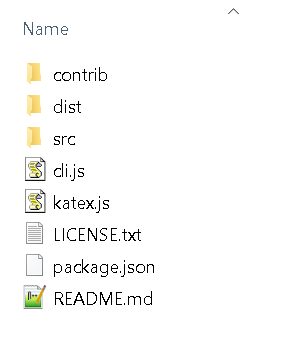
That's really strange. Could you check whether the directory C:\Users\[username]\.vscode\extensions\yzhang.markdown-all-in-one-1.3.0\node_modules\@iktakahiro\markdown-it-katex\node_modules\katex exists?
yzhang-gh
on 18 May 2018
Yes it exist. It has following contents:
Agarwal-Nikhil
on 18 May 2018
It looks perfect. I have no idea why vscode still says "cannot find katex"
One last option is to try it with vscode-insider build because its extensions are isolated from the stable build.
yzhang-gh
on 18 May 2018
This happens to me when I open a new tab (a brand new, unsaved file). If I save the file, everything works. However, I'd like this to work on unsaved files, because setting files.defaultLanguage to markdown makes new files markdown automatically, which I can use to quickly jot down notes with style. This works fine without the extension installed, but of course I'd prefer to use the tools this extension provides.
Is there any way to do this?
 cbejensen
on 18 May 2018
cbejensen
on 18 May 2018
@cbejensen You can try the latest build v1.3.0-0519.
yzhang-gh
on 19 May 2018
@neilsustc
For me, latest build works well thanks.
 sasukeh
on 19 May 2018
sasukeh
on 19 May 2018
This is caused by markdown-all-in-one. Uninstall the extension were help.
@neilsustc Update the vscode is heplp, but it 's not the reason to cause this warning info.
 maoxiaoke
on 28 Jun 2018
maoxiaoke
on 28 Jun 2018
not working for me even after restart and reload
windows 7
Version 1.23.1
Commit d0182c3417d225529c6d5ad24b7572815d0de9ac
Date 2018-05-10T17:11:17.614Z
Shell 1.7.12
Renderer 58.0.3029.110
Node 7.9.0
Architecture x64
 Triamus
on 29 Jun 2018
Triamus
on 29 Jun 2018
@Triamus Your vscode version is old. Please update it first and you will get it work.
And this issue itself is also out-of-date. Please find the latest one 😂.
yzhang-gh
on 29 Jun 2018
Have just recently worked, but started getting out of a sudden.
onBackspaceKey and onEnterKey
MacOS X High Sierra
Version 1.25.1 (1.25.1)
Extension: v1.5.1
Reinstall/Reload IDE did not work.
 mantasindrasius
on 14 Jul 2018
mantasindrasius
on 14 Jul 2018
For the problem like "command '...' not found", please try to
- wait for a few seconds after you open a Markdown file for the first time
- doesn't work? -> update vscode
- doesn't work? -> reinstall this extension
- still doesn't work? 😵 -> please open the developer tools to see whether there is any error message, and then paste it below. (Menu Bar -> Help -> Toggle Developer Tools)
And please discuss this in #217. This thread is out-of-date.
yzhang-gh
on 15 Jul 2018
Related issues
 maoturing
·
4Comments
maoturing
·
4Comments
 baby5
·
5Comments
baby5
·
5Comments
 rdhar
·
4Comments
rdhar
·
4Comments
 chuyangliu
·
5Comments
chuyangliu
·
5Comments
 alexb148
·
3Comments
alexb148
·
3Comments
Most helpful comment
I can confirm this is fixed now with the latest plugin and vscode.