Vscode-markdown: Paste URL over selection to create link
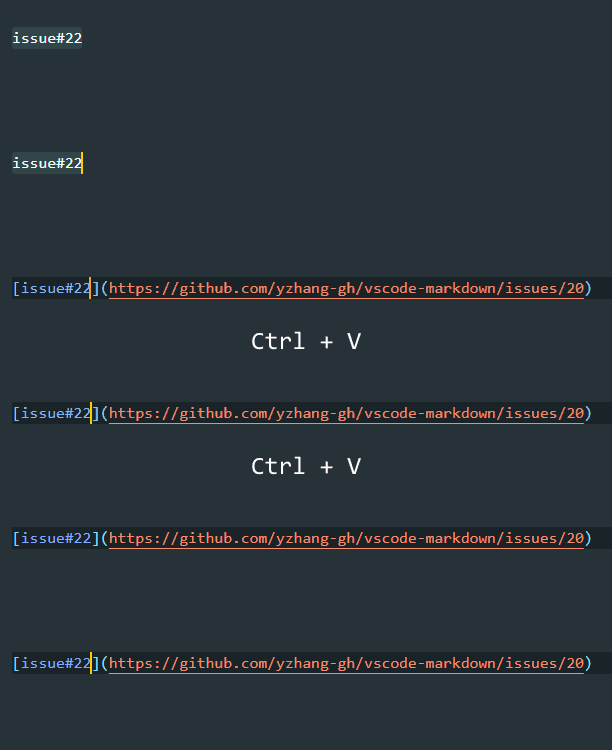
The ideal UX, in my opinion, is what pasting detects URL from the clipboard and does its magic. For example, before paste:

After paste:

The next preferred method is a keyboard shortcut like here on GitHub. I select text, press a keyboard shortcut (Ctrl+K would be ideal but that one is taken by VSCode so probably Ctrl+L which is the second most popular shortcut for MD links in various editors) and get this:

I can then paste the URL which is in my clipboard.
Thanks for this awesome extension!
UPDATE 06/2019 for anyone reading this:
- ✅ If clipboard contains a link, pasting over a selected text now works 🎉: https://github.com/yzhang-gh/vscode-markdown/issues/20#issuecomment-461481950
- ✅ For
Ctrl+L/Cmd+Lto insert links, one can define a custom snippet inkeybindings.json: https://github.com/yzhang-gh/vscode-markdown/issues/20#issuecomment-318393965 - Out-of-the box keybinding provided by this extension: was blocked by https://github.com/Microsoft/vscode/issues/31372 but that is resolved now; I'm not sure if there are other problems but I just tried and Cmd+L is not bound by default.
 borekb
All 23 comments
Good suggestion
 yzhang-gh
on 18 Jul 2017
yzhang-gh
on 18 Jul 2017
I find that we cannot get the text from clipboard using vscode APIs. So we cannot detect if the text is an URL.
I'm going to adopt the second method ctrl+l.
But there must be an upstream issue contributing snippets with arguments.
If you would like to try it, just add this to you Markdown keybindings (Menu>File>Preferences>Keyboard Shortcuts>advanced customizations->open keybindings.json),
{
    "command": "editor.action.insertSnippet",
    "args": "[$TM_SELECTED_TEXT]($0)", // not correct, see the updated snippet in discussion below
    "key": "ctrl+l",
    "mac": "cmd+l",
    "when": "editorTextFocus && editorLangId == markdown"
}
It gives me this palette:
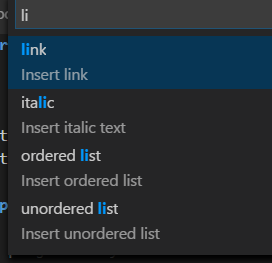
Is this expected? When I select _Insert link_, it works as expected but I thought it would insert the link syntax straight away.
borekb
on 27 Jul 2017
But thanks for the tip anyway!
borekb
on 27 Jul 2017
Are you using vscode insider version?
I think it might be a bug of insider version because v1.14.1 (stable) inserts link syntax directly.
yzhang-gh
on 27 Jul 2017
I'm on 1.14.2, Windows 10.
borekb
on 27 Jul 2017
This works for me:
    {
        "command": "editor.action.insertSnippet",
        "args": {
            "snippet": "[$TM_SELECTED_TEXT]($0)"
        },
        "key": "ctrl+l", // or "cmd+l" on Mac
        "when": "editorTextFocus && editorLangId == 'markdown'"
    }
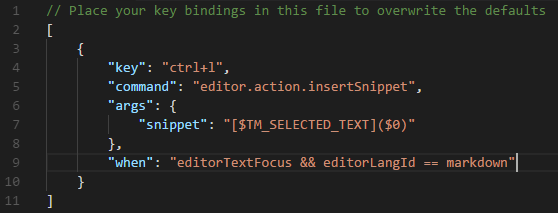
Oops, my fault
This is my setting
yzhang-gh
on 27 Jul 2017
BTW, this is the upstream issue vscode #31372 preventing this extension to configure the keybinding out-of-box for you.
But it seems to have a low priority... You can vote for this.
yzhang-gh
on 27 Jul 2017
Upvoted, thanks.
borekb
on 27 Jul 2017
By any chance, doesn't VSCode API provide access to clipboard today, compared to last year? This would still be a great feature to have :)
I was also thinking if it would be possible to paste regardless of clipboard contents and then retrospectively look at what it was: if a URL, keep it, if something else, revert it. If this happened very quickly, maybe I wouldn't able to notice as a user? But maybe this would be problematic for larger blocks of text in the clipboard, I don't know.
borekb
on 29 May 2018
Not a good news but you can find more information here.
yzhang-gh
on 29 May 2018
Thanks, very useful!
borekb
on 29 May 2018
The workaround doesn't seem very feasible, does it?
borekb
on 29 May 2018
The information I got from that comment is that
1) vscode team has no interest in it,
2) no satisfactory workaround now ...
yzhang-gh
on 29 May 2018
I meant this:
I was also thinking if it would be possible to paste regardless of clipboard contents and then retrospectively look at what it was: if a URL, keep it, if something else, revert it. If this happened very quickly, maybe I wouldn't able to notice as a user? But maybe this would be problematic for larger blocks of text in the clipboard, I don't know.
borekb
on 29 May 2018
In fact, we can watch for any text changes (no matter it is a pasting or normal typing) and do something. I think it is feasible. But one concern is there will be a noticeable two consecutive edits.
yzhang-gh
on 29 May 2018
Finally we get it. Please try out the dev build.
yzhang-gh
on 7 Feb 2019
@yzhang-gh works like a charm! 🎉
borekb
on 16 Feb 2019
The feature is great, but it is not clear from the gif that you are doing the selection in the insert mode. I spent half an hour trying to see if there was other keybinding conflicts. Since the source code for keybinding is different from what you have above with editorHasSelection, it would be helpful to add that detail in the README.md
 johnyoonh
on 30 Mar 2019
johnyoonh
on 30 Mar 2019
it is not clear from the gif that you are doing the selection in the insert mode
Sorry, I don't get the point. Are you using the Vim extension?
I assumed the short text above the gif "Paste link on selected text" is enough.
yzhang-gh
on 30 Mar 2019
Yes I am using that vim extension. It could be just me. You happen to have syntax highlighting on previous gif for current line the same color as the selected text color, hence the confusion. Coming from vanilla vim, text selection in insert mode was a new concept for me..
johnyoonh
on 30 Mar 2019
I've updated the OP with clarification about the status of this issue as of today.
borekb
on 15 Jun 2019
Related issues
 PierreMarchand20
·
3Comments
PierreMarchand20
·
3Comments
 ichirou2910
·
3Comments
ichirou2910
·
3Comments
 akshaybabloo
·
3Comments
akshaybabloo
·
3Comments
 lengyingzi
·
5Comments
lengyingzi
·
5Comments
 jerry-sky
·
4Comments
jerry-sky
·
4Comments
Most helpful comment
Finally we get it. Please try out the dev build.