Vscode-live-server: Live Server is not starting
I'm submitting a...
[ ] Regression (a behavior that used to work and stopped working in a new release)
[x] Bug report  <!-- Please search GitHub for a similar issue or PR before submitting -->
[ ] Feature request
[ ] Documentation issue or request
[ ] Other: <!-- Please describe: -->
Current behavior
I installed the extension, created an index.html file, right-click on it and then click on "Open with Live Server" and then nothing happens.
Expected behavior
Live Server is Starting
Environment
Browser:

- [ ] Chrome (desktop) version XX
- [ ] Firefox version XX
- [ ] Safari (desktop) version XX
- [ ] IE version XX
- [x] Edge version 89

For Tooling issues:

- Live Server: 5.6.1
- Platform:  Windows 10
- Visual Studio Code: 1.54
Others
Errors from the VS Code Dev Console:
console.ts:137 [Extension Host] rejected promise not handled within 1 second: Error: ENOENT: no such file or directory, open
v @ console.ts:137
$logExtensionHostMessage @ mainThreadConsole.ts:35
_doInvokeHandler @ rpcProtocol.ts:417
_invokeHandler @ rpcProtocol.ts:402
_receiveRequest @ rpcProtocol.ts:318
_receiveOneMessage @ rpcProtocol.ts:245
(anonymous) @ rpcProtocol.ts:110
fire @ event.ts:622
fire @ ipc.net.ts:468
_receiveMessage @ ipc.net.ts:821
(anonymous) @ ipc.net.ts:660
fire @ event.ts:622
acceptChunk @ ipc.net.ts:241
(anonymous) @ ipc.net.ts:202
I @ ipc.net.ts:32
emit @ events.js:315
addChunk @ _stream_readable.js:295
readableAddChunk @ _stream_readable.js:271
Readable.push @ _stream_readable.js:212
onStreamRead @ internal/stream_base_commons.js:186
console.ts:137

[Extension Host] stack trace: Error: ENOENT: no such file or directory, open    at Object.openSync (fs.js:466:3)    at Object.func [as openSync] (electron/js2c/asar_bundle.js:5:1812)    at Object.readFileSync (fs.js:368:35)    at Object.e.readFileSync (electron/js2c/asar_bundle.js:5:8583)    at Function.getHttpsSetup (c:\Users\Patrick\.vscode\extensions\ritwickdey.liveserver-5.6.1\out\src\Helper.js:106:27)    at Function.generateParams (c:\Users\Patrick\.vscode\extensions\ritwickdey.liveserver-5.6.1\out\src\Helper.js:73:30)    at AppModel.<anonymous> (c:\Users\Patrick\.vscode\extensions\ritwickdey.liveserver-5.6.1\out\src\appModel.js:63:42)    at Generator.next (<anonymous>)    at fulfilled (c:\Users\Patrick\.vscode\extensions\ritwickdey.liveserver-5.6.1\out\src\appModel.js:4:58)    at processTicksAndRejections (internal/process/task_queues.js:97:5)
v @ console.ts:137
$logExtensionHostMessage @ mainThreadConsole.ts:35
_doInvokeHandler @ rpcProtocol.ts:417
_invokeHandler @ rpcProtocol.ts:402
_receiveRequest @ rpcProtocol.ts:318
_receiveOneMessage @ rpcProtocol.ts:245
(anonymous) @ rpcProtocol.ts:110
fire @ event.ts:622
fire @ ipc.net.ts:468
_receiveMessage @ ipc.net.ts:821
(anonymous) @ ipc.net.ts:660
fire @ event.ts:622
acceptChunk @ ipc.net.ts:241
(anonymous) @ ipc.net.ts:202
I @ ipc.net.ts:32
emit @ events.js:315
addChunk @ _stream_readable.js:295
readableAddChunk @ _stream_readable.js:271
Readable.push @ _stream_readable.js:212
onStreamRead @ internal/stream_base_commons.js:186
log.ts:296

ERR ENOENT: no such file or directory, open: Error: ENOENT: no such file or directory, open
    at Object.openSync (fs.js:466:3)
    at Object.func [as openSync] (electron/js2c/asar_bundle.js:5:1812)
    at Object.readFileSync (fs.js:368:35)
    at Object.e.readFileSync (electron/js2c/asar_bundle.js:5:8583)
    at Function.getHttpsSetup (c:\Users\Patrick\.vscode\extensions\ritwickdey.liveserver-5.6.1\out\src\Helper.js:106:27)
    at Function.generateParams (c:\Users\Patrick\.vscode\extensions\ritwickdey.liveserver-5.6.1\out\src\Helper.js:73:30)
    at AppModel.<anonymous> (c:\Users\Patrick\.vscode\extensions\ritwickdey.liveserver-5.6.1\out\src\appModel.js:63:42)
    at Generator.next (<anonymous>)
    at fulfilled (c:\Users\Patrick\.vscode\extensions\ritwickdey.liveserver-5.6.1\out\src\appModel.js:4:58)
    at processTicksAndRejections (internal/process/task_queues.js:97:5)
 Zerotask
All 4 comments
Try Five Server.
 yandeu
on 1 Apr 2021
yandeu
on 1 Apr 2021
👍2
Thank you Yandeu,
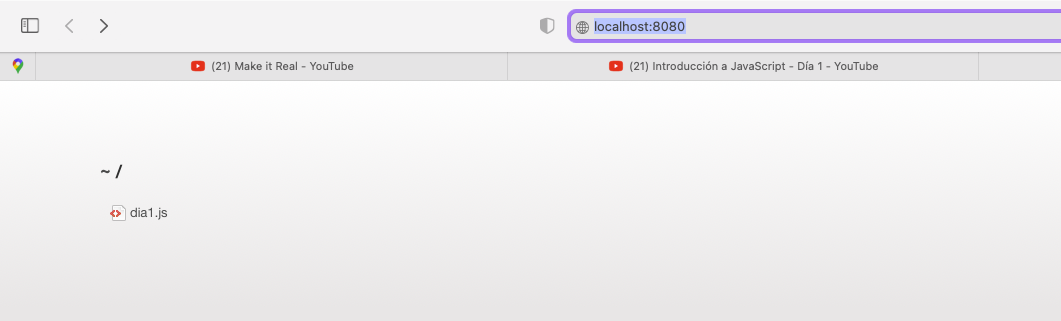
I installed it and when it opens it shows the folder where the file is located but not what's in the file, like the screenshot attached.
 pipe-mv
on 9 Apr 2021
pipe-mv
on 9 Apr 2021
Is there no .html file?
Just click on dia1.js to open it.
But what you probably want to do is adding an index.html file.
Example:
<!DOCTYPE html>
<html>
  <body>
    <h1>My First JavaScript</h1>
  </body>
  <script src="./dia1.js"></script>
</html>
Hi Yandeu,
Thank you so much for your help!!!!!
I opened it in a HTML file and now is working properly.
I appreciate your help!!!!
Kind Regards,
pipe-mv
on 10 Apr 2021
👍1
Was this page helpful?
0 / 5 - 0 ratings
Related issues
 kmdrGroch
·
5Comments
kmdrGroch
·
5Comments
 Josee9988
·
3Comments
Josee9988
·
3Comments
 dominik-korsa
·
6Comments
dominik-korsa
·
6Comments
 Missangay
·
7Comments
Missangay
·
7Comments
 iAdesanyaDaniel
·
3Comments
iAdesanyaDaniel
·
3Comments
Most helpful comment
Try Five Server.