Vscode-live-server: Live Server not reloading to display new changes
I'm submitting a...
[x] Regression (a behavior that used to work and stopped working in a new release)
[ ] Bug report  <!-- Please search GitHub for a similar issue or PR before submitting -->
[ ] Feature request
[ ] Documentation issue or request
[ ] Other: <!-- Please describe: -->
Current behavior
Live Server does not reload changes anymore, It only reloads and still show previous view, I would have to reload manually to get my new changes showing.
Expected behavior
Once I return to the browser, server ought to reload and show new changes
Environment
Browser:

- [x] Chrome (desktop) version XX
- [ ] Firefox version XX
- [ ] Safari (desktop) version XX
- [ ] IE version XX
- [ ] Edge version XX

For Tooling issues:

- Live Server: 5.2.0 <!-- Check which version is installed -->
- Platform:  Windows <!-- Mac, Linux, Windows -->
- Visual Studio Code: 1.22.2 <!-- `code --version` -->
Others
 BolajiAyodeji
All 53 comments
I am having the same issue.
Chrome Canary: 72.0.3594.0
VS Code Insider: 1.30.0
Live Server: 5.2.0
 shankarramr
on 21 Nov 2018
shankarramr
on 21 Nov 2018
Can anyone send a screenshot of Vscode console? (help -> Toggle developer tools)
 ritwickdey
on 21 Nov 2018
ritwickdey
on 21 Nov 2018
@ritwickdey would do that now!
BolajiAyodeji
on 21 Nov 2018
I just updated VsCode to the Latest version and it seems to be working fine.
Although it works for a while and stops, then I have to refresh again.
The auto reloading is not consistent.
I'm sending the screenshot of VsCode console now.
BolajiAyodeji
on 21 Nov 2018


BolajiAyodeji
on 21 Nov 2018
@ritwickdey
BolajiAyodeji
on 21 Nov 2018
On every change you should see, "Change detected" ?
Let me know if you're getting Change detected but browser is not refreshing!! @BolajiAyodeji
ritwickdey
on 21 Nov 2018
I just checked in my laptop. It's working fine.
ritwickdey
on 21 Nov 2018
Change not detected browser loading.
Its working fine here now on Latest VsCode update, but its not consistent, works fine for a while and stops reloading changes.
On older version it doesn't work at all
@ritwickdey
BolajiAyodeji
on 21 Nov 2018
but its not consistent, works fine for a while and stops reloading changes.
When it stop to work, can take a screenshot of browser console and Vscode console?
ritwickdey
on 21 Nov 2018
but its not consistent, works fine for a while and stops reloading changes.
When it stop to work, can take a screenshot of browser console and Vscode console?
Alright!
Right now, Its very slow in loading.
Might take 3 seconds to load new changes.
Would take a shot once it stops working
BolajiAyodeji
on 21 Nov 2018
Same here on latest public VScode and Chrome (actually tried FF and IE too). Both console tabs show nothing.

 talinas
on 30 Nov 2018
talinas
on 30 Nov 2018
hi @talinas, You have not save the file. You've to save the file in order to live reload
ritwickdey
on 30 Nov 2018
Hi @ritwickdey,
Thanks for a quick reply! I did save it, but probably over clicked something additionally while doing screenshot, therefore vscode shows '1 unsaved', anyway sending one more screen with all saved now, but page not refreshed:

talinas
on 30 Nov 2018
Can you please open VsCode console (Help => Toggle Developer Tools)
On every saves you should see, "Change detected" ....
please share a screenshot after 3-4 times of save .
ritwickdey
on 30 Nov 2018
And Can you share a screenshot of View Source Page from browser?
ritwickdey
on 30 Nov 2018
I do see "change detected" events:


talinas
on 30 Nov 2018
Oh. I got the issue. Valid JS tag is <script src="..."></script> not <script src="..." />
ritwickdey
on 30 Nov 2018
Whoops! That solved it, refresh now works well.
Thanks @ritwickdey !
talinas
on 30 Nov 2018
hi @talinas, You have not save the file. You've to save the file in order to live reload
Indeed, it would be great if this could be reworked to refresh 'live', just as Brackets does it. #228 & #190. The extension is called 'live' server, after all 😁
 dalDevelo
on 30 Nov 2018
dalDevelo
on 30 Nov 2018
Sorry, guys, but it doesnt actually see my changes at all. Here is my vscode console:

No "changes detected" after any possible changes in css/html (saved file via different possible ways: interface, ctrl+S (if it has any meaning))
 WadeShadow
on 22 Mar 2019
WadeShadow
on 22 Mar 2019
Live Server Not Reloading the web page.
My Config.


"Changes Detected but no live reloading"
I am using the latest version of VSCode.
Please Fix this issue ASAP.
 Chandu4221
on 27 Mar 2019
Chandu4221
on 27 Mar 2019
Update visual studio code, bottom left click on settings and "check for updates".
Make sure you saved changes.
Make sure you have no other programs running on the same port as vsc.
Make sure you have body or head tag.
Live Reload is not possible without body or head tag.
 Djo44
on 13 Jul 2019
Djo44
on 13 Jul 2019
So i have disabled AutoSave option and then refresh the html page. After that its working fine.
 A86S
on 22 Aug 2019
A86S
on 22 Aug 2019
It seems to do the actual refreshing on its own if the Autosave option is enabled, rather than me having to save manually each and every time I want my changes to appear in the browser.
 SphoorthyN
on 11 Sep 2019
SphoorthyN
on 11 Sep 2019
On every change you should see, "Change detected" ?
Let me know if you're getting
Change detectedbut browser is not refreshing!! @BolajiAyodeji
i have same problem :/ can you help please?
 n1kalai
on 26 Oct 2019
n1kalai
on 26 Oct 2019
Please am having the same problem of browser not reloading or refreshing after save. Here is the vs console log I got.

Please, I really need to resolve this.
ritwickdey
 binuxo
on 5 Dec 2019
binuxo
on 5 Dec 2019
try to delete node_modules and install then.. npm i or yarn install
чт, 5 дек. 2019 г. в 18:11, binuxo notifications@github.com:
Please am having the same problem of browser not reloading or refreshing
after save. Here is the vs console log I got.
[image: consol]
https://user-images.githubusercontent.com/48191417/70242489-366bd000-1771-11ea-90d0-8d3a11ebc2be.pngPlease, I really need to resolve this.
ritwickdey
—
You are receiving this because you commented.
Reply to this email directly, view it on GitHub
https://github.com/ritwickdey/vscode-live-server/issues/236?email_source=notifications&email_token=ALMTU2V33FBAS3RIW2GPVIDQXEDZ5A5CNFSM4GFRGG72YY3PNVWWK3TUL52HS4DFVREXG43VMVBW63LNMVXHJKTDN5WW2ZLOORPWSZGOEGA2O5Y#issuecomment-562145143,
or unsubscribe
https://github.com/notifications/unsubscribe-auth/ALMTU2UA2ASRN5JMWVS7EXLQXEDZ5ANCNFSM4GFRGG7Q
.
n1kalai
on 9 Dec 2019
Live Server não atualiza após salvar arquivo html via vscode
Versões:
- Live Server v5.6.1
- VSCode v1.42.1
Tentativas de reparo:
- Desativado "onSave" para "off"
- Reinstalado Live Server
Restart no VSCode
salvamento automático: afterDelay
- AutoSaveDelay: 1
LiveServer Wait: 1
Removido a pasta: .vscode/ritwickdey.liveserver-5.6.1
Alguém tem uma solução por favor?
 wilsonrg
on 13 Mar 2020
wilsonrg
on 13 Mar 2020
Meu Live Server voltou a funcionar após instalar outro plugin chamado Live Server Preview
Instalei, reiniciei o VSCode e testei o Live Server que funcionou corretamente.
Espero que outras pessoas possam ser ajudadas com esta solução estranha assim como eu fui.
wilsonrg
on 30 Mar 2020
browser not reloading or web page not refreshing after the save of the file, the file is auto saved but i have to refresh web page manually to see the changes even when i am in a live sever
 Srijan-CdGd
on 9 Apr 2020
Srijan-CdGd
on 9 Apr 2020
browser not reloading or web page not refreshing after the save of the file, the file is auto saved but i have to refresh web page manually to see the changes even when i am in a live sever
I have that same problem.
 halisogluiskender
on 16 Apr 2020
halisogluiskender
on 16 Apr 2020
Same problem here: Browser started by Live Server never updates without a manual a reload. (I am not using Autosave in VSC editor.)
 moof-moof
on 17 Apr 2020
moof-moof
on 17 Apr 2020
Hey @ritwickdey, I just installed Live Server in VSCODE, but the problem is there is NO "Reload" option showing, so that I can activate it. I'm not able to run my HTML code. What to do now ? Please Help

 aakashmt97
on 11 May 2020
aakashmt97
on 11 May 2020
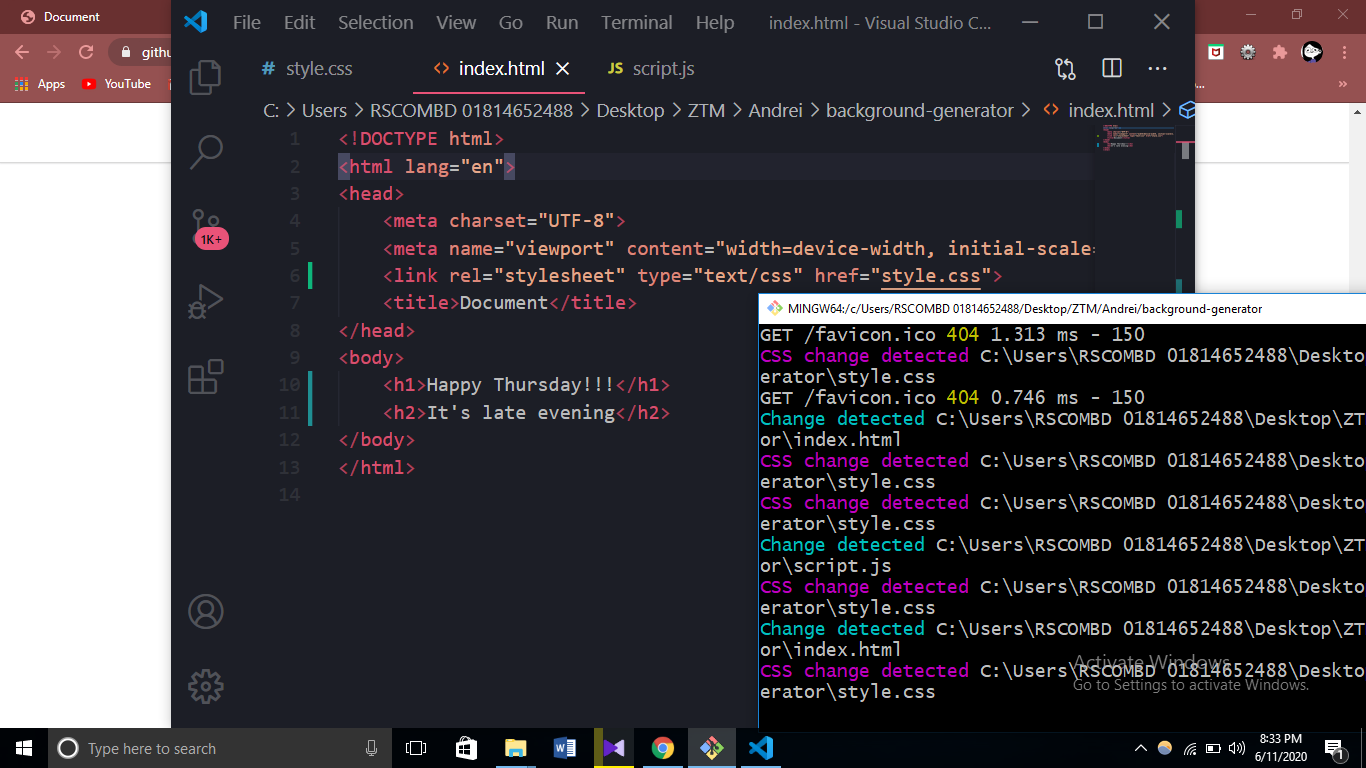
 Erina2016
on 11 Jun 2020
Erina2016
on 11 Jun 2020
Doesn't reload changes
Erina2016
on 11 Jun 2020
Seems to not be working with the latest update (v1.46.0) on vscode. It detects changes but doesn't refresh the browser (at least for chrome and firefox).
 Pixelat0r
on 11 Jun 2020
Pixelat0r
on 11 Jun 2020
I had the same problem, I will see if this is still there tomorrow, but i know, that on an other install, it was just ENabling autosave with a delay of app. 1000ms ... this can be found in the VS Code settings ... and remember you will want to try :
'Auto Save'
'afterDelay'
with an
'Auto Save Delay' of
'500'
thats milliseconds. So if you activate that every 1/2 second your VS code automatically saves the file, change will get detected and so the preview will refresh. MAYBE... today I also experienced some strange behavior on a very old devbox with ubuntu 18.04 installed where it just would not refresh "no matter what"...
I will report tomorrow. what could be the reason, if I have the time to find out.
 patarok
on 1 Jul 2020
patarok
on 1 Jul 2020
Auto Save is off
Change is detected by Live Sass
CSS outputs but without changes
HACK
Go to your main.scss file where you import all the other scss files and follow the below steps.
- Comment // @import 'file.sass';
- Save
- Remove the comment @import 'file.sass';
- Save again IT WORKS!!!!
So to see the changes every time I have to do this.
Any solution?
 vinaynkashyap
on 1 Jul 2020
vinaynkashyap
on 1 Jul 2020
SOLVED (For me at least)
In settings search for "useWebExt" en check you DON'T have it enabled. I just unchecked this and now it's working!
 noobato1
on 14 Jul 2020
noobato1
on 14 Jul 2020
SOLVED (For me at least)
In settings search for "useWebExt" en check you DON'T have it enabled. I just unchecked this and now it's working!
Yup, this worked for me as well. I just changed it to a false value.
 mikefox17
on 17 Aug 2020
mikefox17
on 17 Aug 2020
Hi guys. it's simple. if you go to setting you will see auto save is off. choose "after delay" and done.
 Pouria-R
on 12 Sep 2020
Pouria-R
on 12 Sep 2020
SOLVED (For me at least)
In settings search for "useWebExt" en check you DON'T have it enabled. I just unchecked this and now it's working!
THANK YOU!! I spent LOTS of wasted time... SET THIS TO 'FALSE' in VS settings...
"liveServer.settings.useWebExt": false,
 ccbrandev
on 18 Sep 2020
ccbrandev
on 18 Sep 2020
That did not solve the problem for me in the Dev console I see:
[Extension Host] Change detected d:\Cloud\text.html
console.ts:137 [Extension Host] Looking for parseable documents...
console.ts:137 [Extension Host] Found all parseable documents.
console.ts:137 [Extension Host] Parsing documents and looking for CSS class definitions...
console.ts:137 [Extension Host] Summary:
console.ts:137 [Extension Host]% 1 parseable documents found
console.ts:137 [Extension Host]% 0 CSS class definitions found
console.ts:137 [Extension Host]% 0 unique CSS class definitions found
console.ts:137 [Extension Host]% 0 failed attempts to parse. List of the documents:
console.ts:137 [Extension Host]
vscode 1.49.2 Live Server 5.6.1
 theking2
on 25 Sep 2020
theking2
on 25 Sep 2020
None of the solutions above worked for me, problem still persists. Not only using vscode's Live Server extension but also npm's live-server as well, not both at the same time of course. I have to refresh the browser myself. Using brave browser.
vscode 1.49.3 Live Server 5.6.1
Update: Works with Chrome browser, no issues. Don't know what's going on with brave but I'm good to go with chrome
 steelvelveteen
on 8 Oct 2020
steelvelveteen
on 8 Oct 2020
Problem still persists.It only works one time when i opened vs code for first time.After that it dosent change automatically.
Tried enabling auto save- toDelay
Tried changing browsers
In debug log of vscode it shows change detected but in browser logs it dosent show change detected
 vinayaka16041999
on 23 Nov 2020
vinayaka16041999
on 23 Nov 2020
can anyone help me please?
i tried all the solution above here but no one is working for me :(
the problem is that the live server is not working on saving the file, it only works when i go and refresh the browser page
i tried all the solution but no one working
can anyone help me with this please
thanks in advance
 ehsanajmal
on 4 Dec 2020
ehsanajmal
on 4 Dec 2020
If you are here couse live server is not reloading on Brave browser but it is on Chrome , try to disable Brave shields (the brave icon that disable scripts and that stuff...)
It work for me :p
 ivancardozo11
on 8 Feb 2021
ivancardozo11
on 8 Feb 2021
In many cases, the link between vscode and the browser, which the extension uses to reload the browser when the file is saved in vscode, is broken by invalid HTML.
The extension injects a <script> tag at the bottom of your HTML document to establish that link. If there's some invalid HTML before that tag, it may cause it to be ignored by the browser, and therefore the live reload won't work until you fix your HTML to be valid again.
One example of this is:
<script src="my-script.js" />
This is invalid and causes the <script> tag that live-server injects to not be taken into account, it should be:
<script src="my-script.js"></script>
Another example:
<div style="
If you open an attribute but never close it, then it will cause the rest of the HTML to be considered as part of this attribute, and therefore will prevent live-server from injecting its script correctly.
It would be nice if the extension could inject its script in a safer way, but in the meantime, do make sure your HTML is correctly formed.
 captainbrosset
on 7 Apr 2021
captainbrosset
on 7 Apr 2021
I've found out that adding a
to the page solved the problem kingma-sbw
on 8 Apr 2021
kingma-sbw
on 8 Apr 2021
If the html file is missing a head the code cannot be injeckted. add an empty
<head></head>
And reloads work
theking2
on 24 Apr 2021
A day later I decided to used Edge and it worked (it didn't work on Chrome and Firefox). I also set auto save to after delay.
 NaolGB
on 25 May 2021
NaolGB
on 25 May 2021
A day later I decided to used Edge and it worked (it didn't work on Chrome and Firefox). I also set autosave to after delay.
I installed the Edge update on 05/24/21, not sure when it was downloaded
NaolGB
on 25 May 2021
Related issues
 mpower02
·
6Comments
mpower02
·
6Comments
 Er-rchydy
·
3Comments
Er-rchydy
·
3Comments
 ghost
·
6Comments
ghost
·
6Comments
 Stonerea656
·
5Comments
Stonerea656
·
5Comments
 Josee9988
·
3Comments
Josee9988
·
3Comments
Most helpful comment
Oh. I got the issue. Valid JS tag is
<script src="..."></script>not<script src="..." />https://www.w3schools.com/tags/att_script_src.asp