Vscode-live-server: The Parameter is incorrect
I'm submitting a...
[ ] Regression (a behavior that used to work and stopped working in a new release)
[ x] Bug report  <!-- Please search GitHub for a similar issue or PR before submitting -->
[ ] Feature request
[ ] Documentation issue or request
[ ] Other: <!-- Please describe: -->
Current behavior
When i try to launch the live server i get a pop up box saying http://127.0.0.1:5500/02.html
Expected behavior
I expect the browser to launch with some live reloading
Environment
Browser:

- [x ] Chrome (desktop) version XX
- [ ] Firefox version XX
- [ ] Safari (desktop) version XX
- [ ] IE version XX
- [ ] Edge version XX

For Tooling issues:

- Live Server: 4.1.0
- Platform:  Windows
- Visual Studio Code: 1.24.0
Others
 deanhtid
All 29 comments
Where you getting the pop-up?
Is it inside vscode?
 rjoydip
on 11 Jun 2018
rjoydip
on 11 Jun 2018
Nah it’s seperate from VScode. I would share a screenshot but I don’t have access to my laptop right now
deanhtid
on 11 Jun 2018
That's will be better if you share screenshot
rjoydip
on 11 Jun 2018

I have also tried randomising the port and same issue
deanhtid
on 12 Jun 2018
Okay, basically same as #120 #65
Set "liveServer.settings.CustomBrowser":"chrome"
 ritwickdey
on 12 Jun 2018
ritwickdey
on 12 Jun 2018
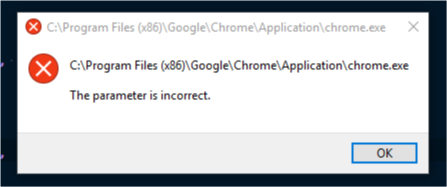
Now i get this. This is the correct file path
deanhtid
on 12 Jun 2018
Is chrome installed at this location?
ritwickdey
on 12 Jun 2018
Or you can try with other browser as custom browser. To check whether other browser has same error or not
rjoydip
on 12 Jun 2018
Yep installed exactly there. Would rather not give up on using Chrome. Thanks
deanhtid
on 13 Jun 2018
Tried Firefox as a test and exactly the same error
deanhtid
on 13 Jun 2018
I've been having the same problem now for a week or so on my home machine. No problem on my machine in class. Tried the "chrome" solution above but still the same. Also tried reinstalling VSCode and the extensions.
The Open-In-Browser extension gives the same error, so it doesn't seem to be related to Live Server, and I also get the exact same error in Atoms live server, so I'm not sure if it's a VSCode problem either.
I'm running Windows 10 insider build so maybe it's a problem there?
I'm also running MAMP but uninstalling it didn't help, and I've got MAMP on my class machine and it's fine.
 gijoe50000
on 13 Jun 2018
gijoe50000
on 13 Jun 2018
I'm having the same problem.
Using VSCode Insider and running windows 10.
This solution didn't work:
Set "liveServer.settings.CustomBrowser":"chrome"
neither change to another browser.
 davimdantas
on 14 Jun 2018
davimdantas
on 14 Jun 2018
I am not sure that whether is this happening by the firewall !
rjoydip
on 14 Jun 2018
Nope. I tried turning off my firewall, and everything security related I
could find. Didn't make any difference. But it could still very well be
something in the network config. It's a pity the error message isn't even a
little more helpful.
On Thu, 14 Jun 2018 at 18:31, Joydip Roy notifications@github.com wrote:
I am not sure that whether is this happening by the firewall !
—
You are receiving this because you commented.
Reply to this email directly, view it on GitHub
https://github.com/ritwickdey/vscode-live-server/issues/152#issuecomment-397376208,
or mute the thread
https://github.com/notifications/unsubscribe-auth/AR147KuH22rmNCr8xEga1EszS_hjnZSZks5t8p4KgaJpZM4UiMf-
.
gijoe50000
on 14 Jun 2018
Just for a confirmation, after getting this error, if you manually open the site (127.0.0.1:5500) ,
Is the server working fine? Or server is also not working!!!
ritwickdey
on 14 Jun 2018
Yea, it works fine after you open the html file manually. I'm using random port numbers so it's not always 5500, but yea.
gijoe50000
on 14 Jun 2018
Tried a lot of things like copying and pasting the address from the addressbar into settings, and localhost instead of 127.. too. I'm thinking it must be a Windows issue, since the error is generated by Windows (I assume) and I've seen people get the same error with server misconfigs too.. It's very vague. Could b some config change that Microsoft have in the pipeline, since I'm using the insiders build. Don't know if other people with the error are insiders too?
gijoe50000
on 14 Jun 2018
I don't think it's a windows problem. I have no problem opening the chrome through vscode Task command, works like a charm. I'm using this code:
{
            "taskName": "Open in Chrome",
            "isBuildCommand": true,
            "command": "Chrome",
            "windows": {
                "command": "C:/Program Files (x86)/Google/Chrome/Application/chrome.exe"
            },
            "args": [
                "http://localhost:5500/${relativeFile}"
            ]
 }
I got this from @RickStrahl's blog
davimdantas
on 15 Jun 2018
okay, I think, all of you using Windows Insider Version? We are using OPN npm library to open a browser. This saw an issue request on OPN with the same title. https://github.com/sindresorhus/opn/issues/95
ritwickdey
on 16 Jun 2018
Yep, confirmed, thanks.
Live server opens fine in Edge when it's the default browser. Microsoft at their shenanigans again.. :-)
I wonder if it's just an error or a new upcoming feature?.. Or a way of forcing people to use Edge for a while in the hopes they'll adapt to it?
gijoe50000
on 16 Jun 2018
I also encountered the same problem when using Webstorm, and I think the problem is in the windows10 preview system itself, hoping to get more information
 Nirnturt
on 20 Jun 2018
Nirnturt
on 20 Jun 2018
Same here :(
Probably is related to the last update of W10 Insider...
I'm using build 17692 btw.
 edumazzucco
on 21 Jun 2018
edumazzucco
on 21 Jun 2018
Yep i am also running the insiders build. Any updates?
deanhtid
on 22 Jun 2018
Yes I've got the same issue, and am running Windows 10 Build: 17692.rs_prerelease_flt.180625-1624 myself and I get the same error message when trying to open _Live Server_
Error occurs on both VS Code stable build and Insider's Edition.
However it does work just fine if you open it in the browser
Thanks @ritwickdey your the man!! 👍 🏅 👏 😎
 petercr
on 10 Jul 2018
petercr
on 10 Jul 2018
Same here on 17713, only works when Edge is default browser.
Some background https://github.com/sindresorhus/opn/issues/95#issuecomment-393469429
 patroza
on 23 Jul 2018
patroza
on 23 Jul 2018
Why is this issue considered closed? It's still happening in Insider Preview (build 17692) with all browsers except Edge.
 MCanterel
on 26 Jul 2018
MCanterel
on 26 Jul 2018
Build 17723 fixed it for me.
 krnlde
on 27 Jul 2018
krnlde
on 27 Jul 2018
I get exactly the same error trying to run browser-sync after updating to W10, build17713 (Firefox default browser) which prevents all my NPM & Gulp build processes working automatically.
Rolled back to earlier version (17134) and problem solved.
 andymabb
on 8 Aug 2018
andymabb
on 8 Aug 2018
@andymabb You can also upgrade Win10 to 17723. That fixed it for me.
MCanterel
on 8 Aug 2018
Related issues
 julesmqz
·
7Comments
julesmqz
·
7Comments
 Missangay
·
7Comments
Missangay
·
7Comments
 mpower02
·
6Comments
mpower02
·
6Comments
 Rakesh-webdeveloper
·
4Comments
Rakesh-webdeveloper
·
4Comments
 tehsy97
·
6Comments
tehsy97
·
6Comments