Vscode-jupyter: Solarized Dark color theme doesn't work in the Python Interactive Window
I use solarized dark as color theme (why not?) because I like it.
The jupyter output becomes very unreadable.
Might be solved with microsoft/vscode-python#3107

 louisabraham
All 15 comments
Our latest release should fix this for themes shipped in the box. Can you retry? We just shipped yesterday afternoon.
 rchiodo
on 30 Jan 2019
rchiodo
on 30 Jan 2019
Actually I just tried solarized. It's not working for me either.
rchiodo
on 30 Jan 2019
Oh, awesome!
It is beautiful with the Dark+ theme.
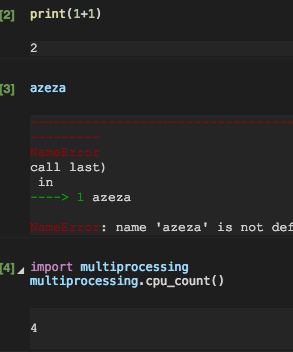
Btw, note that the colors are not exactly the same (for example multiprocessing).
With solarized dark, it definitely changed but still isn't perfect.

louisabraham
on 30 Jan 2019
Glad the other themes work.
Solarized dark isn't matching our search for colors. The json for the theme is inconsistent. This is really a vscode issue. They don't expose their color themeing to us so we have to try and figure it out on our own.
We'll have to special case this theme. Blech.
rchiodo
on 30 Jan 2019
You can see the problem here:
Solarized dark json:
"name": "Solarized (dark)",
Kimbie dark
"name": "Kimbie Dark",
In Kimbie Dark, the name in the json matches the actual theme name.
rchiodo
on 30 Jan 2019
@louisabraham there's another issue we already have were the colors aren't _exactly_ the same. TLDR; Vscode isn't exposing their parsing to us.
It's because we don't have the capability to use the textmate parser that vscode does (they don't expose this either). So we use another tokenizer (CodeMirror) and then try to apply the colors we find in the theme json file as close as possible to the tokens textmate would have generated. multiprocessing from CodeMirror's point of view is a variable, not an import (it doesn't have that tokenization)
rchiodo
on 30 Jan 2019
@rchiodo Yes, that's why I mentioned microsoft/vscode-python#3107.
At least I got some working dark themes, and this is fine for me.
louisabraham
on 30 Jan 2019
This same problem occurs with
- Red
- Tomorrow Night Blue
- Monokai
- Monokai Dimmed
- Atom One Dark
rchiodo
on 30 Jan 2019
Package.json in the theme root seems to map the display name to the json with the colors in it. We should use that instead of parsing the color theme json files directly.
rchiodo
on 30 Jan 2019
I'm also having a problem with Material Theme Darker High Contrast. Though i do use a custom CSS file to color my python. Is there not a way to just have the interactive terminal be colored the same way a .py file is in VSCode?
 vlurgio
on 1 Feb 2019
vlurgio
on 1 Feb 2019
TLDR; Nope.
Longer answer -
VS Code doesn't expose their tokenization or their colors to extension writers. They expose __some__ of them, but not all. So we have to try a bunch of hacks to get at them. Our hack isn't working in this case. We don't parse their token to color json map correctly.
Additionally we don't use the same editor to display our code. We use a simpler editor called CodeMirror. We're probably going to switch to the monaco-editor, but that still has the issue of the tokenizer that vscode uses requiring a native dll to do the tokenization. We are reluctant to include native code with our extension as it opens up a lot of extra requirements, so we've been trying to get by with the hacks we have.
I think we can fix this bug by parsing the json for colors better.
As far as your custom CSS, that won't work unless we start using the same tokenizer as VS Code (so that your colors match) and we allow you to supply the CSS to our panel.
rchiodo
on 1 Feb 2019
Abyss also looks quite bad in the interpreter.

 smithalexk
on 14 Mar 2019
smithalexk
on 14 Mar 2019
@smithalexk what version of the extension are you running? Colorization is fixed in our insider's build. You can install it with 'Install from VSIX' in the command line.
rchiodo
on 14 Mar 2019
Here's what it looks like after the fix:

This is the current insider's version (well as of me writing this)

rchiodo
on 14 Mar 2019
Hi @rchiodo, I was on the release version. The insider's build seems to have fixed it. Thanks!
smithalexk
on 14 Mar 2019
Related issues
 schatt89
·
4Comments
rchiodo
·
3Comments
schatt89
·
4Comments
rchiodo
·
3Comments
 hyderkh
·
4Comments
hyderkh
·
4Comments
 jediyoda36
·
4Comments
jediyoda36
·
4Comments
 n-a-sz
·
3Comments
n-a-sz
·
3Comments