Vscode-jupyter: Copy text from Data Viewer cells
Description
it would be super-nice to be able to copy text of the selected cells
 veonua
All 10 comments
Sorry do you mean in the notebook or in the data viewer?
 rchiodo
on 9 Oct 2019
rchiodo
on 9 Oct 2019
Data viewer, but it should be possible to use dataviewer in notebook
veonua
on 9 Oct 2019
Sorry but not sure what you mean by dataviewer then.
We have this window:
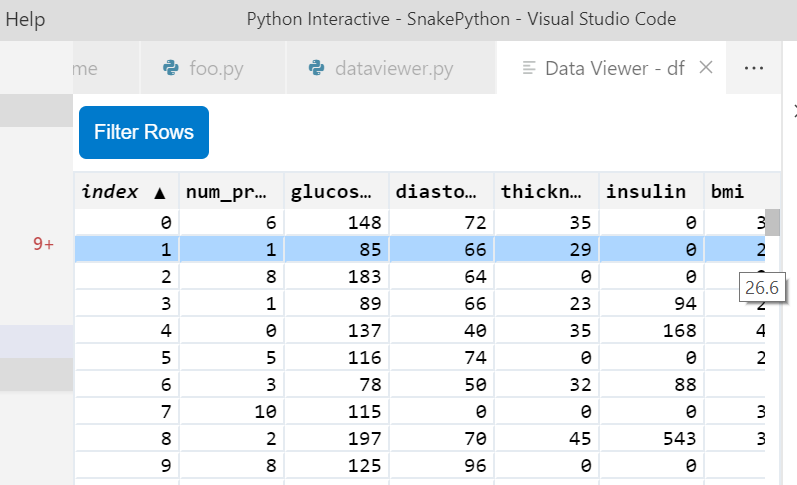
Is this what you mean by data viewer?
This data viewer is usable in a notebook. You have to expand the variables tab to get to it:

rchiodo
on 9 Oct 2019
Yes, in the first window I have a string column and Ctrl + C does not copy
cell value to the clipboard.
Also it would be nice to embed same view to the notebook cell output, so
df
Would display dataviewer with sorting and filtering.
Tab solution is not the best as requires visual context switching
On Wed, Oct 9, 2019, 23:04 Rich Chiodo notifications@github.com wrote:
Sorry but not sure what you mean by dataviewer then.
We have this window:
[image: image]
https://user-images.githubusercontent.com/19672699/66520049-47fc6880-ea9d-11e9-8954-2fac013cb701.pngIs this what you mean by data viewer?
This data viewer is usable in a notebook. You have to expand the variables
tab to get to it:[image: image]
https://user-images.githubusercontent.com/19672699/66520218-990c5c80-ea9d-11e9-93fe-fdfe8488dd81.png—
You are receiving this because you authored the thread.
Reply to this email directly, view it on GitHub
https://github.com/microsoft/vscode-python/issues/7840?email_source=notifications&email_token=AALYALVKIJ72V7O4CX7HTQDQNZBMBA5CNFSM4I64VS52YY3PNVWWK3TUL52HS4DFVREXG43VMVBW63LNMVXHJKTDN5WW2ZLOORPWSZGOEAZL43A#issuecomment-540196460,
or unsubscribe
https://github.com/notifications/unsubscribe-auth/AALYALSC4CVQWGQ2VI6KBVLQNZBMBANCNFSM4I64VS5Q
.
veonua
on 9 Oct 2019
Your second ask actually has an issue for it already:
https://github.com/microsoft/vscode-python/issues/7502
Feel free to up vote that issue.
rchiodo
on 9 Oct 2019
An "export to csv" feature in the data viewer will be nice too.
 ronglums
on 17 Oct 2019
ronglums
on 17 Oct 2019
Yes! please! would be extremely useful to be able to copy a cell value
 paguzma
on 4 May 2020
paguzma
on 4 May 2020
Dupe of microsoft/vscode-jupyter#1149
 greazer
on 25 Jun 2020
greazer
on 25 Jun 2020
@greazer was it fixed? because I can't find any related commit
veonua
on 25 Jun 2020
This bug was closed because it's a dupe of microsoft/vscode-jupyter#1149. microsoft/vscode-jupyter#1149 is still open.
rchiodo
on 26 Jun 2020
Related issues
 janosh
·
4Comments
rchiodo
·
3Comments
janosh
·
4Comments
rchiodo
·
3Comments
 ashtou
·
3Comments
ashtou
·
3Comments
 BCArg
·
3Comments
BCArg
·
3Comments
 jediyoda36
·
4Comments
jediyoda36
·
4Comments
Most helpful comment
An "export to csv" feature in the data viewer will be nice too.