Vscode-jupyter: Python Interactive Window container itself is scrolling
Issue Type: Bug
- open any python file or an empty file and write some lines of codes.
- execute it in the python interactive window
- Scroll over the python interactive window

Extension version: 2019.10.44104
VS Code version: Code 1.40.0 (86405ea23e3937316009fc27c9361deee66ffbf5, 2019-11-06T17:02:13.381Z)
OS version: Windows_NT x64 10.0.18362
System Info
|Item|Value|
|---|---|
|CPUs|Intel(R) Core(TM) i7-8750H CPU @ 2.20GHz (12 x 2208)|
|GPU Status|2d_canvas: enabled
flash_3d: enabled
flash_stage3d: enabled
flash_stage3d_baseline: enabled
gpu_compositing: enabled
metal: disabled_off
multiple_raster_threads: enabled_on
oop_rasterization: disabled_off
protected_video_decode: unavailable_off
rasterization: enabled
skia_renderer: disabled_off
surface_control: disabled_off
surface_synchronization: enabled_on
video_decode: enabled
viz_display_compositor: enabled_on
viz_hit_test_surface_layer: disabled_off
webgl: enabled
webgl2: enabled|
|Load (avg)|undefined|
|Memory (System)|15.88GB (3.20GB free)|
|Process Argv||
|Screen Reader|no|
|VM|50%|
 ghimiresdp
All 12 comments
I have the same bug, same version of VS Code and Python plugin, OS: Linux x64 5.0.0-32-generic (Ubuntu).
 eSoares
on 11 Nov 2019
eSoares
on 11 Nov 2019
Thanks for letting us know. We'll look into it.
 DavidKutu
on 11 Nov 2019
DavidKutu
on 11 Nov 2019
We're having trouble reproing this, but it might be related to this issue:
https://github.com/microsoft/vscode/issues/83209
 rchiodo
on 13 Nov 2019
rchiodo
on 13 Nov 2019
No, the status bar is fine. Only the problem is with the Python Interactive window, and it does not happen always and resolves when we restart vscode.
ghimiresdp
on 13 Nov 2019
It's not that the status bar is being covered, it's that windows are bleeding over into each other. VS code may not be sizing things correctly, although it's suspicious that it takes an event from us to cause it. That sounds more like it's our fault.
The sure fire way to tell if it's a VS code issue or our webview's problem is to run the "Developer: Open Webview Tools" and use the chrome tools to see what the height of the webview is.
You can see in this screenshot how the inner body object inside of the iframe represents the total height of the webview (this is the part our extension controls):
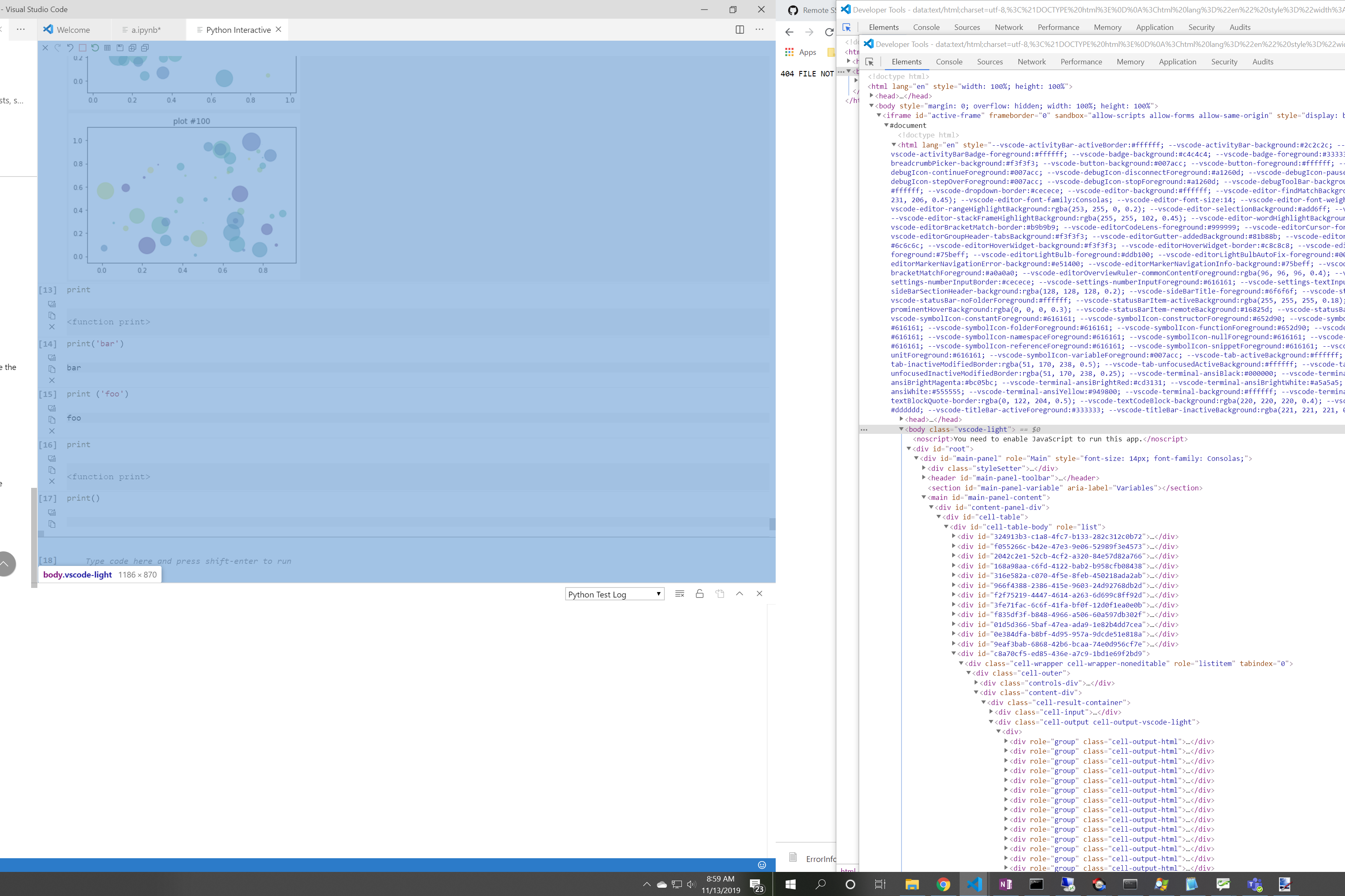
If that body element doesn't encompass the black area of your screen, then this is a VS code issue.
rchiodo
on 13 Nov 2019
Edit: I didn't have the latest insider. It seems to be fixed now!
 JDisselhorst
on 14 Nov 2019
JDisselhorst
on 14 Nov 2019
From your screenshot, that would have been a VS code issue. That webview portion is outside of the iframe that contains our html.
rchiodo
on 14 Nov 2019
I believe the problem originates from the documentation tooltip, because it overflows its container, as shown in the screenshot.
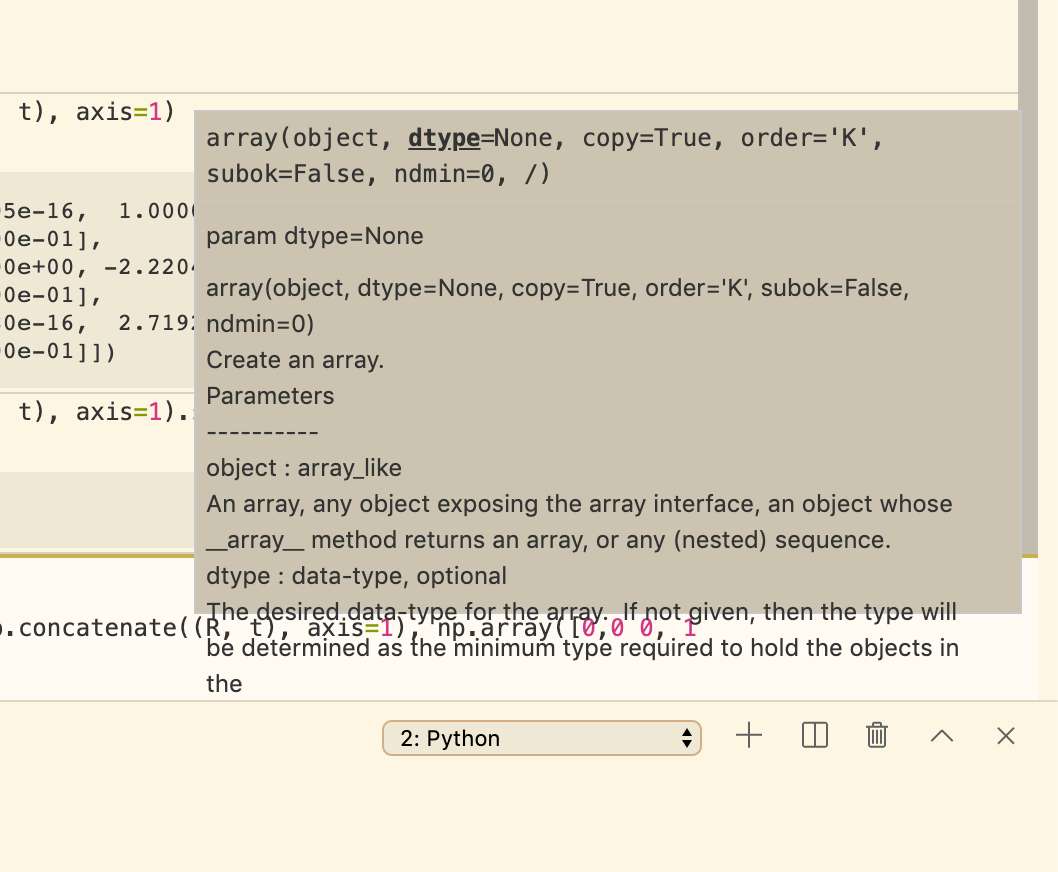
After disabling it in the settings "editor.parameterHints.enabled": false and restarting VS Code, the problem isn't occurring anymore.
 SebastianGrans
on 18 Nov 2019
SebastianGrans
on 18 Nov 2019
I'm seeing this same behavior and am able to reliably reproduce by using a function with a "long" parameter hint (thx @SebastianGrans).
Steps to reproduce:
- Open VS Code
- Wait for code analysis to complete
- Open interactive window
- import numpy as np
- type "np.logspace(" and wait for parameter hint to appear
The interactive window is broken. Only way to fix is restart VS Code. Turning off parameterHints ("editor.parameterHints.enabled": false) fixes the issue.
VS Code: 1.40.1
Python extension: 2019.10.44104
Python 3.6.9
Windows 10 x64
Edit: @rchiodo Confirmed this is fixed in the bits that dropped this week. Thanks for pointing at microsoft/vscode-python#8006
 mlline00
on 18 Nov 2019
mlline00
on 18 Nov 2019
facing the same issue
 jadhosn
on 18 Nov 2019
jadhosn
on 18 Nov 2019
The issue that @mlline00 and @jadhosn are reporting is different. It's this bug here:
https://github.com/microsoft/vscode-python/issues/8006
This issue has been fixed in our newest bits that should be coming out today or tomorrow.
rchiodo
on 18 Nov 2019
Please reopen this issue or create a new issues if this is not resolved in the next official release.
 greazer
on 12 Feb 2020
greazer
on 12 Feb 2020
Related issues
 janosh
·
4Comments
janosh
·
4Comments
 qdlmcfresh
·
3Comments
rchiodo
·
3Comments
qdlmcfresh
·
3Comments
rchiodo
·
3Comments
 entron
·
4Comments
entron
·
4Comments
 n-a-sz
·
3Comments
n-a-sz
·
3Comments
Most helpful comment
The issue that @mlline00 and @jadhosn are reporting is different. It's this bug here:
https://github.com/microsoft/vscode-python/issues/8006
This issue has been fixed in our newest bits that should be coming out today or tomorrow.