Vscode-jupyter: "Save as" does not work for .ipynb
Bug: Notebook Editor, Interactive Window, Editor cells
Steps to cause the bug to occur
- Open existing .ipynb file
- Press ctrl + shift + s or access (save as) from command (ctrl + shift + p)
Actual behavior
Nothing happens
Expected behavior
Pop-up should open asking where to actually save the file
Your Jupyter and/or Python environment
Please provide as much info as you readily know
- Jupyter server running: Local
- Extension version: 2019.11.50794
- VS Code version: 1.42.0-insider
- Setting python.jediEnabled: false
- Python and/or Anaconda version: 3.6.8
- OS: Linux (xubuntu):
- Virtual environment: conda/venv
Microsoft Data Science for VS Code Engineering Team: @rchiodo, @IanMatthewHuff, @DavidKutu, @DonJayamanne, @greazer
 Noezor
All 18 comments
Sorry but a lot of the commands that VS code supports just aren't currently supported in the notebook editor. See this issue for more information:
https://github.com/microsoft/vscode-python/issues/7244
 rchiodo
on 16 Dec 2019
rchiodo
on 16 Dec 2019
I'm not sure it has to do with shortcut only as even from the "commands" I can't access it.
Thanks anyways, will look at the coming updates :)
Noezor
on 16 Dec 2019
It's related to our not being a real 'TextDocument' so VS code does not know that it needs to activate the command.
This API when it's done should alleviate at least Save As problems:
https://github.com/microsoft/vscode/issues/77131.
Once VS code ships that API, our window will be treated as something that should be saveable.
rchiodo
on 16 Dec 2019
not sure you want to wait for that based on the last discussion I had with @mjbvz here:
https://github.com/microsoft/vscode/issues/86802#issuecomment-566773351
might work for your save as scenario, but not much more ...
 RandomFractals
on 17 Dec 2019
RandomFractals
on 17 Dec 2019
@greazer I see you closed this and all dups. Has this been implemented in the latest vscode release?
RandomFractals
on 7 May 2020
It's not working on version 1.45 (April 2020)
 jiangoz
on 18 May 2020
jiangoz
on 18 May 2020
Not working on version 1.46.
Not even "save" works. I have to close the ipynb and wait for the "Do you want to save your changes" dialog.
Version: 1.46.0
Commit: a5d1cc28bb5da32ec67e86cc50f84c67cc690321
Date: 2020-06-10T08:59:04.923Z
Electron: 7.3.1
Chrome: 78.0.3904.130
Node.js: 12.8.1
V8: 7.8.279.23-electron.0
OS: Linux x64 4.15.0-58-generic
 adrianog
on 14 Jun 2020
adrianog
on 14 Jun 2020
@greazer @rchiodo should it be reoppened even though the solution does not appear to be responsability of your team ?
Noezor
on 18 Jun 2020
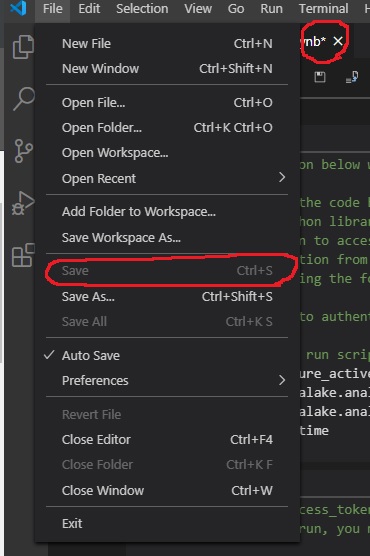
I also cannot save my jupyter notebook files. It doesn't even autosave. (See screenshot with asterix above the .ipynb which shows that the file isn't saved.) I can't even push changes I made to a team repository on Azure Dev Ops. To address this issue, I have to copy and paste my entire notebook to a new window and save those changes as a new file. It's very onerous.
 PCstumbleine
on 2 Jul 2020
PCstumbleine
on 2 Jul 2020
@PCstumbleine you have to save from the save button on the window. Or by hitting CTRL+S.
As stated above, VS code doesn't know about our notebook as being an editor (not yet anyway - when this API is ready it will https://github.com/microsoft/vscode-python/issues/10496)
rchiodo
on 2 Jul 2020
Clicking the save button doesn't do anything for me.
 LLTTDAY
on 2 Jul 2020
LLTTDAY
on 2 Jul 2020
@LLTTDAY are you talking about this button here?
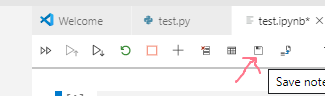
Is the button enabled when the file is dirty (asterisk shows up)?
rchiodo
on 2 Jul 2020
Yes, the button's there but file stays dirty after clicking it--just no apparent response to the click. In a different file, open at the same time, the button works fine. When I closed the file the most recent time I got a prompt to save, which I accepted and which apparently worked. I lost a bunch of changes last week after closing a file I wasn't able to save with the button. I don't remember if I was prompted on closing it.
LLTTDAY
on 2 Jul 2020
@LLTTDAY your bug sounds like this one:
https://github.com/microsoft/vscode-python/issues/12562
Can you provide a full console log in that issue? Thanks.
rchiodo
on 2 Jul 2020
Yes that sounds right. I came here too because I tried Save As as a way around that issue. But I also have the same multiple editors opening problem mentioned there. I will dig up the log and add it in 12562. Thank you!
LLTTDAY
on 2 Jul 2020
We are still having this issue; I'll add to 12562 as well.
 aaronsmith1234
on 17 Sep 2020
aaronsmith1234
on 17 Sep 2020
we're still having the issue..save as does nothing to ipynb
 siddhantrathore
on 17 Oct 2020
siddhantrathore
on 17 Oct 2020
Save as is not supposed to work yet. Our custom webview is not understood by VS code, so Save As doesn't understand it's a file.
However there are workarounds. We have two new ways to open a notebook:
One of them is here:
https://devblogs.microsoft.com/python/notebooks-are-getting-revamped/
The other one can be enabled with this setting here (still has some issues with it though):
    "python.experiments.optInto": [
        "CustomEditorSupport - experiment",
    ],
Related issues
 n-a-sz
·
3Comments
rchiodo
·
3Comments
n-a-sz
·
3Comments
rchiodo
·
3Comments
 TheOrangeJuice
·
4Comments
TheOrangeJuice
·
4Comments
 jediyoda36
·
4Comments
jediyoda36
·
4Comments
 ashtou
·
3Comments
ashtou
·
3Comments
Most helpful comment
It's not working on version 1.45 (April 2020)