Vscode-jupyter: Error "Illegal value for token color" in notebook editor and interactive window
Bug: Notebook Editor, Interactive Window, Editor cells
Steps to cause the bug to occur
- Ctrl+Shit+P and select "Python: Create new Jupyter Notebook"
Actual behavior

Expected behavior
An empty code cell to start writing code. Also when opening existing jupyter notebooks, this covers the first code cell, making it inaccessible to edit/run.
Your Jupyter and/or Python environment
- Jupyter server running: Local
- Extension version: v2020.8.94248-dev
- VS Code version: 1.47.1
- Setting python.jediEnabled: No setting found
- Setting python.languageServer: Jedi
- Python and/or Anaconda version: 3.7.7
- OS: Windows 10 Education
- Virtual environment: conda
Developer Tools Console Output
[Embedded Page] Error: Illegal value for token color: webviewElement.ts:160
workbench.desktop.main.js:sourcemap:3864 [Embedded Page] Could not create web worker(s). Falling back to loading web worker code in main thread, which might cause UI freezes. Please see https://github.com/Microsoft/monaco-editor#faq
workbench.desktop.main.js:sourcemap:3864 [Embedded Page] Failed to construct 'Worker': Script at 'vscode-webview-resource://db7bd419-27be-44a4-8901-86c7131f1d93/file///c%3A/Users/mquiroga/AppData/Local/Temp/editor.worker.js' cannot be accessed from origin 'vscode-webview://db7bd419-27be-44a4-8901-86c7131f1d93'.
workbench.desktop.main.js:sourcemap:266 [Extension Host] Starting WebSocket: RAW/api/kernels/40a52acf-d368-4063-8315-41101374e147
workbench.desktop.main.js:sourcemap:266 [Extension Host] Kernel: connected (40a52acf-d368-4063-8315-41101374e147)
workbench.desktop.main.js:sourcemap:3864 [Embedded Page] Uncaught Error: Illegal value for token color:
Error: Illegal value for token color:
at e.getId (vscode-webview-resource://db7bd419-27be-44a4-8901-86c7131f1d93/file///c%3A/Users/mquiroga/.vscode/extensions/ms-python.python-2020.8.94248-dev/out/datascience-ui/notebook/monaco.bundle.js:1:465553)
at jo (vscode-webview-resource://db7bd419-27be-44a4-8901-86c7131f1d93/file///c%3A/Users/mquiroga/.vscode/extensions/ms-python.python-2020.8.94248-dev/out/datascience-ui/notebook/monaco.bundle.js:1:465290)
at Function.e.createFromParsedTokenTheme (vscode-webview-resource://db7bd419-27be-44a4-8901-86c7131f1d93/file///c%3A/Users/mquiroga/.vscode/extensions/ms-python.python-2020.8.94248-dev/out/datascience-ui/notebook/monaco.bundle.js:1:466485)
at Function.e.createFromRawTokenTheme (vscode-webview-resource://db7bd419-27be-44a4-8901-86c7131f1d93/file///c%3A/Users/mquiroga/.vscode/extensions/ms-python.python-2020.8.94248-dev/out/datascience-ui/notebook/monaco.bundle.js:1:465959)
at e.get [as tokenTheme] (vscode-webview-resource://db7bd419-27be-44a4-8901-86c7131f1d93/file///c%3A/Users/mquiroga/.vscode/extensions/ms-python.python-2020.8.94248-dev/out/datascience-ui/notebook/monaco.bundle.js:1:475626)
at e._toBinaryTokens (vscode-webview-resource://db7bd419-27be-44a4-8901-86c7131f1d93/file///c%3A/Users/mquiroga/.vscode/extensions/ms-python.python-2020.8.94248-dev/out/datascience-ui/notebook/monaco.bundle.js:1:538237)
at e.tokenize2 (vscode-webview-resource://db7bd419-27be-44a4-8901-86c7131f1d93/file///c%3A/Users/mquiroga/.vscode/extensions/ms-python.python-2020.8.94248-dev/out/datascience-ui/notebook/monaco.bundle.js:1:538548)
at Pe (vscode-webview-resource://db7bd419-27be-44a4-8901-86c7131f1d93/file///c%3A/Users/mquiroga/.vscode/extensions/ms-python.python-2020.8.94248-dev/out/datascience-ui/notebook/monaco.bundle.js:1:2444923)
at t._updateTokensUntilLine (vscode-webview-resource://db7bd419-27be-44a4-8901-86c7131f1d93/file///c%3A/Users/mquiroga/.vscode/extensions/ms-python.python-2020.8.94248-dev/out/datascience-ui/notebook/monaco.bundle.js:1:2443836)
at t._tokenizeOneInvalidLine (vscode-webview-resource://db7bd419-27be-44a4-8901-86c7131f1d93/file///c%3A/Users/mquiroga/.vscode/extensions/ms-python.python-2020.8.94248-dev/out/datascience-ui/notebook/monaco.bundle.js:1:2443483)
workbench.desktop.main.js:sourcemap:3864 [Embedded Page] Starting WebSocket: BOGUS_PVSC/api/kernels/40a52acf-d368-4063-8315-41101374e147
workbench.desktop.main.js:sourcemap:3864 [Embedded Page] Kernel: connected (40a52acf-d368-4063-8315-41101374e147)
workbench.desktop.main.js:sourcemap:266 [Extension Host] Starting WebSocket: RAW/api/kernels/0c760cfd-8a68-4ecb-b069-2d8a6ad7a410
workbench.desktop.main.js:sourcemap:266 [Extension Host] Kernel: connected (0c760cfd-8a68-4ecb-b069-2d8a6ad7a410)
Microsoft Data Science for VS Code Engineering Team: @rchiodo, @IanMatthewHuff, @DavidKutu, @DonJayamanne, @greazer, @joyceerhl
 mariadelmarq
All 2 comments
@mariadelmarq, What theme are you using? We're guessing that's where the problem lies.
 greazer
on 23 Jul 2020
greazer
on 23 Jul 2020
@greazer Thanks for your response. I suspected the same, based on the other similar issues I was able to find (https://github.com/microsoft/vscode-python/issues/5827 and https://github.com/microsoft/vscode-python/issues/5950), but I switched between a few themes in File -> Preferences -> Color theme and nothing changed. I had the default bioSyntax initially. Now I tried the Dark (Visual Studio) and it worked (and strangely enough it now works even switching to any of the themes I tried earlier that did not work before???), thanks!
When opening the notebook in vscode, I also sometimes get this error message and it doesn't open:
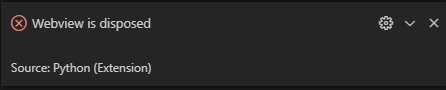
Is it because I'm trying to open it before the Python extension has fully loaded?
Thanks again!
mariadelmarq
on 28 Jul 2020
Related issues
 janosh
·
4Comments
janosh
·
4Comments
 schatt89
·
4Comments
schatt89
·
4Comments
 n-a-sz
·
3Comments
n-a-sz
·
3Comments
 jediyoda36
·
4Comments
greazer
·
3Comments
jediyoda36
·
4Comments
greazer
·
3Comments
Most helpful comment
@greazer Thanks for your response. I suspected the same, based on the other similar issues I was able to find (https://github.com/microsoft/vscode-python/issues/5827 and https://github.com/microsoft/vscode-python/issues/5950), but I switched between a few themes in File -> Preferences -> Color theme and nothing changed. I had the default
bioSyntaxinitially. Now I tried theDark (Visual Studio)and it worked (and strangely enough it now works even switching to any of the themes I tried earlier that did not work before???), thanks!When opening the notebook in vscode, I also sometimes get this error message and it doesn't open:

Is it because I'm trying to open it before the Python extension has fully loaded?
Thanks again!