Vscode-jupyter: Notebook code cell wraps regardless of toggle word wrap setting
Bug: Notebook Editor, Interactive Window, Python Editor cells
Steps to cause the bug to occur
- Edit a Jupyter Notebook through VSCode, and enter enough code into a cell such that you would expect one of two outcomes:
- The line wraps to the next
- The line overflows
Actual & Expected behavior
Actual:
- A code cell wraps regardless of the setting below.

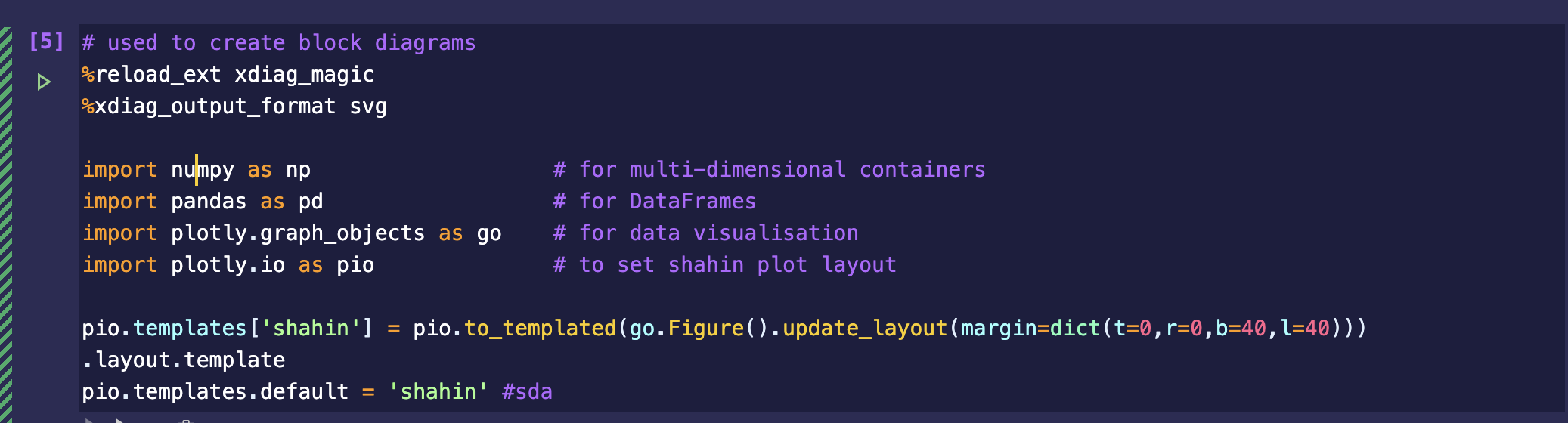
Expected:
- The View -> Toggle Word Wrap setting is used to determine whether the line wraps or overflows
Your Jupyter and/or Python environment
Please provide as much info as you readily know
- Jupyter server running: Local
- VS Code version: 1.40.0-Insider
-Python plugin version: 2019.11.42782-dev - Python and/or Anaconda version: Anaconda 2019.7, Python 3.7.3 64-bit
- OS: Mac
- Virtual environment: conda
 shahinrostami
All 11 comments
Sorry this is an editor setting that's not currently being read. There's a number of VS code customizations for their editor that we're not currently using. Hopefully we'll get to some of these in the near future.
 rchiodo
on 17 Oct 2019
rchiodo
on 17 Oct 2019
Having the same issue. Is this going to be addressed in the next release?
Thank you in advance.
 tgdn
on 11 Dec 2019
tgdn
on 11 Dec 2019
No sorry this is not on our next release plan.
rchiodo
on 11 Dec 2019
Hi! I fully understand the request of @shahinrostami.
For me personally, it would already be great if the wrapped line would keep the indentation level, as it does in my VS-Code files.
Additionally, there is the problem that you cannot distinguish the wrapped lines when line numbers are turned off (as they are by default).
 tbrodbeck
on 22 Mar 2020
tbrodbeck
on 22 Mar 2020
Hi! I fully understand the request of @shahinrostami.
For me personally, it would already be great if the wrapped line would keep the indentation level, as it does in my VS-Code files.
Additionally, there is the problem that you cannot distinguish the wrapped lines when line numbers are turned off (as they are by default).
hello, is there a way to show the line numbers in notebook code cell in vscode?
 bolzzzz
on 25 May 2020
bolzzzz
on 25 May 2020
Hi! I fully understand the request of @shahinrostami.
For me personally, it would already be great if the wrapped line would keep the indentation level, as it does in my VS-Code files.
Additionally, there is the problem that you cannot distinguish the wrapped lines when line numbers are turned off (as they are by default).hello, is there a way to show the line numbers in notebook code cell in vscode?
Yes, you just press l in normal mode to turn it on.
But unfortunately, there is no way to turn it on permanently AFAIK
tbrodbeck
on 25 May 2020
Hi! I fully understand the request of @shahinrostami.
For me personally, it would already be great if the wrapped line would keep the indentation level, as it does in my VS-Code files.
Additionally, there is the problem that you cannot distinguish the wrapped lines when line numbers are turned off (as they are by default).hello, is there a way to show the line numbers in notebook code cell in vscode?
Yes, you just press
lin normal mode to turn it on.
But unfortunately, there is no way to turn it on permanently AFAIK
Thank you very much!
bolzzzz
on 25 May 2020
Any progress on the wrapping feature?
It's also a giant pain if you're working with wide dataframes, the output is unreadable.

 diveyseek
on 23 Jun 2020
diveyseek
on 23 Jun 2020
Still happening and really bothersome! I was so happy to use Jupyter notebooks in vscode until I found out about this.
 mysticaltech
on 4 Nov 2020
mysticaltech
on 4 Nov 2020
I recommend you try this (this is where our notebook support is moving to)
https://devblogs.microsoft.com/python/notebooks-are-getting-revamped/
That should support word wrapping the cell. Not sure about output, you'll have to try it. Might depend upon the output.
rchiodo
on 4 Nov 2020
Happy to hear that, I will wait for when it is stable and try again. For now, I'm back in Jupyter and it feels like breathing oxygen again. Especially for ETL work that requires frequent output of data.
mysticaltech
on 4 Nov 2020
Related issues
 dimitry-ishenko
·
4Comments
dimitry-ishenko
·
4Comments
 PolishShatter
·
4Comments
PolishShatter
·
4Comments
 BCArg
·
3Comments
rchiodo
·
3Comments
BCArg
·
3Comments
rchiodo
·
3Comments
 ashtou
·
3Comments
ashtou
·
3Comments
Most helpful comment
Sorry this is an editor setting that's not currently being read. There's a number of VS code customizations for their editor that we're not currently using. Hopefully we'll get to some of these in the near future.