Vscode-jupyter: Add Markdown syntax highlighting for markdown cells
When using the jupyter notebook data science features, It gets especially hard to read long markdown cells without any sort of syntax highlighting. It would be great leverage the markdown syntax highlighting for any markdown cells.
 nickolasclarke
All 8 comments
Great suggestion! We'd have to investigate if it's feasible.
 ronglums
on 14 Feb 2019
ronglums
on 14 Feb 2019
I would also really like to see this feature added. Doing some reading about how to add syntax highlighting to a vscode extension it seems like an injection grammar with an embedded language would allow the creation of a "py percent" language that uses the existing highlighters.
I would guess that we'd need an _injection_ after line comments (punctuation.definition.comment.python) and _embed_ markdown in there.
The catch being that this needs to follow a # %% [markdown] directive but maybe someone else could help here? There is a markdown codefence injection example on github suggesting we could inject after the start of a line comment, and our embedded language would then need to match that %% [markdown] (or similar) pattern in order to begin. Hopefully taking control until either a line that doesn't begin with a comment or a regular cell # %% is encountered.
Another challenge is that we can't just embed the markdown language without somehow stripping the leading #. Not sure how well this would play with the embedding as it keeps getting broken up.
I know this is just rough notes but the intention was to say it looks feasible. I think this is a really nice feature to have, as someone who writes just as much prose as code in a jupyter notebook, the wall of green text is not as nice as the little bit of color from markdown highlighting could be :)
 SpencerPark
on 11 May 2019
SpencerPark
on 11 May 2019
Great idea! It's really a hardship that write markdown in comments of python script because of the lack of hightlighting.
However, what color should be used to highlight seems to be a difficult choice. I do not want to have a script which is totally a mixture of python and markdown that I can not judge whether this part is a markdown or python scripts.
 SimonCrios
on 30 May 2019
SimonCrios
on 30 May 2019
Moved to Parking lot one more time. I expect it will NOT move back to New Issues.
 greazer
on 9 Jan 2020
greazer
on 9 Jan 2020

 zhaouv
on 7 Aug 2020
zhaouv
on 7 Aug 2020
almost done, todo:
- [ ] fix multi level list
- [ ] fix not stopping fenced code
- [ ] fix quote

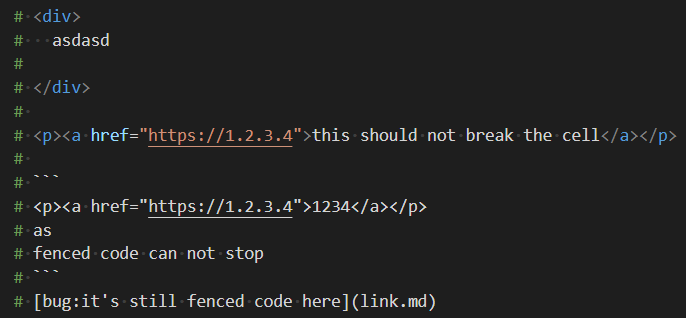
zhaouv
on 8 Aug 2020
Finally found a perfect implementation, a total of 47 lines will solve all problems.
zhaouv
on 9 Aug 2020
Related issues
 chrisjsewell
·
4Comments
chrisjsewell
·
4Comments
 AlbertDeFusco
·
4Comments
AlbertDeFusco
·
4Comments
 sonulohani
·
3Comments
sonulohani
·
3Comments
 rchiodo
·
3Comments
rchiodo
·
3Comments
 jediyoda36
·
4Comments
jediyoda36
·
4Comments
Most helpful comment
I would also really like to see this feature added. Doing some reading about how to add syntax highlighting to a vscode extension it seems like an injection grammar with an embedded language would allow the creation of a "py percent" language that uses the existing highlighters.
I would guess that we'd need an _injection_ after line comments (
punctuation.definition.comment.python) and _embed_ markdown in there.The catch being that this needs to follow a
# %% [markdown]directive but maybe someone else could help here? There is a markdown codefence injection example on github suggesting we could inject after the start of a line comment, and our embedded language would then need to match that%% [markdown](or similar) pattern in order to begin. Hopefully taking control until either a line that doesn't begin with a comment or a regular cell# %%is encountered.Another challenge is that we can't just embed the markdown language without somehow stripping the leading
#. Not sure how well this would play with the embedding as it keeps getting broken up.I know this is just rough notes but the intention was to say it looks feasible. I think this is a really nice feature to have, as someone who writes just as much prose as code in a jupyter notebook, the wall of green text is not as nice as the little bit of color from markdown highlighting could be :)