Vscode-jupyter: Interactive hangs on start
Issue Type: Bug
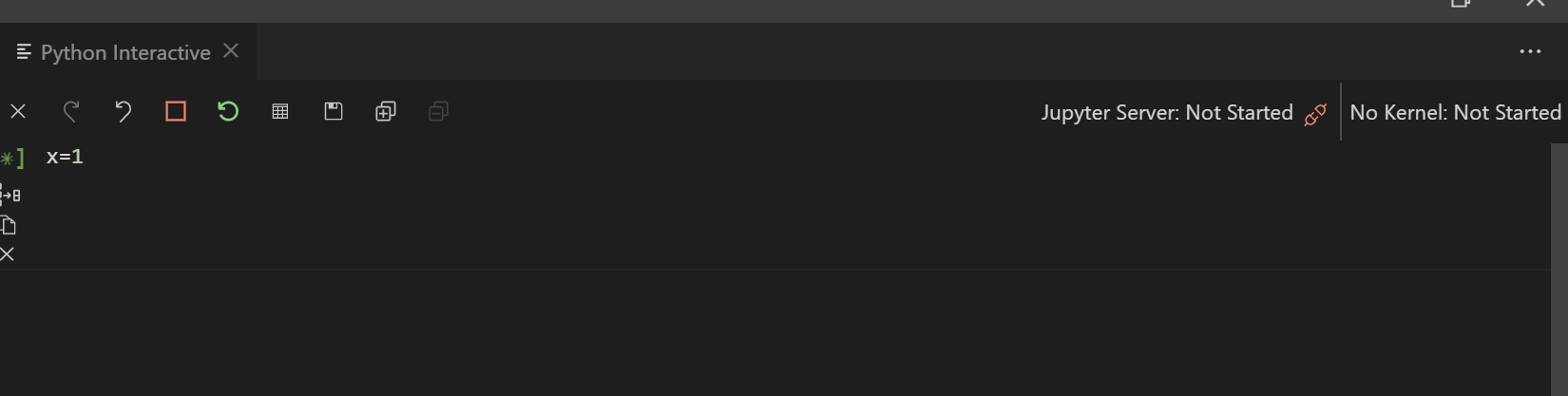
hangs on start. Doesn't work at all. Just cycles. Tried rebooting, turning on and off, Uninstalling.
Extension version: 2020.5.80290
VS Code version: Code 1.45.1 (5763d909d5f12fe19f215cbfdd29a91c0fa9208a, 2020-05-14T08:27:35.169Z)
OS version: Windows_NT x64 10.0.18363
System Info
|Item|Value|
|---|---|
|CPUs|Intel(R) Core(TM) i3-6100 CPU @ 3.70GHz (4 x 3696)|
|GPU Status|2d_canvas: enabled
flash_3d: enabled
flash_stage3d: enabled
flash_stage3d_baseline: enabled
gpu_compositing: enabled
multiple_raster_threads: enabled_on
oop_rasterization: disabled_off
protected_video_decode: unavailable_off
rasterization: enabled
skia_renderer: disabled_off_ok
video_decode: enabled
viz_display_compositor: enabled_on
viz_hit_test_surface_layer: disabled_off_ok
webgl: enabled
webgl2: enabled|
|Load (avg)|undefined|
|Memory (System)|15.96GB (5.95GB free)|
|Process Argv||
|Screen Reader|no|
|VM|0%|
 BillmanH
All 30 comments
Thanks for the bug.
Can you include your console log? (Help | Toggle Developer Tools, go to the console tab, right click, save as, and upload here).
 rchiodo
on 1 Jun 2020
rchiodo
on 1 Jun 2020
console.ts:137 [Extension Host] Info Python Extension: 2020-06-01 14:45:08: Finished waiting for idle on (kernel): 437e73aa-7e63-45fe-828a-6db5d7955f94 -> unknown
console.ts:137 [Extension Host] Info Python Extension: 2020-06-01 14:45:08: shutdownSession 437e73aa-7e63-45fe-828a-6db5d7955f94 - start
console.ts:137 [Extension Host] Error Python Extension: 2020-06-01 14:45:08: Failed to connect to server [r [Error]: The Jupyter notebook server failed to launch in time   at _.waitForIdleOnSession (c:\Users\willi\.vscode\extensions\ms-python.python-2020.5.80290\out\client\extension.js:92:446089)]
t.log @ console.ts:137
$logExtensionHostMessage @ mainThreadConsole.ts:39
_doInvokeHandler @ rpcProtocol.ts:402
_invokeHandler @ rpcProtocol.ts:387
_receiveRequest @ rpcProtocol.ts:303
_receiveOneMessage @ rpcProtocol.ts:230
(anonymous) @ rpcProtocol.ts:105
fire @ event.ts:587
fire @ ipc.net.ts:453
_receiveMessage @ ipc.net.ts:733
(anonymous) @ ipc.net.ts:592
fire @ event.ts:587
acceptChunk @ ipc.net.ts:239
(anonymous) @ ipc.net.ts:200
t @ ipc.net.ts:28
emit @ events.js:203
addChunk @ _stream_readable.js:295
readableAddChunk @ _stream_readable.js:276
Readable.push @ _stream_readable.js:210
onStreamRead @ internal/stream_base_commons.js:166
console.ts:137 [Extension Host] Info Python Extension: 2020-06-01 14:45:08: Killing server because of error Error: The Jupyter notebook server failed to launch in time
console.ts:137 [Extension Host] Info Python Extension: 2020-06-01 14:45:08: Shutting down notebooks for 57099d7c-7333-42db-a174-ec4e2056146d
console.ts:137 [Extension Host] Info Python Extension: 2020-06-01 14:45:08: Shut down session manager
console.ts:137 [Extension Host] Info Python Extension: 2020-06-01 14:45:08: SessionManager - dispose contents manager
console.ts:137 [Extension Host] Info Python Extension: 2020-06-01 14:45:08: ShutdownSessionAndConnection - dispose session manager
console.ts:137 [Extension Host] Info Python Extension: 2020-06-01 14:45:08: Shutdown server - dispose conn info
console.ts:137 [Extension Host] Info Python Extension: 2020-06-01 14:45:08: Retry because of wait for idle problem.
notificationsAlerts.ts:40 Starting Jupyter has timedout. Please check the 'Jupyter' output panel for further details.
onDidChangeNotification @ notificationsAlerts.ts:40
(anonymous) @ notificationsAlerts.ts:26
fire @ event.ts:587
addNotification @ notifications.ts:207
notify @ notificationService.ts:106
(anonymous) @ mainThreadMessageService.ts:83
_showMessage @ mainThreadMessageService.ts:44
$showMessage @ mainThreadMessageService.ts:38
_doInvokeHandler @ rpcProtocol.ts:402
_invokeHandler @ rpcProtocol.ts:387
_receiveRequest @ rpcProtocol.ts:303
_receiveOneMessage @ rpcProtocol.ts:230
(anonymous) @ rpcProtocol.ts:105
fire @ event.ts:587
fire @ ipc.net.ts:453
_receiveMessage @ ipc.net.ts:733
(anonymous) @ ipc.net.ts:592
fire @ event.ts:587
acceptChunk @ ipc.net.ts:239
(anonymous) @ ipc.net.ts:200
t @ ipc.net.ts:28
emit @ events.js:203
addChunk @ _stream_readable.js:295
readableAddChunk @ _stream_readable.js:276
Readable.push @ _stream_readable.js:210
onStreamRead @ internal/stream_base_commons.js:166
console.ts:137 [Extension Host] Info Python Extension: 2020-06-01 14:45:08: Server started.
console.ts:137 [Extension Host] Info Python Extension: 2020-06-01 14:45:08: Adding sys info for e60a1357-1eea-49f2-9664-75a4dc2e17cc 0
console.ts:137 [Extension Host] Info Python Extension: 2020-06-01 14:45:08: Sys info for e60a1357-1eea-49f2-9664-75a4dc2e17cc 0 complete
console.ts:137 [Extension Host] Info Python Extension: 2020-06-01 14:45:08: Submitting code for e60a1357-1eea-49f2-9664-75a4dc2e17cc
console.ts:137 [Extension Host] Info Python Extension: 2020-06-01 14:45:08: Loading web panel. Panel is set
2console.ts:137 [Extension Host] Info Python Extension: 2020-06-01 14:45:08: Wait for sys info for e60a1357-1eea-49f2-9664-75a4dc2e17cc 0
console.ts:137 [Extension Host] Kernel: reconnecting (437e73aa-7e63-45fe-828a-6db5d7955f94)
console.ts:137 [Extension Host] Connection lost, reconnecting in 1 seconds.
t.log @ console.ts:137
$logExtensionHostMessage @ mainThreadConsole.ts:39
_doInvokeHandler @ rpcProtocol.ts:402
_invokeHandler @ rpcProtocol.ts:387
_receiveRequest @ rpcProtocol.ts:303
_receiveOneMessage @ rpcProtocol.ts:230
(anonymous) @ rpcProtocol.ts:105
fire @ event.ts:587
fire @ ipc.net.ts:453
_receiveMessage @ ipc.net.ts:733
(anonymous) @ ipc.net.ts:592
fire @ event.ts:587
acceptChunk @ ipc.net.ts:239
(anonymous) @ ipc.net.ts:200
t @ ipc.net.ts:28
emit @ events.js:203
addChunk @ _stream_readable.js:295
readableAddChunk @ _stream_readable.js:276
Readable.push @ _stream_readable.js:210
onStreamRead @ internal/stream_base_commons.js:166
console.ts:137 [Extension Host] Info Python Extension: 2020-06-01 14:45:08: > ~\Anaconda3\python.exe c:\Users\willi\.vscode\extensions\ms-python.python-2020.5.80290\pythonFiles\pyvsc-run-isolated.py vscode_datascience_helpers.daemon --daemon-module=vscode_datascience_helpers.jupyter_daemon -v
3console.ts:137 [Extension Host] Info Python Extension: 2020-06-01 14:45:08: Cached data exists getEnvironmentVariables, \Users\willi\source\repos\montecarlo
console.ts:137 [Extension Host] Info Python Extension: 2020-06-01 14:45:09: shutdownSession 437e73aa-7e63-45fe-828a-6db5d7955f94 - shutdown complete
Oddly I tried opening some other applications in vscode and they seem to work. I wondered if it was just this env, but other projects seem to work fine with this env. So I deleted settings.json and it still won't work. Other VScode items seem to work. So I just don't use VSCode for this project. It would be nice to have an error that I can fix or something.
BillmanH
on 2 Jun 2020
The kernel in use is timing out. It looks like you don't have the entire console log there though. Can you make sure there isn't any filtering and restart from the beginning?
Additionally the jupyter tab in the Output pane might have more information as well.
rchiodo
on 2 Jun 2020

Looks like there are limits to how much I can paste. I'll see if I can find a more relevant subsection
BillmanH
on 2 Jun 2020
console.ts:137 [Extension Host] Info Python Extension: 2020-06-01 15:24:16: Cached data exists getEnvironmentVariables, c:\Users\willi\source\repos\montecarlo
console.ts:137 [Extension Host] Info Python Extension: 2020-06-01 15:24:19: Waiting for jupyter server and web panel ...
console.ts:137 [Extension Host] Info Python Extension: 2020-06-01 15:24:19: Loading web panel. Panel is notset
console.ts:137 [Extension Host] Info Python Extension: 2020-06-01 15:24:19: Loading web view...
console.ts:137 [Extension Host] Warn Python Extension: 2020-06-01 15:24:19: startHttpServer=false, will not be used. Temporarily turned off
t.log @ console.ts:137
$logExtensionHostMessage @ mainThreadConsole.ts:39
_doInvokeHandler @ rpcProtocol.ts:402
_invokeHandler @ rpcProtocol.ts:387
_receiveRequest @ rpcProtocol.ts:303
_receiveOneMessage @ rpcProtocol.ts:230
(anonymous) @ rpcProtocol.ts:105
fire @ event.ts:587
fire @ ipc.net.ts:453
_receiveMessage @ ipc.net.ts:733
(anonymous) @ ipc.net.ts:592
fire @ event.ts:587
acceptChunk @ ipc.net.ts:239
(anonymous) @ ipc.net.ts:200
t @ ipc.net.ts:28
emit @ events.js:203
addChunk @ _stream_readable.js:295
readableAddChunk @ _stream_readable.js:276
Readable.push @ _stream_readable.js:210
onStreamRead @ internal/stream_base_commons.js:166
console.ts:137 [Extension Host] Info Python Extension: 2020-06-01 15:24:19: Web view created.
console.ts:137 [Extension Host] Info Python Extension: 2020-06-01 15:24:19: Adding sys info for da4f901b-0347-4083-9d67-85bf84670019 0
console.ts:137 [Extension Host] Info Python Extension: 2020-06-01 15:24:19: Sys info for da4f901b-0347-4083-9d67-85bf84670019 0 complete
console.ts:137 [Extension Host] Info Python Extension: 2020-06-01 15:24:20: Submitting code for da4f901b-0347-4083-9d67-85bf84670019
console.ts:137 [Extension Host] Info Python Extension: 2020-06-01 15:24:21: Web view react rendered
console.ts:137 [Extension Host] Info Python Extension: 2020-06-01 15:24:21: Request for onigasm file at c:\Users\willi\.vscode\extensions\ms-python.python-2020.5.80290\out\client\node_modules\onigasm\lib\onigasm.wasm
console.ts:137 [Extension Host] Info Python Extension: 2020-06-01 15:24:21: Request for tmlanguage file.
console.ts:137 [Extension Host] Info Python Extension: 2020-06-01 15:24:21: Searching for token colors ...
console.ts:137 [Extension Host] Info Python Extension: 2020-06-01 15:24:21: Attempting search for colors ...
console.ts:137 [Extension Host] Info Python Extension: 2020-06-01 15:24:21: Loading web panel. Panel is set
console.ts:137 [Extension Host] Info Python Extension: 2020-06-01 15:24:21: Searching for token colors ...
console.ts:137 [Extension Host] Info Python Extension: 2020-06-01 15:24:21: Attempting search for colors ...
console.ts:137 [Extension Host] Info Python Extension: 2020-06-01 15:24:21: Loading colors from c:\Program Files\Microsoft VS Code\resources\app\extensions\theme-defaults\themes\dark_plus.json ...
console.ts:137 [Extension Host] Info Python Extension: 2020-06-01 15:24:21: Wait for sys info for da4f901b-0347-4083-9d67-85bf84670019 0
console.ts:137 [Extension Host] Info Python Extension: 2020-06-01 15:24:21: Loading colors from c:\Program Files\Microsoft VS Code\resources\app\extensions\theme-defaults\themes\dark_plus.json ...
console.ts:137 [Extension Host] Info Python Extension: 2020-06-01 15:24:21: Wait for sys info for da4f901b-0347-4083-9d67-85bf84670019 0
console.ts:137 [Extension Host] Info Python Extension: 2020-06-01 15:24:21: Searching for token colors ...
console.ts:137 [Extension Host] Info Python Extension: 2020-06-01 15:24:21: Attempting search for colors ...
console.ts:137 [Extension Host] Info Python Extension: 2020-06-01 15:24:21: Searching for token colors ...
console.ts:137 [Extension Host] Info Python Extension: 2020-06-01 15:24:21: Attempting search for colors ...
console.ts:137 [Extension Host] Info Python Extension: 2020-06-01 15:24:21: Searching for token colors ...
console.ts:137 [Extension Host] Info Python Extension: 2020-06-01 15:24:21: Attempting search for colors ...
console.ts:137 [Extension Host] Info Python Extension: 2020-06-01 15:24:21: Searching for token colors ...
console.ts:137 [Extension Host] Info Python Extension: 2020-06-01 15:24:21: Attempting search for colors ...
console.ts:137 [Extension Host] Info Python Extension: 2020-06-01 15:24:21: Searching for token colors ...
console.ts:137 [Extension Host] Info Python Extension: 2020-06-01 15:24:21: Attempting search for colors ...
console.ts:137 [Extension Host] Info Python Extension: 2020-06-01 15:24:21: Loading colors from c:\Program Files\Microsoft VS Code\resources\app\extensions\theme-defaults\themes\dark_plus.json ...
console.ts:137 [Extension Host] Info Python Extension: 2020-06-01 15:24:21: Searching for token colors ...
console.ts:137 [Extension Host] Info Python Extension: 2020-06-01 15:24:21: Attempting search for colors ...
console.ts:137 [Extension Host] Info Python Extension: 2020-06-01 15:24:21: Loading colors from c:\Program Files\Microsoft VS Code\resources\app\extensions\theme-defaults\themes\dark_plus.json ...
console.ts:137 [Extension Host] Info Python Extension: 2020-06-01 15:24:21: Searching for token colors ...
console.ts:137 [Extension Host] Info Python Extension: 2020-06-01 15:24:21: Attempting search for colors ...
console.ts:137 [Extension Host] Info Python Extension: 2020-06-01 15:24:21: Loading colors from c:\Program Files\Microsoft VS Code\resources\app\extensions\theme-defaults\themes\dark_plus.json ...
console.ts:137 [Extension Host] Info Python Extension: 2020-06-01 15:24:21: Searching for token colors ...
console.ts:137 [Extension Host] Info Python Extension: 2020-06-01 15:24:21: Attempting search for colors ...
5console.ts:137 [Extension Host] Info Python Extension: 2020-06-01 15:24:21: Loading colors from c:\Program Files\Microsoft VS Code\resources\app\extensions\theme-defaults\themes\dark_plus.json ...
3console.ts:137 [Extension Host] Info Python Extension: 2020-06-01 15:24:21: Cached data exists getEnvironmentVariables, \Users\willi\source\repos\montecarlo
10console.ts:137 [Extension Host] Info Python Extension: 2020-06-01 15:24:22: Attempting search for colors ...
10console.ts:137 [Extension Host] Info Python Extension: 2020-06-01 15:24:22: Loading base colors from c:\Program Files\Microsoft VS Code\resources\app\extensions\theme-defaults\themes\dark_plus.json ...
10console.ts:137 [Extension Host] Info Python Extension: 2020-06-01 15:24:22: Using colors to generate CSS ...
webviewElement.ts:287 [Embedded Page] Could not create web worker(s). Falling back to loading web worker code in main thread, which might cause UI freezes. Please see https://github.com/Microsoft/monaco-editor#faq
webviewElement.ts:287 [Embedded Page] Failed to construct 'Worker': Script at 'vscode-resource://file///c%3A/Users/willi/source/repos/montecarlo/.ipynb_checkpoints/editor.worker.js' cannot be accessed from origin 'null'.
If you save the console log and just drag the file onto github, that should work. It will generate a link
rchiodo
on 2 Jun 2020
Looks like the item above captured it though. Perhaps I didn't clear out the console before rerunning.
BillmanH
on 2 Jun 2020
Sorry that's not the right content either.
Can you:
- Close VS code and reopen
- Click on Run Cell
- Let it sit there for 30 seconds or so
- Then go and get the console log.
Thanks.
rchiodo
on 2 Jun 2020
BillmanH
on 2 Jun 2020
If you are interested here are some steps that I know can work around the problem (although it's easier to just not use VSCode for this project). This happens from time to time and I'm pretty sure it has something to do with the environment, but I can't seem to lock it down.
If you try to run some code in REPL (run cell or sift+enter) and the interpreter hangs.
1) open your settings.json file and pick a different env path
2) close the console and re-open it (by running a cell), it should still hang because it's holding on to the other environment.
3) close VSC (making sure that your settings.json is changed)
4) re-open VSC and see if the new environment loads. If it doesn't, try a different env in step one.
It might be better to have the console crash earlier than just hanging for a few minutes, or to tell you what it is about that environment that isn't working. Then you could make plans.
BillmanH
on 2 Jun 2020
Here's the root cause of the problem:
[I 15:34:12.144 NotebookApp] KernelRestarter: restarting kernel (1/5), new random ports
Traceback (most recent call last):
  File "C:\Users\willi\Anaconda3\envs\nlp\lib\runpy.py", line 193, in _run_module_as_main
    "__main__", mod_spec)
  File "C:\Users\willi\Anaconda3\envs\nlp\lib\runpy.py", line 85, in _run_code
    exec(code, run_globals)
  File "C:\Users\willi\Anaconda3\envs\nlp\lib\site-packages\ipykernel_launcher.py", line 15, in <module>
    from ipykernel import kernelapp as app
  File "C:\Users\willi\Anaconda3\envs\nlp\lib\site-packages\ipykernel\__init__.py", line 2, in <module>
    from .connect import *
  File "C:\Users\willi\Anaconda3\envs\nlp\lib\site-packages\ipykernel\connect.py", line 18, in <module>
    import jupyter_client
  File "C:\Users\willi\Anaconda3\envs\nlp\lib\site-packages\jupyter_client\__init__.py", line 4, in <module>
    from .connect import *
  File "C:\Users\willi\Anaconda3\envs\nlp\lib\site-packages\jupyter_client\connect.py", line 21, in <module>
    import zmq
  File "C:\Users\willi\Anaconda3\envs\nlp\lib\site-packages\zmq\__init__.py", line 47, in <module>
    from zmq import backend
  File "C:\Users\willi\Anaconda3\envs\nlp\lib\site-packages\zmq\backend\__init__.py", line 40, in <module>
    reraise(*exc_info)
  File "C:\Users\willi\Anaconda3\envs\nlp\lib\site-packages\zmq\utils\sixcerpt.py", line 34, in reraise
    raise value
  File "C:\Users\willi\Anaconda3\envs\nlp\lib\site-packages\zmq\backend\__init__.py", line 27, in <module>
    _ns = select_backend(first)
  File "C:\Users\willi\Anaconda3\envs\nlp\lib\site-packages\zmq\backend\select.py", line 28, in select_backend
    mod = __import__(name, fromlist=public_api)
  File "C:\Users\willi\Anaconda3\envs\nlp\lib\site-packages\zmq\backend\cython\__init__.py", line 6, in <module>
    from . import (constants, error, message, context,
ImportError: DLL load failed: The specified module could not be found.
Looks like the environment is not capable for running a kernel or we're not starting it correctly.
rchiodo
on 2 Jun 2020
THat should have shown up in your jupyter output tab. At least I think we log errors in kernels to the jupyter tab.
rchiodo
on 2 Jun 2020
I think this is a conda problem. Where activating your nlp environment here:
console.ts:137 [Extension Host] Info Python Extension: 2020-06-01 15:32:08: Activating Environment to capture Environment variables, C:/Users/willi/Anaconda3/Scripts/activate && conda activate nlp && echo 'e8b39361-0157-4923-80e1-22d70d46dee6' && python c:\Users\willi\.vscode\extensions\ms-python.python-2020.5.80290\pythonFiles\pyvsc-run-isolated.py c:/Users/willi/.vscode/extensions/ms-python.python-2020.5.80290/pythonFiles/printEnvVariables.py
But then later on, it doesn't look like we use the python for that conda environment to start jupyter:
console.ts:137 [Extension Host] Info Python Extension: 2020-06-01 15:32:08: > ~\Anaconda3\python.exe (daemon) -m jupyter notebook --no-browser --notebook-dir=C:\Users\willi\AppData\Local\Temp\5745def2-6f36-448c-9948-bea276a2e1f9 --config=C:\Users\willi\AppData\Local\Temp\5745def2-6f36-448c-9948-bea276a2e1f9\jupyter_notebook_config.py --NotebookApp.iopub_data_rate_limit=10000000000.0
You can probably work around the problem by:
- Starting an anaconda prompt
- Conda activate nlp
- Run 'code' from the command prompt.
This should make VS code just run with the right environment setup.
rchiodo
on 2 Jun 2020
I didn't know you could activate 'code" from the terminal. That's neat.

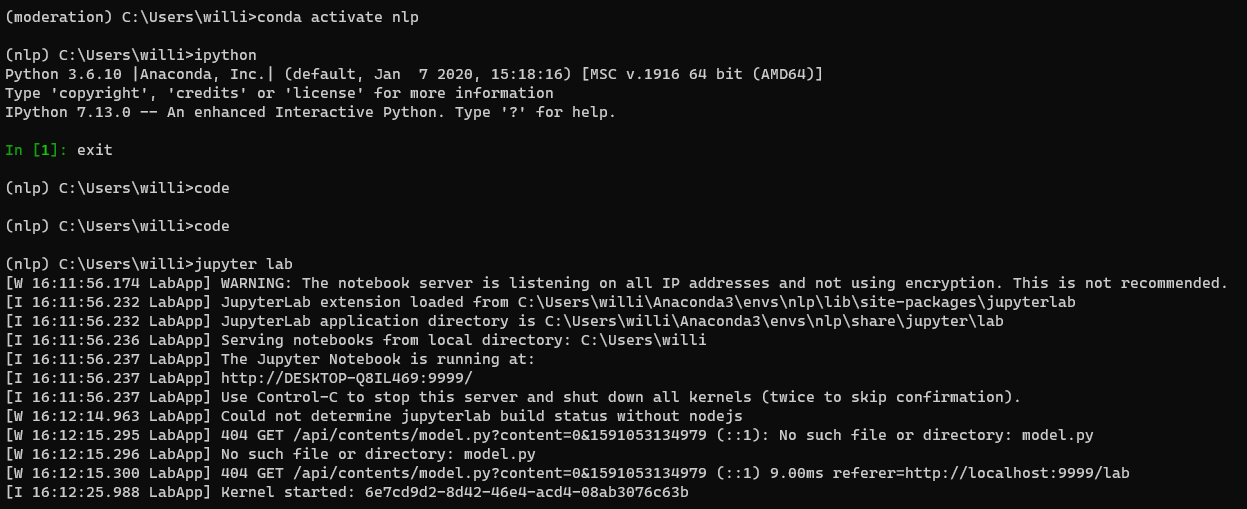
I tried it out, and that's awesome. But it still hangs on opening. Mappin to a different env is the only workaround. You can see here that I am able to open nlp from the Ipython terminal.
BillmanH
on 2 Jun 2020
Can you run jupyter notebook from that environment? That would be closer to what we do. We don't run ipython, but rather startup jupyter and talk to it.
rchiodo
on 2 Jun 2020
Working great. I did Lab but I'm using the NLP env
BillmanH
on 2 Jun 2020
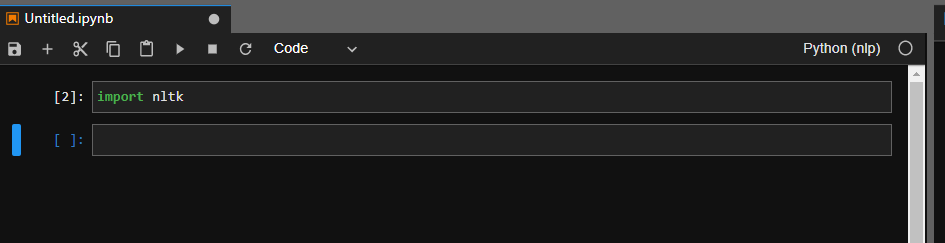
Just to be sure I ran it in notebook as well:

BillmanH
on 2 Jun 2020
What does jupyter kernelspec list show?
rchiodo
on 2 Jun 2020
I'm thinking the cached kernel.json we generated for your nlp environment might be out of date. That would at least explain how the kernel is crashing for us but not for jupyter.
rchiodo
on 2 Jun 2020
Hey I think you're on to something:
Available kernels:
  iot                                                               C:\Users\willi\AppData\Roaming\jupyter\kernels\iot
  nlp                                                               C:\Users\willi\AppData\Roaming\jupyter\kernels\nlp
  prodweb                                                           C:\Users\willi\AppData\Roaming\jupyter\kernels\prodweb
  python36264bitenvitscondaconda9ec83e2e9e5c41b78258c9ce7c7908ea    C:\Users\willi\AppData\Roaming\jupyter\kernels\python36264bitenvitscondaconda9ec83e2e9e5c41b78258c9ce7c7908ea
  python36264bitmoderationcondaae77b0e2fb1e455b801a67189c4b7eac     C:\Users\willi\AppData\Roaming\jupyter\kernels\python36264bitmoderationcondaae77b0e2fb1e455b801a67189c4b7eac
  python36564bitazureconda3fc0cd21eb2541aa8703f9b147613296          C:\Users\willi\AppData\Roaming\jupyter\kernels\python36564bitazureconda3fc0cd21eb2541aa8703f9b147613296
  webscraping                                                       C:\Users\willi\AppData\Roaming\jupyter\kernels\webscraping
  python3                                                           C:\Users\willi\Anaconda3\envs\nlp\share\jupyter\kernels\python3
I'm a little out of my depth here, but it looks like there are two references to nlp This could thow VSC off in ways that other IDE's don't.
BillmanH
on 2 Jun 2020
Yeah this one is likely the one we're using:
nlp C:\Users\willi\AppData\Roaming\jupyter\kernels\nlp
Whereas I suspect jupyter is using this one:
python3 C:\Users\willi\Anaconda3\envs\nlp\share\jupyter\kernels\python3
Can you rename the first one (you can just rename the kernel.json to like kernel.broken or something)
rchiodo
on 2 Jun 2020
I actually just deleted it. and unregistered the other nlp. Then I opened VSCode, still hung. Just to be sure I deleted the settings.json and tried again.
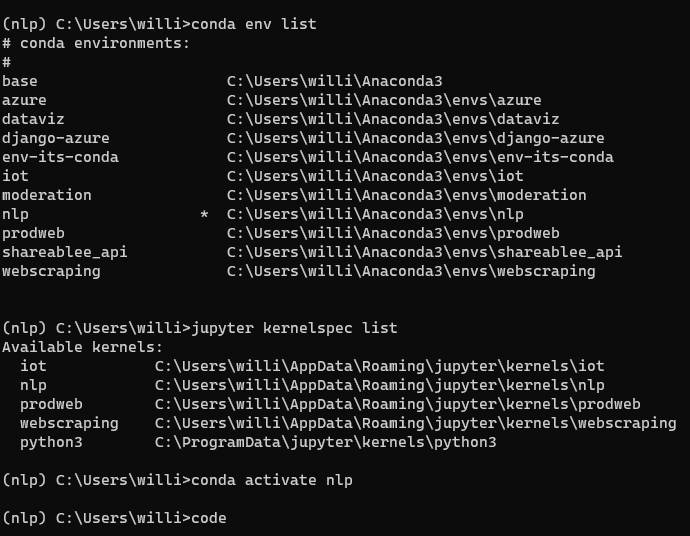
Still hung
BillmanH
on 2 Jun 2020
We should have generated a new kernel in that case. I don't see it there. Something else is likely going wrong.
rchiodo
on 2 Jun 2020
Wait you still have the old nlp kernel. This one:
C:\Users\willi\AppData\Roaming\Jupyter\kernels\nlp
That's the one I think is wrong/off.
rchiodo
on 2 Jun 2020
Yea, I have it and it looks like its working well:

BillmanH
on 2 Jun 2020
Hmm, well not sure why the import dll fails then. It should work if you start VS code with the same environment (as the environment paths should be set). We are starting that kernel as far as I can tell.
rchiodo
on 2 Jun 2020
This looks to be a problem with the jupyter we start as the 'global' jupyter. (This is shown in the jupyter output tab as the python we use to launch jupyter).
The workaround for this issue is to run this command:

and then restart VS code.
That should end up with the same result as if you ran jupyter notebook from the conda prompt for the nlp environment.
Thanks for the help @BillmanH . In the future we hope to eliminate this problem by not using Jupyter as an intermediary for starting kernels.
rchiodo
on 2 Jun 2020
I confirm that this solution works.
BillmanH
on 3 Jun 2020
Related issues
 TheOrangeJuice
·
4Comments
rchiodo
·
3Comments
TheOrangeJuice
·
4Comments
rchiodo
·
3Comments
 entron
·
4Comments
entron
·
4Comments
 schatt89
·
4Comments
schatt89
·
4Comments
 SimonCrios
·
3Comments
SimonCrios
·
3Comments
Most helpful comment
This looks to be a problem with the jupyter we start as the 'global' jupyter. (This is shown in the jupyter output tab as the python we use to launch jupyter).
The workaround for this issue is to run this command:

and then restart VS code.
That should end up with the same result as if you ran
jupyter notebookfrom the conda prompt for the nlp environment.Thanks for the help @BillmanH . In the future we hope to eliminate this problem by not using Jupyter as an intermediary for starting kernels.