Vscode-jupyter: IPyKernel not installed into interpreter Python 3.8.5 32-bit
Issue Type: Bug
1.Open VS Code
- Start Jupyter Notebook
- VScode will attempt to connect to Ipython Kernels
- Then prompt to download "Data Science library ipykernel is not installed. Install?" appears. I selected Yes
- VS Code is unable to download ipykernel.
Extension version: 2020.8.106424
VS Code version: Code 1.48.2 (a0479759d6e9ea56afa657e454193f72aef85bd0, 2020-08-25T10:13:11.295Z)
OS version: Windows_NT x64 10.0.19041
System Info
|Item|Value|
|---|---|
|CPUs|AMD A8-7410 APU with AMD Radeon R5 Graphics (4 x 2196)|
|GPU Status|2d_canvas: enabled
flash_3d: enabled
flash_stage3d: enabled
flash_stage3d_baseline: enabled
gpu_compositing: enabled
multiple_raster_threads: enabled_on
oop_rasterization: unavailable_off
protected_video_decode: unavailable_off
rasterization: unavailable_off
skia_renderer: disabled_off_ok
video_decode: enabled
viz_display_compositor: enabled_on
viz_hit_test_surface_layer: disabled_off_ok
webgl: enabled
webgl2: enabled|
|Load (avg)|undefined|
|Memory (System)|6.91GB (2.92GB free)|
|Process Argv||
|Screen Reader|no|
|VM|0%|
 tylerol74
All 32 comments

tylerol74
on 8 Sep 2020
I also attempted to download Ipykernel in the terminal via a pip install but this is what I got...
PS C:Users\Jim Farris> pip install ipykernel
Requirement already satisfied: ipykernel in c:users\jim farris\appdata\roamingpythonpython38\site-packages (5.3.4)
Requirement already satisfied: ipython>=5.0.0 in c:users\jim farris\appdata\roamingpythonpython38\site-packages (from ipykernel) (5.5.0)
Requirement already satisfied: traitlets>=4.1.0 in c:users\jim farris\appdata\roamingpythonpython38\site-packages (from ipykernel) (5.0.4)
Requirement already satisfied: jupyter-client in c:users\jim farris\appdata\roamingpythonpython38\site-packages (from ipykernel) (6.1.7)
Requirement already satisfied: tornado>=4.2 in c:users\jim farris\appdata\local\programspythonpython38-32\lib\site-packages (from ipykernel) (4.5.3)
Requirement already satisfied: simplegeneric>0.8 in c:users\jim farris\appdata\roamingpythonpython38\site-packages (from ipython>=5.0.0->ipykernel) (0.8.1)
Requirement already satisfied: setuptools>=18.5 in c:users\jim farris\appdata\local\programspythonpython38-32\lib\site-packages (from ipython>=5.0.0->ipykernel) (47.1.0)
Requirement already satisfied: colorama; sys_platform == "win32" in c:users\jim farris\appdata\roamingpythonpython38\site-packages (from ipython>=5.0.0->ipykernel) (0.4.3)
Requirement already satisfied: prompt-toolkit<2.0.0,>=1.0.4 in c:users\jim farris\appdata\roamingpythonpython38\site-packages (from ipython>=5.0.0->ipykernel) (1.0.18)
Requirement already satisfied: pygments in c:users\jim farris\appdata\roamingpythonpython38\site-packages (from ipython>=5.0.0->ipykernel) (2.6.1)
Requirement already satisfied: pickleshare in c:users\jim farris\appdata\roamingpythonpython38\site-packages (from ipython>=5.0.0->ipykernel) (0.7.5)
Requirement already satisfied: decorator in c:users\jim farris\appdata\roamingpythonpython38\site-packages (from ipython>=5.0.0->ipykernel) (4.4.2)
Requirement already satisfied: ipython-genutils in c:users\jim farris\appdata\roamingpythonpython38\site-packages (from traitlets>=4.1.0->ipykernel) (0.2.0)
Requirement already satisfied: jupyter-core>=4.6.0 in c:users\jim farris\appdata\roamingpythonpython38\site-packages (from jupyter-client->ipykernel) (4.6.3)
Requirement already satisfied: python-dateutil>=2.1 in c:users\jim farris\appdata\roamingpythonpython38\site-packages (from jupyter-client->ipykernel) (2.8.1)
Requirement already satisfied: pyzmq>=13 in c:users\jim farris\appdata\roamingpythonpython38\site-packages (from jupyter-client->ipykernel) (19.0.2)
Requirement already satisfied: six>=1.9.0 in c:users\jim farris\appdata\local\programspythonpython38-32\lib\site-packages (from prompt-toolkit<2.0.0,>=1.0.4->ipython>=5.0.0->ipykernel) (1.12.0)
Requirement already satisfied: wcwidth in c:users\jim farris\appdata\roamingpythonpython38\site-packages (from prompt-toolkit<2.0.0,>=1.0.4->ipython>=5.0.0->ipykernel) (0.2.5)
Requirement already satisfied: pywin32>=1.0; sys_platform == "win32" in c:users\jim farris\appdata\roamingpythonpython38\site-packages (from jupyter-core>=4.6.0->jupyter-client->ipykernel) (228)
PS C:Users\Jim Farris>
tylerol74
on 8 Sep 2020
Thanks for the bug. Can you set this setting
"python.logging.level": "debug"
Reload VS code, attempt again and then upload the results from the 'Python Output' tab?
 rchiodo
on 8 Sep 2020
rchiodo
on 8 Sep 2020
User belongs to experiment group 'ShowPlayIcon - start'
User belongs to experiment group 'ShowExtensionSurveyPrompt - enabled'
User belongs to experiment group 'DebugAdapterFactory - experiment'
User belongs to experiment group 'PtvsdWheels37 - experiment'
User belongs to experiment group 'UseTerminalToGetActivatedEnvVars - control'
User belongs to experiment group 'LocalZMQKernel - experiment'
User belongs to experiment group 'CollectLSRequestTiming - experiment'
User belongs to experiment group 'CollectNodeLSRequestTiming - experiment'
User belongs to experiment group 'EnableIPyWidgets - experiment'
User belongs to experiment group 'RunByLine - control'
User belongs to experiment group 'CustomEditorSupport - control'
User belongs to experiment group 'pythonaacf'
Error 2020-09-08 16:33:15: Failed to download and store experiments, Class name = b, completed in 1420ms, has a falsy return value, , Return Value: undefined [Error: Failed with status 404, Not Found, Uri https://raw.githubusercontent.com/microsoft/vscode-python/master/experiments.json
at H._callback (c:Users\Jim Farris.vscode\extensionsms-python.python-2020.8.106424\out\client\extension.js:54:713175)
at H.a._callback.a.callback.a.callback (c:Users\Jim Farris.vscode\extensionsms-python.python-2020.8.106424\out\client\node_modules\request.js:189:5442)
at H.emit (events.js:203:13)
at H.
at H.emit (events.js:203:13)
at IncomingMessage.
at Object.onceWrapper (events.js:291:20)
at IncomingMessage.emit (events.js:208:15)
at endReadableNT (_stream_readable.js:1168:12)
at processTicksAndRejections (internal/process/task_queues.js:77:11)]
Error 2020-09-08 16:33:15: Failed to initialize experiments, Class name = b, completed in 1450ms, has a falsy return value, , Return Value: undefined [Error: Failed with status 404, Not Found, Uri https://raw.githubusercontent.com/microsoft/vscode-python/master/experiments.json
at H._callback (c:Users\Jim Farris.vscode\extensionsms-python.python-2020.8.106424\out\client\extension.js:54:713175)
at H.a._callback.a.callback.a.callback (c:Users\Jim Farris.vscode\extensionsms-python.python-2020.8.106424\out\client\node_modules\request.js:189:5442)
at H.emit (events.js:203:13)
at H.
at H.emit (events.js:203:13)
at IncomingMessage.
at Object.onceWrapper (events.js:291:20)
at IncomingMessage.emit (events.js:208:15)
at endReadableNT (_stream_readable.js:1168:12)
at processTicksAndRejections (internal/process/task_queues.js:77:11)]
conda --version
pyenv root
python3.7 "c:Users\Jim Farris.vscode\extensionsms-python.python-2020.8.106424pythonFiles\pyvsc-run-isolated.py" -c "import sys;print(sys.executable)"
python3.6 "c:Users\Jim Farris.vscode\extensionsms-python.python-2020.8.106424pythonFiles\pyvsc-run-isolated.py" -c "import sys;print(sys.executable)"
python3 "c:Users\Jim Farris.vscode\extensionsms-python.python-2020.8.106424pythonFiles\pyvsc-run-isolated.py" -c "import sys;print(sys.executable)"
python2 "c:Users\Jim Farris.vscode\extensionsms-python.python-2020.8.106424pythonFiles\pyvsc-run-isolated.py" -c "import sys;print(sys.executable)"
python "c:Users\Jim Farris.vscode\extensionsms-python.python-2020.8.106424pythonFiles\pyvsc-run-isolated.py" -c "import sys;print(sys.executable)"
py -3.7 "c:Users\Jim Farris.vscode\extensionsms-python.python-2020.8.106424pythonFiles\pyvsc-run-isolated.py" -c "import sys;print(sys.executable)"
py -3.6 "c:Users\Jim Farris.vscode\extensionsms-python.python-2020.8.106424pythonFiles\pyvsc-run-isolated.py" -c "import sys;print(sys.executable)"
py -3 "c:Users\Jim Farris.vscode\extensionsms-python.python-2020.8.106424pythonFiles\pyvsc-run-isolated.py" -c "import sys;print(sys.executable)"
py -2 "c:Users\Jim Farris.vscode\extensionsms-python.python-2020.8.106424pythonFiles\pyvsc-run-isolated.py" -c "import sys;print(sys.executable)"
python "c:Users\Jim Farris.vscode\extensionsms-python.python-2020.8.106424pythonFiles\pyvsc-run-isolated.py" -c "import sys;print(sys.executable)"
conda info --json
Error 2020-09-08 16:33:17: Detection of Python Interpreter for Command py and args -3.6 failed as file Python 3.6 not found!
-3.8-32 does not exist
Error 2020-09-08 16:33:17: Detection of Python Interpreter for Command py and args -3.7 failed as file Python 3.7 not found!
-3.8-32 does not exist
Error 2020-09-08 16:33:17: Detection of Python Interpreter for Command py and args -2 failed as file Python 2 not found!
-3.8-32 does not exist
python "c:Users\Jim Farris.vscode\extensionsms-python.python-2020.8.106424pythonFiles\pyvsc-run-isolated.py" -c "import sys;print(sys.executable)"
python "c:Users\Jim Farris.vscode\extensionsms-python.python-2020.8.106424pythonFiles\pyvsc-run-isolated.py" -c "import sys;print(sys.executable)"
python "c:Users\Jim Farris.vscode\extensionsms-python.python-2020.8.106424pythonFiles\pyvsc-run-isolated.py" -c "import sys;print(sys.executable)"
python "c:Users\Jim Farris.vscode\extensionsms-python.python-2020.8.106424pythonFiles\pyvsc-run-isolated.py" -c "import sys;print(sys.executable)"
python "c:Users\Jim Farris.vscode\extensionsms-python.python-2020.8.106424pythonFiles\pyvsc-run-isolated.py" -c "import sys;print(sys.executable)"
python "c:Users\Jim Farris.vscode\extensionsms-python.python-2020.8.106424pythonFiles\pyvsc-run-isolated.py" -c "import sys;print(sys.executable)"
python "c:Users\Jim Farris.vscode\extensionsms-python.python-2020.8.106424pythonFiles\pyvsc-run-isolated.py" -c "import sys;print(sys.executable)"
python "c:Users\Jim Farris.vscode\extensionsms-python.python-2020.8.106424pythonFiles\pyvsc-run-isolated.py" -c "import sys;print(sys.executable)"
python "c:Users\Jim Farris.vscode\extensionsms-python.python-2020.8.106424pythonFiles\pyvsc-run-isolated.py" -c "import sys;print(sys.executable)"
python "c:Users\Jim Farris.vscode\extensionsms-python.python-2020.8.106424pythonFiles\pyvsc-run-isolated.py" -c "import sys;print(sys.executable)"
python "c:Users\Jim Farris.vscode\extensionsms-python.python-2020.8.106424pythonFiles\pyvsc-run-isolated.py" -c "import sys;print(sys.executable)"
python "c:Users\Jim Farris.vscode\extensionsms-python.python-2020.8.106424pythonFiles\pyvsc-run-isolated.py" -c "import sys;print(sys.executable)"
python "c:Users\Jim Farris.vscode\extensionsms-python.python-2020.8.106424pythonFiles\pyvsc-run-isolated.py" -c "import sys;print(sys.executable)"
python "c:Users\Jim Farris.vscode\extensionsms-python.python-2020.8.106424pythonFiles\pyvsc-run-isolated.py" -c "import sys;print(sys.executable)"
python "c:Users\Jim Farris.vscode\extensionsms-python.python-2020.8.106424pythonFiles\pyvsc-run-isolated.py" -c "import sys;print(sys.executable)"
python "c:Users\Jim Farris.vscode\extensionsms-python.python-2020.8.106424pythonFiles\pyvsc-run-isolated.py" -c "import sys;print(sys.executable)"
python "c:Users\Jim Farris.vscode\extensionsms-python.python-2020.8.106424pythonFiles\pyvsc-run-isolated.py" -c "import sys;print(sys.executable)"
python "c:Users\Jim Farris.vscode\extensionsms-python.python-2020.8.106424pythonFiles\pyvsc-run-isolated.py" -c "import sys;print(sys.executable)"
python "c:Users\Jim Farris.vscode\extensionsms-python.python-2020.8.106424pythonFiles\pyvsc-run-isolated.py" -c "import sys;print(sys.executable)"
python "c:Users\Jim Farris.vscode\extensionsms-python.python-2020.8.106424pythonFiles\pyvsc-run-isolated.py" -c "import sys;print(sys.executable)"
python "c:Users\Jim Farris.vscode\extensionsms-python.python-2020.8.106424pythonFiles\pyvsc-run-isolated.py" -c "import sys;print(sys.executable)"
python "c:Users\Jim Farris.vscode\extensionsms-python.python-2020.8.106424pythonFiles\pyvsc-run-isolated.py" -c "import sys;print(sys.executable)"
python "c:Users\Jim Farris.vscode\extensionsms-python.python-2020.8.106424pythonFiles\pyvsc-run-isolated.py" -c "import sys;print(sys.executable)"
python "c:Users\Jim Farris.vscode\extensionsms-python.python-2020.8.106424pythonFiles\pyvsc-run-isolated.py" -c "import sys;print(sys.executable)"
~\AppData\Local\Programs\Python\Python38-32python.exe "c:Users\Jim Farris.vscode\extensionsms-python.python-2020.8.106424pythonFiles\pyvsc-run-isolated.py" -c "import jupyter"
~\AppData\Local\Programs\Python\Python38-32python.exe "c:Users\Jim Farris.vscode\extensionsms-python.python-2020.8.106424pythonFiles\pyvsc-run-isolated.py" -c "import jupyter"
~\AppData\Local\Programs\Python\Python38-32python.exe "c:Users\Jim Farris.vscode\extensionsms-python.python-2020.8.106424pythonFiles\pyvsc-run-isolated.py" -c "import notebook"
~\AppData\Local\Programs\Python\Python38-32python.exe "c:Users\Jim Farris.vscode\extensionsms-python.python-2020.8.106424pythonFiles\pyvsc-run-isolated.py" -c "import notebook"
Python interpreter path: ~\AppData\Local\Programs\Python\Python38-32python.exe
Starting Jedi Python language engine.
~\AppData\Local\Programs\Python\Python38-32python.exe -c "import os;print(os.path.realpath("C:\Users\Jim Farris\AppData\Roaming\jupyter\kernels"))"
~\AppData\Local\Programs\Python\Python38-32python.exe -c "import os;print(os.path.realpath("C:\Users\Jim Farris\AppData\Roaming\jupyter\kernels"))"
python "c:Users\Jim Farris.vscode\extensionsms-python.python-2020.8.106424pythonFiles\pyvsc-run-isolated.py" -c "import sys;print(sys.executable)"
python "c:Users\Jim Farris.vscode\extensionsms-python.python-2020.8.106424pythonFiles\pyvsc-run-isolated.py" -c "import sys;print(sys.executable)"
~\AppData\Local\Programs\Python\Python38-32python.exe "c:Users\Jim Farris.vscode\extensionsms-python.python-2020.8.106424pythonFiles\pyvsc-run-isolated.py" -c "import ipykernel"
~\AppData\Local\Programs\Python\Python38-32python.exe "c:Users\Jim Farris.vscode\extensionsms-python.python-2020.8.106424pythonFiles\pyvsc-run-isolated.py" -c "import ipykernel"
python "c:Users\Jim Farris.vscode\extensionsms-python.python-2020.8.106424pythonFiles\pyvsc-run-isolated.py" -c "import sys;print(sys.executable)"
python "c:Users\Jim Farris.vscode\extensionsms-python.python-2020.8.106424pythonFiles\pyvsc-run-isolated.py" -c "import sys;print(sys.executable)"
python "c:Users\Jim Farris.vscode\extensionsms-python.python-2020.8.106424pythonFiles\pyvsc-run-isolated.py" -c "import sys;print(sys.executable)"
python "c:Users\Jim Farris.vscode\extensionsms-python.python-2020.8.106424pythonFiles\pyvsc-run-isolated.py" -c "import sys;print(sys.executable)"
~\AppData\Local\Programs\Python\Python38-32python.exe -c "import os;print(os.path.realpath("C:\Users\Jim Farris\AppData\Roaming\jupyter\kernels"))"
~\AppData\Local\Programs\Python\Python38-32python.exe -c "import os;print(os.path.realpath("C:\Users\Jim Farris\AppData\Roaming\jupyter\kernels"))"
~\AppData\Local\Programs\Python\Python38-32python.exe -c "import os;print(os.path.realpath("C:\Users\Jim Farris\AppData\Roaming\jupyter\kernels"))"
~\AppData\Local\Programs\Python\Python38-32python.exe -c "import os;print(os.path.realpath("C:\Users\Jim Farris\AppData\Roaming\jupyter\kernels"))"
~\AppData\Local\Programs\Python\Python38-32python.exe "c:Users\Jim Farris.vscode\extensionsms-python.python-2020.8.106424pythonFiles\pyvsc-run-isolated.py" -c "import ipykernel"
~\AppData\Local\Programs\Python\Python38-32python.exe "c:Users\Jim Farris.vscode\extensionsms-python.python-2020.8.106424pythonFiles\pyvsc-run-isolated.py" -c "import ipykernel"
~\AppData\Local\Programs\Python\Python38-32python.exe "c:Users\Jim Farris.vscode\extensionsms-python.python-2020.8.106424pythonFiles\pyvsc-run-isolated.py" -c "import ipykernel"
~\AppData\Local\Programs\Python\Python38-32python.exe "c:Users\Jim Farris.vscode\extensionsms-python.python-2020.8.106424pythonFiles\pyvsc-run-isolated.py" -c "import ipykernel"
conda --version
python "c:Users\Jim Farris.vscode\extensionsms-python.python-2020.8.106424pythonFiles\pyvsc-run-isolated.py" -c "import sys;print(sys.executable)"
python "c:Users\Jim Farris.vscode\extensionsms-python.python-2020.8.106424pythonFiles\pyvsc-run-isolated.py" -c "import sys;print(sys.executable)"
~\AppData\Local\Programs\Python\Python38-32python.exe "c:Users\Jim Farris.vscode\extensionsms-python.python-2020.8.106424pythonFiles\pyvsc-run-isolated.py" -c "import ipykernel"
~\AppData\Local\Programs\Python\Python38-32python.exe "c:Users\Jim Farris.vscode\extensionsms-python.python-2020.8.106424pythonFiles\pyvsc-run-isolated.py" -c "import ipykernel"
~\AppData\Local\Programs\Python\Python38-32python.exe "c:Users\Jim Farris.vscode\extensionsms-python.python-2020.8.106424pythonFiles\pyvsc-run-isolated.py" jupyter kernelspec --version
~\AppData\Local\Programs\Python\Python38-32python.exe "c:Users\Jim Farris.vscode\extensionsms-python.python-2020.8.106424pythonFiles\pyvsc-run-isolated.py" jupyter kernelspec --version
~\AppData\Local\Programs\Python\Python38-32python.exe "c:Users\Jim Farris.vscode\extensionsms-python.python-2020.8.106424pythonFiles\vscode_datascience_helpers\getJupyterKernelspecVersion.py"
~\AppData\Local\Programs\Python\Python38-32python.exe "c:Users\Jim Farris.vscode\extensionsms-python.python-2020.8.106424pythonFiles\vscode_datascience_helpers\getJupyterKernelspecVersion.py"
~\AppData\Local\Programs\Python\Python38-32python.exe "c:Users\Jim Farris.vscode\extensionsms-python.python-2020.8.106424pythonFiles\pyvsc-run-isolated.py" vscode_datascience_helpers.daemon --daemon-module=vscode_datascience_helpers.jupyter_daemon -v
~\AppData\Local\Programs\Python\Python38-32python.exe "c:Users\Jim Farris.vscode\extensionsms-python.python-2020.8.106424pythonFiles\pyvsc-run-isolated.py" vscode_datascience_helpers.daemon --daemon-module=vscode_datascience_helpers.jupyter_daemon -v
~\AppData\Local\Programs\Python\Python38-32python.exe "c:Users\Jim Farris.vscode\extensionsms-python.python-2020.8.106424pythonFiles\pyvsc-run-isolated.py" vscode_datascience_helpers.daemon --daemon-module=vscode_datascience_helpers.jupyter_daemon -v
~\AppData\Local\Programs\Python\Python38-32python.exe "c:Users\Jim Farris.vscode\extensionsms-python.python-2020.8.106424pythonFiles\pyvsc-run-isolated.py" vscode_datascience_helpers.daemon --daemon-module=vscode_datascience_helpers.jupyter_daemon -v
~\AppData\Local\Programs\Python\Python38-32python.exe "c:Users\Jim Farris.vscode\extensionsms-python.python-2020.8.106424pythonFiles\pyvsc-run-isolated.py" vscode_datascience_helpers.daemon --daemon-module=vscode_datascience_helpers.jupyter_daemon -v
~\AppData\Local\Programs\Python\Python38-32python.exe "c:Users\Jim Farris.vscode\extensionsms-python.python-2020.8.106424pythonFiles\pyvsc-run-isolated.py" vscode_datascience_helpers.daemon --daemon-module=vscode_datascience_helpers.jupyter_daemon -v
python "c:Users\Jim Farris.vscode\extensionsms-python.python-2020.8.106424pythonFiles\pyvsc-run-isolated.py" -c "import sys;print(sys.executable)"
python "c:Users\Jim Farris.vscode\extensionsms-python.python-2020.8.106424pythonFiles\pyvsc-run-isolated.py" -c "import sys;print(sys.executable)"
python "c:Users\Jim Farris.vscode\extensionsms-python.python-2020.8.106424pythonFiles\pyvsc-run-isolated.py" -c "import sys;print(sys.executable)"
python "c:Users\Jim Farris.vscode\extensionsms-python.python-2020.8.106424pythonFiles\pyvsc-run-isolated.py" -c "import sys;print(sys.executable)"
Error 2020-09-08 16:34:41: Failed to determine if a notebook is active for the current editor [Error: IPyKernel not installed into interpreter Python 3.8.5 32-bit
at D.verifyIpyKernel (c:Users\Jim Farris.vscode\extensionsms-python.python-2020.8.106424\out\client\extension.js:56:535048)
at processTicksAndRejections (internal/process/task_queues.js:85:5)]
Error 2020-09-08 16:34:41: Failed to determine if a notebook is active for the current editor [Error: IPyKernel not installed into interpreter Python 3.8.5 32-bit
at D.verifyIpyKernel (c:Users\Jim Farris.vscode\extensionsms-python.python-2020.8.106424\out\client\extension.js:56:535048)
at processTicksAndRejections (internal/process/task_queues.js:85:5)]
Error 2020-09-08 16:34:41: Failed to determine if a notebook is active for the current editor [Error: IPyKernel not installed into interpreter Python 3.8.5 32-bit
at D.verifyIpyKernel (c:Users\Jim Farris.vscode\extensionsms-python.python-2020.8.106424\out\client\extension.js:56:535048)
at processTicksAndRejections (internal/process/task_queues.js:85:5)]
Error 2020-09-08 16:34:41: Failed to determine if a notebook is active for the current editor [Error: IPyKernel not installed into interpreter Python 3.8.5 32-bit
at D.verifyIpyKernel (c:Users\Jim Farris.vscode\extensionsms-python.python-2020.8.106424\out\client\extension.js:56:535048)
at processTicksAndRejections (internal/process/task_queues.js:85:5)]
Error 2020-09-08 16:34:41: Failed to determine if a notebook is active for the current editor [Error: IPyKernel not installed into interpreter Python 3.8.5 32-bit
at D.verifyIpyKernel (c:Users\Jim Farris.vscode\extensionsms-python.python-2020.8.106424\out\client\extension.js:56:535048)
at processTicksAndRejections (internal/process/task_queues.js:85:5)]
Error 2020-09-08 16:34:41: Failed to determine if a notebook is active for the current editor [Error: IPyKernel not installed into interpreter Python 3.8.5 32-bit
at D.verifyIpyKernel (c:Users\Jim Farris.vscode\extensionsms-python.python-2020.8.106424\out\client\extension.js:56:535048)
at processTicksAndRejections (internal/process/task_queues.js:85:5)]
Error 2020-09-08 16:34:41: Failed to determine if a notebook is active for the current editor [Error: IPyKernel not installed into interpreter Python 3.8.5 32-bit
at D.verifyIpyKernel (c:Users\Jim Farris.vscode\extensionsms-python.python-2020.8.106424\out\client\extension.js:56:535048)
at processTicksAndRejections (internal/process/task_queues.js:85:5)]
Error 2020-09-08 16:34:41: Failed to determine if a notebook is active for the current editor [Error: IPyKernel not installed into interpreter Python 3.8.5 32-bit
at D.verifyIpyKernel (c:Users\Jim Farris.vscode\extensionsms-python.python-2020.8.106424\out\client\extension.js:56:535048)
at processTicksAndRejections (internal/process/task_queues.js:85:5)]
Error 2020-09-08 16:34:41: Failed to determine if a notebook is active for the current editor [Error: IPyKernel not installed into interpreter Python 3.8.5 32-bit
at D.verifyIpyKernel (c:Users\Jim Farris.vscode\extensionsms-python.python-2020.8.106424\out\client\extension.js:56:535048)
at processTicksAndRejections (internal/process/task_queues.js:85:5)]
Error 2020-09-08 16:34:41: Failed to determine if a notebook is active for the current editor [Error: IPyKernel not installed into interpreter Python 3.8.5 32-bit
at D.verifyIpyKernel (c:Users\Jim Farris.vscode\extensionsms-python.python-2020.8.106424\out\client\extension.js:56:535048)
at processTicksAndRejections (internal/process/task_queues.js:85:5)]
Error 2020-09-08 16:34:41: Failed to determine if a notebook is active for the current editor [Error: IPyKernel not installed into interpreter Python 3.8.5 32-bit
at D.verifyIpyKernel (c:Users\Jim Farris.vscode\extensionsms-python.python-2020.8.106424\out\client\extension.js:56:535048)
at processTicksAndRejections (internal/process/task_queues.js:85:5)]
Error 2020-09-08 16:34:41: Failed to determine if a notebook is active for the current editor [Error: IPyKernel not installed into interpreter Python 3.8.5 32-bit
at D.verifyIpyKernel (c:Users\Jim Farris.vscode\extensionsms-python.python-2020.8.106424\out\client\extension.js:56:535048)
at processTicksAndRejections (internal/process/task_queues.js:85:5)]
Error 2020-09-08 16:34:41: Failed to determine if a notebook is active for the current editor [Error: IPyKernel not installed into interpreter Python 3.8.5 32-bit
at D.verifyIpyKernel (c:Users\Jim Farris.vscode\extensionsms-python.python-2020.8.106424\out\client\extension.js:56:535048)
at processTicksAndRejections (internal/process/task_queues.js:85:5)]
Error 2020-09-08 16:34:41: Failed to determine if a notebook is active for the current editor [Error: IPyKernel not installed into interpreter Python 3.8.5 32-bit
at D.verifyIpyKernel (c:Users\Jim Farris.vscode\extensionsms-python.python-2020.8.106424\out\client\extension.js:56:535048)
at processTicksAndRejections (internal/process/task_queues.js:85:5)]
Error 2020-09-08 16:34:41: Failed to determine if a notebook is active for the current editor [Error: IPyKernel not installed into interpreter Python 3.8.5 32-bit
at D.verifyIpyKernel (c:Users\Jim Farris.vscode\extensionsms-python.python-2020.8.106424\out\client\extension.js:56:535048)
at processTicksAndRejections (internal/process/task_queues.js:85:5)]
Error 2020-09-08 16:34:41: Failed to determine if a notebook is active for the current editor [Error: IPyKernel not installed into interpreter Python 3.8.5 32-bit
at D.verifyIpyKernel (c:Users\Jim Farris.vscode\extensionsms-python.python-2020.8.106424\out\client\extension.js:56:535048)
at processTicksAndRejections (internal/process/task_queues.js:85:5)]
Error 2020-09-08 16:34:41: Failed to determine if a notebook is active for the current editor [Error: IPyKernel not installed into interpreter Python 3.8.5 32-bit
at D.verifyIpyKernel (c:Users\Jim Farris.vscode\extensionsms-python.python-2020.8.106424\out\client\extension.js:56:535048)
at processTicksAndRejections (internal/process/task_queues.js:85:5)]
Error 2020-09-08 16:34:41: Failed to determine if a notebook is active for the current editor [Error: IPyKernel not installed into interpreter Python 3.8.5 32-bit
at D.verifyIpyKernel (c:Users\Jim Farris.vscode\extensionsms-python.python-2020.8.106424\out\client\extension.js:56:535048)
at processTicksAndRejections (internal/process/task_queues.js:85:5)]
Error 2020-09-08 16:34:41: Failed to determine if a notebook is active for the current editor [Error: IPyKernel not installed into interpreter Python 3.8.5 32-bit
at D.verifyIpyKernel (c:Users\Jim Farris.vscode\extensionsms-python.python-2020.8.106424\out\client\extension.js:56:535048)
at processTicksAndRejections (internal/process/task_queues.js:85:5)]
Error 2020-09-08 16:34:41: Failed to determine if a notebook is active for the current editor [Error: IPyKernel not installed into interpreter Python 3.8.5 32-bit
at D.verifyIpyKernel (c:Users\Jim Farris.vscode\extensionsms-python.python-2020.8.106424\out\client\extension.js:56:535048)
at processTicksAndRejections (internal/process/task_queues.js:85:5)]
Error 2020-09-08 16:34:41: Failed to determine if a notebook is active for the current editor [Error: IPyKernel not installed into interpreter Python 3.8.5 32-bit
at D.verifyIpyKernel (c:Users\Jim Farris.vscode\extensionsms-python.python-2020.8.106424\out\client\extension.js:56:535048)
at processTicksAndRejections (internal/process/task_queues.js:85:5)]
Error 2020-09-08 16:34:41: Failed to determine if a notebook is active for the current editor [Error: IPyKernel not installed into interpreter Python 3.8.5 32-bit
at D.verifyIpyKernel (c:Users\Jim Farris.vscode\extensionsms-python.python-2020.8.106424\out\client\extension.js:56:535048)
at processTicksAndRejections (internal/process/task_queues.js:85:5)]
Error 2020-09-08 16:34:41: Failed to initialize S [Error: IPyKernel not installed into interpreter Python 3.8.5 32-bit
at D.verifyIpyKernel (c:Users\Jim Farris.vscode\extensionsms-python.python-2020.8.106424\out\client\extension.js:56:535048)
at processTicksAndRejections (internal/process/task_queues.js:85:5)]
Error 2020-09-08 16:34:41: Failed to initialize S [Error: IPyKernel not installed into interpreter Python 3.8.5 32-bit
at D.verifyIpyKernel (c:Users\Jim Farris.vscode\extensionsms-python.python-2020.8.106424\out\client\extension.js:56:535048)
at processTicksAndRejections (internal/process/task_queues.js:85:5)]
Error 2020-09-08 16:34:41: Failed to initialize S [Error: IPyKernel not installed into interpreter Python 3.8.5 32-bit
at D.verifyIpyKernel (c:Users\Jim Farris.vscode\extensionsms-python.python-2020.8.106424\out\client\extension.js:56:535048)
at processTicksAndRejections (internal/process/task_queues.js:85:5)]
Error 2020-09-08 16:34:41: DataScience Error [Error: IPyKernel not installed into interpreter Python 3.8.5 32-bit
at D.verifyIpyKernel (c:Users\Jim Farris.vscode\extensionsms-python.python-2020.8.106424\out\client\extension.js:56:535048)
at processTicksAndRejections (internal/process/task_queues.js:85:5)]
Error 2020-09-08 16:34:41: DataScience Error [Error: IPyKernel not installed into interpreter Python 3.8.5 32-bit
at D.verifyIpyKernel (c:Users\Jim Farris.vscode\extensionsms-python.python-2020.8.106424\out\client\extension.js:56:535048)
at processTicksAndRejections (internal/process/task_queues.js:85:5)]
Error 2020-09-08 16:34:41: DataScience Error [Error: IPyKernel not installed into interpreter Python 3.8.5 32-bit
at D.verifyIpyKernel (c:Users\Jim Farris.vscode\extensionsms-python.python-2020.8.106424\out\client\extension.js:56:535048)
at processTicksAndRejections (internal/process/task_queues.js:85:5)]
Error 2020-09-08 16:34:41: DataScience Error [Error: IPyKernel not installed into interpreter Python 3.8.5 32-bit
at D.verifyIpyKernel (c:Users\Jim Farris.vscode\extensionsms-python.python-2020.8.106424\out\client\extension.js:56:535048)
at processTicksAndRejections (internal/process/task_queues.js:85:5)]
Error 2020-09-08 16:34:41: DataScience Error [Error: IPyKernel not installed into interpreter Python 3.8.5 32-bit
at D.verifyIpyKernel (c:Users\Jim Farris.vscode\extensionsms-python.python-2020.8.106424\out\client\extension.js:56:535048)
at processTicksAndRejections (internal/process/task_queues.js:85:5)]
Error 2020-09-08 16:34:41: DataScience Error [Error: IPyKernel not installed into interpreter Python 3.8.5 32-bit
at D.verifyIpyKernel (c:Users\Jim Farris.vscode\extensionsms-python.python-2020.8.106424\out\client\extension.js:56:535048)
at processTicksAndRejections (internal/process/task_queues.js:85:5)]
Error 2020-09-08 16:34:41: Failed to initialize ipywidgetHandler [Error: IPyKernel not installed into interpreter Python 3.8.5 32-bit
at D.verifyIpyKernel (c:Users\Jim Farris.vscode\extensionsms-python.python-2020.8.106424\out\client\extension.js:56:535048)
at processTicksAndRejections (internal/process/task_queues.js:85:5)]
Error 2020-09-08 16:34:41: Failed to initialize ipywidgetHandler [Error: IPyKernel not installed into interpreter Python 3.8.5 32-bit
at D.verifyIpyKernel (c:Users\Jim Farris.vscode\extensionsms-python.python-2020.8.106424\out\client\extension.js:56:535048)
at processTicksAndRejections (internal/process/task_queues.js:85:5)]
Error 2020-09-08 16:34:41: Failed to initialize ipywidgetHandler [Error: IPyKernel not installed into interpreter Python 3.8.5 32-bit
at D.verifyIpyKernel (c:Users\Jim Farris.vscode\extensionsms-python.python-2020.8.106424\out\client\extension.js:56:535048)
at processTicksAndRejections (internal/process/task_queues.js:85:5)]
Error 2020-09-08 16:34:41: DataScience Error [Error: IPyKernel not installed into interpreter Python 3.8.5 32-bit
at D.verifyIpyKernel (c:Users\Jim Farris.vscode\extensionsms-python.python-2020.8.106424\out\client\extension.js:56:535048)
at processTicksAndRejections (internal/process/task_queues.js:85:5)]
Error 2020-09-08 16:34:41: DataScience Error [Error: IPyKernel not installed into interpreter Python 3.8.5 32-bit
at D.verifyIpyKernel (c:Users\Jim Farris.vscode\extensionsms-python.python-2020.8.106424\out\client\extension.js:56:535048)
at processTicksAndRejections (internal/process/task_queues.js:85:5)]
python "c:Users\Jim Farris.vscode\extensionsms-python.python-2020.8.106424pythonFiles\pyvsc-run-isolated.py" -c "import sys;print(sys.executable)"
python "c:Users\Jim Farris.vscode\extensionsms-python.python-2020.8.106424pythonFiles\pyvsc-run-isolated.py" -c "import sys;print(sys.executable)"
python "c:Users\Jim Farris.vscode\extensionsms-python.python-2020.8.106424pythonFiles\pyvsc-run-isolated.py" -c "import sys;print(sys.executable)"
python "c:Users\Jim Farris.vscode\extensionsms-python.python-2020.8.106424pythonFiles\pyvsc-run-isolated.py" -c "import sys;print(sys.executable)"
~\AppData\Local\Programs\Python\Python38-32python.exe "c:Users\Jim Farris.vscode\extensionsms-python.python-2020.8.106424pythonFiles\pyvsc-run-isolated.py" -c "import ipykernel"
~\AppData\Local\Programs\Python\Python38-32python.exe "c:Users\Jim Farris.vscode\extensionsms-python.python-2020.8.106424pythonFiles\pyvsc-run-isolated.py" -c "import ipykernel"
python "c:Users\Jim Farris.vscode\extensionsms-python.python-2020.8.106424pythonFiles\pyvsc-run-isolated.py" -c "import sys;print(sys.executable)"
python "c:Users\Jim Farris.vscode\extensionsms-python.python-2020.8.106424pythonFiles\pyvsc-run-isolated.py" -c "import sys;print(sys.executable)"
Thanks for the bug. Can you set this setting
"python.logging.level": "debug"Reload VS code, attempt again and then upload the results from the 'Python Output' tab?
tylerol74
on 8 Sep 2020
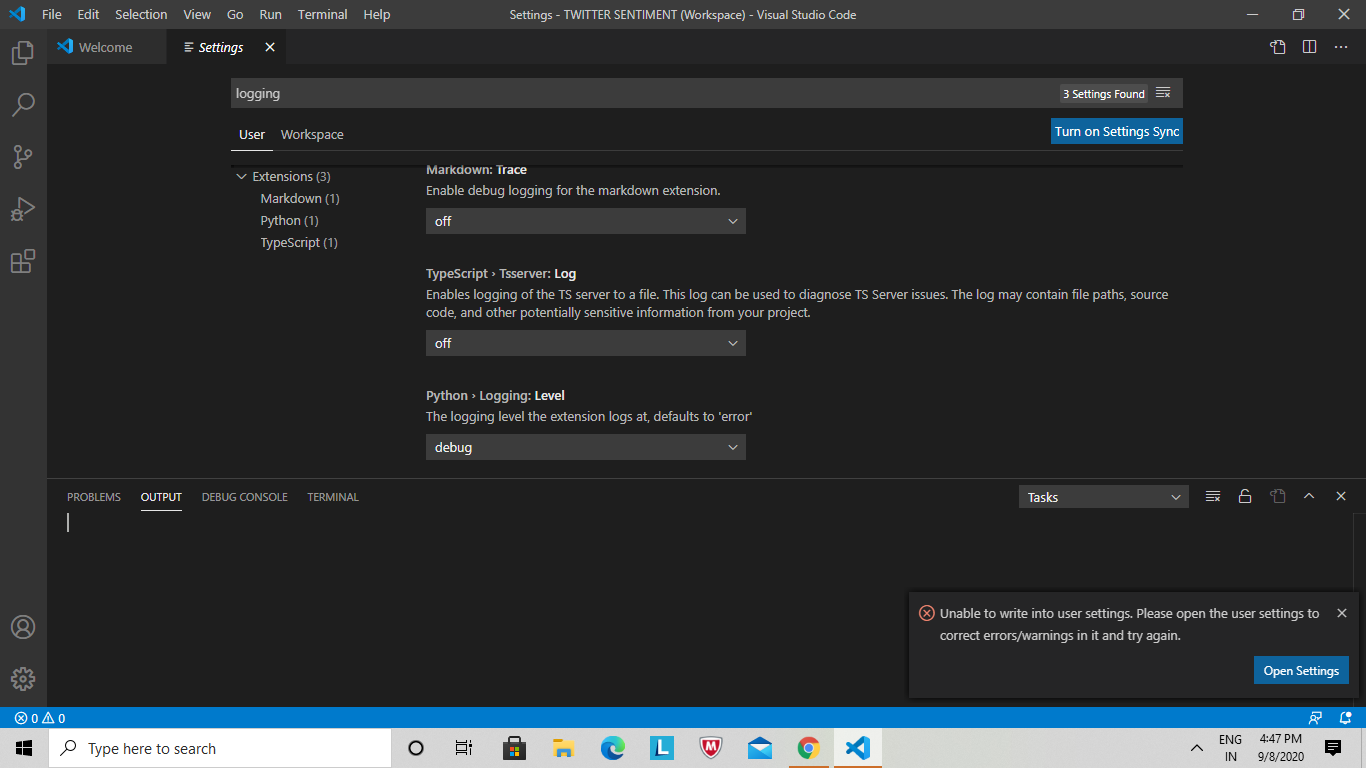
Currently cannot change setting to debug I get error message, " Unable to write into user settings. Please open the user settings to correct errors/warnings in it and try again."
tylerol74
on 8 Sep 2020
If you open the user settings.json does it point out what the error is?
rchiodo
on 8 Sep 2020
If you open the user settings.json does it point out what the error is?
I was able to fix the setting.json error, and allow the change to debug
tylerol74
on 9 Sep 2020
Sorry but we need the full output (not just the end).
rchiodo
on 9 Sep 2020
OUTPUT.txt
Sorry the text was larger than the character limit here and I couldn't figure out how else to get the full output to you. Thanks for your help Rchiodo!
tylerol74
on 9 Sep 2020
Can you open a terminal window in VS code and run this exact code?
~\AppData\Local\Programs\Python\Python38-32\python.exe "c:\Users\Jim Farris\.vscode\extensions\ms-python.python-2020.8.106424\pythonFiles\pyvsc-run-isolated.py" -c "import ipykernel;print(ipykernel.__version__)"
Well and tell me what it outputs?
rchiodo
on 9 Sep 2020
~\AppData\Local\Programs\Python\Python38-32\python.exe "c:\Users\Jim Farris\.vscode\extensions\ms-python.python-2020.8.106424\pythonFiles\pyvsc-run-isolated.py" -c "import ipykernel"
Traceback (most recent call last):
File "C:Users\Jim Farris\AppData\Roaming\Python\Python38\site-packages\IPython\utils\timing.py", line 27, in
import resource
ModuleNotFoundError: No module named 'resource'
During handling of the above exception, another exception occurred:
Traceback (most recent call last):
File "c:Users\Jim Farris.vscode\extensionsms-python.python-2020.8.106424pythonFiles\pyvsc-run-isolated.py", line 20, in
exec(code, ns, ns)
File "
File "C:Users\Jim Farris\AppData\Roaming\Python\Python38\site-packages\ipykernel__init__.py", line 2, in
from .connect import *
File "C:Users\Jim Farris\AppData\Roaming\Python\Python38\site-packages\ipykernel\connect.py", line 13, in
from IPython.core.profiledir import ProfileDir
File "C:Users\Jim Farris\AppData\Roaming\Python\Python38\site-packages\IPython__init__.py", line 49, in
from .terminal.embed import embed
File "C:Users\Jim Farris\AppData\Roaming\Python\Python38\site-packages\IPython\terminal\embed.py", line 19, in
from IPython.terminal.ipapp import load_default_config
File "C:Users\Jim Farris\AppData\Roaming\Python\Python38\site-packages\IPython\terminal\ipapp.py", line 30, in
from IPython.core.magics import ScriptMagics
File "C:Users\Jim Farris\AppData\Roaming\Python\Python38\site-packages\IPython\core\magics__init__.py", line 21, in
from .execution import ExecutionMagics
File "C:Users\Jim Farris\AppData\Roaming\Python\Python38\site-packages\IPython\core\magics\execution.py", line 46, in
from IPython.utils.timing import clock, clock2
File "C:Users\Jim Farris\AppData\Roaming\Python\Python38\site-packages\IPython\utils\timing.py", line 64, in
clocku = clocks = clock = time.clock
AttributeError: module 'time' has no attribute 'clock'
tylerol74
on 9 Sep 2020
Well we should definitely surface this somehow. Not sure why we don't at least log install failure output.
Looks like this problem here:
https://stackoverflow.com/questions/60966135/cant-launch-jupyter-notebook-modulenotfounderror-no-module-named-resource
I would hazard a guess that your install has an older ipykernel? You might try upgrading it with:
~\AppData\Local\Programs\Python\Python38-32\python.exe -m pip install -U ipykernel
Oh and ipython too.
rchiodo
on 9 Sep 2020
I just pip downloaded the ipykernel in the terminal earlier today to ensure that I had the extensions, despite the error message. In addition I ran the update code you sent me, it was up to date. Since your message I tried pip unistall ipykernel and reinstalled it through the VS code to see if that would stop the error. Still says that the Ipykernel is not connected to the workspace.
tylerol74
on 9 Sep 2020
What happens if you just do this?
~\AppData\Local\Programs\Python\Python38-32\python.exe -c "import ipykernel;print(ipykernel.__version__)"
I get this:
PS C:Users\Jim Farris> ~\AppData\Local\Programs\Python\Python38-32python.exe -c "import ipykernel;print(ipykernel.__version__)"
Traceback (most recent call last):
File "C:Users\Jim Farris\AppData\Roaming\Python\Python38\site-packages\IPython\utils\timing.py", line 27, in
import resource
ModuleNotFoundError: No module named 'resource'
During handling of the above exception, another exception occurred:
Traceback (most recent call last):
File "
File "C:Users\Jim Farris\AppData\Roaming\Python\Python38\site-packages\ipykernel__init__.py", line 2, in
from .connect import *
File "C:Users\Jim Farris\AppData\Roaming\Python\Python38\site-packages\ipykernel\connect.py", line 13, in
from IPython.core.profiledir import ProfileDir
File "C:Users\Jim Farris\AppData\Roaming\Python\Python38\site-packages\IPython__init__.py", line 49, in
from .terminal.embed import embed
File "C:Users\Jim Farris\AppData\Roaming\Python\Python38\site-packages\IPython\terminal\embed.py", line 19, in
from IPython.terminal.ipapp import load_default_config
File "C:Users\Jim Farris\AppData\Roaming\Python\Python38\site-packages\IPython\terminal\ipapp.py", line 30, in
from IPython.core.magics import ScriptMagics
File "C:Users\Jim Farris\AppData\Roaming\Python\Python38\site-packages\IPython\core\magics__init__.py", line 21, in
from .execution import ExecutionMagics
File "C:Users\Jim Farris\AppData\Roaming\Python\Python38\site-packages\IPython\core\magics\execution.py", line 46, in
from IPython.utils.timing import clock, clock2
File "C:Users\Jim Farris\AppData\Roaming\Python\Python38\site-packages\IPython\utils\timing.py", line 64, in
clocku = clocks = clock = time.clock
AttributeError: module 'time' has no attribute 'clock'
tylerol74
on 9 Sep 2020
Okay at least the isolation py file isn't causing the problem. So something about your system is causing the resource error.
I looked at the offending py file on my machine. It looks like mine has different code than yours.
# If possible (Unix), use the resource module instead of time.clock()
try:
import resource
def clocku():
"""clocku() -> floating point number
Return the *USER* CPU time in seconds since the start of the process.
This is done via a call to resource.getrusage, so it avoids the
wraparound problems in time.clock()."""
return resource.getrusage(resource.RUSAGE_SELF)[0]
def clocks():
"""clocks() -> floating point number
Return the *SYSTEM* CPU time in seconds since the start of the process.
This is done via a call to resource.getrusage, so it avoids the
wraparound problems in time.clock()."""
return resource.getrusage(resource.RUSAGE_SELF)[1]
def clock():
"""clock() -> floating point number
Return the *TOTAL USER+SYSTEM* CPU time in seconds since the start of
the process. This is done via a call to resource.getrusage, so it
avoids the wraparound problems in time.clock()."""
u,s = resource.getrusage(resource.RUSAGE_SELF)[:2]
return u+s
def clock2():
"""clock2() -> (t_user,t_system)
Similar to clock(), but return a tuple of user/system times."""
return resource.getrusage(resource.RUSAGE_SELF)[:2]
except ImportError:
# There is no distinction of user/system time under windows, so we just use
# time.perff_counter() for everything...
clocku = clocks = clock = time.perf_counter <-- This line doesn't match.
def clock2():
"""Under windows, system CPU time can't be measured.
This just returns perf_counter() and zero."""
return time.perf_counter(),0.0
It sounds like IPython is out of date then. At least our versions don't match (This line here):
clocku = clocks = clock = time.perf_counter
From your callstack, yours says this:
clocku = clocks = clock = time.clock
So what you're saying is a python update would fix the issue?
tylerol74
on 9 Sep 2020
Not python but the module 'ipython' (the extra 'i' in front). It's the basis for the Jupyter python kernel.
It looks to me like your version is not correct.
Theoretically doing this should fix it:
~\AppData\Local\Programs\Python\Python38-32\python.exe -m pip install -U ipython
But if that doesn't fix the problem, maybe you need to remove ipython and start over.
rchiodo
on 9 Sep 2020
Thank you for this dialog. I was able to follow it and get past the "IPyKernel not installed into interpreter" error message in VS Code. My issue was a little different, but your instructions helped. In my case, running...
python -c "import ipykernel;print(ipykernel.__version__)"
...revealed this error...
ImportError: cannot import name 'constants' from partially initialized module 'zmq.backend.cython'
I fixed that by running the following...
python -m pip uninstall jupiter-client
python -m pip uninstall pyzmq
python -m pip install pyzmq
python -m pip install jupiter-client
After that, VS Code no longer showed the "IPyKernel not installed into interpreter" message.
 Wallace-Kelly
on 10 Sep 2020
Wallace-Kelly
on 10 Sep 2020
I've had a similar issue, I was using Jupyter just fine and suddenly it stopped working today.
After searching for a while, uninstalling Python entirely etc, in my case I believe it comes from switching between 32-bits and 64-bits interpreters.
VsCode installs the site-packages to <AppData>\Roaming\Python\Python38, so if the first time I ran Jupyter I was using the 32-bits interpreter, but when I switched to 64 it found the package to be incompatible, all the while not being to reinstall on top of it.
IMO it should be using eg <AppData>\Roaming\Python\Python38-64
This is also why uninstalling Python did nothing for me, as it removed some irrelevant site-packages.
 benblo
on 24 Sep 2020
benblo
on 24 Sep 2020
I've had a similar issue, I was using Jupyter just fine and suddenly it stopped working today.
After searching for a while, uninstalling Python entirely etc, in my case I believe it comes from switching between 32-bits and 64-bits interpreters.VsCode installs the site-packages to
<AppData>\Roaming\Python\Python38, so if the first time I ran Jupyter I was using the 32-bits interpreter, but when I switched to 64 it found the package to be incompatible, all the while not being to reinstall on top of it.
IMO it should be using eg<AppData>\Roaming\Python\Python38-64This is also why uninstalling Python did nothing for me, as it removed some irrelevant site-packages.
Did you finally get it to work? @benblo Im facing the same issue
 neonflux56
on 29 Sep 2020
neonflux56
on 29 Sep 2020
@rchiodo I did the Ipython upgrade you prescribed, and at least now it fetches the kernels and connects, but soon times out...lol. "Timed out waiting to get a heartbeat from kernel process." What should I try next?
tylerol74
on 29 Sep 2020
That could be this issue:
https://github.com/microsoft/vscode-python/issues/14118
Caused by having a space in your user folder.
rchiodo
on 29 Sep 2020
Which we should be fixing in the next day or two
rchiodo
on 29 Sep 2020
I had a similar problem when I change my python version from 32 to 64 bits, the Jupyter notebook didn't recognize the kernel and I didn't find a solution :( but I had a different issue with the latest version of anaconda ( Anaconda3-2020.07-Windows-x86_64 )
The error was "Anaconda latest version error while trying to open Jupyter notebook from the prompt or anaconda navigator" so a found this particular solution for this issue here
I did all the steps and add this route to the path
C:Users\admin\AppData\Roaming\Python\Python38\Scripts' because I had a warning from the system
and that was all Vs code now is working I have no problem with kernel ... maybe it was just reinstalled Jupyter
 HARDROCO
on 8 Oct 2020
HARDROCO
on 8 Oct 2020
python -m pip uninstall jupiter-client
python -m pip uninstall pyzmq
python -m pip install pyzmq
python -m pip install jupiter-client==4.2.2
this worked for me as well
 rushilg13
on 12 Oct 2020
rushilg13
on 12 Oct 2020
Thank you for this dialog. I was able to follow it and get past the "IPyKernel not installed into interpreter" error message in VS Code. My issue was a little different, but your instructions helped. In my case, running...
python -c "import ipykernel;print(ipykernel.__version__)"...revealed this error...
ImportError: cannot import name 'constants' from partially initialized module 'zmq.backend.cython'I fixed that by running the following...
python -m pip uninstall jupiter-client
python -m pip uninstall pyzmq
python -m pip install pyzmq
python -m pip install jupiter-client
After that, VS Code no longer showed the "IPyKernel not installed into interpreter" message.
worked for me as well. Thanks Man!!
rushilg13
on 12 Oct 2020
I'm getting the same issue. and the steps laid out in rushilg13 don't work for me.
this issue came up after I upgraded from 3.8 64-bit to 3.9 64-bit.
 weirdyang
on 5 Nov 2020
weirdyang
on 5 Nov 2020
I'm getting the same issue. and the steps laid out in rushilg13 don't work for me.
this issue came up after I upgraded from 3.8 64-bit to 3.9 64-bit.
Are you using anaconda too?
If yes, 64bit?
rushilg13
on 5 Nov 2020
This happened to me when I forgot to activate my virtual environment in anaconda.
Hopes this helps.
 Meesaan
on 25 Nov 2020
Meesaan
on 25 Nov 2020
Related issues
 chrisjsewell
·
4Comments
rchiodo
·
3Comments
chrisjsewell
·
4Comments
rchiodo
·
3Comments
 allefeld
·
4Comments
allefeld
·
4Comments
 n-a-sz
·
3Comments
n-a-sz
·
3Comments
 qdlmcfresh
·
3Comments
qdlmcfresh
·
3Comments
Most helpful comment
Thank you for this dialog. I was able to follow it and get past the "IPyKernel not installed into interpreter" error message in VS Code. My issue was a little different, but your instructions helped. In my case, running...
...revealed this error...
I fixed that by running the following...
After that, VS Code no longer showed the "IPyKernel not installed into interpreter" message.