Vscode-jupyter: Python Interactive Window 'Export As' button doesn't work
Bug: Notebook Editor, Interactive Window, Editor cells
Steps to cause the bug to occur
1. Ctrl+Shift+P: Specify local or remove Jupyter server... ( happens in both remote and local)
2. Ctrl+Shift+P: Create Python Interactive Window
3. Run some code : print("hello")
4. Click on button 'Export As', nothing happens.
Actual behavior
I couldn't upload a gif, but I uploaded a video
https://youtu.be/TbK3K2jHwLw
Expected behavior
Export as shows the dropdown menu and I can export te interactive window result as html, as usual
Your Jupyter and/or Python environment
_Please provide as much info as you readily know_
- Jupyter server running: Local & Remote
- Extension version: v2020.9.111407
- VS Code version: 1.49.1
- Setting python.jediEnabled: true | false (I don't see the option, but I see in my file system some jedi cache)
- Setting python.languageServer: Microsoft
- Python and/or Anaconda version: python 3.9.6/ conda n.a.
- OS: Windows | Mac | Linux (distro): Ubuntu 18.04
- Virtual environment: N/A
Python Output
Microsoft Data Science for VS Code Engineering Team: @rchiodo, @IanMatthewHuff, @DavidKutu, @DonJayamanne, @greazer, @joyceerhl
 picatostas
All 20 comments
HI @picatostas will have someone take a look as soon as possible!
 claudiaregio
on 26 Sep 2020
claudiaregio
on 26 Sep 2020
@picatostas can you do this for us?
- Set the following setting:
"python.logging.level": "info" - upload the contents your 'Python' output tab
Thanks
 rchiodo
on 26 Sep 2020
rchiodo
on 26 Sep 2020
Hi, I also encountered this problem and may can provide info.
I've added "python.logging.level": "info" to my settings.json, started Python interactive and pressed Export as.
Now how can I find my log?
 shikiponn
on 29 Sep 2020
shikiponn
on 29 Sep 2020
@shikiponn, you can set this by doing the following steps:
- Type Ctrl+Shift+P to bring up the command palette
- Type 'Open Settings (JSON)'
- Add
"python.logging.level": "info"anywhere in the settings.json file - Reload VS Code
Now when you repeat the repro steps you provided above, you should get more detailed logs in your Python output tab.
Thanks for your help!
 joyceerhl
on 29 Sep 2020
joyceerhl
on 29 Sep 2020
@joyceerhl
I just followed your step and after that I did,
- Ctrl+Shift+P > Reload window
- Started new Python interactive
- Ran : print("hello")
- Click on button 'Export As'
which gave me,
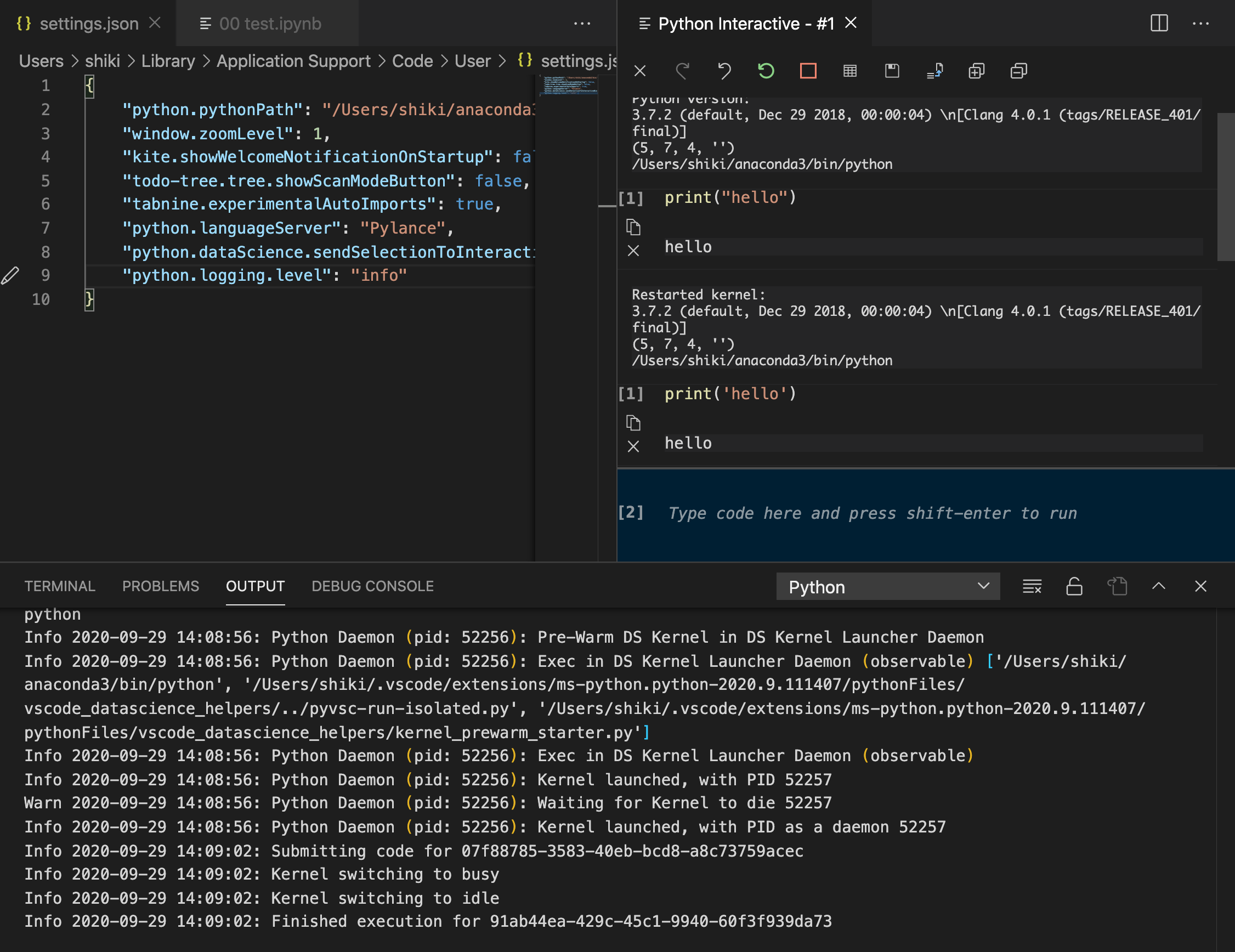
Seems Export as give me no output in Python OUTPUT.
Note: I ran this on my local OSX machine since logging setting seems only applicable on the local.
However, I encountered this issue on my remote server(Ubuntu) too.
shikiponn
on 29 Sep 2020
Python output updated, shall I better add I file instead of the paste ? because is huge and not so easy to ready imo.
picatostas
on 29 Sep 2020
@picatostas yes please, and you can upload the logs as a text file in your comment by dragging and dropping them! Thanks again for being willing to debug this with us!
joyceerhl
on 30 Sep 2020
@picatostas and @shikiponn could you please also check what version of nbconvert you have in your target environment? I think there is possibly one open issue with the newest version of nbconvert.
 IanMatthewHuff
on 30 Sep 2020
IanMatthewHuff
on 30 Sep 2020
pycodestyle : Version: 2.3.1
flake8 : Version: 3.5.0
autopep8 : Version: 1.5.4
pyflakes : Version: 2.2.0
ipython : Version: 5.5.0
jupyter-nbconvert : Version: 5.6.1
picatostas
on 30 Sep 2020
The version I'm using is,
nbconvert 6.0.5 py38h32f6830_0 conda-forge
shikiponn
on 30 Sep 2020
@shikiponn There is a known issue with nbconvert version 6.0+, which just came out Sept 10th. I have a fix currently in PR for that. But for export to work I think that you would currently need to downgrade back to version 5.6.1 which was the last version before the 6.0 update.
@picatostas I'm not going to close this issue, because for you it looks like you are still using 5.6.1 so it's not the 6.0 issue for you.
IanMatthewHuff
on 30 Sep 2020
@IanMatthewHuff Thanks, let me try with 5.6.1
shikiponn
on 1 Oct 2020
@picatostas the version of nbconvert that you listed. We actually use nbconvert that might be installed into a different environment than the one that your notebook is executing. If you run the command "Python: Select interpreter to start Jupyter server" can you check the version of nbconvert in that environment as well?
IanMatthewHuff
on 1 Oct 2020
I've tried Export as with nbconvert of version nbconvert 5.6.1 py38_0 but in vain.
I'm using a same kernel in the left bottom of vscode and Python interactive which has the nbconvert version 5.6.1.
Tail of my log is,
Info 2020-10-02 10:08:20: Using colors to generate CSS ...
Info 2020-10-02 10:08:20: Finished waiting for idle on (kernel): 35a7a9a6-70e0-4772-a60a-276356410fd5 -> idle
Info 2020-10-02 10:08:22: Attempting to start a server because of preload conditions ...
Info 2020-10-02 10:08:23: Submitting code for c6bbec9d-7b9d-495f-bb18-5bf5fa308e0c
Info 2020-10-02 10:08:23: Kernel switching to busy
Info 2020-10-02 10:08:24: Kernel switching to idle
Info 2020-10-02 10:08:24: Finished execution for 21138cdf-48a4-4e65-a63f-0eba817fb56a
Info 2020-10-02 10:09:10: Submitting code for c6bbec9d-7b9d-495f-bb18-5bf5fa308e0c
Info 2020-10-02 10:09:10: Kernel switching to busy
Info 2020-10-02 10:09:10: Kernel switching to idle
Info 2020-10-02 10:09:10: Finished execution for d87c0a05-58d0-4f27-b031-c53bf3dc9dbb
Info 2020-10-02 10:09:38: Cached data exists getEnvironmentVariables, extension-output-#4
Any info I can provide more than this?
JFYI
- Python version:3.8.3
shikiponn
on 2 Oct 2020
In the remote enviroment I have a raspberry Pi 4 with:
nb-convert: Version 5.6.1
pycodestyle : Version: 2.4.0
flake8 : Version: 3.6.0
pyflakes : Version: 2.0.0
ipython : Version: 7.14.0
python: version: 3.7.3
I would like to add, that before it broke, I installed autopep8 extension in VSCode https://marketplace.visualstudio.com/items?itemName=himanoa.Python-autopep8
which made me downgrade pyflakes and pycodestyle, I don't remember which versions I had before, but maybe it gives a lead.
picatostas
on 2 Oct 2020
There was a second issue with the interactive window exporting. My PR here should resolve this and we'll look at getting it into a fix quick. https://github.com/microsoft/vscode-python/pull/14224
IanMatthewHuff
on 2 Oct 2020
@IanMatthewHuff I saw that the fix has been merged, how can I test it ?
picatostas
on 5 Oct 2020
@picatostas sorry didn't see this last message come in right away. You should be able to see this issue by checking out our development build here:
https://github.com/microsoft/vscode-python/blob/main/CONTRIBUTING.md#development-build
IanMatthewHuff
on 7 Oct 2020
Actually, we just did a point release in our extension. I ported that fix in there so you don't need the dev build. Just check for an update to the main extension.
IanMatthewHuff
on 7 Oct 2020
With the latest update issue has been solved
picatostas
on 14 Oct 2020
Related issues
 taolluo
·
103Comments
taolluo
·
103Comments
 jbeyer16
·
41Comments
jbeyer16
·
41Comments
 bigrat911
·
71Comments
bigrat911
·
71Comments
 leonarduschen
·
61Comments
leonarduschen
·
61Comments
 clouds56
·
75Comments
clouds56
·
75Comments