vscode-jest activates for all folders in a multi-root workspace if any folder contains jest-related files
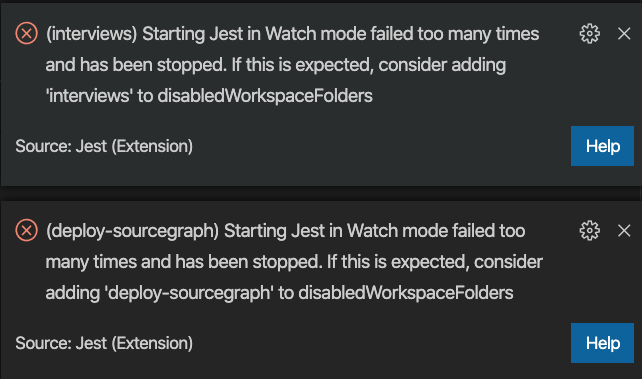
vscode-jest activates for all roots in a multi-root workspace if any folder contains jest-related files. When it activates on folders that don't have jest files, it spams a bunch of error messages.
Expected Behavior
Don't show errors on roots where there are no jest files.
Actual Behavior
Shows errors on roots that don't use jest.
Workaround
It seems like only way to reduce scope would be to exhaustively list all folders where Jest should be disabled with jest.disabledWorkspaceFolders - there’s no way to specify a whitelist of folders where Jest should run (which would be better).
 nicksnyder
>All comments
While this feature is definitely nice to have, it is the expected behavior for the current implementation: instead of doing a deep search for jest files on each folder, it took a simpler approach by providing a customize-option... As the error panel indicated above, you can skip these folders by adding "jest.disabledWorkspaceFolders": ['interviews', 'deploy-sourcegraph'] to .vscode/settings.json or the equivalent.
PR is welcome.
 connectdotz
on 8 May 2020
connectdotz
on 8 May 2020
Related issues
 orta
·
5Comments
orta
·
5Comments
orta
·
5Comments
orta
·
5Comments
 ayan4m1
·
3Comments
ayan4m1
·
3Comments
 RehanSaeed
·
5Comments
RehanSaeed
·
5Comments
 exapsy
·
3Comments
exapsy
·
3Comments