Vscode-jest: Question: Is it possible to always show the DEBUG button even if the test is passing?
 callmeberzerker
👍3
All 3 comments
I did this by adding
  "jest.debugCodeLens.showWhenTestStateIn": [
    "skip",
    "pass",
    "fail",
    "unknown"
  ]
to my .vscode/settings.json.
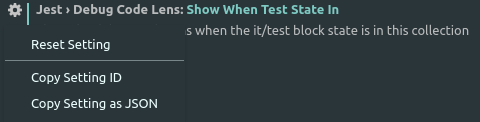
Took a bit of looking around and I finally found it by clicking the cogwheel as shown below below and then Copy Setting as JSON, in User Settings, search for Jest:
 eghernqvist
on 24 May 2019
eghernqvist
on 24 May 2019
👍3
❤1
That's exactly the way it is supposed to work.
 stephtr
on 22 Jun 2019
stephtr
on 22 Jun 2019
Thanks @eghernqvist !
callmeberzerker
on 22 Jun 2019
Was this page helpful?
0 / 5 - 0 ratings
Related issues
 connectdotz
·
5Comments
connectdotz
·
5Comments
 RehanSaeed
·
5Comments
RehanSaeed
·
5Comments
 somewhatabstract
·
4Comments
somewhatabstract
·
4Comments
 bbshih
·
3Comments
bbshih
·
3Comments
 ryanlittle
·
3Comments
ryanlittle
·
3Comments
Most helpful comment
I did this by adding
to my

.vscode/settings.json.Took a bit of looking around and I finally found it by clicking the cogwheel as shown below below and then Copy Setting as JSON, in User Settings, search for Jest: