Vscode-java: JAVA_HOME is not pointing to a JDK.
[provide a description of the issue]
Environment
Operating System: macOS Mojave
JDK version: OpenJDK 11.4
- Visual Studio Code version: 1.38.1
- Java extension version: 0.48.0
Steps To Reproduce
- Opening Java Project
Current Result
After opening a Java project, the configure window pops up and shows, that the JAVA_HOME is set, but it's not pointing to a JDK.

The JAVA_HOME path is correctly set.
Expected Result
JDK should be found.
 phhoef
All 26 comments
FYI, I've just tried the latest AdoptOpenJDK 11, and it works well for me.

A JDK(instead of JRE) is required. Please check
- if
bin/javacexists under JAVA_HOME? e.g. using commandls $JAVA_HOME/bin/javac.
 Eskibear
on 17 Sep 2019
Eskibear
on 17 Sep 2019
I installed OpenJDK 11 via Homebrew.
javac exists in the bin directory.
➜  ~ ls $JAVA_HOME/bin/javac
/Library/Java/JavaVirtualMachines/adoptopenjdk-11.jdk/Contents/Home/bin/javac
➜  ~ /usr/libexec/java_home -V
Matching Java Virtual Machines (1):
    11.0.4, x86_64: "AdoptOpenJDK 11"   /Library/Java/JavaVirtualMachines/adoptopenjdk-11.jdk/Contents/Home

/Library/Java/JavaVirtualMachines/adoptopenjdk-11.jdk/Contents/Home
I can call java or javac from iTerm (zsh) without any problems.
Maven does also recognize the JDK. It seems that it's just VScode that does not work.
I also tried setting the java.home property in the user settings of VScode.
Then, the path is shown in the overview, but again it says the path is invalid.
phhoef
on 17 Sep 2019
I thought it was Homebrew issue, (e.g. privileges etc.), then I just reinstalled my OpenJDK11 via Homebrew, and it still works.
In your case, now all I can see is: you do have bin/javac under JAVA_HOME but the test pathExists.sync(path.resolve(javaHome, 'bin', JAVAC_FILENAME) fails, for both vscode-java and Java Home Configure Page
@fbricon @akaroml Any thoughts?
Eskibear
on 17 Sep 2019
hmm, that's weird.
Is it possible, to easily debug the mentioned lines?
Maybe it's still a problem with permissions?
➜  Home ls -la
total 8
drwxr-xr-x  12 root  wheel   384 23 Aug 19:18 .
drwxr-xr-x   5 root  wheel   160 23 Aug 15:39 ..
drwxr-xr-x  34 root  wheel  1088 23 Aug 15:45 bin
drwxr-xr-x   3 root  wheel    96 23 Aug 19:18 bundle
drwxr-xr-x   7 root  wheel   224 23 Aug 15:39 conf
drwxr-xr-x   5 root  wheel   160 23 Aug 15:39 demo
drwxr-xr-x   9 root  wheel   288 23 Aug 15:39 include
drwxr-xr-x  72 root  wheel  2304 23 Aug 15:39 jmods
drwxr-xr-x  72 root  wheel  2304 23 Aug 15:39 legal
drwxr-xr-x  57 root  wheel  1824 23 Aug 15:45 lib
drwxr-xr-x   5 root  wheel   160 16 Sep 11:14 man
-rwxr-xr-x   1 root  wheel  1221 23 Aug 15:39 release
I did't changed the permissions for these folders, but I had installed Oracle JDK before.
I removed it yesterday and switched to OpenJDK.
phhoef
on 17 Sep 2019
The permission looks good.
Is it possible that the VSCode process still has the out-dated JAVA_HOME which is pointing to your deleted OracleJDK? You can have a try to fully quit the VSCode via cmd + q, and restart VS Code from a terminal where JAVA_HOME has the correct value. (The java.home setting has the highest priority, if a valid java.home setting also fails as you mentioned above, then I've no idea what's happening.)
BTW, if java runtime cannot be recognized, an error box will popup on the bottom-right, which might carry more detailed info.
If you want to debug the extension, you need to have NodeJS installed. The java-pack extension is more easier for you to get started.
- clone it, run
npm install - open the folder in VS Code, set the breakpoint mentioned above, press F5.
- in the newly created Extension Host window, cmd+ shift + p, run "Configure Java Runtime" to trigger the breakpoint manually.
Eskibear
on 17 Sep 2019
I tried to open another Java project and it seems that with this project the JDK can be found - at least the messages are not popping up.
I closed VScode and opened the first project: Again the same error.

The error box pops up, but does not have really more information. Please see the attached screenshot.
Now, it's getting really weird.
I quit VSCode and opened it again through the terminal.
➜  ~ echo $JAVA_HOME
/Library/Java/JavaVirtualMachines/adoptopenjdk-11.jdk/Contents/Home
➜  ~ open /Applications/Visual\ Studio\ Code.app
And actually, the error is gone.
The path $JAVA_HOME path is exactly the same as shown in the error message.
Now, when opening VSCode directly without the Terminal, it still works.
I have no clue, what's going on ...
phhoef
on 17 Sep 2019
@phhoef I guess you did set the wrong JAVA_HOME, by appending an extra whitespace.
From the bottom-left error box in your screenshot, you can see there is a whitespace before ), and check the source code, it must be from your JAVA_HOME.
Back to compare the original screenshots, you can see more clear that your JAVA_HOME was longer than mine, with an extra whitespace.


Eskibear
on 17 Sep 2019
True, that could be the problem.
Actually, I didn't set the JAVA_HOME by myself, but Homebrew did it for me during cask install.
It still feels strange. I didn't change the JAVA_HOME, just opened VSCode through the terminal and then it started working.
Anyhow, I think it's found now, except when I open the pom.xml from the project.
The message box in the lower right corner pops up showing "The JAVA_HOME environment variable points to a missing folder".
As you see on the screenshot in the console, the Java server has been successfully started.
The message comes from the XML extension (redhat.vscode-xml).

I am not sure if this is related to the original problem.
I echoed the JAVA_HOME into a text file and at least for the Terminal there was no trailing whitespace.
P.S.
In the meantime I downgraded to OpenJDK 8, as some projects were not JDK 11 compatible.
The message box also pop ups with JDK 11 installed.
----- EDIT:
I opened the "Configure Java Runtime" manually, and actually it still says that the path is wrong.
The page won't open automatically on startup and also the message box doesn't appear at start (only when opening pom.xml)

This is also true, when opening VScode through terminal
phhoef
on 17 Sep 2019
I had the same problem on my Mint. The problem was fixed after I reinstalled openjdk-11.
I used the following command. Should work for Ubuntu as well.
sudo apt install openjdk-11-*
 prasada7
on 24 Jan 2020
prasada7
on 24 Jan 2020
Not sure why this coninues to be an issue for me. I enjoy using VSC for quick edits where VI* isn't the only option available. Although with my $JAVA_HOME set, exported automatically, and picked up on automatically by other IDEs such as IntelliJ, Eclipse, AND NetBeans... VSC even shows the path it found, but instead decides to mention that in my settings "$JAVA_HOME" is an invalid path..? wuh wuh?
Advice for a JDK8 user?
 varrix
on 22 Mar 2020
varrix
on 22 Mar 2020
I have same issue on Fedora 32. I have set all paths as required but still issues
 gablex
on 3 Jun 2020
gablex
on 3 Jun 2020
@gablex dis you install vscode via flatpack? Many reports indicates flatpack vscode can't access Java home, because of the sandbox nature of flatpack
 fbricon
on 3 Jun 2020
fbricon
on 3 Jun 2020
No, I used below commands after adding repo as stated in [https://code.visualstudio.com/docs/setup/linux]
sudo dnf check-update
sudo dnf install code
gablex
on 4 Jun 2020
I have tried creating a direct path name on VC but says that my path doesn't point to JDK Installation
gablex
on 4 Jun 2020
/usr/local/java/jdk-14.0.1+7 InvalidThis path is not pointing to a JDK. | JAVA_HOME | Environment Variable
-- | -- | --
gablex
on 4 Jun 2020
On ArchLinux with sdkman:
this path is incorrect and says it's invalid directory for JDK
"java.home": "/home/agilob/.sdkman/candidates/java/14.0.1-open",
but this symlink works - and it points to the directory above:
"java.home": "/home/agilob/.sdkman/candidates/java/current",

 agilob
on 16 Jun 2020
agilob
on 16 Jun 2020
try "java.home": "/home/agilob/.sdkman/candidates/java/14.0.1.hs-adpt" there's no 14.0.1-open in your candidates directory.
fbricon
on 16 Jun 2020
Getting same error on Linux openSUSE,
The JAVA_HOME environment variable (/usr/lib64/jvm/java-11-openjdk-11) does not point to a JDK.
JAVA_HOME set correctly:
export JAVA_HOME=/usr/lib64/jvm/java-11-openjdk-11
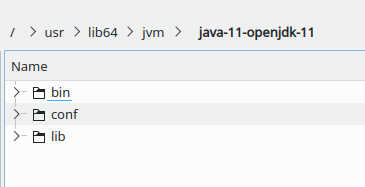
[UPDATE]:
It seems what I had install was only the JRE even though it's named openjdk?
I ended up downloading the package suggested to my by vscode in the, "Configure Java Runtime" setting, point JAVA_HOME to it and everything works, no errors.
You can also down the jdk from here: https://jdk.java.net/
Update A better solution might be to use SDKMAN to install java, jdk and sdk! https://sdkman.io/
 rajinder-yadav
on 17 Jun 2020
rajinder-yadav
on 17 Jun 2020
Let me help to form a guide from most of above cases.
Root cause
Because of the confusing name of packages, some Linux users actually installed a JRE (Java Runtime Environment) instead of a JDK (Java Development Kit).
As ./bin/javac doesn't exists under path of Java home folder, the extension recognizes it as a JRE instead of a JDK (which is required), thus prints this error message.
Follow below steps to fix it
- Open command palette, run "Java: Configure Java Runtime", to find out which java homedir is taking effect.
- If you don't have the command, install Java extension pack or follow the Setting the JDK to find out by your own.
- Check if
.bin/javacexists under above path.
- If yes, report to us with detailed information.
- installed java packages on your Linux distribution
- recognized java home directory
- file permission of the related files
- etc..
- If no (most of the cases), try installing a JDK instead of JRE. E.g many packages have confusing names, make sure you installed the correct one
- on Debian/Ubuntu, install
openjdk-11-jdkwith an additional jdk appended - others may append
devel,src,alletc.
Eskibear
on 17 Jun 2020
I am still stranded using java in visual code. I managed to solve missing JDK issue , however, when running my code I get below error:-
[Running] cd "/home/admin/Dev/Java/demo/src/main/java/com/martin/test/demo/" && javac DemoApplication.java && java DemoApplication
/bin/sh: javac: command not found
My OS is Fedora 32.
Below is my javac test
$JAVA_HOME/bin/javac -version
javac 14.0.1
gablex
on 17 Jun 2020
@gablex I've never seen messages like "[running] cd ... ", and this extension doesn't call javac directly to compile your project. I guess you are talking about other extensions.
Just FYI, I use Language suport for Java for editing, and Debugger for Java to run/debug.
Eskibear
on 17 Jun 2020
@Eskibear I agree. I have uninstalled all java plugins and installed java plugin pack only and now works
sh-5.0$ /home/admin/Downloads/Programs/jdk11/bin/java -Dfile.encoding=UTF-8 @/tmp/cp_8wzwvixrylq96snesdedrppha.argfile org.acme.martin.QuickStart
Hello, World.
Thank all.
gablex
on 17 Jun 2020
i have the same problem on windows10 19042.423, i hava try adopt jdk 11 and oracle jdk 11, all the same problem.
 RonaldinhoL
on 21 Aug 2020
RonaldinhoL
on 21 Aug 2020

As quick solution, just edit your vscode setting.json and pointing directly to java_home (eg: add "java.home": "C:\\java\\jdk\\java-11-openjdk-11.0.8-2", ). Please refer attached picture, saved it and vscode will ask to restart. After restart, should be no more same issue. I hope this will help.
 RobbiNespu
on 26 Aug 2020
RobbiNespu
on 26 Aug 2020
Got the same error on Linux Debian 10.5 (buster).
I realized that if I was launching VSC by the application itself, it was doing this error, while if I launch VSC through the terminal, all's good. Maybe user's settings.
 NoxFly
on 6 Oct 2020
NoxFly
on 6 Oct 2020
try cd your path in the terminal, if it fails, maybe the character format is wrong. then you could write the full path by keyboard, not Copy and Paste.
 lovexbma
on 26 Oct 2020
lovexbma
on 26 Oct 2020
Related issues
 marlinla
·
3Comments
marlinla
·
3Comments
 tveimo
·
4Comments
tveimo
·
4Comments
 gorkem
·
4Comments
gorkem
·
4Comments
 ronniehicks
·
3Comments
ronniehicks
·
3Comments
 xriu
·
4Comments
xriu
·
4Comments
Most helpful comment
I had the same problem on my Mint. The problem was fixed after I reinstalled openjdk-11.
I used the following command. Should work for Ubuntu as well.
sudo apt install openjdk-11-*