Vscode-java: Java runtime (JDK, NOT JRE) COULD NOT BE LOCATED
Hey, im having this problem with VS code, i installed the extension to use JAVA but im getting this message
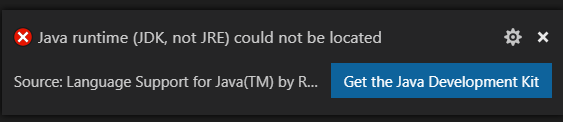
I downloaded JDK from oracle's webpage and when I look the settings I get this
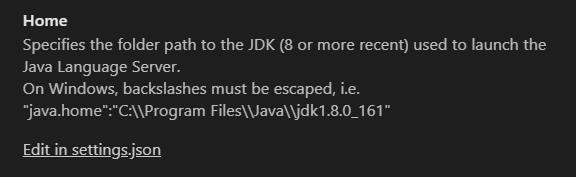
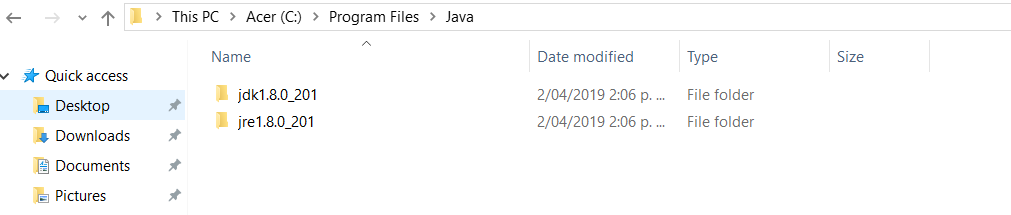
It says that my version is jdk1.8.0_161 but in my program files I have this.
I don't know what I have to do, i need help please
Environment
- Operating System: Windows 10 Home
- JDK version: 1.8.0_201
- Visual Studio Code version: Last ONe
- Java extension version:
 Santiagoarego
All 8 comments
The setting you're seeing is an example ( i.e). You need to click on Edit in settings.json and point the java.home preference to your actual JDK
 fbricon
on 2 Apr 2019
fbricon
on 2 Apr 2019
@Santiagoarego If you are new to the VSCode Java, you can follow this tutorial: https://code.visualstudio.com/docs/java/java-tutorial
 yaohaizh
on 3 Apr 2019
yaohaizh
on 3 Apr 2019
I had the same issue. Removed the Open JDK and installed Oracle JDK, then it started working.
 anks333
on 8 Apr 2019
anks333
on 8 Apr 2019
I am facing the same issue. Even i download the Java Runtime.
 Tariqafridi36
on 23 May 2019
Tariqafridi36
on 23 May 2019
I have same issue. Has anyone found any solution yet?
 hemangjoshi37a
on 10 Jul 2019
hemangjoshi37a
on 10 Jul 2019
I had this issue today, It needs access to the javac program to compile the java.
On windows open CMD and type where javac
Hopefully it will come back with a not found error indicating that the jdk is not in your path.
On windows 10
- go to start and type 'env' to bring up 'Edit the system environment variables'
- Click 'Envirionment Variables'
- Under user variables select Path and Edit
- Add the path to the jdk bin folder ( for me it was C:\Program Files\Java\jdk-12.0.2\bin)
Go back to cmd and type where javac - this time it should come back with a path. Resart vscode and cross your fingers.
 DazSheehan
on 24 Aug 2019
DazSheehan
on 24 Aug 2019
Thanks dude @Santiagoarego
 RanjithKumarPeddala
on 28 Sep 2019
RanjithKumarPeddala
on 28 Sep 2019
I want to specify my JDK version and had the same issue with macOS.
works
```setting.json
{
"java.home": "/Users/myname/.sdkman/candidates/java/8.0.222.j9-adpt"
}
**not works**

```setting.json
{
    "java.home": "${env:HOME}/.sdkman/candidates/java/8.0.222.j9-adpt"
}
Environment
- OS: macOS Catalina
- VSCode: 1.41.1
 xhiroga
on 29 Dec 2019
xhiroga
on 29 Dec 2019
Related issues
 tveimo
·
4Comments
tveimo
·
4Comments
 shawmanz32na
·
3Comments
shawmanz32na
·
3Comments
 xriu
·
4Comments
xriu
·
4Comments
 ronniehicks
·
3Comments
yaohaizh
·
4Comments
ronniehicks
·
3Comments
yaohaizh
·
4Comments
Most helpful comment
The setting you're seeing is an example ( i.e). You need to click on Edit in settings.json and point the java.home preference to your actual JDK