Vscode-java: Completing /** no longer generates Javadoc with params
Previously, when entering /**+Enter, Javadoc was generated with parameters. Now, this is no longer occurring (see #228 -- this was addressed, but is no longer working).
Environment
- Operating System: Ubuntu 18.04.1
- JDK version: 10.0.2
- Visual Studio Code version: 1.31.1
- Java extension version: 0.39.0
Steps To Reproduce
- When a Java file is open, and the user enters
/**+Enterabove a method, the params in the method are not generated for the Javadoc. See example below:
Current Result

Thanks -- please let me know if anything is needed.
 mwschultz
All 23 comments
please attach the server logs and the vscode logs from the Output view
 fbricon
on 25 Feb 2019
fbricon
on 25 Feb 2019
@fbricon I have the same problem with same version.
Attached my logs.
 ppatierno
on 27 Feb 2019
ppatierno
on 27 Feb 2019
please add the logs from the output view after enabling "java.trace.server":"verbose"
You can try the "Java: Clean the Java language server workspace" command.
If it still happens, try uninstalling all other java extensions and try again.
@yaohaizh developer_tools.log shows problems with vscjava.vscode-java-dependency
fbricon
on 27 Feb 2019
@fbricon
Thank you for the prompt reply, apologize for the delay in getting back to you. I set "java.trace.server": "verbose" in my settings.json file and I have attached the logs here.
java language server.log
vscode-java.log
One note -- This is now for Java extension version: 0.40.0.
Please let me know if there is anything else needed. Thanks!
mwschultz
on 1 Mar 2019
you might want to disable the vscode-java-saber extension, in case it causes a conflict.
Please attach the content of the output view for Language Support for Java
fbricon
on 1 Mar 2019
Thanks -- I have disabled the vscode-java-saber extension. Attached are the results of the output view for Language Support for Java.
mwschultz
on 1 Mar 2019
Hi,
Just checking in on this issue -- is there anything else you might need from me that could help?
Thanks!
mwschultz
on 10 Mar 2019
The same issue on the version of 0.40.0
 bobjiang1988
on 12 Mar 2019
bobjiang1988
on 12 Mar 2019
The same issue on the version of 0.40.0
Unfortunately Im having the same issue on this version. Is there something that we could do to help solving this?
 henriquesqs
on 12 Mar 2019
henriquesqs
on 12 Mar 2019
I found this is caused by the Intellicode extension. I reported the issue there: https://github.com/MicrosoftDocs/intellicode/issues/72
fbricon
on 15 Mar 2019
In the meantime, you can try to uninstall or disable the Intellicode extension and Javadoc completion should be restored
fbricon
on 15 Mar 2019
It's confirmed to be a bug of IntelliCode Java module, and here is a private build with the fix:
vscodeintellicode-1.1.5-fix-javadoc-completion.vsix.zip
Can you give it a try, and let me know if it works for you? @mwschultz @henriquesqs @fbricon
Unzip it, and install the .vsix file via:
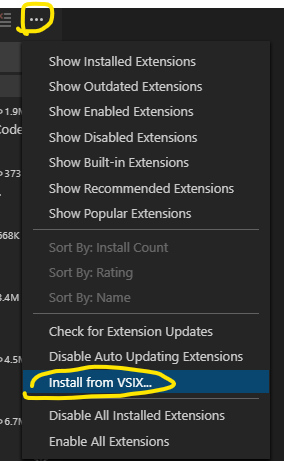
 Eskibear
on 15 Mar 2019
Eskibear
on 15 Mar 2019
It's confirmed to be a bug of IntelliCode Java module, and here is a private build with the fix:
vscodeintellicode-1.1.5-fix-javadoc-completion.vsix.zip
Can you give it a try, and let me know if it works for you? @mwschultz @henriquesqs @fbriconUnzip it, and install the .vsix file via:
Unfortunately I'm not able to test it right now. I will check it asap. Thank you!
henriquesqs
on 15 Mar 2019
@Eskibear your extension works
fbricon
on 15 Mar 2019
@Eskibear still not working for me. How do I proceed?
henriquesqs
on 15 Mar 2019
@Eskibear
Works for me. Thank you!
bobjiang1988
on 18 Mar 2019
@henriquesqs You may try to totally remove Java extension and IntelliCode extension, then re-install them. If the issue still exists, look for clues in both output channels "VS IntelliCode" and "Language support for Java" .
Eskibear
on 18 Mar 2019
Hello @Eskibear, I tried to completely remove Java extension but it still not working for me. I'll attach my output for you to see. If there is something else that I should do I'll be glad to help.
henriquesqs
on 18 Mar 2019
@Eskibear for some reason now I (think that I) can use javadoc. But I can't figure out why it just works with this function and this file. Am I doing something wrong? :p

henriquesqs
on 18 Mar 2019
@henriquesqs Actually the completion item provider in intellicode follows exact the same logic as in eclipse.jdt.ls . From the log, I can only tell that for some reason the exception occurs in SnippetCompletionProposal.getSnippets, so the next line is not executed, thus no javadoc completion items added. So I guess your exception should also occur without intellicode enabled? And if you can stably reproduce it, please also attach a piece of code for us to diagnose maybe.
@yaohaizh Could you take a look at the log, see if there's any potential issue in jdt.ls completion handler?
Eskibear
on 19 Mar 2019
@Eskibear I tried disabling the Intellicode extension and now there's nothing to see in output. Both "VSIntellicode" and "Language Support for Java" channels now disappeared. Also, the Javadoc is still working in the same way as I mentioned here.
I tried reenabling the extension to generate a new output on those channels and I attached the new generated logs:
LanguageSupport.txt
VSIntellicode.txt
Here's the code I'm using to check it (some text is in portuguese but nothing to worry about):
public static void main(String[] args){

        Scanner leituraString = new Scanner(System.in);

        System.out.printf("\nDigite uma frase: "); // enter a string
        String Frase = leituraString.nextLine();

        Vowels vogais = new Vowels(Frase.length(), Frase);

        vogais.vowelsQuantity();

        System.out.println("\nFrase em letras maiúsculas: " + Frase.toUpperCase()); // string in uppercase

        System.out.printf("\nDigite uma segunda frase: "); // enter a second string
        String Frase2 = leituraString.nextLine();

        if(Frase.endsWith(Frase2))
            System.out.println("\nA primeira frase termina com a segunda");

        else if(Frase.startsWith(Frase2))
            System.out.println("\nA primeira frase começa com a segunda");

        else
            System.out.println("\nA primeira frase nem começa, nem termina com a segunda");

        leituraString.close();
    }
Hey guys, the fix has been released with the Intellicode extension v1.1.5 for a week. Please update and see if the issue is gone.
Eskibear
on 1 Apr 2019
Close this as it has been fixed. Please reopen it if still existing.
 yaohaizh
on 4 Apr 2019
yaohaizh
on 4 Apr 2019
Related issues
 zalcorshark
·
3Comments
zalcorshark
·
3Comments
 danielcalvogonzalez
·
3Comments
danielcalvogonzalez
·
3Comments
 BuZZ-dEE
·
4Comments
BuZZ-dEE
·
4Comments
 protoEvangelion
·
3Comments
protoEvangelion
·
3Comments
 ulongx
·
4Comments
ulongx
·
4Comments