Vscode-java: Code action: add static import
Hi. I wonder that there is no way to quickly add static import (+ refactor all occurances).
It is really actual while writing tests or using spring 5 functional routing for example.
- Visual Studio Code version: 1.32
- Java extension version: 0.38
 jnesspro
All 7 comments
static import itself throwing error, in my case
 cedric05
on 21 Feb 2019
cedric05
on 21 Feb 2019
@jnesspro By default, the Java extension will only recommend static import for the members below.
    "java.completion.favoriteStaticMembers": [
        "org.junit.Assert.*",
        "org.junit.Assume.*",
        "org.junit.jupiter.api.Assertions.*",
        "org.junit.jupiter.api.Assumptions.*",
        "org.junit.jupiter.api.DynamicContainer.*",
        "org.junit.jupiter.api.DynamicTest.*",
        "org.mockito.Mockito.*",
        "org.mockito.ArgumentMatchers.*",
        "org.mockito.Answers.*"
      ]
If you want to enable static import for spring 5 members, you need modify the user settings and append your favorite package into java.completion.favoriteStaticMembers.
For example:
    "java.completion.favoriteStaticMembers": [
        ...
        "org.springframework.test.web.servlet.request.MockMvcRequestBuilders.*",
        "org.springframework.test.web.servlet.result.MockMvcResultMatchers.*"
      ]
 testforstephen
on 15 Mar 2019
testforstephen
on 15 Mar 2019
@cedric05 Can you execute VS Code command Java: Open Java Language Server log file, and share us the log?
testforstephen
on 15 Mar 2019
@testforstephen sorry for filing wrong. its working.
cedric05
on 15 Mar 2019
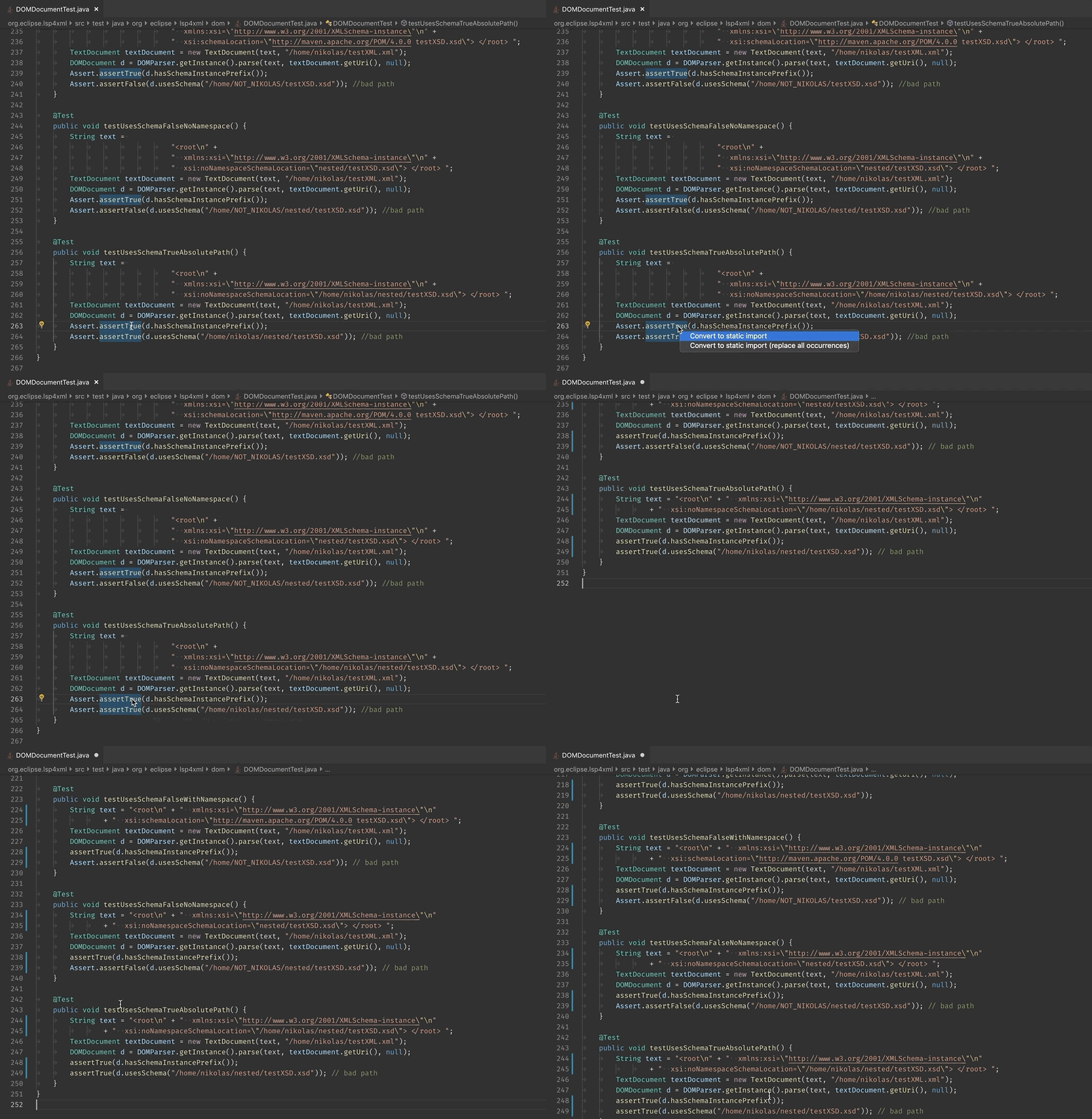
You asked for it, @testforstephen delivered:
 fbricon
on 26 Mar 2019
fbricon
on 26 Mar 2019
@fbricon How are you bringing up the menu?
 notmattlythgoe
on 21 May 2019
notmattlythgoe
on 21 May 2019
Click on static method, Ctrl+. (Cmd+. on mac) or click on lightbulb or right-click -> Code Action
fbricon
on 21 May 2019
Related issues
 yaohaizh
·
4Comments
yaohaizh
·
4Comments
 roben
·
4Comments
roben
·
4Comments
 joewood
·
3Comments
joewood
·
3Comments
 ViniciusAtaide
·
4Comments
ViniciusAtaide
·
4Comments
 tveimo
·
4Comments
tveimo
·
4Comments
Most helpful comment
Click on static method,
Ctrl+.(Cmd+.on mac) or click on lightbulb or right-click -> Code Action