Vscode-java: Any way to get rid of .project .classpath .settings/ files?
Every time I open a Java project, no matter Maven or Gradle, the extension always creates many .project .settings/ .classpath files in my project folder. And yes I know it's Eclipse's behavior to create files in project root folder as mentioned in https://github.com/redhat-developer/vscode-java/issues/466#issuecomment-373391208 But it's really very annoying that the extension creates these files silently without any confirmation, especially with the SCM stuffs, I have to manually add them into .gitignore file. And I also have to add them into "files.exclude" in VSCode's settings to hide them from the explorer.
I've noticed some projects are also created in the "workspaceStorage" folder, so is it possible to create a corresponding project in the "workspaceStorage" folder and link my files to it? I followed this post in Eclipse, and find it adds <linkedResources> entries in .project. I suppose it might be somehow doable.
Moreover, it would be also nice for me if it notifies the changes and provides shortcuts to hide/ignore them, because I don't know and don't care about .settings/ stuffs. E.g. it might pop up a message box saying something like "Some files are created by the extension, do you want to add them into .gitignore?"
 Eskibear
All 40 comments
The problem is we're delegating the import part to m2e and buildship, for Maven and Gradle projects, respectively, which do generate the project metadata files directly under the project folders, so changing that behaviour will be extremely hard, if not impossible.
Adding them to .gitignore is dependent on users using Git for their source control management, the Git integration on each client, so we'd need to be smart on how to send that sort of notification
 fbricon
on 27 Aug 2018
fbricon
on 27 Aug 2018
The problem is we're delegating the import part to m2e ...... so changing that behaviour will be extremely hard, if not impossible.
@fbricon Thanks for the clarification, and I realize it might involve the whole project management part. In fact as a user I don't care that much about where you put the metadata files, just don't let me know the existence of these files. It does confuse me when I'm using VSCode to write Java and it generates a bunch of eclipse-looked files there. And one more point is, am I supposed to modify these files manually? I suppose that's not suggested, and usually some strange errors occur wrongly when I make some mistakes in modifying those files.
So I think if the extension manages these files and keep them invisible to me, it should help. It avoids confusion and potential errors caused by wrongly modifying/deleting metadata files. For me, a) hiding them from the explorer and b) add them into .gitignore both help a lot.
we'd need to be smart on how to send that sort of notification.
I'm not sure about the detailed implementation. Is it possible to detect whether there is a .gitignore file in workspace root foler, and if there is, append related rules to it? Then from git status, I see only one file changes instead of tons of new files added.
Eskibear
on 2 Sep 2018
I tried to add the following to the extension's package.json
   "configurationDefaults": {
        "files.exclude": {
          "**/.project": true,
          "**/.classpath": true,
          "**/.settings": true
      }
    },
but it seemed ignored by vscode. @aeschli is it expected?
fbricon
on 5 Sep 2018
While we cannot modify built-in configurations in "configurationDefaults", I think it would be helpful to provide a shortcut to add the "files.exclude" configuration into workspace settings. E.g. For the first time a project is built (these files are also created), a message box pops up saying "Ah we've created some important files, do you want to hide them from the explorer?". With the confirmation of the user, it automatically updates the workspace settings and hide these files immediately.
For me, every time I open different projects, I have to add the same "files.exclude" configurations to hide them, and also update the ".gitignore" file to exclude them from SCM. That is the pain point. So if there's any shortcut I can do that with one-click, the user experience will be largely improved. 😆
Eskibear
on 9 Oct 2018
We need to prioritize this one. Bad review again...

 akaroml
on 24 Dec 2018
akaroml
on 24 Dec 2018
We now partially address the problem by asking to hide those pesking files on startup:

You still need to manually add them to your SCM ignored list though.
fbricon
on 31 Jan 2019
@fbricon Does this ask you every time on Startup? I think I hit the close "x" the first time it came up(just like I do for everything), but I can't get this to popup again. Is there a way to Exclude this Globally with out the popup?
 M-Jas
on 28 Feb 2019
M-Jas
on 28 Feb 2019
@M-Jas If you doesn't want it pop up and without change anything, just click the "Never" selection.
 yaohaizh
on 28 Feb 2019
yaohaizh
on 28 Feb 2019
@M-Jas from File -> Preferences -> Settings -> User Settings -> Extensions -> Java configuration -> There's a section for "Check Project Settings Exclusions". It might popup again if the box is ticked (I didn't do experiment though)
@yaohaizh I thought the "Never" means "Never exclude", so it will show those files as default.
but my problem is actually, I remember I clicked "Exclude globally" before, but it still created bunch of these files, and show them all on the file explorer. Kinda weird.
 chuhsuanlee
on 4 Mar 2019
chuhsuanlee
on 4 Mar 2019
but my problem is actually, I remember I clicked "Exclude globally" before, but it still created bunch of these files, and show them all on the file explorer. Kinda weird.
@chuhsuanlee Does this issue still happen?
yaohaizh
on 5 Mar 2019
I am running into the same issue as @chuhsuanlee. I checked "Exclude globally" which worked once, but when I went to open another project it does not properly exclude. I also can't figure out a way to get the prompt to exclude the files to trigger again. I tried unchecking and rechecking to no avail.
 ryanpagefico
on 6 May 2019
ryanpagefico
on 6 May 2019
This is so frustrating, why is my text editor creating random files for me?
 esr360
on 29 May 2019
esr360
on 29 May 2019
Please, find a way to keep those files somewhere else. It's extremely annoying. I'd rather uninstall this extension completely then allow to keep them in project root. VSCode isn't IDE, so it's supposed to be lightweight, which also means no bloated project files and metadata as well.
 mkpaz
on 12 Jul 2019
mkpaz
on 12 Jul 2019
This has been a huge pain for me -- it's even adding files to my android studio projects!
git clean -fd has been magic... :)
 mrk-han
on 18 Jul 2019
mrk-han
on 18 Jul 2019
I am using VSCode only to edit (+intellisense) Java files in a very large project which has all the settings/project/config files. Asking Git to check them back every time is not really an option...
There should be an option not to create those files.
 davydden
on 24 Jul 2019
davydden
on 24 Jul 2019
Without knowing the details, is it possible to somehow fix the _root cause_ (i.e. the part of the code that creates these files/folders in the first place)? I understand it might be an upstream package, or something that is not in direct control of this repository.
Again just asking, since this issue it the one reason I do _not_ install this extension for my vscode.
 friederbluemle
on 10 Sep 2019
friederbluemle
on 10 Sep 2019
Note I tried this plugin and am promptly uninstalling it because of this issue. I don't ever expect VSCode to generate files on my behalf unless it's the result of an explicit action I took (beyond just opening some folders VSCode).
 bgeihsgt
on 10 Sep 2019
bgeihsgt
on 10 Sep 2019
Just throwing my hat into the ring to say that it's really annoying that VSCode generates these files. It's super annoying to have to git clean -df them every time, enough to make me not want to use VSCode for Android projects.
 noahsark769
on 12 Nov 2019
noahsark769
on 12 Nov 2019
We'll revisit this issue.
akaroml
on 3 Dec 2019
I am having the same issue with these .settings files getting generated by the vs-code java plugin. i think it is also giving me 2k+ 'problems'
 1ak31sha
on 6 Dec 2019
1ak31sha
on 6 Dec 2019
@akaroml in the old Eclipse Che, jdt was forked to add a custom .che location: https://github.com/eclipse/che/blob/26f6766390f6ff7481ce296cafc8d07d638160b4/plugins/plugin-java/che-plugin-java-ext-jdt/org-eclipse-jdt-ui/src/main/java/org/eclipse/jdt/internal/core/JavaProject.java#L114
You'd need to checkout the repo at this commit to find all usages of Constants.CHE_DIR, JavaProject.INNER_DIR
@tolusha @evidolob @benoitf might be able to give you more details, in particular, where/how are created .project and .settings/
fbricon
on 11 Dec 2019
This is becoming a huge problem for me as well. Going to have to disable / uninstall the plugin until this is resolved. Shame.
 bverkron
on 17 Jan 2020
bverkron
on 17 Jan 2020
Hi,
What is the complete list of workspace settings I need in order to totally prevent the generation/updating of any of those project files for a particular workspace?
For example, is this sufficient ?
    "java.autobuild.enabled": false,
    "java.configuration.updateBuildConfiguration": "disabled",
    "java.import.gradle.enabled": false,
    "java.import.maven.enabled": false
....
My use-case: For one particular project I use Eclipse for Java and and VSCode for other languages. When I open the workspace in VSCode I don't want it to start overwriting all my .classpath files, which is does do by default. Once it does that, it breaks my project in Eclipse. It doesn't prompt me before overwriting my files.
Why don't I just uninstall the plugin? Well, because I use VSCode Java for a totally different workspace.
 dlandis
on 22 Jan 2020
dlandis
on 22 Jan 2020
The issues with android projects have been mentioned before, but some more details are:
I use vscode with the java extensions for some of my java projects, and I also use it for an ionic/capacitor mobile app which is built via CLI (fastlane). I do not edit any of the java files manually in this project, but did accidentally open one java file in vscode. As soon as I did that, vscode has started to create a .project file in my android folder and I have not been able to make it stop.
Is there a way to reset the java extension to "before I opened the java file" so that it stops doing this?
 brownoxford
on 31 Mar 2020
brownoxford
on 31 Mar 2020
@brownoxford You may be interested in the lightweight mode we recently provided. You can enable it via user setting "java.server.launchMode": "LightWeight" in _.vscode/settings.json_. See https://github.com/redhat-developer/vscode-java/pull/1329.
Lightweight mode is optimized for reading scenario. It won't generate these metadata files in your workspace. And it will only provide syntax features such as outline view, hover for javadoc, code navigation between your sources and JDK. Besides, please notice that the lightweight mode won't load thirdparty extensions, such as java test runner, java debugger, etc.
 testforstephen
on 10 Apr 2020
testforstephen
on 10 Apr 2020
Hi,
What is the complete list of workspace settings I need in order to totally prevent the generation/updating of any of those project files for a particular workspace?
For example, is this sufficient ?
    "java.autobuild.enabled": false,
    "java.configuration.updateBuildConfiguration": "disabled",
    "java.import.gradle.enabled": false,
    "java.import.maven.enabled": false
....
My use-case: For one particular project I use Eclipse for Java and and VSCode for other languages. When I open the workspace in VSCode I don't want it to start overwriting all my
.classpathfiles, which is does do by default. Once it does that, it breaks my project in Eclipse. It doesn't prompt me before overwriting my files.Why don't I just uninstall the plugin? Well, because I use VSCode Java for a totally different workspace.
This helped me a lot :smile:
No idea why these files are generated by default. Caused issues in my project.
 DanJBower
on 12 Apr 2020
DanJBower
on 12 Apr 2020
@brownoxford You may be interested in the lightweight mode we recently provided. You can enable it via user setting
"java.server.launchMode": "LightWeight"in _.vscode/settings.json_. See #1329.Lightweight mode is optimized for reading scenario. It won't generate these metadata files in your workspace. And it will only provide syntax features such as outline view, hover for javadoc, code navigation between your sources and JDK. Besides, please notice that the lightweight mode won't load thirdparty extensions, such as java test runner, java debugger, etc.
Can you make this the default? And only switch to another mode if the user takes an action which would need the other mode?
 DanielHabenicht
on 17 May 2020
DanielHabenicht
on 17 May 2020
Can you make this the default? And only switch to another mode if the user takes an action which would need the other mode?
Fair enough, that's exactly what we thought.
@jdneo is working on this, he can share more details.
testforstephen
on 18 May 2020
@DanielHabenicht
We are trying to make the extension ask the user whether he wants to import the project or not at the initialization. The language server will do the real import only when the user confirms.
Well, what I was thinking previously was that, only ask the user this question when the project files like .project and .classpath have not been generated. If they already exist (means the projects exist in the workspace), directly update all the existing projects.
Seems that this behavior does not meet your requirement since you hope the standard language server won't activated at all.
@fbricon @akaroml @testforstephen @Eskibear
Any thoughts on this? Do you think we should always do an import action even when the project has been imported already? Which means the pop-up will always show when the user opens a Java project in VS Code, if he does not set the related settings to automatic.
 jdneo
on 18 May 2020
jdneo
on 18 May 2020
@DanielHabenicht
We are trying to make the extension ask the user whether he wants to import the project or not at the initialization. The language server will do the real import only when the user confirms.
Well, what I was thinking previously was that, only ask the user this question when the project files like
.projectand.classpathhave not been generated. If they already exist (means the projects exist in the workspace), directly update all the existing projects.Seems that this behavior does not meet your requirement since you hope the standard language server won't activated at all.
That isn't what I was trying to say - sry for being unclear.
I am not the standard java user with vscode, as I am currently using it just for reviewing java code. Thus I never really execute it, but the .project and .classpath files are generated nonetheless.
If the files are already there then starting the standard server won't affect the files so it would be ok, like you already planned on doing.
DanielHabenicht
on 18 May 2020
my problem is the opposite I want to change .classpath but it was not generated or I can't find it anywhere.
 Toro98M
on 18 Jun 2020
Toro98M
on 18 Jun 2020
@Toro98M Did you hide them through the setting java.configuration.checkProjectSettingsExclusions?
jdneo
on 18 Jun 2020
@Toro98M Did you hide them through the setting
java.configuration.checkProjectSettingsExclusions?
I have this enabled. I tried with both true and false
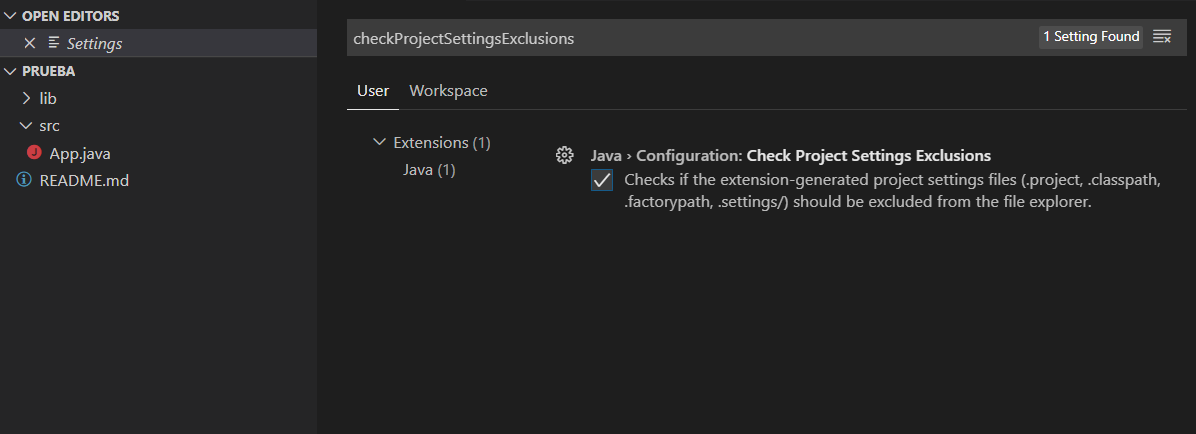
Toro98M
on 18 Jun 2020
I see. It's a standalone project. If you want to see the .classpath file, please follow the steps:
- In dependency viewer, right click your project and choose
reveal in explorer
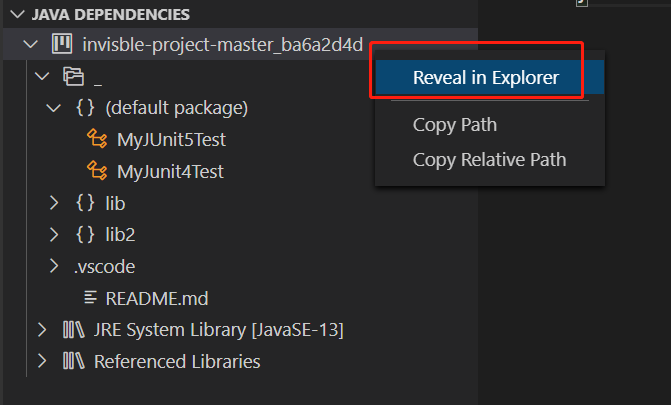
- In the opened file explorer, go into the selected folder, them you will see the
.classpathfile
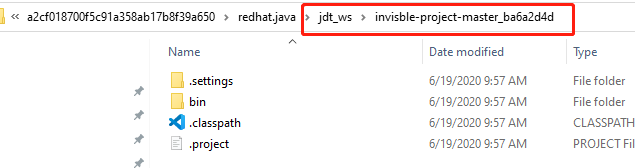
BTW, could you please let us know what kind of operation you want to do that makes you have to manually edit the .classpath file?
jdneo
on 19 Jun 2020
@Toro98M For standalone java files, we don't suggest you changing .classpath directly, but using java.project.referencedLibraries user setting to add extra libraries dependencies. See more details about this setting https://github.com/redhat-developer/vscode-java/pull/1196#issuecomment-568192224
testforstephen
on 19 Jun 2020
@Toro98M Did you hide them through the setting
java.configuration.checkProjectSettingsExclusions?I have this enabled. I tried with both true and false
This was the best option for me.
Dont forget to restart VSCode after the change (it will not prompt, but you must !)
 myasas
on 26 Jun 2020
myasas
on 26 Jun 2020
What a stupid thing! As a full-stack developer I try to use one editor and when I switch between spring-boot project and flutter project. Extension keeps adding this trash files to my android solution. This leads to situation when VS Code tells me that my mobile project have gradle errors, when it is your product fault. I do not want that, please fix it!
Seems like switching to light-weight mode in VS Code helps, but it is not solution!
 paulkastel
on 23 Jul 2020
paulkastel
on 23 Jul 2020
I fix this problem by adding some global ignore rules,
git config --global core.excludesfile ~/.gitignore
and add rules to ~/.gitignore
**/*.project
**/*.factorypath
**/*.settings
**/*.classpath
 MonsterStorm
on 22 Dec 2020
MonsterStorm
on 22 Dec 2020
In my environment this extension generate .class, .project, .classpath files. I disable it at this moment and I'll keep following this issue.
 raphapaulino
on 9 Jan 2021
raphapaulino
on 9 Jan 2021
@brownoxford You may be interested in the lightweight mode we recently provided. You can enable it via user setting
"java.server.launchMode": "LightWeight"in _.vscode/settings.json_. See #1329.Lightweight mode is optimized for reading scenario. It won't generate these metadata files in your workspace. And it will only provide syntax features such as outline view, hover for javadoc, code navigation between your sources and JDK. Besides, please notice that the lightweight mode won't load thirdparty extensions, such as java test runner, java debugger, etc.
I was reading vscode doc and realized the lightweight mode is still not satisfiable if one chooses to build the project or debug it:
Lightweight mode doesn't resolve imported dependencies nor build the project, so it does not support running, debugging, refactoring, linting, or detecting semantic errors. For these features to be available, you need to switch your workspace from lightweight mode to standard mode.
Wondering if anyone has come up with a better solution to it?
Edit: It seems like light weight does not get rid of the behaviour, it's very annoying to be honest

 wendidy
on 17 Mar 2021
wendidy
on 17 Mar 2021
Related issues
 shawmanz32na
·
3Comments
shawmanz32na
·
3Comments
 roben
·
4Comments
roben
·
4Comments
 protoEvangelion
·
3Comments
protoEvangelion
·
3Comments
 jcjolley
·
3Comments
yaohaizh
·
4Comments
jcjolley
·
3Comments
yaohaizh
·
4Comments
Most helpful comment
This is so frustrating, why is my text editor creating random files for me?