Vscode-java: Hi. Can someone tell me how to import a library in VScode?
I just switched to VS Code from IntelliJ.
But I couldn't figure out how to import a jar in VSCode? I'm using it as a library.
I have some libraries, for example, Junit.
Operating System: Mac Sierra
JDK version: 1.8.0_131
Thank you.
 ghost
ghost
All 10 comments
Duplicate of #346
 gorkem
on 5 Dec 2017
gorkem
on 5 Dec 2017
 fbricon
on 5 Dec 2017
fbricon
on 5 Dec 2017
Hi. I'm confused. So what I need is a .classpath. But it's not an Eclipse project.
Is there a way to generate .classpath file? or I have to manually create one?
ghost
on 6 Dec 2017
fbricon
on 6 Dec 2017
Hi fbricon,
Thanks for the quick reply.
I just tried to manually create .classpath file. It didn't work.
The link isn't answering my question.
So for example, I've just created a .java file in VSCode.
Now I want to import an external library. So I can have this line of code working: import org.junit.Test;
I kind of feel this is a silly question. But I just can't figure out how to make it work.
Thank you for your help. :)
ghost
on 6 Dec 2017
So if I understand this right, I need .project and .classpath to make it work.
ghost
on 6 Dec 2017
yes, both are required. Please check https://github.com/redhat-developer/vscode-java/files/1500211/test_vs_code2.zip see how the jar needs to be referenced in .classpath.
Using a Maven or Gradle project can be very simple to get started, instead of aiming for the Eclipse route. And it'll make your project IDE agnostic.
fbricon
on 6 Dec 2017
Cool!! Thanks for the example code. It works. Basically, all I need is to start a project in Eclipse. I will try Maven tomorrow. It is so weird that VS Code supports Eclipse, Maven, and Gradle, but IntelliJ is not included.
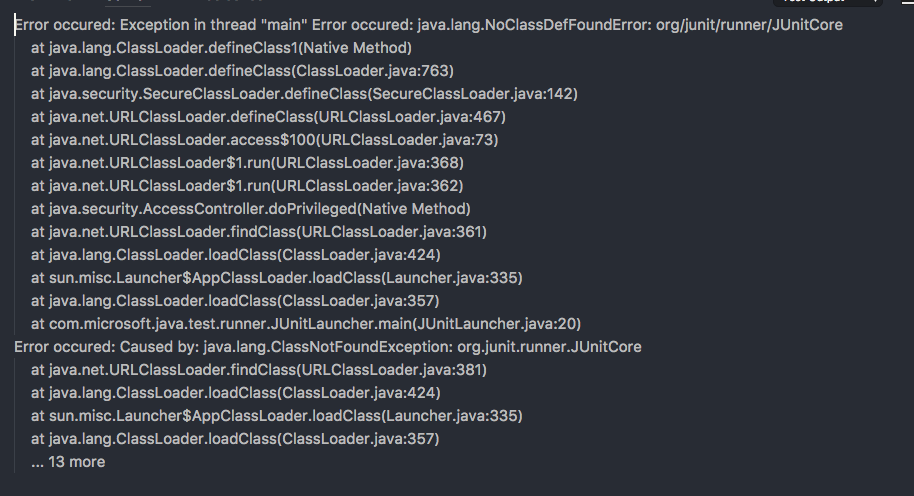
I have one more question. The Junit still doesn't work in VS Code. Other libraries are fine.
I have Java Test Runner installed. But when I click Run Test, it shows this (below in the photo). But the same project works fine in Eclipse.
Do you have any idea how to fix it?
ghost
on 7 Dec 2017
and how do you use the .jar in visual studio code ?
 FabianoTerdenge
on 29 Nov 2018
FabianoTerdenge
on 29 Nov 2018
Is it still the same manual process now (to update .classpath file)?
 lispercat
on 3 Feb 2021
lispercat
on 3 Feb 2021
Related issues
 BuZZ-dEE
·
4Comments
BuZZ-dEE
·
4Comments
 xriu
·
4Comments
xriu
·
4Comments
 bilymed
·
3Comments
bilymed
·
3Comments
 joewood
·
3Comments
joewood
·
3Comments
 zalcorshark
·
3Comments
zalcorshark
·
3Comments
Most helpful comment
Hi fbricon,
Thanks for the quick reply.
I just tried to manually create .classpath file. It didn't work.
The link isn't answering my question.
So for example, I've just created a .java file in VSCode.
Now I want to import an external library. So I can have this line of code working: import org.junit.Test;
I kind of feel this is a silly question. But I just can't figure out how to make it work.
Thank you for your help. :)