Vscode-java: Enable annotation processing
Hi, I'm trying to use https://github.com/immutables/immutables which is an annotation based source code generator.
In the docs (https://immutables.github.io/apt.html), it's mentioned that the m2e-apt Eclipse plugin needs to be configured when building in Eclipse, so presumably this is why in vscode it doesn't work?
I was previously having problems with Rocker templates, and with hindsight this might have been related.
Environment
- Operating System: xubuntu yakkety
- JDK version: 1.8.0_131-b11
- Visual Studio Code version: 1.17.1
- Java extension version: 0.12.0
- Maven 3.5
- Maven compiler plugin 3.6
Steps To Reproduce
https://immutables.github.io/getstarted.html
- Set up a Maven project that includes the
org.immutablesdependency - Add a test class that uses the
@Value.Immutableannotation - vs-code-java fails to generate the source code, but a mvn compile will
Current Result
No generated source code for @Value.Immutable annotated class
Expected Result
Corresponding Immutable... class source code generated
Additional Informations
I tried adding org.jboss.tools.maven.apt.core_1.3.0.201610261805 to the extension's server/plugins folder to see if that allowed the annotation processor to be picked up, but it wasn't effective. I also tried putting the Immutables jar in the annotationProcessorPaths element in the maven compile plugin configuration, but it still wasn't picked up.
 mcgaw
mcgaw
All 16 comments
I've done some tests for https://github.com/eclipse/eclipse.jdt.ls/issues/128, but while file generation seems to work, there's an issue with the client detecting changes in the generated files and sending those changes to apply back to the server, so we end up with garbage content. We need to figure out a proper way to cope with generated content, i.e we need to determine whether or not changes from the generated classes folder are caused by something on the server side or by a maven build on the client side.
Adding the jar to the server/plugins is not sufficient to load it, one solution would be to embed the m2e-apt jar into a vscode-java extension, but you'll end up with the same issue that I mentioned above.
 fbricon
on 22 Oct 2017
fbricon
on 22 Oct 2017
Thanks for the feedback. It's a bit hard for me to comment, since I don't know enough about the vscode-java/jdt.ls architecture, but is there any reason the Java language server must be responsible for building your project? Presumably that's not part of the language server protocol? It surprised me initially when I realised that the vscode-java plugin was building my project.
I've managed to work around the issue by using the apt-maven-plugin, which afaik uses the jdk 6 annotation processing stuff. This plugin hooks into the 'process' goal, and is picked up by m2e out-of-the-box. Now I can run the Jooby development server while in VSCode and it picks up changes to generated classes no problem now. Great!
<plugin>
<groupId>com.mysema.maven</groupId>
<artifactId>apt-maven-plugin</artifactId>
<version>${apt-maven-plugin.version}</version>
<executions>
<execution>
<goals>
<goal>process</goal>
</goals>
<configuration>
<outputDirectory>target/generated-sources</outputDirectory>
<processors>
<processor>org.immutables.processor.ProxyProcessor</processor>
</processors>
</configuration>
</execution>
</executions>
<dependencies>
<dependency>
<groupId>org.immutables</groupId>
<artifactId>value</artifactId>
<version>2.5.6</version>
</dependency>
</dependencies>
</plugin>
The server builds the project so that it can detect workspace-wide compilation errors for instance.
If you open a generated class in vscode in one pane, while modifying a source triggering modifications to that 1st file in a second pane, you should see some interesting stuff :-)
fbricon
on 23 Oct 2017
We've also got some common scenarios in spring-boot projects that depend on annotation processors to work. I.e. the handling of this kind of stuff:
https://docs.spring.io/spring-boot/docs/current/reference/html/configuration-metadata.html#configuration-metadata-annotation-processor.
It would be nice if the language server made annotation processors 'just work' out of the box (i.e. not like it is in Eclipse/m2e where you typically have to jump through a bunch of hoops just to enable it, even if the maven build, when run from the CLI 'just works'). I realize this is probably not easy... but we live on hope :-)
 kdvolder
on 22 Feb 2018
kdvolder
on 22 Feb 2018
@kdvolder see https://github.com/eclipse/eclipse.jdt.ls/pull/616
Screencast: https://www.screencast.com/t/hbrnw9nrG
fbricon
on 6 Apr 2018
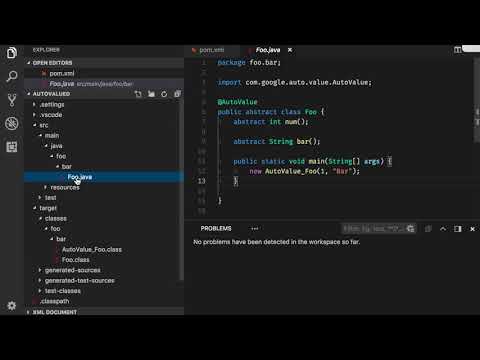
Done. See screencast of annotation processing in action:
fbricon
on 9 May 2018
Should this work with Immutables as well?
I'm trying to use it but it seems that it is not working.
 luiz290788
on 16 May 2018
luiz290788
on 16 May 2018
Nevermind, I was able to make it work in a fresh project. But I wasn't able to have it working in a big project that I have. Is there any limitation?
luiz290788
on 17 May 2018
Is Gradle supported as well? Having the following in build.gradle, I keep getting "[Java] AutoValue_Remark cannot be resolved to a type" errors in my project.
dependencies {
    compile 'com.google.auto.value:auto-value-annotations:1.6.2'
    annotationProcessor 'com.google.auto.value:auto-value:1.6.2'
}
(Version 0.28.0)
 simon04
on 20 Jul 2018
simon04
on 20 Jul 2018
@simon04 I found a simple workaround for using Gradle with the annotationProcessor features (Immutables, AutoValue, Metamodels).
The idea is to add manually the location of the generated sources. In my case, I just had to add build/generated/source/apt/main to srcDirs:
sourceSets {
    main {
        java {
            srcDirs = ['src/main/java', 'build/generated/source/apt/main']
        }
    }
}
I don't know if it is a good idea or whatever, but it works and helps me get the job done 😁
 maelvls
on 6 Mar 2019
maelvls
on 6 Mar 2019
Can someone explain under the hood what vscode-java is doing, so we can reproduce it in other lsp clients? Is this changing the javaagent or bootclasspath args to the jvm like for Lombok? Or is this modifying the .classpath or .settings JDT project ?
 didibus
on 14 Feb 2020
didibus
on 14 Feb 2020
You just need to configure your project properly. Java LS, not vscode-java, will do what is necessary.
See https://github.com/eclipse/eclipse.jdt.ls/issues/128 and https://github.com/redhat-developer/vscode-java/wiki/Annotation-Processing-support-for-Maven-projects
 snjeza
on 15 Feb 2020
snjeza
on 15 Feb 2020
What if I don't use Gradle and don't use Maven?
didibus
on 16 Feb 2020
@didibus See https://github.com/eclipse/eclipse.jdt.ls/issues/128#issuecomment-282556107 and https://github.com/eclipse/buildship/issues/329
snjeza
on 16 Feb 2020
I see, so it seems all the Eclipse JDT server needs is a .factoryPath to be configured? Any documentation on that file config?
didibus
on 16 Feb 2020
I see, so it seems all the Eclipse JDT server needs is a .factoryPath to be configured? Any documentation on that file config?
snjeza
on 16 Feb 2020
Related issues
 bkbonner
·
3Comments
bkbonner
·
3Comments
 ronniehicks
·
3Comments
ronniehicks
·
3Comments
 shawmanz32na
·
3Comments
shawmanz32na
·
3Comments
 protoEvangelion
·
3Comments
protoEvangelion
·
3Comments
 marlinla
·
3Comments
marlinla
·
3Comments
Most helpful comment
Is Gradle supported as well? Having the following in
build.gradle, I keep getting "[Java] AutoValue_Remark cannot be resolved to a type" errors in my project.(Version 0.28.0)