Vscode-java: how to make add classpath directly?
i got a dir of well structured source code, and it keep noticing no classpath founded.
so i m thinking of, what should i do to make the whole thing like a readable project for vscode..
such as adding a .classpath file?
i tried but fail (it does not work at all..):

what should i do?
 ColinTree
All 9 comments
vscode-java depends on Java build tools (namely maven and gradle) to recognize the classpath. I do not recommend .classpath as a way to manage the classpath. Does your project have maven or gradle already? What do you mean by well structured code?
 gorkem
on 16 Sep 2017
gorkem
on 16 Sep 2017
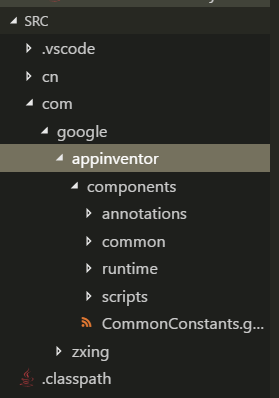
the files are like this, matches most the file needed in the sources, and the rest can be includes from lib.
(well, it is the code here: https://github.com/ColinTree/appinventor-sources/tree/master/appinventor/components/src/)
ColinTree
on 16 Sep 2017
@ColinTree you can try to add the following .classpath and .project:
.project
<?xml version="1.0" encoding="UTF-8"?>
<projectDescription>
    <name>appinventor-components</name>
    <comment></comment>
    <projects>
    </projects>
    <buildSpec>
        <buildCommand>
            <name>org.eclipse.jdt.core.javabuilder</name>
            <arguments>
            </arguments>
        </buildCommand>
    </buildSpec>
    <natures>
        <nature>org.eclipse.jdt.core.javanature</nature>
    </natures>
</projectDescription>
.classpath
<classpath>
    <classpathentry kind="con" path="org.eclipse.jdt.launching.JRE_CONTAINER/org.eclipse.jdt.internal.debug.ui.launcher.StandardVMType/JavaSE-1.8"/>
    <classpathentry kind="src" path="src"/>
    <classpathentry kind="output" path="bin"/>
</classpath>
to https://github.com/ColinTree/appinventor-sources/tree/master/appinventor/components
 snjeza
on 18 Sep 2017
snjeza
on 18 Sep 2017
Not all java projects use maven or gradle.
 AlexLeung
on 2 Mar 2018
AlexLeung
on 2 Mar 2018
+1 @AlexLeung - It would be very helpful, and more in the spirit of VS Code, if you supported adding a classpath with a simple setting rather than requiring Maven or Gradle.
 dleuck
on 5 May 2018
dleuck
on 5 May 2018
Java does not have an accepted way to define a project like package.json. We sure can invent a .json file that lists the jar files. The solution would be vscode-java specific and would not be portable to any other IDEs. I bet that in a few days after we release such a feature we would be asked for a way to build and package the project.
OTOH, a maven or gradle file on a project is good practice. They are portable among all the leading Java IDEs, they help build, test projects and can be used on CI systems.
I think our time is better spend if we try to improve the usability and make it easier working with maven artifacts instead trying to solve the already solved problem of dependency and build management of Java projects.
gorkem
on 7 May 2018
It would be very helpful, and more in the spirit of VS Code, if you supported adding a classpath with a simple setting rather than requiring Maven or Gradle.
@gorkem nobody is asking for the invention of a new .json file format unique to vscode-java. Perhaps vscode-java could just have a way to generate and add to .classpath and .project files. This way small java projects could be created quickly in VSCode with minimal configuration without needing to interface with any other tools.
AlexLeung
on 7 May 2018
Sigh.
 nyetwurk
on 28 Jan 2019
nyetwurk
on 28 Jan 2019
For simple project, you can use this extension to quick create an app. https://marketplace.visualstudio.com/items?itemName=vscjava.vscode-java-dependency
 yaohaizh
on 29 Jan 2019
yaohaizh
on 29 Jan 2019
Related issues
 larixer
·
3Comments
larixer
·
3Comments
 ronniehicks
·
3Comments
ronniehicks
·
3Comments
 danielcalvogonzalez
·
3Comments
danielcalvogonzalez
·
3Comments
 joewood
·
3Comments
joewood
·
3Comments
 jcjolley
·
3Comments
jcjolley
·
3Comments
Most helpful comment
Not all java projects use maven or gradle.