Vscode-java-test: Collapse/Expand Test Levels


All 10 comments
The Collapse All button is the VS Code's API. As far as I know, there is no such API to expand a node. Did you see any example in other VS Code extensions?
 jdneo
on 3 Mar 2020
jdneo
on 3 Mar 2020
button is the VS Code's API
Oh, bummer
As far as I know, there is no such API to expand a node.
😲. Wonder if there's a feature request already for that 🤔?
Did you see any example in other VS Code extensions?
No but I'll keep my eyes open. Thanks @jdneo !
 spottedmahn
on 3 Mar 2020
spottedmahn
on 3 Mar 2020
Thanks, if there is any update/new findings, please feel free to comment here.
jdneo
on 4 Mar 2020
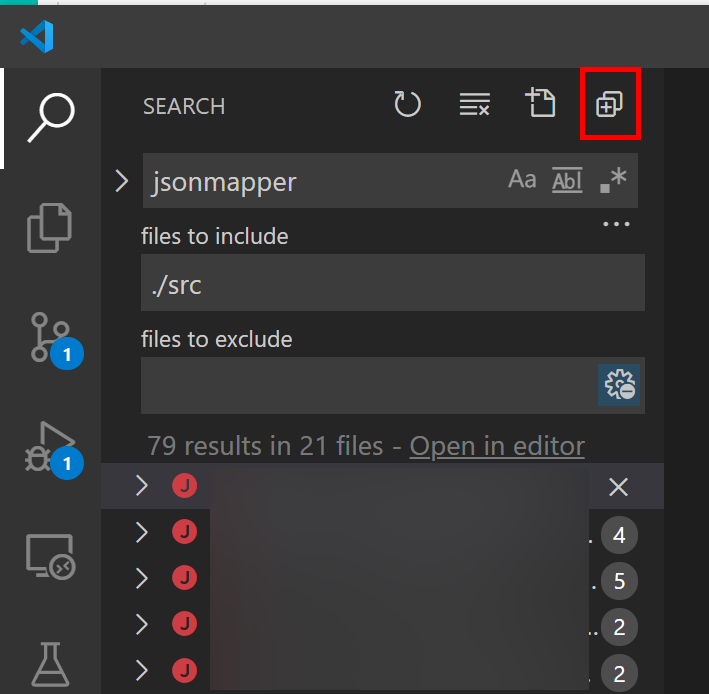
Found one! Search has one 😊
spottedmahn
on 30 Mar 2020
Thank you! Let me check the implementation
jdneo
on 31 Mar 2020
Looking forward for this enhancement :eyes:
 guiAlberto
on 2 Jun 2020
guiAlberto
on 2 Jun 2020
This is still limited by API, see: https://github.com/microsoft/vscode/issues/88682
jdneo
on 13 Jul 2020
This is still limited by API, see: microsoft/vscode#88682
Bummer. Thanks for looking into it again. Should we close the issue again?
spottedmahn
on 13 Aug 2020
@spottedmahn just make it open is fine. Then I can always take a look at the upstream issue when I see it.
jdneo
on 13 Aug 2020
In my opinion the reason for an 'expand all' button comes from the wish to see the status of running/completed tests quickly. A collapsed node does not have any indication if tests inside it are still running/succeeded/failed. Adding this information to classes/packages/projects would be more appropriate.
 ghry5
on 24 Aug 2020
ghry5
on 24 Aug 2020
Related issues
 hrsto
·
4Comments
hrsto
·
4Comments
 fbricon
·
5Comments
fbricon
·
5Comments
 lashchev
·
5Comments
spottedmahn
·
7Comments
lashchev
·
5Comments
spottedmahn
·
7Comments
 oakad
·
9Comments
oakad
·
9Comments