Vscode-java-test: No stacktrace/message in code-server
When you run a test case with vscode-java-test within code-server the message and stacktrace does not show up for the test case. However the report says wether the test case passed/failed. (Gradle with JUnit5)
Note: To install vscode-java-test in code-server; the regular installation through GUI seems to broken; you will have to follow instructions from this dockerfile to download the java pack manually before opening code-server.
 rohinwork
All 17 comments
Hi @rohinwork,
Would you mind to share some screenshot to us?
 jdneo
on 16 May 2019
jdneo
on 16 May 2019
Hi @jdneo,
Sure here you go:
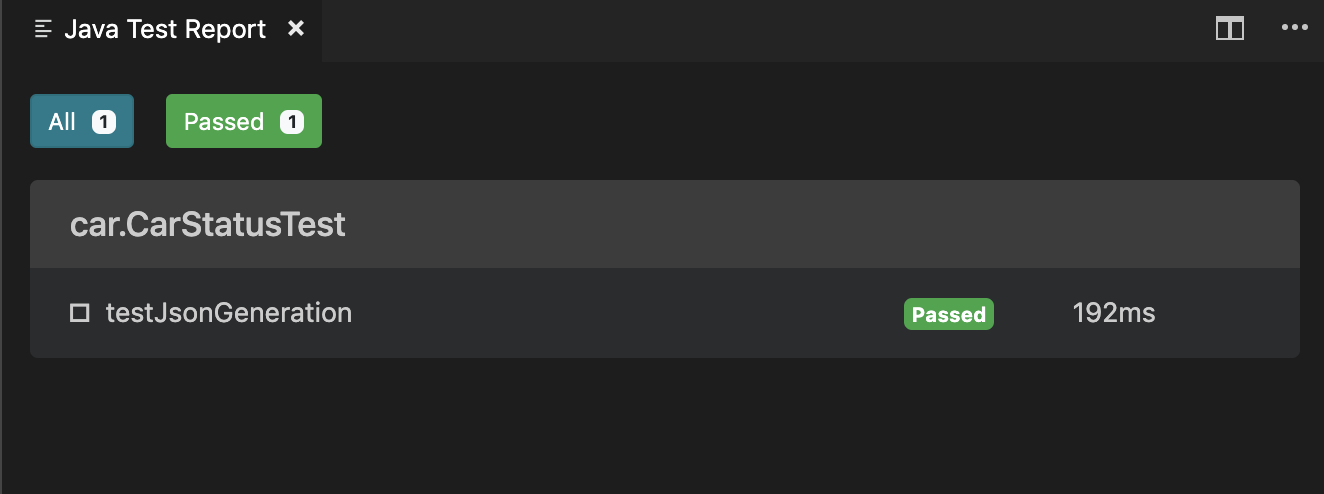
I could also provision a temporary code-server workspace if you would like to debug.
Thanks for your continued support on this! :)
rohinwork
on 16 May 2019
Thank you @rohinwork.
The test report is actually an HTML page and gets rendered by VS Code's webview. And I guess what you are encountering is that the report cannot be expanded.
If that is the case, then I think this should be a bug/issue of Code Server. What we can do from the extension side is really limited since we are just using the API provided by VS Code itself.
jdneo
on 16 May 2019
Hi @jdneo
I looked around a little bit more and found out that there is no output in Java Test Runner View. Would this indicate that there is a problem with the extension not capturing/receiving any output?
Are there any files you would like me to look at in the workspace?
Local Setup:

Code-Server Setup:

Thank you,
Rohin
rohinwork
on 16 May 2019
I see. What's the value of the setting java.test.log.level in your code server?
jdneo
on 16 May 2019
@jdneo sorry my bad. I set it to verbose on remote machine and now I am able to see the logs. However logs are visible without this setting on my local machine.
On remote machine, even after I made this change I am not able to see the stacktrace in the test report. Is there someplace where this report is getting persisted, if so, I could manually check it out.
Quick aside question:
Whenever I try to setup this extension in debug mode (locally) I have a few problems
- I am not able to see anything populated on Test Explorer View except for the project home directory. However, when I click the play button it runs all test-cases.
- CodeLens is not annotating Test Cases

Thanks for your prompt responses :)
rohinwork
on 16 May 2019
However logs are visible without this setting on my local machine.
This is because the setting has the default value:info
For the two questions, you asked. I guess your project is neither a Maven project nor Gradle project. Am I right?
jdneo
on 16 May 2019
@jdneo It is a gradle project actually. So here's what's happening
- if I install vscode and the extension from the extension ui: codelens and test explorer all work as it should.
- if I install vscode and the extension in debug mode (based on instructions from your contribution page) these things are not working.
rohinwork
on 16 May 2019
Have you run npm run build-plugin?
jdneo
on 17 May 2019
Yes I have actually. I am able to set breakpoints within the code and debug as well. Is there a possibility for you to check if this is working for you locally with a fresh clone of the repo and a new project with spring initializer
Here's a recap of what I did:
- clone this repo
- npm install
- npm run build-plugin
- F5
I did not setup eclipse and other tools since I only want to debug the typescript part of this repo as mentioned in the repo.
rohinwork
on 17 May 2019
Thank you for reporting this. I have to apologize for that there is a step missing in the contributing page.
I have updated the docs in this PR: https://github.com/microsoft/vscode-java-test/pull/705
jdneo
on 17 May 2019
@jdneo No problem 👍and thank you for the update.
This aside, I am still not able to this up and running on code-server the right way.
Another observation that I made was that if I set the logger level to info (manually) on my remote machine; no logs show up on the output window. However, only when I set it to verbose the right logs are showing up with stacktrace, etc which means that the HTML that you are generated should be working fine?
If I was to file to a bug with the code-server team. Do I have to tell them anything more to give them more context on this issue?
I would again like to thank you very much for your quick and continued support on this :)
rohinwork
on 17 May 2019
info is only to show the application's output. For example. in your code, you write system.out.printlin("hi").
I think the problem is that code server has some problem for rendering the webview, causing that the test report cannot be expanded.
jdneo
on 17 May 2019
Hi @jdneo, I am Sridher, Rohin's colleague.
Awesome to see such quick replies/commitment for an open-source project from a Microsoft employee :+1: . That's definitely unheard of in the past :)
 sridherj
on 17 May 2019
sridherj
on 17 May 2019
Hi @sridherj,
We are embracing the open-source world 😃. Nice to meet you!
jdneo
on 17 May 2019
@jdneo Thanks for clearing that up. Raised an issue on the code-server repo here.
rohinwork
on 17 May 2019
Closing this one and watch on the upstream issue.
jdneo
on 20 May 2019
Related issues
 Gueka
·
3Comments
Gueka
·
3Comments
 falco467
·
7Comments
falco467
·
7Comments
 spottedmahn
·
7Comments
spottedmahn
·
7Comments
 jimliuxyz
·
7Comments
jdneo
·
4Comments
jimliuxyz
·
7Comments
jdneo
·
4Comments