Vscode-java-debug: "Cannot find any changed classes for hot replace!"
[provide a description of the issue]
Environment
- Operating System: macOS Catalina 10.15.6
- JDK version:
openjdk 11.0.8 2020-07-14
OpenJDK Runtime Environment AdoptOpenJDK (build 11.0.8+10)
OpenJDK 64-Bit Server VM AdoptOpenJDK (build 11.0.8+10, mixed mode) - Visual Studio Code version: 1.47.2
- Java extension version: Java Extension Pack v0.9.1
- Java Debugger extension version: Debugger for Java v0.27.1
Steps To Reproduce
- git clone https://github.com/maxstreifeneder/HotCode-Replace
- mvn compile
- set a Breakpoint in com.maxstreifeneder.hotreload.handlers.test.HelloController.java, Line 11.
- Start Debugger: Run -> Start Debugging
- Open a Browser and hit localhost:8080/hotreload
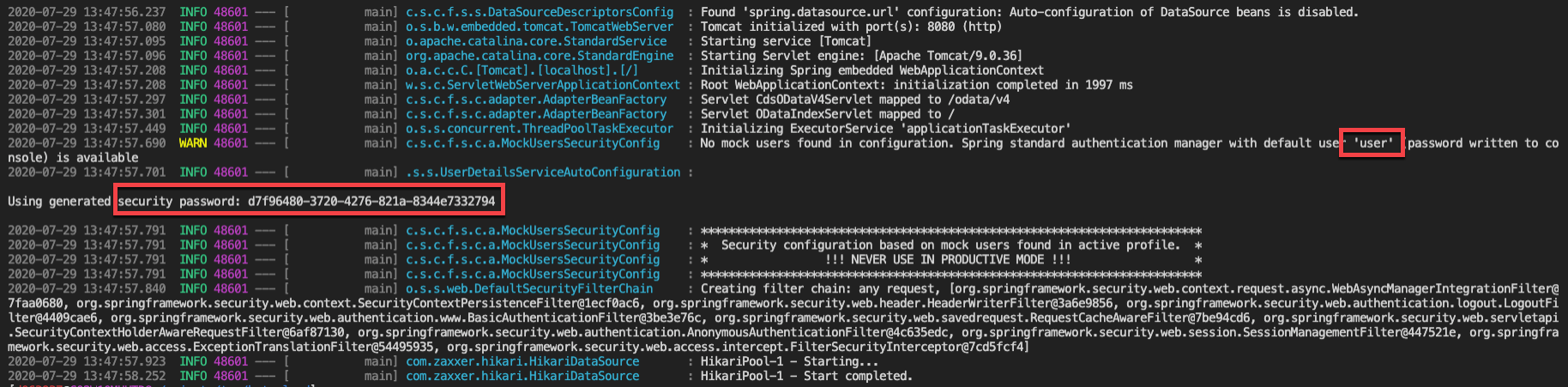
- You will be prompted with a Password prompt. Take the user + password from the log output:
- Debugger will stop.
- Change Line 11 to System.out.println("hotreload");
Press the "Hot Code Replace" Button in the Debugger Tools.

"Cannot find any changed classes for hot replace!" will appear.
[attach a sample project reproducing the error]
https://github.com/maxstreifeneder/HotCode-Replace
Current Result
"Cannot find any changed classes for hot replace!" when trying to use the Hot Code Replacement
Expected Result
Changed code in VS Code will be pushed to the running application using the debugging capabilities
Additional Informations
 maxstreifeneder
All 18 comments
i can reproduce it. Thanks for the detailed steps.
 testforstephen
on 30 Jul 2020
testforstephen
on 30 Jul 2020
I'm facing same issue. HCR not working as expected and after each change I've to restart the program.
 ijazfx
on 30 Jul 2020
ijazfx
on 30 Jul 2020
The root cause for the original issue is the changed class is contained by multiple projects, and the debugger doesn't handle well during dedup.
@ijazfx What's your scenario? Are you working on a multi module maven projects?
testforstephen
on 30 Jul 2020
Yes I've basically a complete framework which itself is a multi-module maven project. Then I've another project which is itself a multi-module maven project and this project uses some of the components from the framework project.
I looked at the code of the extension and found this, could it be the reason it is triggered only on "auto" setting?
if (hcrEvent.body.changeType === HcrChangeType.BUILD_COMPLETE) {
        if (getHotReloadFlag() === "auto") {
            return vscode.window.withProgress({ location: vscode.ProgressLocation.Window }, (progress) => {
                progress.report({ message: "Applying code changes..." });
                return hcrEvent.session.customRequest("redefineClasses");
            });
        }
    }
ijazfx
on 30 Jul 2020
I see, looks like the same root cause.
js side is just glue code. The actual logic happens at debug server, see https://github.com/microsoft/java-debug/blob/master/com.microsoft.java.debug.plugin/src/main/java/com/microsoft/java/debug/plugin/internal/JavaHotCodeReplaceProvider.java#L340
testforstephen
on 30 Jul 2020
@ijazfx @maxstreifeneder Could you have a try on a private fix? https://raw.githubusercontent.com/testforstephen/vscode-test/master/vscode-java-debug-0.27.2.vsix
This private fix is built against Java 11, you need update your JDK to 11 when you try it.
testforstephen
on 30 Jul 2020
Yes it is working as expected. I wasn't able to test all the scenarios but a quick test revealed fast manual HCR.
ijazfx
on 30 Jul 2020
@testforstephen kindly confirm one thing. Changed resources such as .css, .js are not detected and hence requires restart of the application.
ijazfx
on 31 Jul 2020
Correct, the debugger only supports Java code hot reloading. It doesn't have the knowledge of your application background.
testforstephen
on 31 Jul 2020
Okay, thanks for the fix though.
ijazfx
on 31 Jul 2020
@testforstephen works for me! thanks a lot for your quick response and fix - couldn't be any better :-)
maxstreifeneder
on 31 Jul 2020
I am encountering this issue too but the fix doesn't work. After applying the fix I get the error No delegateCommandHandler for vscode.java.validateLaunchConfig
openjdk version "11.0.7" 2020-04-14
OpenJDK Runtime Environment (build 11.0.7+10-post-Ubuntu-3ubuntu1)
OpenJDK 64-Bit Server VM (build 11.0.7+10-post-Ubuntu-3ubuntu1, mixed mode, sharing)
Visual Studio Code version: 1.46.1
Java extension version: Java Extension Pack v0.9.1
 Nintorac
on 31 Jul 2020
Nintorac
on 31 Jul 2020
@Nintorac Could you share the log file?
F1 -> Java: Open Java language server log file
testforstephen
on 31 Jul 2020
I tried updating to Visual Studio Code version: 1.47.3 and still get errors.
Logs here https://pastebin.com/qLZGaAer
Nintorac
on 31 Jul 2020
java.version=9.0.4
Oh, you're still using an old vscode-java version and JDK 9. My private fix is built against Java 11. Could you try to update to JDK 11?
And if you still need build your project against to JDK 1.8, then you can try "java.configuration.runtimes" setting as below.
    "java.home": "C:\\AdoptOpenJDK\\jdk-11.0.8.10-hotspot",
    "java.configuration.runtimes": [
        {
          "default": true,
          "name": "JavaSE-1.8",
          "path": "C:\\Java\\openjdk8u181-b13",
        }
    ]
Yup, that works. Thanks +1
Nintorac
on 31 Jul 2020
FYI for others: I had to remove the project from the workspace and restart vscode to get this error to stop.
Java Debugger v.0.36
 MTyson
on 2 Jun 2021
MTyson
on 2 Jun 2021
I was having this issue in spring boot project. The build job status was building the project fine.
The language server for java logs stated an error in duplicate entry. I opened the .classpath file and removed the duplicate entry. Then the hot code replace started working
 ahmednrana
on 15 Jul 2021
ahmednrana
on 15 Jul 2021
Related issues
 spottedmahn
·
6Comments
spottedmahn
·
6Comments
 dgileadi
·
3Comments
dgileadi
·
3Comments
 PG-practice
·
3Comments
PG-practice
·
3Comments
 bsaby
·
8Comments
bsaby
·
8Comments
 mojo2012
·
5Comments
mojo2012
·
5Comments
Most helpful comment
@ijazfx @maxstreifeneder Could you have a try on a private fix? https://raw.githubusercontent.com/testforstephen/vscode-test/master/vscode-java-debug-0.27.2.vsix
This private fix is built against Java 11, you need update your JDK to 11 when you try it.