Vscode-java-debug: Does vscode-java support javaFx11or openFx11?
_From @jiayaoO3O on December 7, 2018 11:23_
I can use maven to run javaFx11, but every time I run the program I type in the powershell: mvn exec:java, which makes me wonder how to use the breakpoint to debug the program. If I try to click the debug button directly, vscode Will tell me: Error: JavaFX runtime components are missing, and are required to run this application, how can I do this to run and debug the javaFx11 application directly?
Here is the javafx11 plugin I added for maven's pom.xml:

_Copied from original issue: redhat-developer/vscode-java#737_
 yaohaizh
All 12 comments
_From @fbricon on December 7, 2018 21:32_
can you provide a sample project reproducing this issue?
yaohaizh
on 10 Dec 2018
_From @fbricon on December 7, 2018 22:27_
So I managed to reproduce the problem with this sample project : https://github.com/openjfx/samples/tree/master/HelloFX/Maven
server log
[Trace - 4:41:42 PM] Sending request 'workspace/executeCommand - (93)'.
Params: {
    "command": "vscode.java.validateLaunchConfig",
    "arguments": [
        "file:///Users/fbricon/Dev/souk/samples/HelloFX/Maven/hellofx",
        "HelloFX",
        "hellofx",
        false
    ]
}


[Trace - 4:41:42 PM] Received notification 'window/logMessage'.
Params: {
    "type": 3,
    "message": "Dec. 7, 2018, 4:41:42 p.m. >> workspace/executeCommand vscode.java.validateLaunchConfig"
}


[Info  - 4:41:42 PM] Dec. 7, 2018, 4:41:42 p.m. >> workspace/executeCommand vscode.java.validateLaunchConfig
[Trace - 4:41:42 PM] Received response 'workspace/executeCommand - (93)' in 4ms.
Result: {
    "mainClass": {
        "isValid": true
    },
    "projectName": {
        "isValid": true
    }
}


[Trace - 4:41:42 PM] Sending request 'workspace/executeCommand - (94)'.
Params: {
    "command": "vscode.java.resolveClasspath",
    "arguments": [
        "HelloFX",
        "hellofx"
    ]
}


[Trace - 4:41:42 PM] Received notification 'window/logMessage'.
Params: {
    "type": 3,
    "message": "Dec. 7, 2018, 4:41:42 p.m. >> workspace/executeCommand vscode.java.resolveClasspath"
}


[Info  - 4:41:42 PM] Dec. 7, 2018, 4:41:42 p.m. >> workspace/executeCommand vscode.java.resolveClasspath
[Trace - 4:41:42 PM] Received response 'workspace/executeCommand - (94)' in 8ms.
Result: [
    [],
    [
        "/Users/fbricon/Dev/souk/samples/HelloFX/Maven/hellofx/target/classes",
        "/Users/fbricon/.m2/repository/org/openjfx/javafx-controls/11/javafx-controls-11.jar",
        "/Users/fbricon/.m2/repository/org/openjfx/javafx-controls/11/javafx-controls-11-mac.jar",
        "/Users/fbricon/.m2/repository/org/openjfx/javafx-graphics/11/javafx-graphics-11.jar",
        "/Users/fbricon/.m2/repository/org/openjfx/javafx-graphics/11/javafx-graphics-11-mac.jar",
        "/Users/fbricon/.m2/repository/org/openjfx/javafx-base/11/javafx-base-11.jar",
        "/Users/fbricon/.m2/repository/org/openjfx/javafx-base/11/javafx-base-11-mac.jar"
    ]
]


[Trace - 4:41:42 PM] Sending request 'workspace/executeCommand - (95)'.
Params: {
    "command": "vscode.java.startDebugSession",
    "arguments": []
}


[Trace - 4:41:42 PM] Received notification 'window/logMessage'.
Params: {
    "type": 3,
    "message": "Dec. 7, 2018, 4:41:42 p.m. >> workspace/executeCommand vscode.java.startDebugSession"
}


[Info  - 4:41:42 PM] Dec. 7, 2018, 4:41:42 p.m. >> workspace/executeCommand vscode.java.startDebugSession
[Trace - 4:41:42 PM] Received response 'workspace/executeCommand - (95)' in 8ms.
Result: 54164


[Trace - 4:41:43 PM] Received notification 'window/logMessage'.
Params: {
    "type": 3,
    "message": "Dec. 7, 2018, 4:41:43 p.m. \n[request]\n{\"command\":\"initialize\",\"arguments\":{\"clientID\":\"vscode\",\"clientName\":\"Visual Studio Code\",\"adapterID\":\"java\",\"locale\":\"en-us\",\"linesStartAt1\":true,\"columnsStartAt1\":true,\"pathFormat\":\"path\",\"supportsVariableType\":true,\"supportsVariablePaging\":true,\"supportsRunInTerminalRequest\":true},\"seq\":1,\"type\":\"request\"}"
}


[Info  - 4:41:43 PM] Dec. 7, 2018, 4:41:43 p.m.
[request]
{"command":"initialize","arguments":{"clientID":"vscode","clientName":"Visual Studio Code","adapterID":"java","locale":"en-us","linesStartAt1":true,"columnsStartAt1":true,"pathFormat":"path","supportsVariableType":true,"supportsVariablePaging":true,"supportsRunInTerminalRequest":true},"seq":1,"type":"request"}
[Trace - 4:41:43 PM] Received notification 'window/logMessage'.
Params: {
    "type": 3,
    "message": "Dec. 7, 2018, 4:41:43 p.m. \n[[RESPONSE]]\nContent-Length: 591\r\n\r\n{\"success\":true,\"request_seq\":1,\"command\":\"initialize\",\"body\":{\"supportsConfigurationDoneRequest\":true,\"supportsHitConditionalBreakpoints\":true,\"supportsConditionalBreakpoints\":true,\"supportsEvaluateForHovers\":true,\"supportsCompletionsRequest\":true,\"supportsRestartFrame\":true,\"supportsSetVariable\":true,\"supportsRestartRequest\":false,\"supportTerminateDebuggee\":true,\"supportsDelayedStackTraceLoading\":false,\"supportsLogPoints\":true,\"exceptionBreakpointFilters\":[{\"label\":\"Uncaught Exceptions\",\"filter\":\"uncaught\"},{\"label\":\"Caught Exceptions\",\"filter\":\"caught\"}]},\"seq\":1,\"type\":\"response\"}"
}


[Info  - 4:41:43 PM] Dec. 7, 2018, 4:41:43 p.m.
[[RESPONSE]]
Content-Length: 591

{"success":true,"request_seq":1,"command":"initialize","body":{"supportsConfigurationDoneRequest":true,"supportsHitConditionalBreakpoints":true,"supportsConditionalBreakpoints":true,"supportsEvaluateForHovers":true,"supportsCompletionsRequest":true,"supportsRestartFrame":true,"supportsSetVariable":true,"supportsRestartRequest":false,"supportTerminateDebuggee":true,"supportsDelayedStackTraceLoading":false,"supportsLogPoints":true,"exceptionBreakpointFilters":[{"label":"Uncaught Exceptions","filter":"uncaught"},{"label":"Caught Exceptions","filter":"caught"}]},"seq":1,"type":"response"}
[Trace - 4:41:43 PM] Received notification 'window/logMessage'.
Params: {
    "type": 3,
    "message": "Dec. 7, 2018, 4:41:43 p.m. \n[request]\n{\"command\":\"launch\",\"arguments\":{\"type\":\"java\",\"name\":\"CodeLens (Launch) - HelloFX\",\"request\":\"launch\",\"cwd\":\"/Users/fbricon/Dev/souk/samples/HelloFX/Maven/hellofx\",\"console\":\"internalConsole\",\"stopOnEntry\":false,\"mainClass\":\"HelloFX\",\"args\":\"\",\"projectName\":\"hellofx\",\"noDebug\":true,\"modulePaths\":[],\"classPaths\":[\"/Users/fbricon/Dev/souk/samples/HelloFX/Maven/hellofx/target/classes\",\"/Users/fbricon/.m2/repository/org/openjfx/javafx-controls/11/javafx-controls-11.jar\",\"/Users/fbricon/.m2/repository/org/openjfx/javafx-controls/11/javafx-controls-11-mac.jar\",\"/Users/fbricon/.m2/repository/org/openjfx/javafx-graphics/11/javafx-graphics-11.jar\",\"/Users/fbricon/.m2/repository/org/openjfx/javafx-graphics/11/javafx-graphics-11-mac.jar\",\"/Users/fbricon/.m2/repository/org/openjfx/javafx-base/11/javafx-base-11.jar\",\"/Users/fbricon/.m2/repository/org/openjfx/javafx-base/11/javafx-base-11-mac.jar\"],\"debugServer\":54164,\"pipeName\":\"8263276913004b5cb96aa190b391f08c\",\"workspaceFolders\":[{\"uri\":{\"$mid\":1,\"fsPath\":\"/Users/fbricon/Dev/souk/samples/HelloFX/Maven/hellofx\",\"external\":\"file:///Users/fbricon/Dev/souk/samples/HelloFX/Maven/hellofx\",\"path\":\"/Users/fbricon/Dev/souk/samples/HelloFX/Maven/hellofx\",\"scheme\":\"file\"},\"name\":\"hellofx\",\"index\":0}],\"enableMultipleRoots\":true,\"__sessionId\":\"92946216-4bbe-4b32-9e78-0bef3607bc53\"},\"seq\":2,\"type\":\"request\"}"
}


[Info  - 4:41:43 PM] Dec. 7, 2018, 4:41:43 p.m.
[request]
{"command":"launch","arguments":{"type":"java","name":"CodeLens (Launch) - HelloFX","request":"launch","cwd":"/Users/fbricon/Dev/souk/samples/HelloFX/Maven/hellofx","console":"internalConsole","stopOnEntry":false,"mainClass":"HelloFX","args":"","projectName":"hellofx","noDebug":true,"modulePaths":[],"classPaths":["/Users/fbricon/Dev/souk/samples/HelloFX/Maven/hellofx/target/classes","/Users/fbricon/.m2/repository/org/openjfx/javafx-controls/11/javafx-controls-11.jar","/Users/fbricon/.m2/repository/org/openjfx/javafx-controls/11/javafx-controls-11-mac.jar","/Users/fbricon/.m2/repository/org/openjfx/javafx-graphics/11/javafx-graphics-11.jar","/Users/fbricon/.m2/repository/org/openjfx/javafx-graphics/11/javafx-graphics-11-mac.jar","/Users/fbricon/.m2/repository/org/openjfx/javafx-base/11/javafx-base-11.jar","/Users/fbricon/.m2/repository/org/openjfx/javafx-base/11/javafx-base-11-mac.jar"],"debugServer":54164,"pipeName":"8263276913004b5cb96aa190b391f08c","workspaceFolders":[{"uri":{"$mid":1,"fsPath":"/Users/fbricon/Dev/souk/samples/HelloFX/Maven/hellofx","external":"file:///Users/fbricon/Dev/souk/samples/HelloFX/Maven/hellofx","path":"/Users/fbricon/Dev/souk/samples/HelloFX/Maven/hellofx","scheme":"file"},"name":"hellofx","index":0}],"enableMultipleRoots":true,"__sessionId":"92946216-4bbe-4b32-9e78-0bef3607bc53"},"seq":2,"type":"request"}
[Trace - 4:41:43 PM] Received notification 'window/logMessage'.
Params: {
    "type": 3,
    "message": "Dec. 7, 2018, 4:41:43 p.m. Trying to launch Java Program with options:\nmain-class: HelloFX\nargs: \nmodule-path: \nclass-path: /Users/fbricon/Dev/souk/samples/HelloFX/Maven/hellofx/target/classes:/Users/fbricon/.m2/repository/org/openjfx/javafx-controls/11/javafx-controls-11.jar:/Users/fbricon/.m2/repository/org/openjfx/javafx-controls/11/javafx-controls-11-mac.jar:/Users/fbricon/.m2/repository/org/openjfx/javafx-graphics/11/javafx-graphics-11.jar:/Users/fbricon/.m2/repository/org/openjfx/javafx-graphics/11/javafx-graphics-11-mac.jar:/Users/fbricon/.m2/repository/org/openjfx/javafx-base/11/javafx-base-11.jar:/Users/fbricon/.m2/repository/org/openjfx/javafx-base/11/javafx-base-11-mac.jar\nvmArgs: -Dfile.encoding=UTF-8"
}


[Info  - 4:41:43 PM] Dec. 7, 2018, 4:41:43 p.m. Trying to launch Java Program with options:
main-class: HelloFX
args:
module-path:
class-path: /Users/fbricon/Dev/souk/samples/HelloFX/Maven/hellofx/target/classes:/Users/fbricon/.m2/repository/org/openjfx/javafx-controls/11/javafx-controls-11.jar:/Users/fbricon/.m2/repository/org/openjfx/javafx-controls/11/javafx-controls-11-mac.jar:/Users/fbricon/.m2/repository/org/openjfx/javafx-graphics/11/javafx-graphics-11.jar:/Users/fbricon/.m2/repository/org/openjfx/javafx-graphics/11/javafx-graphics-11-mac.jar:/Users/fbricon/.m2/repository/org/openjfx/javafx-base/11/javafx-base-11.jar:/Users/fbricon/.m2/repository/org/openjfx/javafx-base/11/javafx-base-11-mac.jar
vmArgs: -Dfile.encoding=UTF-8
[Trace - 4:41:43 PM] Received notification 'window/logMessage'.
Params: {
    "type": 3,
    "message": "Dec. 7, 2018, 4:41:43 p.m. Launching debuggee proccess succeeded."
}


[Info  - 4:41:43 PM] Dec. 7, 2018, 4:41:43 p.m. Launching debuggee proccess succeeded.
[Trace - 4:41:43 PM] Received notification 'window/logMessage'.
Params: {
    "type": 3,
    "message": "Dec. 7, 2018, 4:41:43 p.m. \n[[RESPONSE]]\nContent-Length: 77\r\n\r\n{\"success\":true,\"request_seq\":2,\"command\":\"launch\",\"seq\":2,\"type\":\"response\"}"
}


[Info  - 4:41:43 PM] Dec. 7, 2018, 4:41:43 p.m.
[[RESPONSE]]
Content-Length: 77

{"success":true,"request_seq":2,"command":"launch","seq":2,"type":"response"}
[Trace - 4:41:43 PM] Received notification 'window/logMessage'.
Params: {
    "type": 3,
    "message": "Dec. 7, 2018, 4:41:43 p.m. \n[[EVENT]]\nContent-Length: 186\r\n\r\n{\"event\":\"output\",\"body\":{\"category\":\"stderr\",\"output\":\"Error: JavaFX runtime components are missing, and are required to run this application\\n\",\"type\":\"output\"},\"seq\":3,\"type\":\"event\"}"
}


[Info  - 4:41:43 PM] Dec. 7, 2018, 4:41:43 p.m.
[[EVENT]]
Content-Length: 186

{"event":"output","body":{"category":"stderr","output":"Error: JavaFX runtime components are missing, and are required to run this application\n","type":"output"},"seq":3,"type":"event"}
[Trace - 4:41:43 PM] Received notification 'window/logMessage'.
Params: {
    "type": 3,
    "message": "Dec. 7, 2018, 4:41:43 p.m. \n[[EVENT]]\nContent-Length: 90\r\n\r\n{\"event\":\"terminated\",\"body\":{\"restart\":false,\"type\":\"terminated\"},\"seq\":4,\"type\":\"event\"}"
}


[Info  - 4:41:43 PM] Dec. 7, 2018, 4:41:43 p.m.
[[EVENT]]
Content-Length: 90

{"event":"terminated","body":{"restart":false,"type":"terminated"},"seq":4,"type":"event"}
[Trace - 4:41:43 PM] Received notification 'window/logMessage'.
Params: {
    "type": 3,
    "message": "Dec. 7, 2018, 4:41:43 p.m. \n[request]\n{\"command\":\"disconnect\",\"arguments\":{\"restart\":false},\"seq\":3,\"type\":\"request\"}"
}


[Info  - 4:41:43 PM] Dec. 7, 2018, 4:41:43 p.m.
[request]
{"command":"disconnect","arguments":{"restart":false},"seq":3,"type":"request"}
[Trace - 4:41:43 PM] Received notification 'window/logMessage'.
Params: {
    "type": 3,
    "message": "Dec. 7, 2018, 4:41:43 p.m. \n[[RESPONSE]]\nContent-Length: 81\r\n\r\n{\"success\":true,\"request_seq\":3,\"command\":\"disconnect\",\"seq\":5,\"type\":\"response\"}"
}


[Info  - 4:41:43 PM] Dec. 7, 2018, 4:41:43 p.m.
[[RESPONSE]]
Content-Length: 81

{"success":true,"request_seq":3,"command":"disconnect","seq":5,"type":"response"}
[Trace - 4:41:43 PM] Sending request 'workspace/executeCommand - (96)'.
Params: {
    "command": "vscode.java.fetchUsageData",
    "arguments": []
}


[Trace - 4:41:44 PM] Received notification 'window/logMessage'.
Params: {
    "type": 3,
    "message": "Dec. 7, 2018, 4:41:43 p.m. Debug connection closed"
}
@yaohaizh please move this issue to https://github.com/Microsoft/vscode-java-debug/issues
yaohaizh
on 10 Dec 2018
_From @jiayaoO3O on December 8, 2018 2:23_
can you provide a sample project reproducing this issue?
I mean I can build javafx11 with maven, but I don't know how to do it on vscode: click the debug button to run the Javafx11 application instead of typing commands on powershell
yaohaizh
on 10 Dec 2018
Use the modular one https://github.com/openjfx/samples/tree/master/CommandLine/Modular/Maven/hellofx, the debug works in vscode.
But the non modular one https://github.com/openjfx/samples/tree/master/HelloFX/Maven cannot debug in vscode.
This looks like an issue on generating the launching command line.
 testforstephen
on 13 Dec 2018
testforstephen
on 13 Dec 2018
Use the modular one https://github.com/openjfx/samples/tree/master/CommandLine/Modular/Maven/hellofx, the debug works in vscode.
But the non modular one https://github.com/openjfx/samples/tree/master/HelloFX/Maven cannot debug in vscode.
This looks like an issue on generating the launching command line.
I used the above example and it works successfully, but I still don't know how to use breakpoints in this example.

Please tell me how to use breakpoints when building a javafx11 project using maven, and how to use the maven build project to directly click the debug button to run the program instead of using powershell to enter mvn exec:java, thank you :)
 jiayaoO3O
on 13 Dec 2018
jiayaoO3O
on 13 Dec 2018
You can use vscode to launch your program directly. Only need click the Debug code lens.

If you prefer to use mvn to launch your program, please reference the following comment for that.
https://github.com/Microsoft/vscode-java-debug/issues/120#issuecomment-417269773
testforstephen
on 13 Dec 2018
You can use vscode to launch your program directly. Only need click the Debug code lens.
If you prefer to use mvn to launch your program, please reference the following comment for that.
#120 (comment)
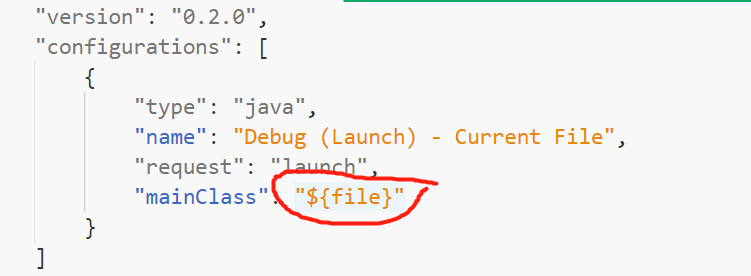
There is nothing in this position, probably because launch.json is not generated. Can you show the contents of launch.json? I try to generate launch.json automatically, but it doesn't work.

 jiayaoO3O
on 13 Dec 2018
jiayaoO3O
on 13 Dec 2018
This config is correct. Maybe there are some environment issues.
Please try the alternative way. Follow the comment https://github.com/Microsoft/vscode-java-debug/issues/120#issuecomment-417269773, use preLaunchTask to launch your program, then F5 to attach to debugger.
testforstephen
on 13 Dec 2018
I know why I can't run it. I should open the "HELLOFX" folder directly.

Now I can click the debug button to run the javafx program, but I still don't understand why this project can run directly but my project can't?
Comparing my project with the examples you provided, I would like to ask if the module-info.java file in the example is automatically generated by maven? I don't have this file in my project, and the code in the .classpath file is generated automatically or manually Input?

jiayaoO3O
on 13 Dec 2018
module-info.java is not auto generated. You need manage it by yourself.
Having module-info.java means your program will be launched as a Java module (module is introduced in java 9). Without module-info.java, it will be taken as a traditional Java program (java 8).
In your app, you use javafx11 library, which must be used by the way of java module. This is probably a bug about how to use java module in a non modular program.
testforstephen
on 13 Dec 2018
Another option is to add arguments to your launch.json like so:
"vmArgs": "--module-path /usr/share/openjfx/lib/ --add-modules javafx.controls,javafx.fxml"
I was having problems running a javaFX 8 project after my openjfx package was updated to version 11. I wasn't familiar with the new Java 9 modules so this was the easiest option while I considered going back to Java 8 or moving forward with Java 11 and setting up modules.
 maroc81
on 18 May 2019
maroc81
on 18 May 2019
Some time ago I'm having this general problem on all IDES, this JavaFX "problem" is easy to fix if you follow these simple steps:
- DON'T create the main static method inside your class that extends Application.
- Create a SEPARATE file class that only has the main static method
- main static method implementation:
Application.launch(MyApp.class);
or with the main [] args:
Application.launch(MyApp.class, args);
 garzy
on 5 Sep 2019
garzy
on 5 Sep 2019
Related issues
 mentaloaf
·
6Comments
mentaloaf
·
6Comments
 dgileadi
·
3Comments
dgileadi
·
3Comments
 isidorn
·
4Comments
isidorn
·
4Comments
 bsaby
·
8Comments
bsaby
·
8Comments
 mojo2012
·
3Comments
mojo2012
·
3Comments
Most helpful comment
Some time ago I'm having this general problem on all IDES, this JavaFX "problem" is easy to fix if you follow these simple steps:
Application.launch(MyApp.class);
or with the main [] args:
Application.launch(MyApp.class, args);