Vscode-java-debug: Java runtime could not be located
OS: win10
VScode: 1.17.2()x64/x86
Jdk: 1.8.0_151(x64/x86)
Plugin: daily build 59
Repro steps:
- Install Language Support for Java by Ret hat and Java debug plugin
- Reload
- Open a project folder and open a .java file in this project
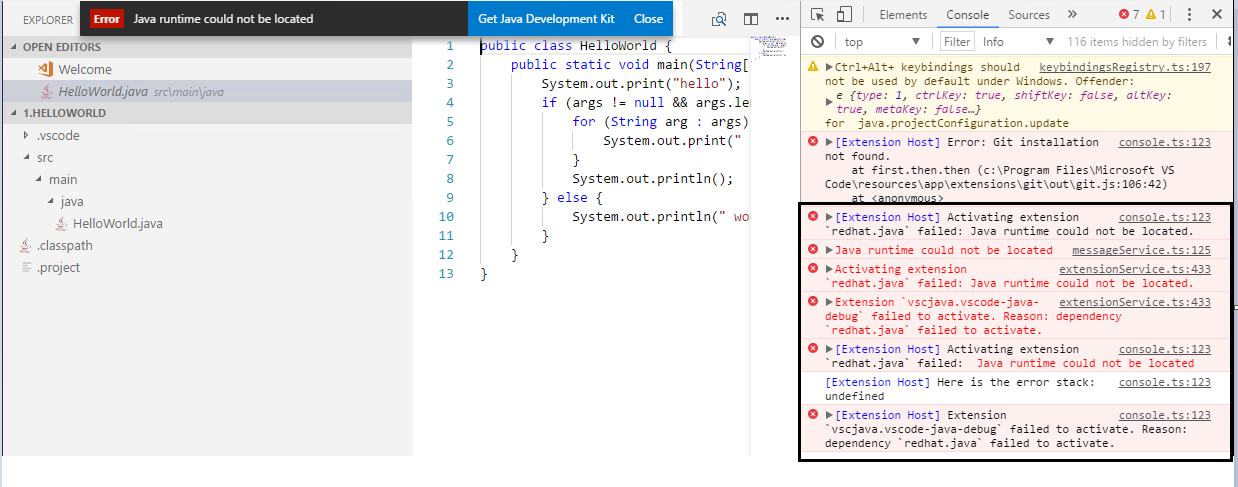
@yaohaizh
 bsaby
bsaby
All 17 comments
@bsaby Is the JAVA_HOME set in your system environment?
 yaohaizh
on 25 Oct 2017
yaohaizh
on 25 Oct 2017
Yes. And after this error occured, restart vscode, Java runtime will work fine.

bsaby
on 25 Oct 2017
It seems the value is not properly resolved by VSCode java extension at the first time. You need restart the VSCode after your set the system variable.
yaohaizh
on 25 Oct 2017
@bsaby please verify if you can still reproduce the issue by setting JAVA_HOME properly.
 akaroml
on 26 Oct 2017
akaroml
on 26 Oct 2017
Still reproduce this issue by setting JAVA_HOME properly using daily build 60.
And this issue only reproduce when reload not restart vscode after installing two java plugin
bsaby
on 26 Oct 2017
@yaohaizh please further investigate this issue.
akaroml
on 27 Oct 2017
VSCode will not populate its system environment when reload. See the VSCode issue here: https://github.com/Microsoft/vscode/issues/6333
yaohaizh
on 6 Nov 2017
For what it's worth, as of 05 March, 2018 the problem illustrated in the original poster's screenshot still exists.
For Linux Mint 32-bit. Visual Studio code 1.20.1.
Installed
/java/jdk1.8.0_161in/usrdirectory. In/binusedjava -versionto verify that the Java executable could be run without error.Added path to JDK in both user and workspace settings:
User Settings:
{
   "java.home": "/usr/java/jdk1.8.0_161",
}
Workspace Settings:
{
  "java.home": "/usr/java/jdk1.8.0_161",
  "python.pydev.java.home": "/usr/java/jdk1.8.0_161",
  "python.linting.pylintPath": "/usr/local/bin/pylint",
  "python.pythonPath": "/usr/bin/python3.5",
}
Although I'm creating Python 3.5 code and not Java code, installed the following extensions in response to guidance offered on this and other forums:

See also https://stackoverflow.com/questions/46751168/visual-studio-code-cant-find-jdk8
- Although I have resolved other issues (such as the inabiity of Visual Studio Code to find the system's instance of _pylint_, the JDK problem persists. And as others with this problem have noted, the solutions offered aren't working.
 WritingSolutions2020
on 6 Mar 2018
WritingSolutions2020
on 6 Mar 2018
@WritingSolutions2020 please give more description of "And as others with this problem have noted, the solutions offered aren't working.", can you give us the a description about your problem:
- are you editing/debugging java code not python code?
- does the error pops show "Java runtime cannot be located"
- what the env variables of
JAVA_HOMEandPATH - what's the result of bash/command prompt result of "which java" and "where java", eg:
C:\Users\andxu>where java

C:\Program Files\Java\jdk1.8.0_152\bin\java.exe
 andxu
on 6 Mar 2018
andxu
on 6 Mar 2018
Actually I think this may be a PyDev extension problem. The popup shown in the original post doesn't occur until I open a PY file. (I'm working entirely with Python, not Java).
ANYHOW I've uninstalled Visual Studio Code and moved on. We can re-close this if you'd like...
WritingSolutions2020
on 6 Mar 2018
Thanks for the feed back, close this issue.
andxu
on 6 Mar 2018
A bit more information. The problem I'm having is that it appears the NONE of the extensions that require a JRE / SDK work. This despite the fact that I've (1) configured and tested JAVA_HOME and PATH, and (2) carerfully configured VCS's JSON configurations.
With regard to JRE / SDK, I have other programs -- Eclipse, jEdit, and others -- that require a JRE. They are all working properly after I installed and pointed them to _jdk1.8.0_161_. I've also used java -version in various places to ensure that that SDK is now this computer's default.
Also, VCS does not report the error until I (a) have PyDev installed, and (b) open a Python 3 source file. So the central problem appears to me to be that PyDev can't use the information I've carefully provided to enable it to find the SDK it needs. AND after removing the PyDev extension the "JRE not found" error no longer occurs.
WritingSolutions2020
on 6 Mar 2018
Seeing the same as @WritingSolutions2020 with:
VS Code version: Version 1.29.0-insider (1.29.0-insider)
OS and version: OSX High Sierra 10.13.6 (17G65)
Also, I'm using jenv which adds another layer of obfuscation, but all shells show:
❯ jenv version
10.0 (set by /Users/bedge/.jenv/version)

❯ java -version
java version "10.0.1" 2018-04-17
Java(TM) SE Runtime Environment 18.3 (build 10.0.1+10)
Java HotSpot(TM) 64-Bit Server VM 18.3 (build 10.0.1+10, mixed mode)

❯ which java
/Users/bedge/.jenv/shims/java
 bedge
on 9 Oct 2018
bedge
on 9 Oct 2018
Hello,
I just installed the Visual studio Code and for the life of me, I keep getting the Java run time could not be located and even after using the paths provided, the error remains. Can anyone kindly help this code newbie.
 joygre1
on 6 Jun 2019
joygre1
on 6 Jun 2019
@joygre1 The checking approach is provided by Language Support for Java(TM) by Red Hat extension, what version did you install Java language support extension?
 testforstephen
on 10 Jun 2019
testforstephen
on 10 Jun 2019
I found an alternative and deleted the Force.com. No worries and thanks so much for responding!
Thanks and regards,
J. Greer
On Jun 9, 2019, at 11:17 PM, Jinbo Wang notifications@github.com wrote:
@joygre1 The checking approach is provided by Language Support for Java(TM) by Red Hat extension, what version did you install Java language support extension?
—
You are receiving this because you were mentioned.
Reply to this email directly, view it on GitHub, or mute the thread.
joygre1
on 10 Jun 2019
sorry for bump the issue. seem this issue is appear on google 1st page, i share my quick solution. read my explanation below

As quick solution, just edit your vscode setting.json and pointing directly to java_home (eg: add "java.home": "C:\\java\\jdk\\java-11-openjdk-11.0.8-2", ). Please refer attached picture, saved it and vscode will ask to restart. After restart, should be no more same issue. I hope this will help.
 RobbiNespu
on 26 Aug 2020
RobbiNespu
on 26 Aug 2020
Related issues
 srfrnk
·
5Comments
srfrnk
·
5Comments
 AlexMAS
·
5Comments
AlexMAS
·
5Comments
 gcbartlett
·
3Comments
gcbartlett
·
3Comments
 llgcode
·
7Comments
llgcode
·
7Comments
 mojo2012
·
5Comments
mojo2012
·
5Comments
Most helpful comment
@bsaby Is the
JAVA_HOMEset in your system environment?