Vscode-java-debug: Failed to resolve classpath: Main class 'org.example.test.Test' doesn't exist in the workspace.
I created a workspace like this:

I get the following error:
Failed
to resolve classpath: Main class 'org.example.test.Test' doesn't exist in the workspace.
What am I doing wrong?
 clankill3r
All 15 comments
@clankill3r The debugger doesn't support package structure for simple java folder yet, you should put Test.java to the root folder and remove org.example.test package declaration. Or open a maven/eclipse/gradle project to try the debugger, because the debugger supports those mature projects more friendly.
 testforstephen
on 12 Oct 2017
testforstephen
on 12 Oct 2017
I tried that and it is extremely bugged.
This project works fine:

With this one I get "Error: Could not find or load main class Test"

Apart from the root path both projects are identical.
clankill3r
on 12 Oct 2017
The maven project works fine however. But I do hope we can go without a maven/eclipse/gradle in the future.
clankill3r
on 12 Oct 2017
This is a known issue that we're fixing. The reason is that the language server doesn't compile the Test.java in background. The workaround is that you modify the Test.java file and that'll trigger the incremental build to generate the Test.class in cache.
@ansyral Please take a look at this issue.
testforstephen
on 13 Oct 2017
I tried that but it does not seem to work. Anyway, I hope a solution will
come soon. For now I will use a maven project.
2017-10-13 3:21 GMT+02:00 Jinbo Wang notifications@github.com:
This is a know issue that we're fixing. The reason is that the language
server doesn't compile the Test.java in background. The workaround is that
you modify the Test.java file and that'll trigger the incremental build to
generate the Test.class in cache.@ansyral https://github.com/ansyral Please take a look at this issue.
—
You are receiving this because you were mentioned.
Reply to this email directly, view it on GitHub
https://github.com/Microsoft/vscode-java-debug/issues/89#issuecomment-336324379,
or mute the thread
https://github.com/notifications/unsubscribe-auth/AAtFWg9ypR4ChQ8LkdA-XIiYvwKQzHKIks5srrsigaJpZM4P2KOa
.
clankill3r
on 13 Oct 2017
@clankill3r #94 is created for this scenario. We'll be working on supporting debugging source code without a project.
 akaroml
on 16 Oct 2017
akaroml
on 16 Oct 2017
@clankill3r The debugger should have support single file without project. Please try it on the latest vscode-java/vscode-java-degger and let's know the result.
 yaohaizh
on 5 Dec 2017
yaohaizh
on 5 Dec 2017
@yaohaizh I tried to debug a single file, but to no avail. I tried it with JDK8 and JDK9 with debug 0.4.0, because this post made me think that could matter.
https://blogs.msdn.microsoft.com/visualstudio/2017/11/10/run-and-debug-java-9-in-visual-studio-code/
- But either way I get the error: Cannot read property 'openConfigFile' of undefined
- Cannot resolve main class automatically, please specify the mainClass (e.g. [mymodule/]com.xyz.MainClass) in the launch.json.
I don't get the dialog where you can choose the class, as the gif in the linked post suggests.
 gijswijs
on 5 Dec 2017
gijswijs
on 5 Dec 2017
@gijswijs Could you try the same steps on the VSCode insider version? The first issue might related to VSCode bugs itself.
yaohaizh
on 5 Dec 2017
@gijswijs What's your JDK version? In JDK 9, there is a known NPE bug when auto resolving the main class. https://github.com/Microsoft/vscode-java-debug/issues/125
testforstephen
on 5 Dec 2017
@yaohaizh I tried it with VScode insider and JDK8, and it's now possible to debug a single file. Thanks for the support!
gijswijs
on 5 Dec 2017
It works!!
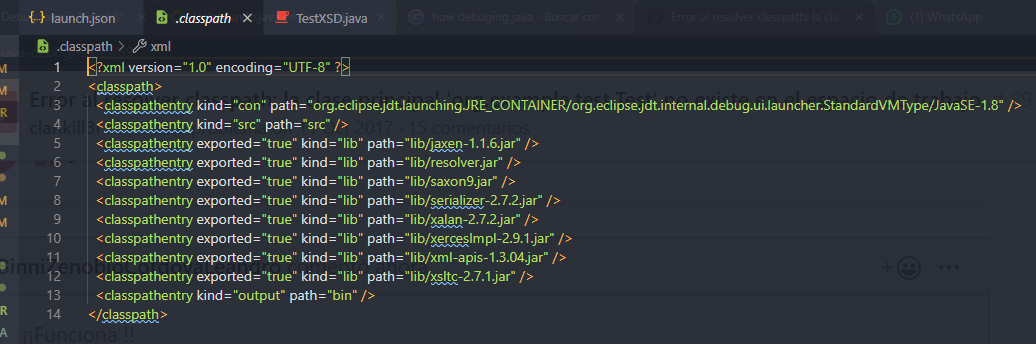
How can I provide a jar files?
I tried:
"args": "-classpath /Users/doekewartena/.m2/repository/org/processing/core/3.3.5"
and:
"args": "-classpath /Users/doekewartena/.m2/repository/org/processing/core/3.3.5/core-3.3.5.jar"
But that does not work.
Also I would prefer a way that intelliSense works.
I also tried a .classpath file in the root:
<?xml version="1.0" encoding="UTF-8"?>
<classpath>
    <classpathentry kind="lib" path="/Users/doekewartena/.m2/repository/org/processing/core/3.3.5/core-3.3.5.jar"/>
</classpath>
Hope this is possible or would be possible in the future.
I'm really looking for a way where I don't have to use maven or eclipse or whatever to set up a simple java project.
clankill3r
on 12 Dec 2017
I just confirmed that this now also works in the regular VSCode.
gijswijs
on 14 Dec 2017
Thanks. Close this as it resolved.
yaohaizh
on 14 Dec 2017
¡¡Funciona!!
¿Cómo puedo proporcionar un archivo jar?
Lo intenté:"args": "-classpath /Users/doekewartena/.m2/repository/org/processing/core/3.3.5"y:
"args": "-classpath /Users/doekewartena/.m2/repository/org/processing/core/3.3.5/core-3.3.5.jar"Pero eso no funciona.
También preferiría una forma en que intelliSense funcione.También probé un
.classpatharchivo en la raíz:<? versión xml = " 1.0 " codificación = " UTF-8 " ?> < classpath > < classpathentry kind = " lib " ruta = " /Users/doekewartena/.m2/repository/org/processing/core/3.3.5/core-3.3.5.jar " /> </ classpath >Espero que esto sea posible o sea posible en el futuro.
Realmente estoy buscando una forma en la que no tenga que usar maven o eclipse o lo que sea para configurar un proyecto java simple.

 BinniZenobioCordovaLeandro
on 1 Nov 2019
BinniZenobioCordovaLeandro
on 1 Nov 2019
Related issues
 bsaby
·
8Comments
bsaby
·
8Comments
 erihanse
·
3Comments
erihanse
·
3Comments
 mojo2012
·
3Comments
mojo2012
·
3Comments
 radu-ion
·
5Comments
radu-ion
·
5Comments
 srfrnk
·
5Comments
srfrnk
·
5Comments
Most helpful comment
@clankill3r The debugger doesn't support package structure for simple java folder yet, you should put Test.java to the root folder and remove org.example.test package declaration. Or open a maven/eclipse/gradle project to try the debugger, because the debugger supports those mature projects more friendly.