Vscode-intelephense: Formating error in html/php file (extra tabs)
I am writing php code, combining html and php for wordpress templates. The problem is that the formatter is not working well, adding other spaces.
Screenshots

Platform and version
macOS High Sierra and Intelephense version 1.3.5
 juanlopezdev
All 10 comments
I'm seeing the same thing:

This has happened before: https://github.com/bmewburn/vscode-intelephense/issues/406
macOS Mojave, Intelephense 1.3.5
 dmpinder
on 16 Dec 2019
dmpinder
on 16 Dec 2019
<?php if ($products_most_viewed->have_posts()) : ?>
    <!-- @start Products-->
    <section class="mb-4 wow fadeInUp">
      <div class="container">
        <h2 class="c-text-subtitle mb-3 text-center text-md-left">Productos más vistos</h2>
        <div class="row justify-content-center">
          <?php while ($products_most_viewed->have_posts()) : ?>
            <div class="col-6 col-lg-3 u-xs370-force-col-full-width">
              <?php
                  $products_most_viewed->the_post();
                  get_template_part('partials/product', 'card');
                  ?>
            </div>
          <?php endwhile; ?>
        </div>
      </div>
    </section>
    <!-- @end Products-->
  <?php endif; ?>
  <?php wp_reset_postdata(); ?>
 bmewburn
on 17 Dec 2019
bmewburn
on 17 Dec 2019
I have the same problem. Since version 1.3, only bugs appear. Please test your plugin more before releasing it. Due to bugs, i dropped the idea of buying a license.
OS : VSCode running in Windows 10 64bit using RemoteSSH in Ubuntu 18.04.3 LTS Server edition.

 nntantidakis
on 17 Dec 2019
nntantidakis
on 17 Dec 2019
Screenshots are not really helpful. What is helpful are code snippets that can be debugged.
bmewburn
on 17 Dec 2019
Sure thing! Here's the snippet from mine:
        <div id="footer-company">
            <p class="title">Company</p>
            <?php wp_nav_menu(array(
                                                                                                                    'menu' => 72,
                                                                                                                )); ?>
            <?php if (!empty(get_field('twitter', 'options'))) { ?>
                <p class="title">Follow us</p>
            <?php } ?>
            <?php require('blocks/standard/social-links/social-links.php'); ?>
I can confirm this, and I've done some troubleshooting to isolate when it happens, following code snippet I've prepared contains when it works and when it starts indenting unreasonably much.
<html>

<head>
    <?php
    echo "It works";
    ?>
    <title>
        <?= "I'm just here for show" ?> - <?= "I am the cause of this" ?>
    </title>
    <?php
                                            echo "It does not work";
    ?>
</head>

</html>
I hope it's easily fixed since it causes quite an annoyance ^^
 Tiinusen
on 17 Dec 2019
Tiinusen
on 17 Dec 2019
On the other hand, there is another small error when one puts html in a php function. For example: Here in the image you can see that the last function is not aligned.
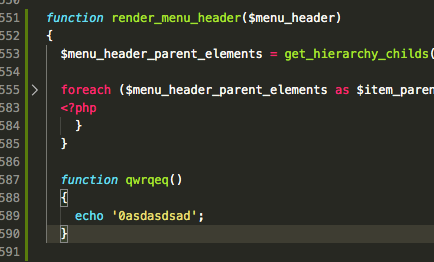
This is the code
function render_menu_header($menu_header)
{
  $menu_header_parent_elements = get_hierarchy_childs($menu_header, 0);   // Elementos padre del menu

  foreach ($menu_header_parent_elements as $item_parent) {
    $item_parent_id = $item_parent['id'];
    $item_parent_title = $item_parent['title'];
    $item_parent_url = $item_parent['url'];
    $item_parent_isactive = check_menu_active($item_parent_url);
    $menu_child_elements = get_hierarchy_childs($menu_header, $item_parent_id);
    ?>
      <li>
        <a class="c-header__nav-link text-uppercase <?php echo $item_parent_isactive; ?>" href="<?php echo $item_parent_url; ?>">
          <?php echo $item_parent_title; ?>
        </a>
        <?php if ($menu_child_elements) { ?>
          <ul class="c-header__subnav">
            <?php
                  foreach ($menu_child_elements as $item_child) {
                    $item_child_url = $item_child['url'];
                    $item_child_title = $item_child['title'];
                    $item_child_isactive = check_menu_active($item_child_url);
                    ?>
              <li>
                <a class="c-header__subnav-link <?php echo $item_child_isactive; ?>" href="<?php echo $item_child_url; ?>">
                  <?php echo $item_child_title; ?>
                </a>
              </li>
            <?php } ?>
          </ul>
        <?php } ?>
      </li>
  <?php
    }
  }

  function qwrqeq()
  {
    echo '0asdasdsad';
  }
When one minimizes the code blocks by visual studio code, the first function literally absorbs the second.

juanlopezdev
on 17 Dec 2019
Confirming Bug. Formatting is buggy.
Code Sample:
<?php
    echo "text";
?>


<?php if (1) : ?>
    <li><a href=""><span></span><span><?php echo "hi" ?></span></a></li>
<?php endif ?>

<?php if (1) : ?>
<?php
if ((true === false)) {

}
?>
<?php endif ?>
After Formating:
<?php
echo "text";
?>


<?php if (1) : ?>
    <li><a href=""><span></span><span><?php echo "hi" ?></span></a></li>
<?php endif ?>

<?php if (1) : ?>
    <?php
                                        if ((true === false)) {
                                        }
    ?>
<?php endif ?>
 stell
on 17 Dec 2019
stell
on 17 Dec 2019
I have the same issue, I found something that maybe can help
Bug here:

<div class="col-12 mb-5">
  <nav aria-label="breadcrumb">
    <ol class="breadcrumb text-uppercase mt-5 mb-0 breadcrumbBackColor">
      <li class="breadcrumb-item"><a href="<?php echo $blog['dominio']; ?>" class="color-link"><i class="fas fa-home icon"></i> Inicio</a></li>
      <li class="breadcrumb-item active" aria-current="page">
        <?php
                                            echo $post['titulo_post'];
        ?>
      </li>
    </ol>
  </nav>
</div>
But if I put the previous echo in other line the problem goes off:

<div class="col-12 mb-5">
  <nav aria-label="breadcrumb">
    <ol class="breadcrumb text-uppercase mt-5 mb-0 breadcrumbBackColor">
      <li class="breadcrumb-item"><a href="
      <?php echo $blog['dominio']; ?>" class="color-link"><i class="fas fa-home icon"></i> Inicio</a></li>
      <li class="breadcrumb-item active" aria-current="page">
        <?php
        echo $post['titulo_post'];
        ?>
      </li>
    </ol>
  </nav>
</div>
 erickxs
on 18 Dec 2019
erickxs
on 18 Dec 2019
Thanks for the examples and patience. Should be good now in 1.3.6.
bmewburn
on 18 Dec 2019
Related issues
 swashata
·
3Comments
swashata
·
3Comments
 usrnm-nk
·
3Comments
usrnm-nk
·
3Comments
 muuvmuuv
·
4Comments
muuvmuuv
·
4Comments
 Ilyes512
·
3Comments
Ilyes512
·
3Comments
 vanasis
·
4Comments
vanasis
·
4Comments
Most helpful comment
Thanks for the examples and patience. Should be good now in 1.3.6.