Vscode-intelephense: VSCode Remote Container with Intelephense causes resource starvation and node crashes
Describe the bug
Intelephense becomes very resource hungry when indexing and causes node to crash, while used in conjunction with the VSCode Remote/Container Attachment. It sometimes causes the container to become non-responsive, and never seems to fully complete its indexing (The Intelephense Indexing spinny-wheel doesn't go away, even after a couple of days of letting it run), and leaves behind these crash reports: report.20191212.073711.88698.0.001.json.txt (I appended .txt to get the bug tool to accept my file).
I've tried allowing as much as 2GB RAM to Intelephense to let it do its thing, and wound up having to scale it back or it would choke the container.
To Reproduce
This happens when developing for Magento, which is a very large codebase. I use a derivative of my Magento Open Source package for Magento Commmerce Cloud development. I allow 6 processor cores and 6GB RAM for the Docker VM. I install VSCode Remote and Intelliphense into the container's vscode server, and when I open a folder that contains php code, intelliphense goes to work indexing the project.
Expected behavior
Um, index and not crash? ;-)
Screenshots
N/A
Platform and version
I'm running Win10 Pro (1809), VSCode 1.40.2, Intelephense 1.3.3 (premium), and Docker Desktop 2.1.0.5 to host an Ubuntu 1804 container.
 wknechtel
All 9 comments
I've made a slight change in 1.3.5. Unfortunately larger workspaces do use quite a bit of memory. In my 1.3.5 tests indexing magento 2 (30k files) takes up ~600MB after GC but spikes to ~1.2GB at times during indexing. I'll see if some improvements can be made here.
 bmewburn
on 15 Dec 2019
bmewburn
on 15 Dec 2019
Found a memory leak were large string were being held onto. Fixed in 1.3.6. Does this improve things at all? In my tests on my i5 laptop magento2 indexes in around 90s and uses 500MB memory after GC.
bmewburn
on 18 Dec 2019
EDIT: I didn't see your most recent post until after posting this tome. I'll update to 1.3.6 and get back to you :-)
I updated to 1.3.5 and tried again. With the amount of allowed memory set to 1024MB I was still getting crash reports about it being out of memory. I increased it to 3096 (You mentioned 30k files for Magento 2 - when you move to the enterprise edition, it shoots up to 51k. Oof.) and that particular behavior went away. However, it's still binding up the procs. While idling, the load average on this particular docker instance hovers around 0.12. During the first couple of hours I was letting it index it was between 2 and 6 or so, and it was peaking near 18. Once the load average approaches 5 or so, the connection to the instance starts getting spotty. I let it run overnight, thinking that it would be done by the time I got back to it this morning, since it wasn't crashing anymore. No such luck, I'm afraid, When I got in this morning it was bound up with the load average being over 60.
I did notice that at times the number of instances of indexers was around 12 or so. Is there a way, perhaps, of limiting the number of indexers, so that while it will take longer to index, it won't bind up the instance? I'm attaching this screenshot just so you can see how the load averages are peaking.

wknechtel
on 18 Dec 2019
That did it! You, sir, are fantastic. It indexed in a reasonable amount of time and let me get on with things. Thanks so very much!
wknechtel
on 18 Dec 2019
I'm afraid this has cropped back up again. Currently running VSCode 1.42.1 and Intelephense 1.3.11. The report file is attatched:
report.20200306.084145.737.0.001.json.txt
wknechtel
on 6 Mar 2020
I'm trying to run VS Code Remote SSH to a Magento 2 server and it just uses 100% CPU on the remote server and never stops indexing, and the autocomplete (Ctrl+Space) just shows "Loading".
 BreezeMaxWeb-NS
on 1 Apr 2020
BreezeMaxWeb-NS
on 1 Apr 2020
Encounter the same issues. Also tried to bump maxMemory up to 4096 (4 GB). When I start indexing it shows, that it has finished:
[Info  - 5:32:06 PM] Initialising intelephense 1.3.11
[Info  - 5:32:06 PM] Reading state from /home/mg/.vscode-server/data/User/workspaceStorage/fb5379f3a83c3b662785d7ea6ca6bb41/bmewburn.vscode-intelephense-client/a84a495.
[Info  - 5:32:06 PM] Initialised in 27 ms
[Info  - 5:32:11 PM] Indexing started.
[Info  - 5:35:59 PM] Indexing ended. 53261 files indexed in 227s.
[Info  - 5:35:59 PM] Writing state to /home/mg/.vscode-server/data/User/workspaceStorage/fb5379f3a83c3b662785d7ea6ca6bb41/bmewburn.vscode-intelephense-client/a84a495.
[Info  - 5:36:21 PM] Wrote state in 22.4s.
But autocompletion does load forever, keeps Loading.... I tried several restarts and also reboot of my remote server but nothing changes. I am using the offical Remote SSH extension of VSCode. Perhaps my infos might help you - please let me know if you need anything else! 🙂
 matzeeable
on 2 Apr 2020
matzeeable
on 2 Apr 2020
Setting the "intelephense.maxMemory" setting in settings.json seems to be ignored when using remote WSL2 mode.
VSCode 1.46.1
Intelephense 1.4.1
Intelephense crash report attached
local settings.json
{
    "intelephense.maxMemory": 8192,
    "intelephense.files.associations": [

        "*.php",
        "*.phtml"
    ],
    "intelephense.environment.phpVersion": "7.3.0"
}
Notice that even though i have max memory set to 8192 the crash report shows
"memoryLimit": 2197815296
report.20200630.104011.14913.0.001.json.txt
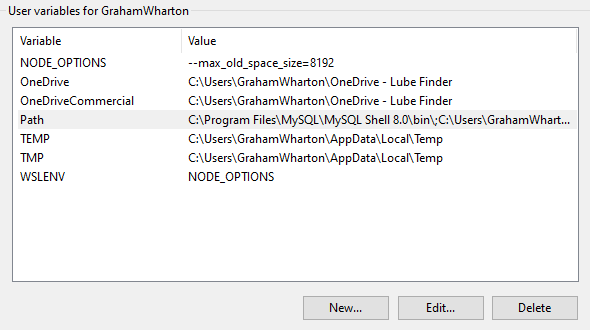
As a workaround if you need to control the max memory limit for node running within WSL you can create the following environment variables in Windows. In this case, increasing node memory usage to 8GB. The presence of the WSL_ENV variable causes the NODE_OPTIONS environment variable to be shared within WSL.
NODE_OPTIONS=--max_old_space_size=8192
WSL_ENV=NODE_OPTIONS
 gwharton
on 30 Jun 2020
gwharton
on 30 Jun 2020
This seems related
 jfinstrom
on 29 Sep 2020
jfinstrom
on 29 Sep 2020
Related issues
 ghnp5
·
3Comments
ghnp5
·
3Comments
 zlianon
·
3Comments
zlianon
·
3Comments
 swashata
·
3Comments
swashata
·
3Comments
 muuvmuuv
·
4Comments
muuvmuuv
·
4Comments
 dgunay
·
3Comments
dgunay
·
3Comments
Most helpful comment
Encounter the same issues. Also tried to bump
maxMemoryup to4096(4 GB). When I start indexing it shows, that it has finished:But autocompletion does load forever, keeps
Loading.... I tried several restarts and also reboot of my remote server but nothing changes. I am using the offical Remote SSH extension of VSCode. Perhaps my infos might help you - please let me know if you need anything else! 🙂