Vscode-intelephense: No Symbols Found In Document for some PHP Files
It seems that symbols are not being displayed in VSCode (both stable and insider builds) for certain files. When opening some PHP files, then showing the symbols pane, I get the error message:
No symbols found in document 'myfile.php'`
In other files it seems to work fine. (Unfortunately I can't paste the file here, as it is licensed.)
 mikebronner
All 7 comments
There was a bug with variable variables $$foo that was preventing symbols from showing. Should be resolved now in v1.0.0
 bmewburn
on 20 Feb 2019
bmewburn
on 20 Feb 2019
I have a file that's tripping on this too, but I'm not seeing any variable variables. I'll try to reduce and see what's causing it to trip up.
--edit
It looks like in my case it was leading slashes on use statements:
<?php
use \Phalcon\Db\Column as Column;
use \Phalcon\Db\Index as Index;
use \Phalcon\Db\Reference as Reference;
...
causes the no symbols error where as
<?php
use Phalcon\Db\Column as Column;
use Phalcon\Db\Index as Index;
use Phalcon\Db\Reference as Reference;
...
behaves as expected.
 jellisii
on 20 Feb 2019
jellisii
on 20 Feb 2019
This is also happening for me and seems like a bug. Can confirm that any use statements with a preceding slash causes the problem as outlined by @jellisii.
@bmewburn is this something you'd be willing to include in a patch release, I could look into making a PR for it. Seems like lots of projects are going to have the root namespace aliasing in use.
Edit: _after looking at the source a bit more, i'm not sure what introduced this change from version 0.8.8 to version 1.0.2, would be happy to help if I can, but in terms of making a PR I'll need a little extra direction because it turns out I've got no idea how this thing works!_ 😂
 austenc
on 22 Feb 2019
austenc
on 22 Feb 2019
I am finding that it is also prepending slashes on functions like array_key_exists().
mikebronner
on 22 Feb 2019
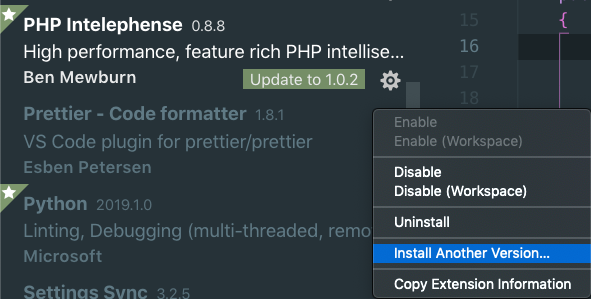
Found a workaround until this gets patched. Code lets you install other versions of an extension now. Installing 0.8.8 brings back the expected functionality.
austenc
on 22 Feb 2019
@jellisii thanks for narrowing it down
bmewburn
on 23 Feb 2019
Thanks Ben!
austenc
on 25 Feb 2019
Related issues
 muuvmuuv
·
4Comments
muuvmuuv
·
4Comments
 swashata
·
3Comments
swashata
·
3Comments
 aleksandervines
·
3Comments
aleksandervines
·
3Comments
 ottopic
·
3Comments
ottopic
·
3Comments
 ghost
·
3Comments
ghost
·
3Comments
Most helpful comment
Found a workaround until this gets patched. Code lets you install other versions of an extension now. Installing 0.8.8 brings back the expected functionality.