Vscode-intelephense: Curly bracket on the same line ?
Hi,
It was asked before (like here https://github.com/bmewburn/vscode-intelephense/issues/26), however, I wasn't able to find a solution for it.
Thank you
 jamesst20
All 7 comments
There's no settings to customise formatting. The design goal is to have a minimal config, PSR2 formatter. You can disable this formatter in settings and install a more configurable formatter.
 bmewburn
on 19 Mar 2018
bmewburn
on 19 Mar 2018
Is this still the case?
I just installed Intelephense because it seems very promising, but really didn't like how to reformatted all my starting braces to the next line. I searched and searched for config options, but only found this post. I think you are doing something great...I just can't live with braces on the next line.
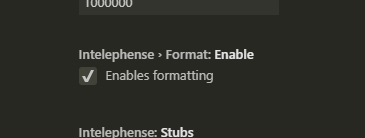
Where do I disable "the formatter in settings"?
 eh1160
on 22 Mar 2019
eh1160
on 22 Mar 2019
@eh1160 - From what i see, you can disable Formatter in settings:
 kanlukasz
on 14 Jun 2019
kanlukasz
on 14 Jun 2019
Is there still no way to prevent brackets from being forced to the next line? Thanks
 plato1123
on 30 Jan 2020
plato1123
on 30 Jan 2020
Hello,
I have purchased the license of your promising plugin.
Unfortunately the bracket formatting is a nightmare in PHP.
We should be able to configure the formatting according our PSR or our phpcs rule.
Can you help on this?.
Kind regards.
 ku-enza
on 17 Apr 2020
ku-enza
on 17 Apr 2020
Hello,
I have purchased the license of your promising plugin.
Unfortunately the bracket formatting is a nightmare in PHP.
We should be able to configure the formatting according our PSR or our phpcs rule.
Can you help on this?.
Kind regards.
You are asking about something in a closed issue so i recommend creating a new ticket
Anyway the goal of the project was minimal configuration, formatter PSR2.
I don't know what the target looks like now.
Here is a ticket (#729) regarding the possibility of changing the formatter,
kanlukasz
on 17 Apr 2020
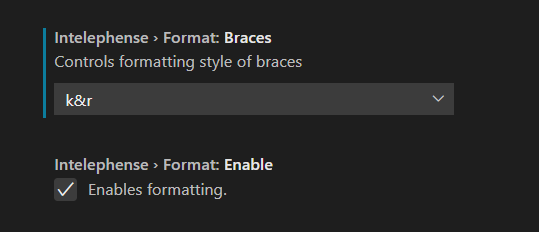
I was able to leave brackets on same line with k&r
 georgeglessner
on 25 Aug 2020
georgeglessner
on 25 Aug 2020
Related issues
 zlianon
·
4Comments
zlianon
·
4Comments
 vanasis
·
4Comments
vanasis
·
4Comments
 ghnp5
·
3Comments
ghnp5
·
3Comments
 aleksandervines
·
3Comments
zlianon
·
3Comments
aleksandervines
·
3Comments
zlianon
·
3Comments
Most helpful comment
I was able to leave brackets on same line with k&r