Vscode-icons: Angular Icons Replaced with Plain TS
[x] I'm sure this issue is not a _duplicate_.
More info:
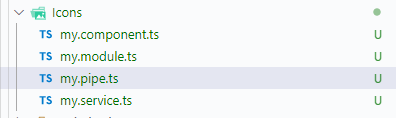
Some icons specific for Angular, such as .component.ts and .service.ts (full list here #437) appear to me as plain typescript since the latest release:
 rodrigodivino
👍2
>All comments
I can confirm the same issue on my current setup after last update. The fix is to manually activate the angular icons at workspace level by opening the command toolbar and select "Icons: toggle angular preset (workspace level)"
 KingDarBoja
on 18 Sep 2020
KingDarBoja
on 18 Sep 2020
👍5
Was this page helpful?
0 / 5 - 0 ratings
Related issues
 ajsb85
·
4Comments
ajsb85
·
4Comments
 ventayol
·
3Comments
ventayol
·
3Comments
 Tekbr
·
3Comments
Tekbr
·
3Comments
 yageek
·
3Comments
yageek
·
3Comments
 filleduchaos
·
3Comments
filleduchaos
·
3Comments
Most helpful comment
I can confirm the same issue on my current setup after last update. The fix is to manually activate the angular icons at workspace level by opening the command toolbar and select "Icons: toggle angular preset (workspace level)"