Vscode-icons: Annoying 'info' popup appears on every launch of vscode
- [x] I'm sure this issue is not a duplicate?
- [ ] I want to create an icon request
When launching vscode, a very annoying 'info' banner appears saying 'vscode-icons now ships with official API support.'

Also, when 'Learn more about File & Folder icons' or 'Learn about this extension', nothing happens and the info banner remains there.
I am running on Linux if that is any help.
 joealden
All 32 comments
Which vscode version are you using? Extension version?
 robertohuertasm
on 8 Aug 2017
robertohuertasm
on 8 Aug 2017
Vscode version 1.14.2
Vscode-icons version 7.12.0
joealden
on 8 Aug 2017
@joealden Are there any errors when you toggle the developers tool?
Help > Toggle Developers Tool. Something like settings.json not found?
 jens1o
on 8 Aug 2017
jens1o
on 8 Aug 2017
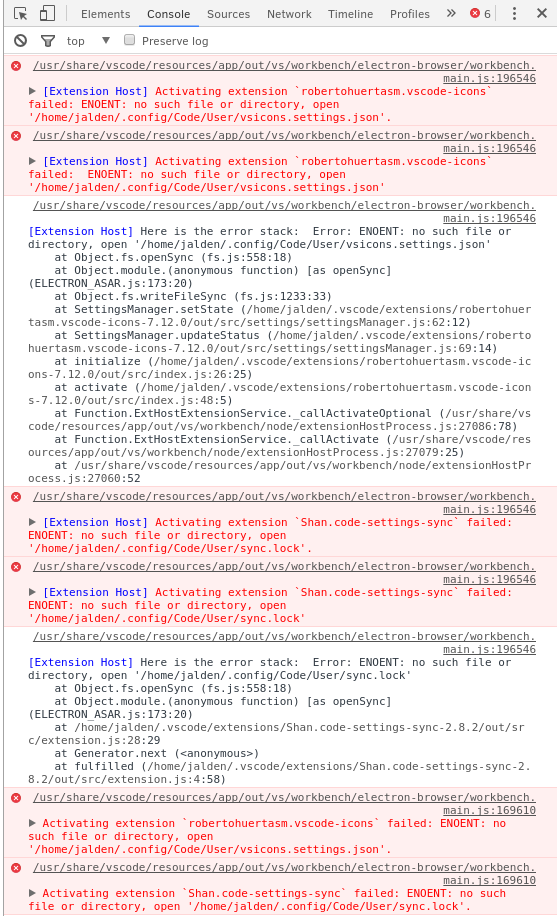
It looks like you are correct, looking at the top two errors in the console.
Ignore the other error messages as they are from another extension.
joealden
on 8 Aug 2017
Can you verify the folder /home/jalden/.config/Code/User has read, write and execute permissions?
jens1o
on 8 Aug 2017
It appears that my vscode config directory is called 'Code - OSS' instead of 'Code' which sounds like an issue. I have created a copy of the contents inside my 'Code - OSS' dir to a 'Code' dir and it has solved the issue.
I am guessing that this is an issue with my distributions naming of folders / config of vscode itself.
joealden
on 8 Aug 2017
Ehm, we had fixed that issue in 7.11...
Can you show us the package.json of the finished build?
jens1o
on 8 Aug 2017
Finished build of what? The extension? And where would I find this file?
joealden
on 8 Aug 2017
It seems that you're using a special build of VSCode. The original issue: #1101.
robertohuertasm
on 8 Aug 2017
Yes it looks that way, most packages in my distros repo are built from source, so it would explain it. However, from that linked issue, it sounds as though it was fixed?
joealden
on 8 Aug 2017
Originally, yes, it was.
I mean the package.json of your build of vscode. There should be a name that differs from what we've had implemented.
jens1o
on 8 Aug 2017
Is this the file you are looking for? https://dev.solus-project.com/source/vscode/browse/master/files/product.json
joealden
on 8 Aug 2017
That's strange, from my eyes, that should be fine.
@JimiC Maybe you can help here?
jens1o
on 8 Aug 2017
I thought so too, do you think that it would be worth contacting the vscode maintainer of my distro?
joealden
on 8 Aug 2017
Personally I would do it, yes.
jens1o
on 8 Aug 2017
For what I see, your vscode distro it's using the official name. That's why we detect it as Code and not Code - OSS.
Here you have a file that seems to be expecting another installation path.
Contact your vscode distro mantainer and ask him about this incongruence.
robertohuertasm
on 8 Aug 2017
Thank you for the info, will do.
joealden
on 9 Aug 2017
I'm also having this issue.
Every time I open VSCode the popup shows. I clic Activate but next time it shows again.

 thewinger
on 19 Sep 2017
thewinger
on 19 Sep 2017
@thewinger Take another screeny of the Console after you click on Activate, and be so kind to tell us what version of the extension you have installed.
 JimiC
on 19 Sep 2017
JimiC
on 19 Sep 2017
After clicking Activate nothing happens in the Console.
vscode-icons version: 7.13.0
I am on Mac High Sierra 10.13 Beta (17A362a).
Maybe that has to do something with it.
thewinger
on 19 Sep 2017
Do the following:
- Close
vscode. - Locate
/Users/<your_user>/Library/Application Support/Code/User/vsicons.settings.jsonfile. - Delete
vsicons.settings.jsonfile. - Restart
vscode.
If vscode-icons is already present in your workspace settings the info message should not appear.
In case it appears, click on Activate and repeat step 4.
After that, the info message should not appear again.
JimiC
on 19 Sep 2017
It doesn't appear anymore.
Thank you very much
thewinger
on 19 Sep 2017
I'm on Windows 8.1, vscode 1.16.1, vscode-icons 7.13.0 .
I've had vscode-icons installed for several vscode versions now, but It's not my default icons theme (occasionally I check it out after an update though). I don't recall such infobar issues in the past.
After the last vscode-icons update, the infobar showed (eventhough it wasn't set as my default icons theme - I think it shouldn't pop on such case). I dismissed it and it showed again on next startup. I chose "Activate", closed vscode, started it again (no infobar now), reverted to my other preferred icons theme, started vscode, and the infobar popped again.
Do the following:
Close vscode.
Locate /Users/<your_user>/Library/Application Support/Code/User/vsicons.settings.json file.
Delete vsicons.settings.json file.
Restart vscode.
Deleting the file (at .../AppData/Roaming/Code/User/vsicons.settings.json ) does not help. It's recreated on startup and has this content:
{"version":"7.13.0","status":2,"welcomeShown":true}
Despite welcomeShown being true, the infobar still pops on startup after I change to another icon theme (assuming the welcome _is_ the infobar, but regardless, the issue exists).
In case it appears, click on Activate and repeat step 4.
After that, the info message should not appear again.
I have, it didn't help.
Any chance you could fix it in an update without needing to manually touch config files?
 avih
on 20 Sep 2017
avih
on 20 Sep 2017
@avih In your case, the extension is working as intended. If you don't want the info message to show when you use another file icon theme, then disable the extension from the Extensions section (use either Disable (Workspace) or Disable (Always)). When you want to use our extension again, just re-enable it.
There is nothing to fix here.
P.S. The extension settings file will also be written to disk as long as the extension is enabled.
JimiC
on 20 Sep 2017
@JimiC, I was also confronted with this behavior yesterday while using the Insiders version. I think we should provide a way to disable this warning. Something like a button Never warn me about this again or something similar. I like to change my icon theme just to see how other packages are doing and , IMHO, it seems like a little bit excessive to have to disable the extension in order to avoid this message.
I think it has a minor impact in our development effort and a major impact in terms of user experience.
robertohuertasm
on 20 Sep 2017
@robertohuertasm Then change the condition in https://github.com/vscode-icons/vscode-icons/blob/master/src/init/welcome.ts#L13 from OR to AND.
JimiC
on 20 Sep 2017
@avih In your case, the extension is working as intended.
OK, this is surprising.
If you don't want the info message to show when you use another file icon theme
Wait, you mean there's at least one person who actually wants to see that info bar on each startup when vscode-icons is not the active theme? is "vscode-icons now ships with official API support." such an important message for end users? It doesn't strike me as such, personally.
Additionally, it behaves unlike all other (icon)themes. With all other colors/icons themes, you can have several installed and not disabled, but just one active. There's even a dedicated menu item to choose the active one among the installed ones. The non active ones shouldn't bug me, and certainly not more than once.
then disable the extension from the Extensions
I did already earlier. It's too annoying otherwise.
There is nothing to fix here.
There is. The design.
avih
on 20 Sep 2017
@avih, I understand your concern, but please let's be more peaceful in our comments and try to not get out of normal tone (English is not my mother tongue so I don't know if I expressed this with the right amount of finesse, no intention to offend anyone here).
We really appreciate your insights and will certainly take a look at this issue and try to improve its user experience. I encourage you to share your opinions about the extension and give us more points of improvement so we can discuss it.
robertohuertasm
on 20 Sep 2017
It was a minor sarcasm, come on ;) and not even in vain. Otherwise, I don't have anything further to add to my previous post.
avih
on 20 Sep 2017
Seems it pop up when another icon theme is on, this will ask to be activated.
 linonetwo
on 20 Sep 2017
linonetwo
on 20 Sep 2017
It pops up with VSCode Great Icons theme. I really don't like the default vscode-icons theme, so this is annoying. I already have "vsicons.dontShowNewVersionMessage": true,
Easy fix :
Go to c:\Users\<youruser>\.vscode\extensions\robertohuertasm.vscode-icons-7.13.0\out\src\init\index.js and comment __export(require("./welcome"));
JS is so awesome. I don't understand why we need that anyways, we are talking about icons, it also slows down vscode significantly.
Suggestion : Add "vsicons.silent": true to stop messages entirely from the extension.
 Leninsky
on 22 Sep 2017
Leninsky
on 22 Sep 2017
@isti37 You're free to look into this issue, we plan to get rid of that excessive messaging: #1176
Also, we do not recommend changing the source files, this may have unwanted side-effects and you need to do that after each update.
jens1o
on 22 Sep 2017
Related issues
 Alex-Sokolov
·
3Comments
Alex-Sokolov
·
3Comments
 filleduchaos
·
3Comments
filleduchaos
·
3Comments
 RobPethick
·
3Comments
robertohuertasm
·
4Comments
RobPethick
·
3Comments
robertohuertasm
·
4Comments
 iRoachie
·
3Comments
iRoachie
·
3Comments
Most helpful comment
It was a minor sarcasm, come on ;) and not even in vain. Otherwise, I don't have anything further to add to my previous post.