Vscode-gitlens: Where do I change ${author}?
Where do I change ${author} ? Where does it come from?
 pmahend1
All 14 comments
Sorry, I'm not sure what you are asking about.
 eamodio
on 15 Nov 2019
eamodio
on 15 Nov 2019
@eamodio

I would like to change this value. In some commits only my first name is coming up. I would like to update it from CodeLens . Hope there is a way
pmahend1
on 15 Nov 2019
You can click on that _Commit Tokens_ link and it will take you to the documentation about those tokens. Also if you use use the GitLens interactive settings editor from the command palette run GitLens: Open Settings, you'll get a more guided experience

eamodio
on 15 Nov 2019
And where do I set value for the token author?
pmahend1
on 15 Nov 2019
Huh? You don't -- those are replacement tokens which come from the commit.
eamodio
on 15 Nov 2019
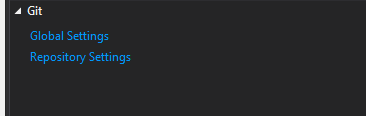
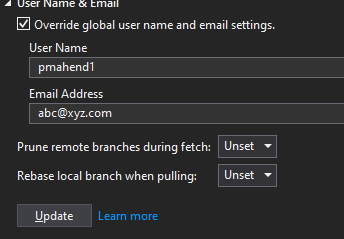
Ok. I get it but is there a way I can override this for a repository or all git repositories?
We have this feature in Visual studio Windows and Mac
pmahend1
on 15 Nov 2019
I'm sorry I really don't understand what you are trying to do. Those tokens come from the commits themselves -- which could all have different authors. So what do you mean by override?
Are you trying to change how Git displays a particular author?
eamodio
on 15 Nov 2019
Here is the query.
My full name is "ABC XYZ" , if I commit and push from other applications like Visual studio , Visual studio mac , then commit history shows author as ABC XYZabcxyz@company.com
When I commit and push from VS code its showing ABC abcxyz@company.com
I would like to know if I change it to _ABC XYZ_ in VS Code or GitLens settings
Is that even possible.
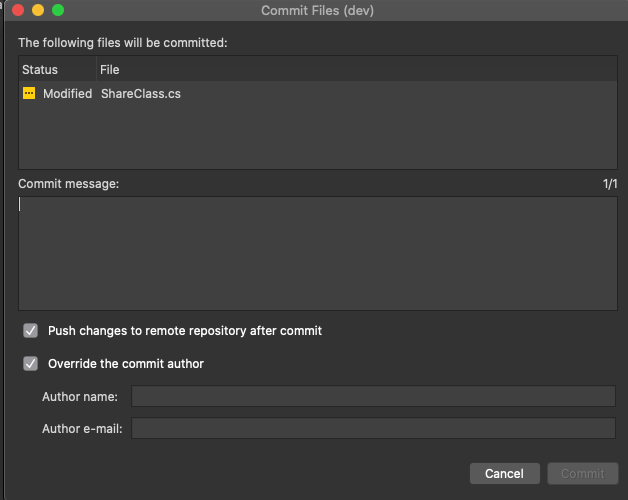
Is there setting which does below things
$ git config --global user.name "John Doe"
$ git config --global user.email "[email protected]"
on VS Mac it looks like below
pmahend1
on 15 Nov 2019
Ah, VS Code Git doesn't offer an override for the author name -- it just uses your git config settings. I would suggest to set your global/local git config to the name you would like to have show up in your commits.
You can use the "mailmap" feature of Git (via a .mailmap file) to merge multiple commit identities into 1 (which GitLens will then honor).
Here is a good overview of Git mailmap (while this is from Atlassian it isn't Atlassian/Bitbucket specific): https://blog.developer.atlassian.com/aliasing-authors-in-git/
Hope that helps!
eamodio
on 15 Nov 2019
I could do it from command line but wanted to check git extension within VS code or GitLens support this. Thanks! May be I will add a request to support this to at VSCode (Source control). Would you be able to add it in Gitlens too?
pmahend1
on 15 Nov 2019
Feel free to open an issue on the vscode repo -- GitLens doesn't offer commit capability, so it isn't something that would apply to GitLens.
eamodio
on 15 Nov 2019
@eamodio is there a way to show the $(author) token as "John Doe" instead of the rendered suffix "You".
 discitechris
on 18 Aug 2020
discitechris
on 18 Aug 2020
@discitechris No, that currently isn't an option. Could you explain why you would want that?
eamodio
on 18 Aug 2020
This issue has been automatically locked since there has not been any recent activity after it was closed. Please open a new issue for related bugs.
![github-actions[bot] picture](https://avatars2.githubusercontent.com/in/15368?v=4&s=40) github-actions[bot]
on 25 Nov 2020
github-actions[bot]
on 25 Nov 2020
Related issues
 obrejla
·
3Comments
obrejla
·
3Comments
 susiwen8
·
3Comments
eamodio
·
3Comments
susiwen8
·
3Comments
eamodio
·
3Comments
 derrickstolee
·
3Comments
derrickstolee
·
3Comments
 Ardeshir81
·
3Comments
Ardeshir81
·
3Comments