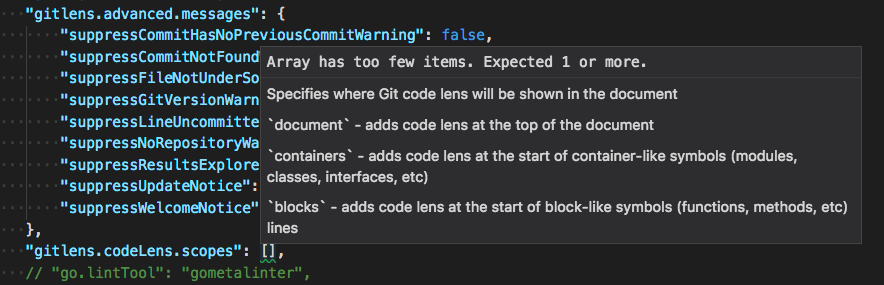
Vscode-gitlens: `gitlens.codeLens.scopes` setting cannot be empty
- GitLens Version: v8.0.2
- VSCode Version: 1.20.1
- OS Version: OSX 10.13.3 (17D102)
 dbkaplun
All 5 comments
What are you trying to do that you don't want any scopes? Having no scopes is akin to just turning off the code lens, so use "gitlens.codeLens.enabled": false instead if you want to disable it.
You can also just use interactive settings editor built into GitLens to configure things how you'd like. You can open it from the command palette GitLens: Open Settings 😄
 eamodio
on 28 Feb 2018
eamodio
on 28 Feb 2018
@eamodio I just want this to be visible during editing:
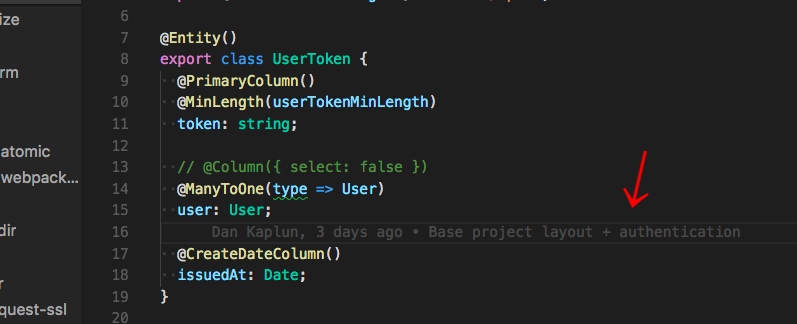
Is that an acceptable use case?
dbkaplun
on 28 Feb 2018
The scopes only affect the code lens, not the current line blame (or anything else). So I'm still not sure what you are looking to do. But I would recommend opening the interactive settings editor, because it will show you visually how each setting works and how it will behave.
eamodio
on 28 Feb 2018
"gitlens.codeLens.enabled": false from your edit works for me. Thanks!
dbkaplun
on 28 Feb 2018
This issue has been automatically locked since there has not been any recent activity after it was closed. Please open a new issue for related bugs.
![github-actions[bot] picture](https://avatars2.githubusercontent.com/in/15368?v=4&s=40) github-actions[bot]
on 6 Dec 2020
github-actions[bot]
on 6 Dec 2020
Related issues
 roblourens
·
4Comments
roblourens
·
4Comments
 ridhwaans
·
3Comments
ridhwaans
·
3Comments
 dwlsalmeida
·
3Comments
dwlsalmeida
·
3Comments
 vgrafe
·
3Comments
vgrafe
·
3Comments
 susiwen8
·
3Comments
susiwen8
·
3Comments
Most helpful comment
What are you trying to do that you don't want any scopes? Having no scopes is akin to just turning off the code lens, so use
"gitlens.codeLens.enabled": falseinstead if you want to disable it.You can also just use interactive settings editor built into GitLens to configure things how you'd like. You can open it from the command palette GitLens: Open Settings 😄