Vscode-git-graph: New branch line on graph?
Hello
_In fact, I'm still learning to work with git, so I'm not sure this question is justified, but I'll try_
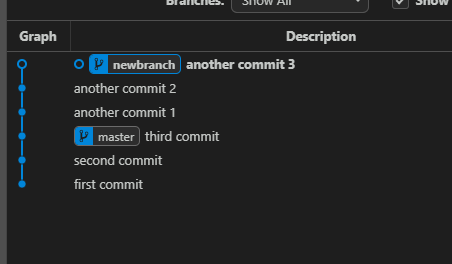
I don't understand why after creating a new branch and several commits, there is no new line in the graph
It's hard to explain, so I'll try to show it in the picture below
Here's how it is now:
Here's how I expect it:
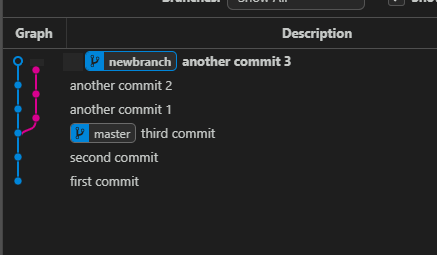
I created new branch with command:
git checkout -b newbranch
My VSCode:
Version: 1.40.2 (system setup)
Commit: f359dd69833dd8800b54d458f6d37ab7c78df520
Date: 2019-11-25T14:54:45.096Z
Electron: 6.1.5
Chrome: 76.0.3809.146
Node.js: 12.4.0
V8: 7.6.303.31-electron.0
OS: Windows_NT x64 10.0.18363
 kanlukasz
All 3 comments
Commits have to be in a list, the branch lines describe how they relate to each other as best they can.
This means that some branches appear in line with each other simply because the commits were in that order and there was no other information to force a new line to be created.
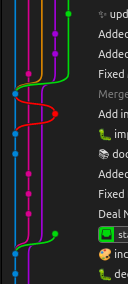
If you checked out the master branch and made another commit directly to it, or had some uncommitted changes, you would see the branch lines change to match what you expect would happen.
Here is a slightly complicated example from one of my repos:
 willpower232
on 4 Dec 2019
willpower232
on 4 Dec 2019
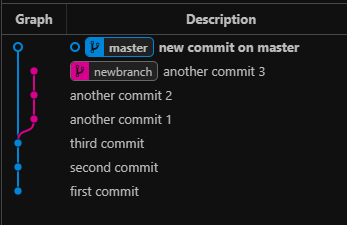
Even though you've created newbranch and made commits on it, it is shown in the graph straight above the master branch as the master branch has no new commits on it (and stops where the master label is). In your example there is only one line of history in the repository (even though there are two branches), one line of history = one column in the graph with one colour.
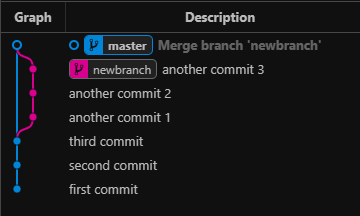
The graph will only use multiple columns once a commit has two children (each having there own line of history).
Based on your example:
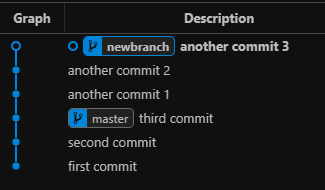
If a new commit is created on the master branch, a second column & colour will be used as third commit now has two children with separate lines of history:
If newbranch was merged back into master, an new commit is also created on the master branch (so a second column & colour will also be used):
I hope this helps to answer your question. Please reply with follow up questions if you have any.
Thanks Will for assisting with answering this question!
 mhutchie
on 5 Dec 2019
mhutchie
on 5 Dec 2019
Thank you all for the thorough explanation! 🖤
kanlukasz
on 5 Dec 2019
Related issues
 kimyvgy
·
7Comments
kimyvgy
·
7Comments
 ackvf
·
7Comments
ackvf
·
7Comments
 Konsonanz
·
4Comments
Konsonanz
·
4Comments
 umairkhan-dev
·
5Comments
umairkhan-dev
·
5Comments
 morganlombard
·
5Comments
morganlombard
·
5Comments
Most helpful comment
Thank you all for the thorough explanation! 🖤