Vscode-extension-for-zowe: Error encountered while activating and initializing logger (solved by removing base profile)
Describe the bug
Apparently since the update of Zowe Explorer to version 1.10.0, or since the VS Code version upgrade to 1.50.x, a warning window is displayed when VS Code is launched concerning access to a function.
To Reproduce
Steps to reproduce the behavior:
- Start VS Code
- A pop-up window displays an error concerning the management of the Zowe Explorer log
Screenshots
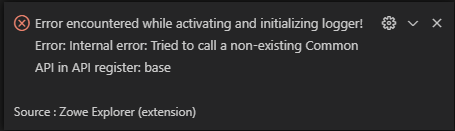
Desktop (please complete the following information):
- OS: Windows 10 x64
- VS Code Version : 1.50.1
- Zowe Explorer Version: v1.10.0
- Zowe CLI Version: 6.22.0
- Are you using Secure Credential Store? No
Additional context
N/A
 FALLAI-Denis
All 10 comments
Solved by erasing all preferences about Zowe Explorer in settings.json.....
Having also problems on profiles...
Does the order in which the settings are declared in the settings.json file matter?
The parameters had been manually re-sorted for educational purposes. In particular, the "persistence" parameter was not at the start of the listing of the properties of "Zowe-xx-Persistent" objects.
Before:
    "Zowe-DS-Persistent": {
      "favorites": [
        "[TMVS]: J070188.PUBLIC.COBOL.SRCELIB{pds}"
        ],
      "fileHistory": [
        "[TMVS]: J070188.PUBLIC.COBOL.JCL($CB6CO)",
        "[TMVS]: J070188.PUBLIC.COBOL.JCL($$TEST)",
        "[TMVS]: J070188.PUBLIC.COBOL.SRCELIB(AJ5074K)",
        "[TMVS]: J070188.PUBLIC.COBOL.SRCELIB(COB0C7)",
        "[TMVS]: J070188.PUBLIC.COBOL.SRCELIB(UTICV8)",
        "[TMVS]: J070188.PUBLIC.COBOL.PARMLIB(CB6PROD)",
        "[TMVS]: J070188.PUBLIC.COBOL.PARMLIB(CB6TEST)",
        "[TMVS]: J070188.PUBLIC.COBOL.PARMLIB(CB6BAT)",
        "[TMVS]: J070188.PUBLIC.COBOL.JCL($CB4)",
        "[TMVS]: J070188.PUBLIC.COBOL.SRCELIB(TEST1147)"
        ],
      "history": [],
      "persistence": true,
      "recall": [],
      "searchHistory": [
        "J070188.PUBLIC.COBOL.**",
        "J070188.USER.**"
        ],
      "sessions": [
        "TMVS",
        "TMVSML"
        ]
    },
    "Zowe-Jobs-Persistent": {
      "favorites": [],
      "history": [],
      "searchHistory": [
        "Owner:J070188 Prefix:J070188*",
        "Owner:J005365 Prefix:J005365*"
        ],
      "sessions": [
        "TMVS"
        ],
      "persistence": true
      },
    "Zowe-Temp-Folder-Location": {
      "folderPath": "D:\\DVLT\\DepotsGIT\\Temp"
      },
    "Zowe-USS-Persistent": {
      "favorites": [],
      "fileHistory": [],
      "history": [],
      "persistence": true,
      "searchHistory": [
        "/u/J070188"
        ],
      "sessions": [
        "TMVS"
        ]
    }
After:
    "Zowe-DS-Persistent": {
      "persistence": true,
      "favorites": [],
      "history": [],
      "sessions": [
        "TMVS"
      ],
      "fileHistory": [
        "[TMVS]: J070188.PUBLIC.COBOL.SRCELIB($COMPARE)"
      ],
      "recall": [],
      "searchHistory": [
        "J070188.PUBLIC.COBOL.**"
      ]
    },
    "Zowe-Jobs-Persistent": {
      "persistence": true,
      "favorites": [],
      "history": [],
      "sessions": [
        "TMVS"
      ],
      "searchHistory": []
    },
    "Zowe-Temp-Folder-Location": {
      "folderPath": "D:\\DVLT\\DepotsGIT\\Temp"
      },
    "Zowe-USS-Persistent": {
      "persistence": true,
      "favorites": [],
      "history": [],
      "sessions": [
        "TMVS"
      ],
      "fileHistory": [],
      "searchHistory": []
    }
Adding to #1000 .
 jellypuno
on 22 Oct 2020
jellypuno
on 22 Oct 2020
The error is repeated every time you start VS Code and blocks the use of Zowe Explorer.
Solution:
- open the settings.json file
- remove the profiles referenced in the "sessions" properties
- restart VS Code
Zowe Explorer extension redetects default profiles and declares them automatically in settings.json.
Zowe Explorer works ... until the next restart of VS Code.
FALLAI-Denis
on 25 Oct 2020
The problem is caused by the existence of a base profile declared by default.
Removing the default base profile permanently eliminates the problem.
FALLAI-Denis
on 28 Oct 2020
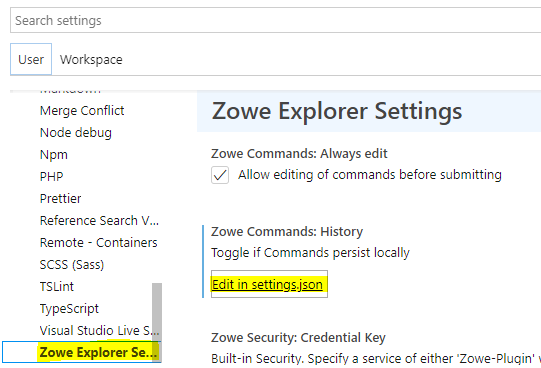
How can I find where this settings.json file is?
 mpettis
on 13 Nov 2020
mpettis
on 13 Nov 2020
@mpettis You can access settings.json here:

Or, go to File >> Preferences >> Settings, then locate Zowe Explorer Settings in the list on the left, and click Edit in settings.json under one of the categories on the right:
@zdmullen I think this was fixed in PR #993, I will look into it...
 katelynienaber
on 8 Dec 2020
katelynienaber
on 8 Dec 2020
@katelynienaber, any update on this?
 zdmullen
on 14 Jan 2021
zdmullen
on 14 Jan 2021
@zdmullen This is resolved. The initialization was hanging during getCliProfileManager but we added an if() so now if you are missing a certain type of profile you can still start the extension.
I tested if it works when the base folder is completely missing, and when the folder is present but doesn't contain any default.yaml file.
This could also fix issue #1067...but their post is so vague, they could be referring to any kind of error during init.
katelynienaber
on 19 Jan 2021
Thank you for investigating this @katelynienaber.
@FALLAI-Denis Can we close this issue?
jellypuno
on 19 Jan 2021
Issue seems to be resolved
 crawr
on 5 Mar 2021
crawr
on 5 Mar 2021
Related issues
 zFernand0
·
3Comments
katelynienaber
·
3Comments
jellypuno
·
4Comments
zFernand0
·
3Comments
katelynienaber
·
3Comments
jellypuno
·
4Comments
 travatine
·
4Comments
jellypuno
·
5Comments
travatine
·
4Comments
jellypuno
·
5Comments