Vscode-extension-for-zowe: Zowe Explorer is unresponsive when a profile exists with minimal properties
I am trying to leverage base profiles so I can benefit from SSO capabilities and so that I do not have to maintain the same property in multiple locations.
For example, in my Windows environment, I have a zosmf profile that looks like this:
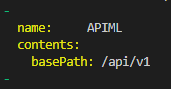
When I launch Visual Studio Code, Zowe Explorer is unresponsive and I see the following message:
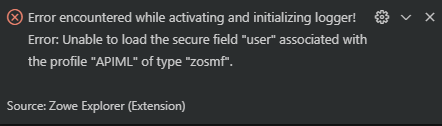
In this case, I am trying to leverage SSO via the Zowe API Mediation Layer.
Similarly, in my Ubuntu environment, I have a zosmf profile that looks like this:

When I launch Visual Studio Code, Zowe Explorer is unresponsive and I see the following message:
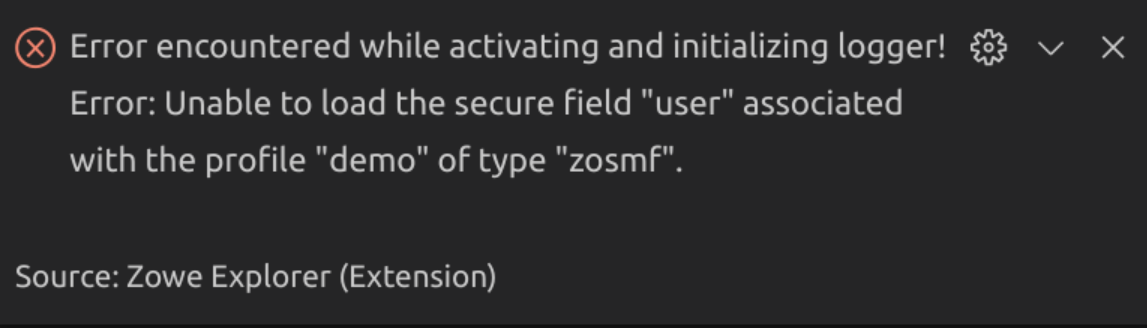
In this case, I am trying to avoid managing my host, username, and password in multiple profiles.
To Reproduce
Steps to reproduce the behavior:
- Create a zosmf profile with only port or only base-path.
- Launch Visual Studio Code with Zowe Explorer installed.
Expected behavior
Zowe Explorer functions properly. Ideally, I would be able to use my abbreviated profiles and Zowe Explorer would respect my default base profile settings. But, at a minimum, I'd like to continue to use my fully qualified profiles that do not rely on my base profile information.
Desktop (please complete the following information):
- OS: Windows 10 & Ubuntu 16.04
- Zowe Explorer Version: 1.10 & 1.10
- (Optional) Zowe CLI Version: 6.23.0 & 6.23.0
- (Optional) Are you using Secure Credential Store?: Yes & Yes
 MikeBauerCA
All 24 comments
Related issue #1038
 jellypuno
on 15 Oct 2020
jellypuno
on 15 Oct 2020
@MikeBauerCA Are you logged in apiml? The only baseProfile feature that is allowed for now is if you are logged in apiml. If you are not and you have incomplete profile details then an error occurs due to the create session api. This will be handled in the future.
jellypuno
on 15 Oct 2020
I still receive the error when I am logged into the API Mediation Layer.
MikeBauerCA
on 15 Oct 2020
So Just to clarify, this is what's happening to my ZE. I have v1.10 as well. And I am not experiencing the error.

Can you try and go to your settings.json and remove all values inside session (all 3 of them? It should be an empty array.
Then reload ZE.
"sessions": [
"test",
"zcobol",
"ztrial"
],
Let me know the results.
jellypuno
on 16 Oct 2020
I adjusted sessions to be an empty array for DS, USS, and Jobs. I still receive the error.
Visual Studio Code version: 1.50.1
MikeBauerCA
on 16 Oct 2020
I have the same VSCode version. My CLI is 6.22, node 12 and npm 6.14. I also have SCS.
This is a weird behavior
jellypuno
on 16 Oct 2020
What specific version of node 12? I run with nvm so switching will be easy to test.
MikeBauerCA
on 16 Oct 2020
node v12.18.4
I also updated to zowe cli 6.23 and its working for me.
jellypuno
on 16 Oct 2020
The problem still exists for me with node v12.18.4, npm v6.14.6, and zowe CLI v6.23.0.
MikeBauerCA
on 16 Oct 2020
I also run into similar issues when anything inside profile is missing. Currently a profile needs to have all the required properties including username and password, otherwise extension does not activate.
 kristinochka
on 20 Oct 2020
kristinochka
on 20 Oct 2020
Regarding the SCS update error that was discussed today, see https://github.com/zowe/zowe-cli-scs-plugin/issues/31
TL;DR: Just delete the ~/.zowe/profiles/zosmf/zosmf_meta.yaml
 zFernand0
on 20 Oct 2020
zFernand0
on 20 Oct 2020
I'd like to try it. What do I need to do?
 jelaplan
on 21 Oct 2020
jelaplan
on 21 Oct 2020
Just checking in to see if there is an ETA on when this may be prioritized/resolved.
@jelaplan
Steps to reproduce the behavior:
Create a zosmf profile with only port or only base-path.
Launch Visual Studio Code with Zowe Explorer installed.
MikeBauerCA
on 18 Nov 2020
Note, you need to create a zosmf profile with port and base-path, and from Zowe CLI (since you cannot create a profile with limited parameters in Zowe Explorer). If you create a profile in Zowe CLI with only base-path, it actually assigns a default port (443) still, which will be problematic for everything to work.
 zdmullen
on 25 Nov 2020
zdmullen
on 25 Nov 2020
From the CLI, you can create a zosmf profile with only the base-path set by using the --dd flag (disable-defaults). For example, zowe profiles create zosmf myzosmf --base-path "api/v1" --dd.
MikeBauerCA
on 30 Nov 2020
@MikeBauerCA, true. I don't know how familiar people are with that particular parameter, and just wanted to note that a default port is assigned otherwise.
zdmullen
on 30 Nov 2020
Hi @MikeBauerCA, So I've tested this using the following versions and it is successful for me.
Zowe Explorer:  1.11.0
Zowe CLI: 6.24
VSCode: 1.52
SCS: 4.1.1
NodeJS: 14.15.1
Steps that I did:
- Install the SCS Plugin
- Open VSCode and I've received the initialize error that you have posted in this issue.
- I've updated the
Zowe Security: Credential Keyin the settings - Reloaded VSCode and received the initialize error again.
- Execute command
zowe scs u - Verify if all of my profiles are successfully stored in the credential vault.
Please note that I have existing profiles that only contains base-path and it is also successfully added in the credential vault. - Reload VSCode and this time the initialization is successful.
- Created a new profile that contains only the base-path via Zowe CLI
- Login to APIML
- Click the Refresh Button and add the new profile to the tree
- Use it as per normal (e.g. Submit a job)

My suggestion for you is to make sure that your profile is added to the credential vault. If it is not successfully written then it will have an initialization error.
As to why this is happening, I believe @zFernand0 has explained it in our previous stand-up and added a link to an existing issue here.
jellypuno
on 16 Dec 2020
I tried to transition to this but couldn't get it to work. Ultimately, I deleted all of my profiles and plug-ins and started from scratch. My Zowe Explorer now seems to tolerate at least z/OSMF profiles with minimal properties. I had some issue leveraging the profile (see below) but Zowe Explorer works with other profiles so that is a big improvement.
It did not seem to matter what value I put in the Zowe Security: Credential Key field (I tried Zowe-Plugin, @zowe/cli, and empty). They all worked. This setting seems confusing for end users.
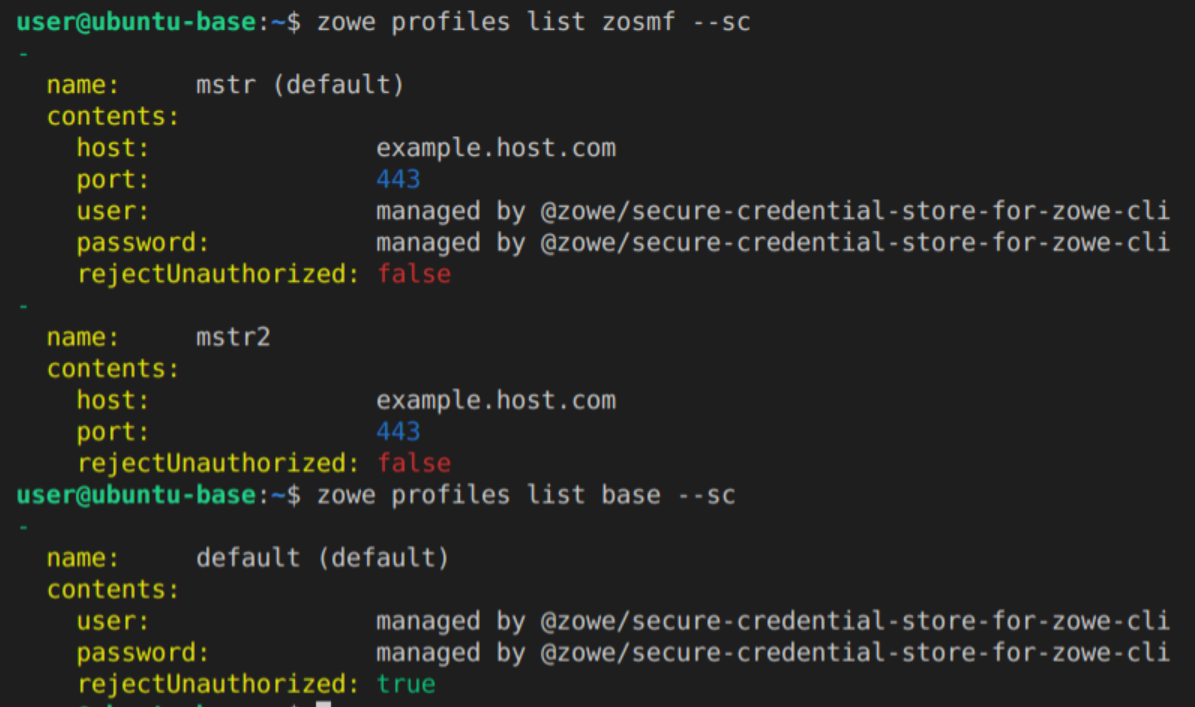
I still need to try this out with API ML (hopefully next week), but it seems Zowe Explorer doesn't read credentials from base profiles. When trying to use a z/OSMF profile that falls back to creds stored in my base profile, I get this message:
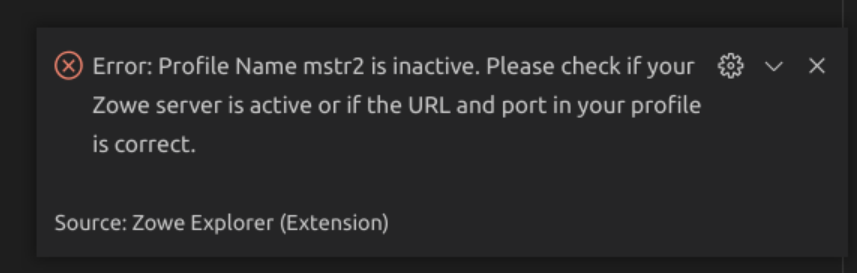
Zowe CLI is working properly. Not sure if it is related to the extra validation that Zowe Explorer is doing.
Below is my profile setup with the host value changed:
MikeBauerCA
on 18 Dec 2020
it seems Zowe Explorer doesn't read credentials from base profiles
Just to take note that ZE reads base profiles that is logged in through APIML. That is the MVP that we've implemented this PI.
jellypuno
on 19 Dec 2020
When I logged into the API ML via Zowe CLI and adjusted the mstr2 z/OSMF profile to just contain the appropriate base-path then I was able to leverage both mstr (direct) and mstr2 (via API ML) as expected.
When I logged out of the API ML and tried to access the service, I received a prompt for credentials. But, after I entered them, I encountered this message:

I then adjusted the Zowe Security: Credential Key in settings to Zowe-Plugin and tried within the same session but received the same error.
Then I relaunched VS Code. When trying to use mstr2, I received this message:
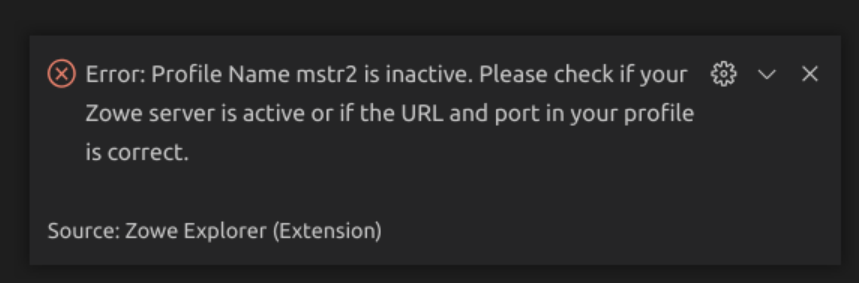
In spite of the error message, I believe the issue is that I just need to login to API ML from Zowe CLI again so I did that. But, within the same session, it remained broken with the same error message.
So I relaunched again. The validation now passes and I can access data sets again. So I logged out again via Zowe CLI. Again I was presented with a prompt for creds, entered them in, and still received the "unable to store secure field" message.
Regarding the Zowe Security: Credential Key, could Zowe Explorer just detect if the SCS plug-in was being used by checking ~/.zowe/settings/imperative.json?
MikeBauerCA
on 21 Dec 2020
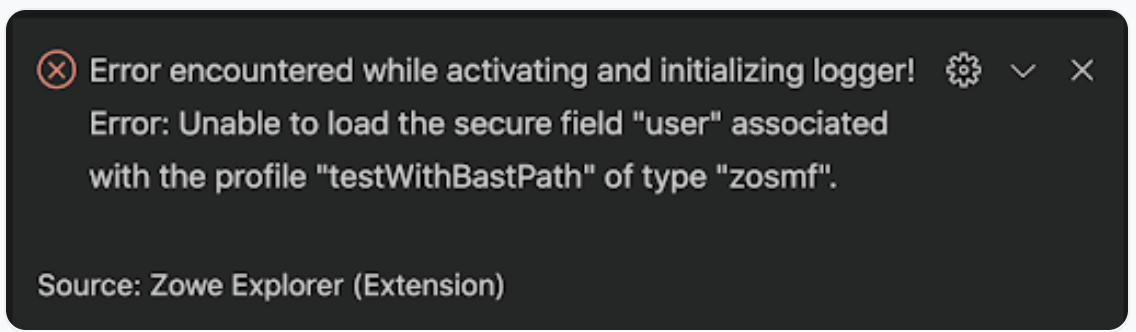
I tried using ZE to access a token based connection to APIML. I get Mike's original problem where nothing appears in the tree and the + button does nothing. I get the same error. Apparently Mike got it working by jumping through a lot of hoops but I don't understand what was necessary. It just seems broken to me.
jelaplan
on 22 Jan 2021
I succeeded in getting Zowe Explorer to connect through API ML with my base and service profiles. To make this happen, I uninstalled Zowe CLI. I then restored those two yaml profile file from a backup and manually copied them into the .zowe folder. I had hoped that the release of 1.12 of ZE would solve the problem. But, I had the same issues w the logging error until I went and deleted Zowe CLI.
My experience wasn't without some troubles.

This wasn't ideal

Here is an unexpected behavior I get when logging in by clicking on the connection

Here is the flow diagram we've been working off

jelaplan
on 12 Feb 2021
This is issue has been fixed with v1.12.1
jellypuno
on 5 Mar 2021
Leaving a comment here, rather than opening a new issue, as I believe the underlying cause of this is what I was experiencing. It was still present as of v1.13.1.
Basically, profile validation fails if you've had a service profile meta.yaml file created before switching over to using base profiles. Previously, certain fields were listed as required during profile creation, such as the host field of a zosmf profile. With base profiles, these fields are no longer required in the service profiles. However, updating Zowe does not update the meta.yaml files, so the validation checks the new profile against the old schema, and fails.
The workaround is to navigate to the ~/.zowe/profiles/\
 mheuzey
on 8 Apr 2021
mheuzey
on 8 Apr 2021
Related issues
jelaplan
·
3Comments
zdmullen
·
3Comments
jellypuno
·
5Comments
jellypuno
·
5Comments
 crawr
·
5Comments
crawr
·
5Comments