Vscode-extension-for-zowe: Issue with saving USS files back to mainframe
After editing a USS file, the save process only happens on local file system, but the upload is not triggered. Happens in Favorites as well. There is no error in VS Code.
Issue reported on Slack #zowe-explorer by Dan Jast.
Possibly related with (didn't do any RCA yet):
https://github.com/zowe/vscode-extension-for-zowe/issues/555
https://github.com/zowe/vscode-extension-for-zowe/issues/606
 Alexandru-Dumitru
All 17 comments
I think this is quite a significant issue and should be looked into sooner than later. I will mark it for the 1.7 release to give the squad time to research it and work on it as needed. We can update it if we deem it more pressing.
 zdmullen
on 3 Apr 2020
zdmullen
on 3 Apr 2020
This is one of the main functions for many of our devs using the Zowe extension. When will you release 1.7 and plan to fix the bug? Because we are already looking into alternatives to save our data to USS.
 Rappel87
on 6 Apr 2020
Rappel87
on 6 Apr 2020
@Rappel87 Hello, no worries, I will discuss it with my colleagues and keep you posted.
 stepanzharychevbroadcom
on 6 Apr 2020
stepanzharychevbroadcom
on 6 Apr 2020
@Rappel87, I've adjusted the milestone to the 1.5 Release, which will go out at the end of April. As @stepanzharychevbroadcom mentioned, we will present this to the team during the stand-up today and ensure it is ready.
zdmullen
on 6 Apr 2020
Thanks for the heads-up.
Rappel87
on 6 Apr 2020
@Colin-Stone @zFernand0 I think this should be an emergency 1.4.1 fix as users would loose all their edits without warning!
I created a PR for 1.4.x here: https://github.com/zowe/vscode-extension-for-zowe/pull/669
 phaumer
on 8 Apr 2020
phaumer
on 8 Apr 2020
@Rappel87 A patch release is now available on the VSCode Marketplace (1.4.1) that fixes the issue with saving USS files.
 ghost
on 8 Apr 2020
ghost
on 8 Apr 2020
I am using 1.4.1 and see the same behavior with saving PDS members. Did no one verify this behavior before the patch was released? This is a major issue.
 impervachris
on 10 Apr 2020
impervachris
on 10 Apr 2020
@impervachris I did actually. I just tried it again:
- opened a PDS member with a jcl file
- edit, save
- close
- Pull from Mainframe
- I see my edits.
Do you see any errors in the logs or output windows?
phaumer
on 11 Apr 2020
No. there are no messages in the output window. It just simply saves it locally.
From: Peter Haumer notifications@github.com
Sent: Friday, April 10, 2020 5:18 PM
To: zowe/vscode-extension-for-zowe vscode-extension-for-zowe@noreply.github.com
Cc: Chris Parker chris.parker@imperva.com; Mention mention@noreply.github.com
Subject: Re: [zowe/vscode-extension-for-zowe] Issue with saving USS files back to mainframe (#660)
@impervachrishttps://github.com/impervachris I did actually. I just tried it again:
- opened a PDS member with a jcl file
- edit, save
- close
- Pull from Mainframe
I see my edits.
Do you see any errors in the logs or output windows?
—
You are receiving this because you were mentioned.
Reply to this email directly, view it on GitHubhttps://github.com/zowe/vscode-extension-for-zowe/issues/660#issuecomment-612242422, or unsubscribehttps://github.com/notifications/unsubscribe-auth/AOM4UULNE3RO46N5LFJIGALRL6LIPANCNFSM4L3TMVYA.
NOTICE:
This email and all attachments are confidential, may be proprietary, and may be privileged or otherwise protected from disclosure. They are intended solely for the individual or entity to whom the email is addressed. However, mistakes sometimes happen in addressing emails. If you believe that you are not an intended recipient, please stop reading immediately. Do not copy, forward, or rely on the contents in any way. Notify the sender and/or Imperva, Inc. by telephone at +1 (650) 832-6006 and then delete or destroy any copy of this email and its attachments. The sender reserves and asserts all rights to confidentiality, as well as any privileges that may apply. Any disclosure, copying, distribution or action taken or omitted to be taken by an unintended recipient in reliance on this message is prohibited and may be unlawful.
Please consider the environment before printing this email.
impervachris
on 11 Apr 2020
Maybe it is specific to using WSL?
From: Peter Haumer notifications@github.com
Sent: Friday, April 10, 2020 5:18 PM
To: zowe/vscode-extension-for-zowe vscode-extension-for-zowe@noreply.github.com
Cc: Chris Parker chris.parker@imperva.com; Mention mention@noreply.github.com
Subject: Re: [zowe/vscode-extension-for-zowe] Issue with saving USS files back to mainframe (#660)
@impervachrishttps://github.com/impervachris I did actually. I just tried it again:
- opened a PDS member with a jcl file
- edit, save
- close
- Pull from Mainframe
I see my edits.
Do you see any errors in the logs or output windows?
—
You are receiving this because you were mentioned.
Reply to this email directly, view it on GitHubhttps://github.com/zowe/vscode-extension-for-zowe/issues/660#issuecomment-612242422, or unsubscribehttps://github.com/notifications/unsubscribe-auth/AOM4UULNE3RO46N5LFJIGALRL6LIPANCNFSM4L3TMVYA.
NOTICE:
This email and all attachments are confidential, may be proprietary, and may be privileged or otherwise protected from disclosure. They are intended solely for the individual or entity to whom the email is addressed. However, mistakes sometimes happen in addressing emails. If you believe that you are not an intended recipient, please stop reading immediately. Do not copy, forward, or rely on the contents in any way. Notify the sender and/or Imperva, Inc. by telephone at +1 (650) 832-6006 and then delete or destroy any copy of this email and its attachments. The sender reserves and asserts all rights to confidentiality, as well as any privileges that may apply. Any disclosure, copying, distribution or action taken or omitted to be taken by an unintended recipient in reliance on this message is prohibited and may be unlawful.
Please consider the environment before printing this email.
impervachris
on 11 Apr 2020
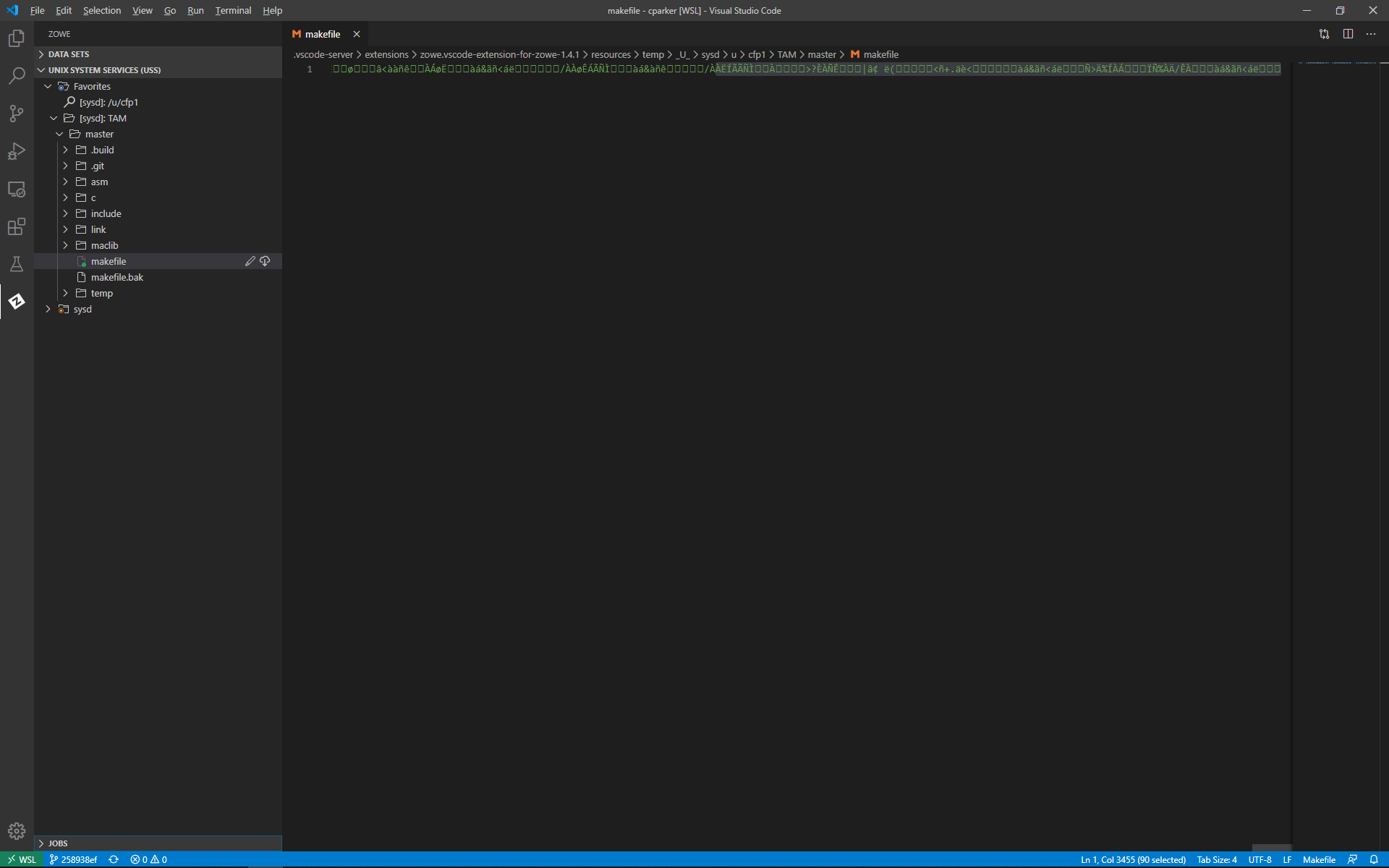
There must be something particular to wsl or vpn for that matter. I now notice that even though the messages say that they are saving on the remote system when editing a USS file, it is not actually being saved. The new behavior is that it then mistranslates the file and it appears as garbage in vscode. The file is fine under USS though. So, I figure I would uninstall and reinstall and I get the following message:
Cannot uninstall extension 'Zowe Explorer'. Extension 'IBM Z Open Editor' depends on this.
I will open another ticket for this.
impervachris
on 13 Apr 2020
I just realized what the message was telling me. At first glance, I thought it was telling me I had an open editor. I'll uninstall the dependents and retry this.
impervachris
on 13 Apr 2020
Okay. I have uninstalled the Z Open Editor and reinstalled ZOWE - without reinstalling the IBM Z Open Editor and I have the same behavior. For PDSes, If I follow your instructions, I only get a local update, with no message indicating an update. For USS, If I follow your instructions, I get the message that USS is being updated, but it really isn't and the subsequent mainframe pull fails to do the translate and the display is garbage.
impervachris
on 13 Apr 2020
Okay. I've narrowed it down. It is code page specific. If the file tag is iso8859-1 it fails to update and turns into garbage. If it is ibm-1047, everything works including the save function.
impervachris
on 13 Apr 2020
I guess if you give me enough time.... :)
The PDS problem is specific to favorites. If I test pds saving from a filtered list, it saves fine. If it is in a pds in the favorites, it does not save.
The uss file problem is related to code pages. If the file is iso8859-1, I see various issues including the file being saved in ibm-1047 which of course creates issues. Do you want me to open a separate issue for this?
impervachris
on 13 Apr 2020
fixed by b3f332e11ae92a17415e0161db458ca4fa0684a8
 zFernand0
on 28 Apr 2020
zFernand0
on 28 Apr 2020
Related issues
 Colin-Stone
·
4Comments
zdmullen
·
3Comments
ghost
·
4Comments
Colin-Stone
·
4Comments
zdmullen
·
3Comments
ghost
·
4Comments
 jelaplan
·
3Comments
jelaplan
·
3Comments
 AHumanFromCA
·
3Comments
AHumanFromCA
·
3Comments