Vscode-extension-for-zowe: USS Explorer Enhancements
I see few potential points to be improved:
1) Add proper integration with binary files: currently interaction with any non-text file ends with exception thrown from the editor, that's not correct, we should show at least something to the user. I would suggest to support following formats:
- Text (should work as it works now);
- Image (user should see an image in the tab, VSCode allows that);
- Other (if format is binary and none of the enlisted above we should show read-only message _
_);
This can be potentially done via Strategy pattern, so lately we can add more file types easily.
Support for uploading of binary files was recently added as well.
2) Make Cloud Icon to change based on file status: currently cloud icon stays unchanged even if file is downloaded, which is not really relevant information which user gets from GUI. I would suggest to add 2 more configurations:
- Sync icon - will be shown instead of Cloud icon once file is downloaded to local filesystem, so user will understand that he syncs his local copy with remote mainframe (title should be changed as well) - example of icon;
- Sync icon with exclamation mark - will be shown when file was last time synced with server (downloaded) more than n minutes ago (may be 5?) so user can understand that there may be not synchronised changes;
3) Currently if you have file opened and there're unsaved changes they will be fully rewritten by click on Cloud icon. I think we need to add Warning before any download happens, so user will approve such override;
 stepanzharychevbroadcom
All 21 comments
@Colin-Stone If you have any thoughts, please, let me know, I would prefer to do this before we proceed with https://github.com/zowe/vscode-extension-for-zowe/issues/458.
stepanzharychevbroadcom
on 20 Jan 2020
This slightly hurts my brain. Today, if I click on a member, it pulls it from the mainframe and opens it in the editor. If I make some changes, I can so one of the following:
- I can save the file and it will check for merge conflicts.
- I can click the cloud pull icon and the interface will ask me if I want to save. I can either save which will overwrite the file on the Mainframe or I can Don't Save and it will re-download the file and replace it in the editor. The latter amounts to a discard changes operation.
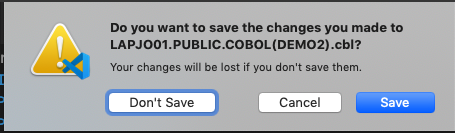
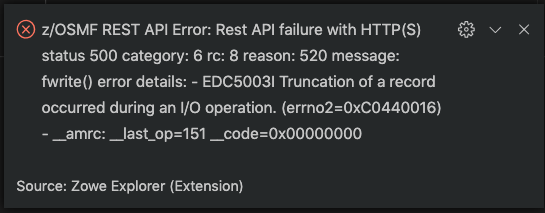
I tried saving a cobol file where I pushed the numbers on the right one over. It seems the Mainframe truncated the digit that I moved to the right and saved it that way. Then when I tried to save again, I got a merge conflict and a lot of messy errors.
So, the prospect of a sync icon is uncertain. It seems that local changes synced to the mainframe file is another way of saying save. And mainframe changes to the local file is another way of saying discard local changes. The latter is today considered a pull.
I'm not clear on the idea of a sync icon with an exclamation mark. What is the significance of a passed time period? I don't think you are suggesting we poll check the mainframe for changes. I'd think a single icon would do and handle things gracefully when clicked.
Here is what happens if I push the digits over to the right. The mainframe objects to that and gives a truncation error which for a Mainframe is impressively clear. This isn't super graceful but I suppose that is the rule with Cobol files and line lengths etc.

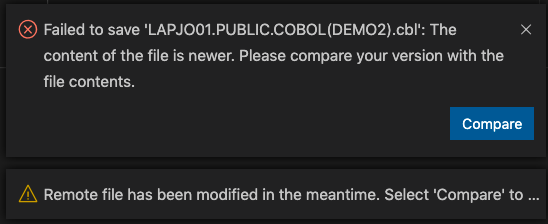
Then if I try to save again, I get a merge conflict. Again not graceful.
 jelaplan
on 20 Jan 2020
jelaplan
on 20 Jan 2020
@stepanzharychevbroadcom You could call me on Tuesday morning 9:00 AM EST and we could talk it over. +1 412-736-4043
jelaplan
on 20 Jan 2020
@Colin-Stone If you have any thoughts, please, let me know, I would prefer to do this before we proceed with #458.
Based upon customer requirements #458 is more relevant as I have examples of users preferring to use other editors and tools over the Zowe Explorer purely based on issue #458. There's a quote one of them keeps telling which is "Path of least astonishment" to describe how we should design UX software so that the default behavior in our case would be to download each and every time.
We have the concept of Safe Save implemented as standard which I think is a good start and am worried we are trying to over-engineer and confuse users.
Don't get me wrong, I think your changes for binary files were important and my intention was to alter the graphic in the explorer views to indicate binary, however I would not want it to be read-only. The other enhancements need more discussion as John is suggesting.
 Colin-Stone
on 21 Jan 2020
Colin-Stone
on 21 Jan 2020
After discussion with John we came to the following use cases, which can be implemented:
Opening of Binary File:
_What I need to mention here is from technical perspective we have no way to figure out if file is binary before we actually download it, it's connected with the fact that list part of API doesn't return such info, while reading of tags can potentially give us nothing because many times file was marked as empty tag. So the only way for us is to open file as text first, handle error if there's some, and re-download it as binary with user's permission for further processing._
1) User tries to open binary file;
2) User sees an error message which suggests him to re-download the file as binary (example is below, please, let me know about wording suggestions);
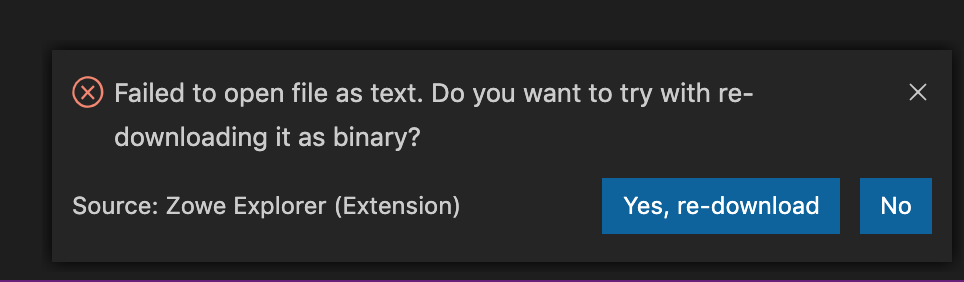
3) Interaction: (Theia doesn't support this kind of element, so after the entire implementation is done we will need to check about possibilities there)
- If User clicks "Yes" - re-download the file as binary with further opening it in separate tab;
- If User clicks "No" - silently close the pop-up;
Handling file loaded/binary statuses:
_After the discussion we decided to put icon changes aside and eliminate sync with exclamation mark completely, though there're changes which can be introduced immediately._
1) User downloaded file in any way, so it's saved in his local filesystem;
2) User hovers over the Cloud Icon;
3) Appeared title/tooltip should say "Rewrite local file (timestamp_of_last_download)";
Handling of overwriting for edited file:
_Pure bug right now. We should copy over the implementation which is already made for DataSets._
1) User opens a text file;
2) User edits the file, but doesn't save his changes;
3) User clicks on Cloud icon to initiate download;
Expected:
User sees message which suggests him to save or not his local changes first.
Actual:
File is silently rewritten by copy from mainframe.
stepanzharychevbroadcom
on 21 Jan 2020
@Colin-Stone @jelaplan I would like to mention the situation with icons separately. We need icons for 2 cases:
1) When we downloading from the mainframe overwriting local copy (second use-case from above and former sync icon);
2) Icon for binary file in tree; (Here I want to be very specific, this icon will be shown only after user downloads the file in the right binary format (first use-case from above), it's the only way due to technical limitations);
stepanzharychevbroadcom
on 21 Jan 2020
@stepanzharychevbroadcom and I get different behavior when re pulling / rewriting the file. I get a warning dialog and I can either save the file locally which pushes it back to MF or I can accept the rewrite. It is not clear why i get the warning and Stepan does not. This may have to do with different behavior on USS and Datasets. The ideal solution is to warn then there it gives people notice and helps to avoid breaking things.
@bubpa01 will look into the cloud icon. Here is a draft that he did quickly but may refine. This icon shows that the file has already been pulled and there is a local copy. This would complement the icon without the check whcih would apear when the file had not yet been pulled.

@IgorCATech, can you weigh in on the tool tip text. Today it is "Pull from Mainframe." We brainstormed "Rewrite local file (timestamp_of_last_download)." We could have a combination. The point we were trying to make is that this action not only pulls the file from the mainframe, it will reset or overwite the file. The time stamp is added to make it clear when it was pulled. A dataset pulled longer ago, is in theory more likely to have changed. In an ideal world, the client would know when the file had changed on the MF and we could signal that. But, we are trying to work with the constraints we have.
@Colin-Stone, you had asked me and Patrik about creating a icon that shows the file is binary. Were you also of the mind that that designation would only be determined once the user tries to download the file. Patrik continues to work on this and I hope to have some thing for you to review soon.
Wrt the prompting to switch to binary, the attraction is that the interface attempts to guide the user. It might be wrong but it gives the user a route to fix the problem. Otherwise, the user has to know that there is a binary option in the context menu and may never find that.
jelaplan
on 21 Jan 2020
@Colin-Stone, you had asked me and Patrik about creating a icon that shows the file is binary.
Were you also of the mind that that designation would only be determined once the user tries to > download the file. Patrik continues to work on this and I hope to have some thing for you to
review soon.
Yes. We already have code that uses chtag to test if a codepage (or binary indicator) has been appropriately set on the server. However this is not always employed so we often get files that have no indication at all and are treated as EBCDIC. The choice for the user is then to override that default and download again as binary. So yes it is because the user has attempted to download and is now trying again.
Wrt the prompting to switch to binary, the attraction is that the interface attempts to guide the
user. It might be wrong but it gives the user a route to fix the problem. Otherwise, the user has to > know that there is a binary option in the context menu and may never find that.
The original solution was very much a "Quick Fix" so anything which presents a better UX gets my vote
Colin-Stone
on 22 Jan 2020
@jelaplan After checking out of USS I found out that not prompting to save file is bug in debug of VSC for Mac. So it's there. Though I found few ways to optimise it, so it will be done.
Also it raises another thing: currently file will be downloaded even if user clicked cancel inside of the dialog and in fact file won't be closed. So I'm planning to allow download only if file was closed.
stepanzharychevbroadcom
on 22 Jan 2020
I did some work on the icons. Please check if you can see via this link.
 bubpa01
on 24 Jan 2020
bubpa01
on 24 Jan 2020
Question regarding the Upload Sync icon, what if I changed my mind about the changes that I did and I don't want to upload it anymore but instead I want to download a fresh copy from mainframe again and start over. will the download icon be available for me?
 jellypuno
on 24 Jan 2020
jellypuno
on 24 Jan 2020
We talked with Stepan about a variant of icons similar to Webflow where fully opaque icons are used with a label, but after initial testing I found that to be a direction I personally wouldn't want to head for valid concerns with legibility, as seen in an example below - where, while zoomed in a little we can see what the icon contains,
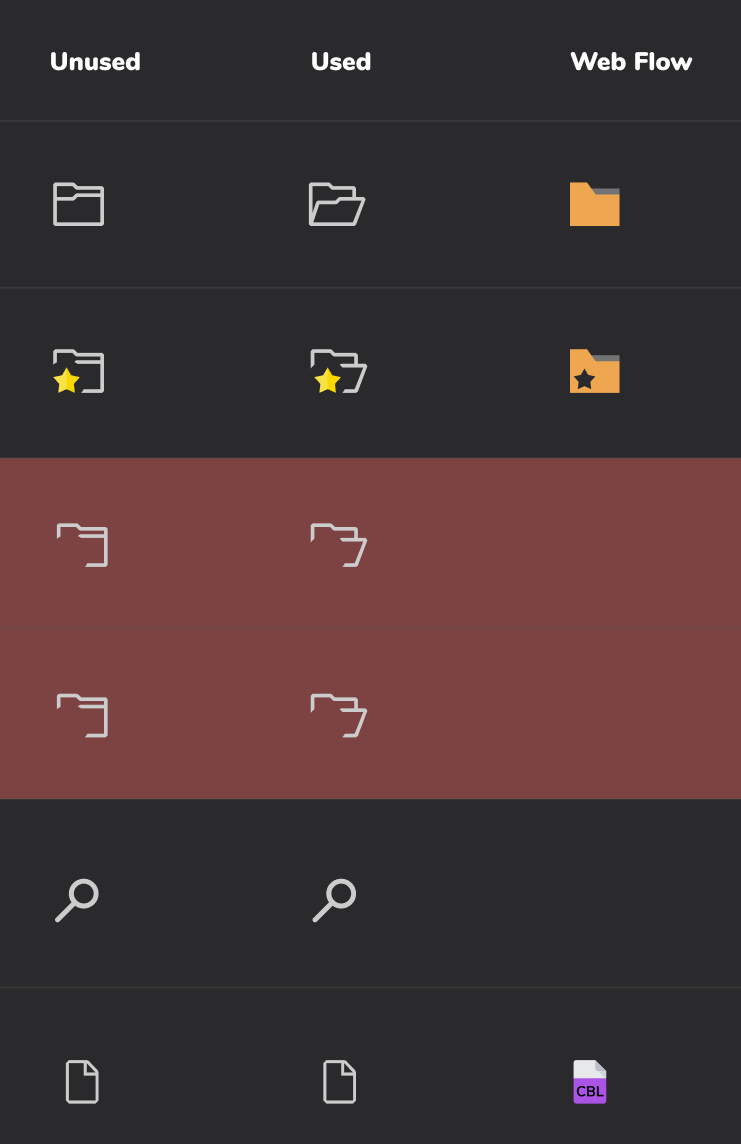
but zoomed out to 100% view details are lost,
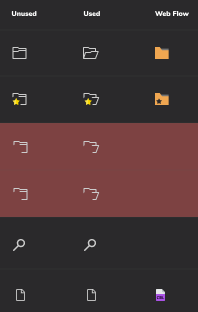
Best practice would be to avoid complexity where possible.
bubpa01
on 24 Jan 2020
310 is another story about icons.
Favorites icon: Change the icon for Favorites to show a star icon.
I'd like to have a meeting with @jalel01, @jellypuno , @stepanzharychevbroadcom , @bubpa01 , and @Colin-Stone to talk this over. There is a lot of promise in enhancing the icons but there is also potential for making a mess. I'll try to find time that fits next week.
jelaplan
on 24 Jan 2020
Question regarding the Upload Sync icon, what if I changed my mind about the changes that I did and I don't want to upload it anymore but instead I want to download a fresh copy from mainframe again and start over. will the download icon be available for me?
@jellypuno , this is possible today and we aren't suggesting any change to the behavior. Today, the user can click the cloud icon. That action attempts to download a fresh copy. If the local copy has changed then the system will warn the user. See the third post in this conversation. I don't think I can communicate all the nuances here without writing a novel. Therefore, I think a meeting is necessary.
jelaplan
on 24 Jan 2020
I would also like to tag this issue #405 . I saw an icon with CBL in it and there are instances that the file is not recognized. Just for info.
jellypuno
on 24 Jan 2020
@jelaplan @Colin-Stone After many changes I want to give you final use cases of changed behaviour. Design will be mentioned as well.
Binary file alternate download:
- User tries to open binary file;
- User sees an error message which suggests him to re-download the file as binary;
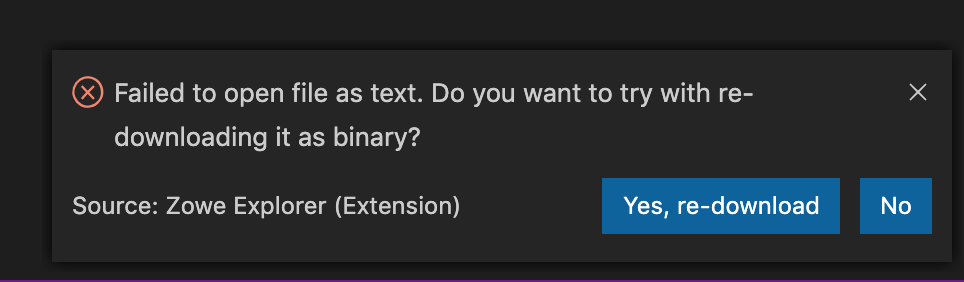
- Interaction: (Theia doesn't support this kind of element, so after the entire implementation is done we will need to check about possibilities there)
- If User clicks "Yes" - re-download the file as binary with further opening it in separate tab;
- If User clicks "No" - silently close the pop-up;
Handling file downloaded and binary statuses:
1) User downloaded text file in any way;
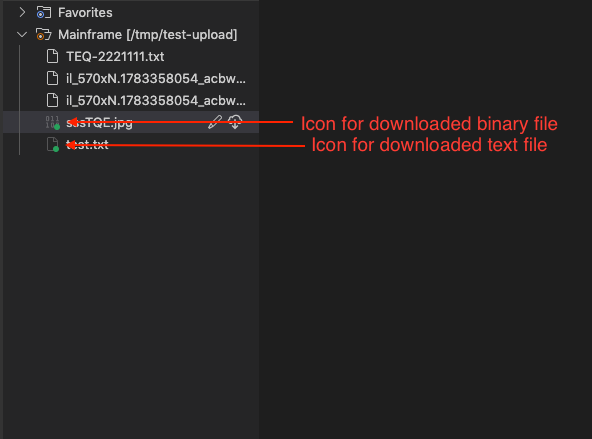
2) User sees that icon of file changed to the more transparent variant with green dot;
3) On hover user sees download timestamp in addition to the common file tooltip (e.g. "tooltip (_Last pulled:_ timestamp_of_last_download)");
1) User downloaded binary file in any way;
2) User sees that icon of file changed to binary transparent variant with green dot;
3) _same with above_
Handling of unnecessary downloads: ((1)-(3) are same for all cases)
1) User modified any file;
2) User tries to pull from the mainframe;
3) User sees dialog which proposes to save/discard file or cancel it;
4) User decides to save file syncing it with mainframe;
5) No download happens and saved file is reopened;
4) User decides not to save the file;
5) Download of mainframe version happens and downloaded file is opened;
4) User decides to cancel;
5) User stays in editor with not changed file;
Those are in essential the cases which were covered. Also I added the fix for reloaded tree when it was not necessary.
stepanzharychevbroadcom
on 24 Jan 2020
@jelaplan @bubpa01 @Colin-Stone Those are the updated icons.
stepanzharychevbroadcom
on 24 Jan 2020
@jelaplan @bubpa01 Stepan has a PR 461 open that will merge the binary vs text file icons above. Are you ok with using these icons? I think the changes make sense but i just want to be sure you are ok with the icons as designed.
 jalel01
on 30 Jan 2020
jalel01
on 30 Jan 2020
@jalel01 Yea, it is fine. It was helfpul to have @bubpa01 step in and make the icons.
jelaplan
on 26 Feb 2020
@stepanzharychevbroadcom is this fixed? if yes, can you please close the issue?
jellypuno
on 5 Mar 2020
@jellypuno It was merged. So I close it.
stepanzharychevbroadcom
on 5 Mar 2020
Related issues
jelaplan
·
3Comments
 zFernand0
·
3Comments
jellypuno
·
5Comments
zFernand0
·
3Comments
jellypuno
·
5Comments
 ghost
·
4Comments
ghost
·
4Comments
 AHumanFromCA
·
3Comments
AHumanFromCA
·
3Comments
Most helpful comment
@jellypuno , this is possible today and we aren't suggesting any change to the behavior. Today, the user can click the cloud icon. That action attempts to download a fresh copy. If the local copy has changed then the system will warn the user. See the third post in this conversation. I don't think I can communicate all the nuances here without writing a novel. Therefore, I think a meeting is necessary.