Vscode-eslint: Doesn't work with external config file from node module
I have my own eslint config that is hooked into .eslintrc.js ->
extends: ['eslint-config-myconfig']
this causes an error to be thrown in VSCode, note that the same setup works in Atom.io
Failed to load plugin 'promise' declared in 'myProject/.eslintrc.js » eslint-config-myconfig': Cannot find module 'eslint-plugin-promise' Require stack: - /Users/{...myWorkspace}/__placeholder__.js Referenced from: /Users/{...myWorkspace}/{...myProject}/node_modules/eslint-config-myconfig/index.js
 skaraman
All 16 comments
@skaraman can you please provide me with a GitHub repository I can clone that demos what you are experiencing. Thanks.
 dbaeumer
on 17 Dec 2019
dbaeumer
on 17 Dec 2019
@dbaeumer setting up a repo isn't something i can do just to preserve my project integretity but you can reproduce this issue by using https://www.npmjs.com/package/eslint-config-synacor in a project, it follows the same principles, please review the readme
skaraman
on 18 Dec 2019
@skaraman my experience shows that bugs like this depend on many things, especially on workspace settings and versions used. So I would highly appreciate if you could provide me with reproducible steps.
If you use eslint from the terminal validating that file from the workspace folder (e.g. the folder you have open in VS Code) will it succeed ? Or do you need to do a cd into one of the sub folders. If so you need to tell eslint about these working directories using the eslint.workingDirectories setting.
dbaeumer
on 18 Dec 2019
This issue has been closed automatically because it needs more information and has not had recent activity. See also our issue reporting guidelines.
Happy Coding!
![vscodebot[bot] picture](https://avatars.githubusercontent.com/in/2406?v=4&s=40) vscodebot[bot]
on 25 Dec 2019
vscodebot[bot]
on 25 Dec 2019
@dbaeumer
I've setup a test repo here - https://github.com/skaraman/test
Current behavior


Expected behavior

I don't think it's an issue with workingDirectories but if it is, please let me know again
This is what atom looks like without the node_modules installed but with the package.json config setup to expect one -
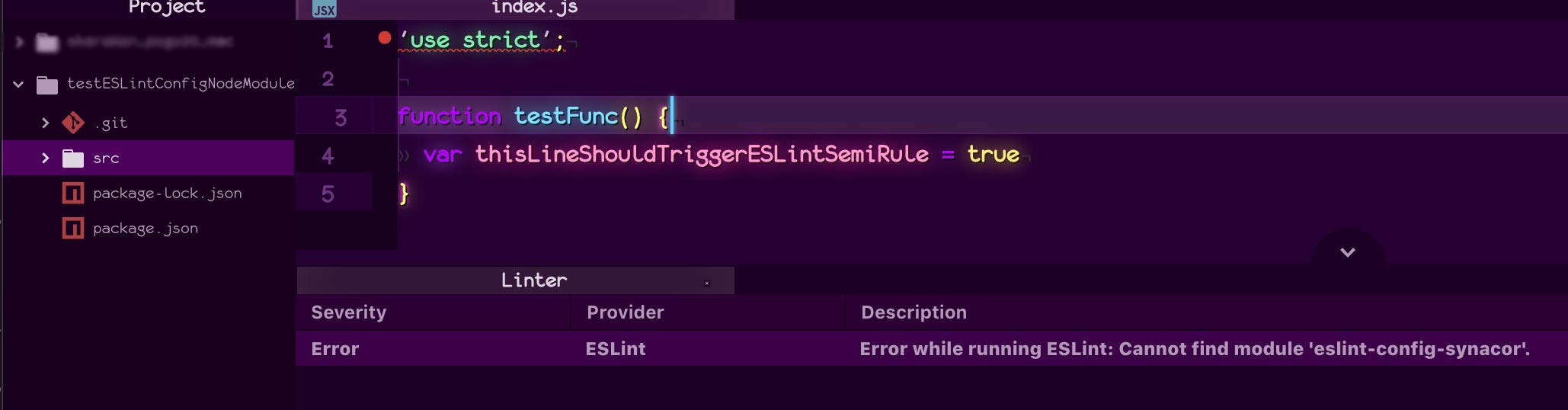
skaraman
on 7 Jan 2020
@skaraman can you please had a eslintrc config file. Otherwise it is hard to tell what is going wrong.
I do see errors with my eslint configuration.
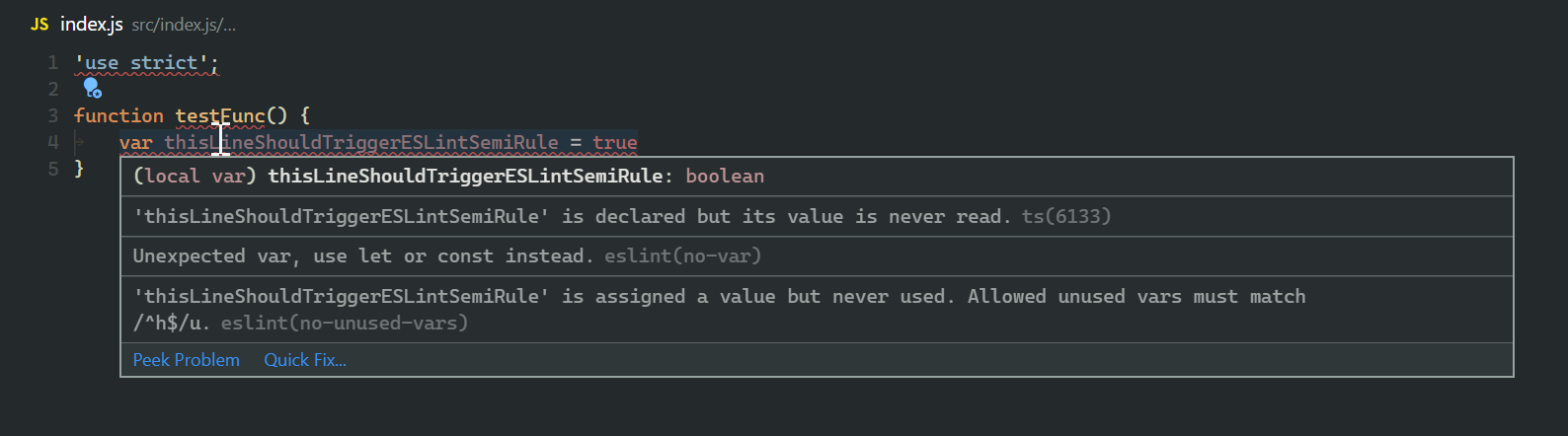
dbaeumer
on 8 Jan 2020
The issue is that the config file is in a node module. Why don’t I need esconfig in atom? What is your configuration file?
skaraman
on 8 Jan 2020
This is what I see in VS Code

and this when running eslint in a terminal:

which is the same result. I am not sure what atom does but I try to stay as close as possible to what happens when running eslint from the terminal.
dbaeumer
on 8 Jan 2020
What do you see when you run eslint from the terminal ?
dbaeumer
on 8 Jan 2020
Hi @dbaeumer I see correct errors in terminal 
but i also see this output from eslint saying failed to load 'compat'

(last part cut off just says Require stack: - /Users/semyonkaraman/Desktop/dev/vscode/__placeholder__.js)
skaraman
on 8 Jan 2020
Can you run in the terminal with --debug to see which config files are read and provide them to me as well (best in the GitHub repository so we are using the same config)
dbaeumer
on 8 Jan 2020
there's a lot of output so i put it in a txt file, all the config is in the node modules so you should have it with npm i and i'm not sure which files you need (if you still need some let me know which ones from the output.txt) , i don't have eslint installed globally either
debug_output.txt
skaraman
on 8 Jan 2020
Actually comparing your output with mine reports exactly the same errors and for me they are even correctly reported in VS Code itself. I have actually no idea why in you setup the compat plugin can not be loaded. On which folder do you open the workspace ?
dbaeumer
on 9 Jan 2020
you figured it out!
the workspace i have is setup on a 'dev' root of my own, then i have subfolders for projects, then i have subfolders for branches (you should be able to see by the smudges in the screenshot above), when i open the branch in the workspace as the root, the eslint plugin works and reports errors correctly

skaraman
on 9 Jan 2020
@dbaeumer Although changing the workspace solves the issue, i would appreciate it if you could try to resolve the issue when there are high up folders, i would like to have a workspace where i can have project folders as some of my projects are like this :
myProject1/oneBranch
myProject1/twoBranch
myProject2/oneBranch
myProject2/twoBranch
if i have two of these same branches set at the roots it's hard to tell what branch is from what project
skaraman
on 9 Jan 2020
@skaraman have a look at the eslint.workingDirectories setting which allows you to customize these setups (https://github.com/microsoft/vscode-eslint#settings-options). They new [{ "mode": "auto" }] might be your friend here.
dbaeumer
on 10 Jan 2020
Related issues
 empz
·
66Comments
empz
·
66Comments
 dracozombie19
·
72Comments
dracozombie19
·
72Comments
 kasvtv
·
107Comments
kasvtv
·
107Comments
 nicobarray
·
75Comments
nicobarray
·
75Comments
 singleghost
·
20Comments
singleghost
·
20Comments
Most helpful comment
@skaraman have a look at the
eslint.workingDirectoriessetting which allows you to customize these setups (https://github.com/microsoft/vscode-eslint#settings-options). They new[{ "mode": "auto" }]might be your friend here.