Vscode-eslint: ESLint fails to load plugins when using ESLint 6.x
I have the following packages installed as dev deps:
{
    "babel-eslint": "^10.0.2",
    "eslint": "^6.0.1",
    "eslint-config-prettier": "^5.1.0",
    "eslint-plugin-import": "^2.18.0",
    "eslint-plugin-prettier": "^3.1.0",
}
And this is my .eslintrc file:
{
    "parser": "babel-eslint",
    "plugins": ["import", "prettier"],
    "extends": [
        "eslint:recommended",
        "plugin:import/errors",
        "plugin:import/warnings",
        "prettier"
    ],
    "settings": {
        "import/resolver": {
            "node": {
                "extensions": [".js"]
            }
        }
    },
    "env": {
        "es6": true,
        "browser": false,
        "node": true,
        "jquery": false,
        "jest": true
    },
    "rules": {
        "quotes": 0,
        "no-console": 1,
        "no-debugger": 1,
        "no-var": 1,
        "no-trailing-spaces": 0,
        "eol-last": 0,
        "no-underscore-dangle": 0,
        "no-alert": 0,
        "no-lone-blocks": 0,
        "import/extensions": 1,
        "import/no-named-as-default": 0,
        "prettier/prettier": [
            "error",
            {
                "singleQuote": true
            }
        ]
    },
    "globals": {
        "Atomics": false,
        "SharedArrayBuffer": false
    }
}
I have Format on Save on. When I run eslint --fix, it works properly. But when I hit save, I get the following error. It doesn't work for any plugin, even though I have all of them installed.

 samrith-s
All 173 comments
I'm getting the same error. I'm using TypeScript + Yarn workspaces + Lerna and have all the plugins installed locally and globally.
Failed to load plugin prettier: Cannot find module 'eslint-plugin-prettier'
Happened while validating foo.tsx This can happen for a couple of reasons:
1. The plugin name is spelled incorrectly in an ESLint configuration file (e.g. .eslintrc).
2. If ESLint is installed globally, then make sure 'eslint-plugin-prettier' is installed globally as well.
3. If ESLint is installed locally, then 'eslint-plugin-prettier' isn't installed correctly.
Restarting Visual Studio Code seemed to have fixed it temporarily for me but the issue keeps coming back.
 CodingDive
on 26 Jun 2019
CodingDive
on 26 Jun 2019
I still continue to have this problem, even after restarting VS Code. I've tried everything:
- Deleting
node_modulesandyarn.lockand runningyarn installagain. - Removing the packages and adding them again.
- Removing ESLint and adding it again.
And weirdly, it's just a problem with this project. In another project, I get this error:
6/26/2019, 6:35:31 PM:
----------------------
Cannot find module './utils/ast-utils'
@samrith-s since this seems to be setup specific can you share a GitHub repository I can clone that demos this.
 dbaeumer
on 27 Jun 2019
dbaeumer
on 27 Jun 2019
I unfortunately cannot share the repository, it's a private one on GitHub. I'll setup a repository which tries to replicate this.
Also, could you just tell me what does plugin 'import' specified in CLIOptions means?? I do not have ESLint globally, and I get this error even when I remove the plugins attribute from my RC file.
samrith-s
on 27 Jun 2019
@dbaeumer Here is a reproducible repository. Do let me know if you get the error, because I am getting it in this repository as well.
samrith-s
on 27 Jun 2019
Also most likely related to this: https://github.com/prettier/prettier-vscode/issues/672
samrith-s
on 27 Jun 2019
@samrith-s actually it works for me

dbaeumer
on 28 Jun 2019
@dbaeumer I think this happened with Prettier-ESLint integration on. I'm closing this issue as it is related to the issue with prettier-vscode and not with vscode-eslint. I started getting these errors after upgrading to Node 12.
samrith-s
on 28 Jun 2019
@dbaeumer I think this happened with Prettier-ESLint integration on. I'm closing this issue as it is related to the issue with
prettier-vscodeand not withvscode-eslint. I started getting these errors after upgrading to Node 12.
I have this same problem and i don't use prettier-vscode.
 sevenmay
on 28 Jun 2019
sevenmay
on 28 Jun 2019
@sevenmay What version of Node are you on?
samrith-s
on 28 Jun 2019
@sevenmay What version of Node are you on?
v8.11.2
sevenmay
on 28 Jun 2019
same problem here.
 saostad
on 1 Jul 2019
saostad
on 1 Jul 2019
Do any of you use eslint.runtime setting to point to a node version. Otherwise VS Code eslint uses the one shipped with VS Code itself so it don't matter which node version you have installed.
dbaeumer
on 1 Jul 2019
same issue here,
Failed to load plugin 'jest' declared in '--config': Cannot find module 'eslint-plugin-jest'
eslint-plugin-jest and eslint are both installed globaly
 or2008
on 1 Jul 2019
or2008
on 1 Jul 2019
Do any of you use
eslint.runtimesetting to point to a node version. Otherwise VS Code eslint uses the one shipped with VS Code itself so it don't matter which node version you have installed.
I am not using it.
saostad
on 1 Jul 2019
A GitHub repository that demos this is highly appreciated. Otherwise it is very hard to track this down.
dbaeumer
on 2 Jul 2019
Hey @dbaeumer, the repo I sent doesn't work with Node v12, but works with Node v10. I do not have eslint.runtime configured.
samrith-s
on 2 Jul 2019
I think that's a prettier-vscode problem:
here is a repo to see:
https://github.com/saostad/react-typescript-starter
saostad
on 2 Jul 2019
Hi there!
I ran into this today while updating our ESLint config repository (found here).
I've done some digging and found that it's probably an incompatibility between vscode-eslint and ESLint 6, but without more detailed error reporting from the extension I can't pinpoint the problem.
Here's some major things I noted while testing:
- Problem began with ESLint 6. All versions of ESLint 5 I tried worked fine.
- Same error occurs for all plugins (
import,babel,react,react-hooks,jsx-a11yin my case), eslint just reports the first one and gives up. - ESLint 6 runs fine in CLI and other editors using the same config ESLint running under the extension fails out on.
I hope this helps find the root cause! I'm going to continue trying to find a workaround to make ESLint 6 work, but so far the only thing I've found is to downgrade to ESLint 5.16.0
 UncleClapton
on 2 Jul 2019
UncleClapton
on 2 Jul 2019
I'm seconding that it's related to ESLint reaching a new semver V6 on Jun21/(6.01 on Jun24)
__Best Practice__ has always been to install eslint and setup .eslintrc files and plugins on project-by-project basis as defined in a project's package.json.
Real World is that many of us use either global eslint installations, global .eslintrc files, or globally-installed plugins. Before v6, to be used by a global eslint installation or .eslintrc file, one need only globally install the plugin via npm install --g eslint-config-_[airbnb]_ .
Apparently, as of ESLint v6, while you can still technically use a global eslint installation, all plugins need to be "locally" installed [per project].
See ESLint v6 Migration Docs for details.
 r-i-c-h
on 3 Jul 2019
r-i-c-h
on 3 Jul 2019
@r-i-c-h and @UncleClapton thanks for providing the detailed information.
I upgraded my test projects to use ESLint 6.0 and the latest version of the plugins and every thing works for me.
I tried to test https://github.com/fuelrats/fuelrats-eslint-config but I can't reach the repository. @UncleClapton is it public?
dbaeumer
on 3 Jul 2019
I was getting the same error for react-hooks config, and unchecking the VSCode option Use 'prettier-tslint' instead of 'prettier' dissipated the error for me.
 Luxiyalu
on 3 Jul 2019
Luxiyalu
on 3 Jul 2019
Started having issues with ESLint today after experimenting with migration to node 12.
I had everything installed at global level (ESLint and babel-eslint) and started seeing the failed to load parser error in VS Code.
This statement from @r-i-c-h helped me resolve my issue.
Apparently, as of ESLint v6, while you can still technically use a global eslint installation, all plugins need to be "locally" installed [per project].
I simply installed the plugin at project level and everything started to work.
Hoping that this helps others as well.
 echarpibm
on 3 Jul 2019
echarpibm
on 3 Jul 2019
@dbaeumer it's public on npm, yes. @fuelrats/eslint-config or @fuelrats/eslint-config-react.
What @r-i-c-h suggested doesn't reflect my own testing unfortunately, so this is still an issue I'm having. I have always preferred an all local install over global. Makes for less version conflicts across projects.
I have a few ideas of what to try next. I'll update if I get a solid answer.
EDIT:
Wow my bad at misunderstanding you were talking about the github repo @dbaeumer. The correct link is https://github.com/fuelrats/eslint-config-fuelrats. Suppose this is what I deserve for attempting to type it in manually. 🤣
UncleClapton
on 4 Jul 2019
@UncleClapton does the repository still show the problem of loading ESLint ?
dbaeumer
on 4 Jul 2019
I face the same issue. The issue started when i upgraded to eslint 6 and disappears when downgraded to 5.
Repo linked here
 chaitanyapotti
on 4 Jul 2019
chaitanyapotti
on 4 Jul 2019
@dbaeumer it does.
After some further digging I think I finally found a culprit, however I'm not sure if this is the cause or just another side-effect of the changes in ESLint v6.
I found that in my specific case, this error was caused by the project not being vscode's workspace root. Whenever I load one of the individual config projects into vscode, everything resolves fine. When I load the repository root, however, both projects fail to load their plugins. This is despite the extension's ESLint server loading ESLint via each project's respective node_modules directory.
I was able to confirm that plugins will only load from the workspace root by copying the node_modules from one of the projects into it. Everything loads fine as long as the node_modules directory in the workspace root contains the plugins that a config defines.
I also just attempted to update one the projects using this config, and everything is working for that project on ESLint v6.
TL;DR: ESLint v6 broke the ability to have multiple projects in a workspace. Would this be fixable from this extension?
UncleClapton
on 4 Jul 2019
@dbaeumer it does.
After some further digging I think I finally found a culprit, however I'm not sure if this is the cause or just another side-effect of the changes in ESLint v6.
I found that in my specific case, this error was caused by the project not being vscode's workspace root. Whenever I load one of the individual config projects into vscode, everything resolves fine. When I load the repository root, however, both projects fail to load their plugins. This is despite the extension's ESLint server loading ESLint via each project's respective
node_modulesdirectory.I was able to confirm that plugins will only load from the workspace root by copying the
node_modulesfrom one of the projects into it. Everything loads fine as long as thenode_modulesdirectory in the workspace root contains the plugins that a config defines.I also just attempted to update one the projects using this config, and everything is working for that project on ESLint v6.
TL;DR: ESLint v6 broke the ability to have multiple projects in a workspace. Would this be fixable from this extension?
I agree with @UncleClapton, I have something like this
-- projectA
-- projectB (JS and has ESLint setup)
If I open projectB as the root in VSCode, the plugin works fine, but if I open parentProject, I will see the error
I also tried to downgrade to ESLint 5 and the situation is the same.
 akphi
on 4 Jul 2019
akphi
on 4 Jul 2019
@blacksteed232 do you have an example project I can clone that demos this?
dbaeumer
on 5 Jul 2019
@dbaeumer Here is the project. you can demo the behaviour in this
chaitanyapotti
on 5 Jul 2019
@chaitanyapotti your problem seems different. Since you have relative paths in your config you need to tell the ESLint extension where the ESLint working directory is. I got your example working using:
  "eslint.workingDirectories": [
    { "directory": "./app", "changeProcessCWD": true }
  ]
It also works if you open the app directory as a folder.
And the command line has the same problem when executed from the root folder:
eslint\torus-website> .\app\node_modules\.bin\eslint.cmd .\app\src\controllers\AccountTracker.js

Oops! Something went wrong! :(

ESLint: 6.0.1.

ESLint couldn't find the plugin "eslint-plugin-vue".

(The package "eslint-plugin-vue" was not found when loaded as a Node module from the directory "C:\Users\dirkb\Projects\mseng\VSCode\Playgrounds\bugs\eslint\torus-website".)

It's likely that the plugin isn't installed correctly. Try reinstalling by running the following:

    npm install eslint-plugin-vue@latest --save-dev

The plugin "eslint-plugin-vue" was referenced from the config file in "app\.eslintrc.json".

If you still can't figure out the problem, please stop by https://gitter.im/eslint/eslint to chat with the team.
@dbaeumer Thanks for pointing out eslint.workingDirectories. This fixed my issues. thanks!
UncleClapton
on 6 Jul 2019
@dbaeumer that fixed it for me. Thanks
chaitanyapotti
on 6 Jul 2019
@dbaeumer Thank you eslint.workingDirectories works for me
akphi
on 6 Jul 2019
Unfortunately, this did not fix it for me using lerna + yarn workspace monorepository.
My structure looks like this
--packages
---- craApp (with eslintrc.json)
---- craDesignSystem (with eslintrc.json)
---- server (with eslintrc.json)
The VSCode ESLint output always shows an error like the following
[Info  - 10:21:29 PM] ESLint library loaded from: root\node_modules\eslint\lib\api.js
[Error - 10:21:29 PM] Cannot find module 'eslint-config-react-app' Referenced from: root\packages\craApp\.eslintrc.json
Issue shows up even with following yarn workspace configuration inside the root package.json. Here I try to prevent the hoisting of eslint-config-react-app into the root folder but even after cleaning all of node_modules and running lerna bootstrap anew, it still seems to install react-scripts and the eslint plugins into the node_modules of root.
"workspaces": {
  "packages": [
    "packages/**"
  ],
  "nohoist": [
    "**/react-scripts/**"
  ]
]
It doesn't matter if I explicitly install eslint-plugin-react-app, extend it through the package.json of the packages, or specify extends via my custom eslintrc.json configuration.
The problem seems to be that it's always installing eslint to the root node_modules folder (I also tried nohoisting eslint to no avail) and when the eslint configs of my packages reference a plugin, ESLint fails to load it since it doesn't know about the root package and looks inside the mostly empty node_modules of e.g craApp.
On top of @dbaeumer solution of specifying eslint.workingDirectories (see https://github.com/microsoft/vscode-eslint/issues/696#issuecomment-508687311), is there a way to point eslint to a fallback (in my case root) directory that may contain the plugins it can't find?
Let me know if you want me to create a new issue in this, create-react-app, yarn or lerna repository but at this point I'm kind of lost on where to find a solution to my problem.
CodingDive
on 6 Jul 2019
The fix for the issue I described above was to install eslint-config-react-app into the package.json of the root, then set a yarn resolution to make sure it doesn't install a newer version of babel-eslint.
"resolutions": {
  "babel-eslint": "10.0.1"
},
Before the update it seems like "monorepo" style directories worked without the need to specify nested eslint working directories. Is it possible to implicitly detect them (like before) rather than having to explicitly specify them?
 johnpyp
on 8 Jul 2019
johnpyp
on 8 Jul 2019
@johnpyp I see your point but the underlying cause of this is that ESLint 6.0 changed the way how they resolve / load plugins. There was no change in the extension.
Detecting the folders in a monrepro might not be easy. I opened https://github.com/microsoft/vscode-eslint/issues/708 since I would like to keep this is focused on the loading issue.
A PR implementing https://github.com/microsoft/vscode-eslint/issues/708 is welcome.
dbaeumer
on 8 Jul 2019
the "eslint.workingDirectories" approach OR opening vscode from a terminal window inside the project root folder with "code ." work for me, but I hope this issue gets fixed. thanks @dbaeumer
 davidysoards
on 9 Jul 2019
davidysoards
on 9 Jul 2019
@davidysoards are you saying this makes a different for you whether you open code from a terminal or not. If so can you provide me with a GitHub repository I can clone that demos this.
As I was trying to explain here this is nothing I can fix easily since it is caused by ESLint 6.0 not supporting plug-in loading in the same way. As I was showing this even happend when executing things form the terminal.
All we can do is to infer working directories as described in #708 but it will still require user interaction since the inference could be simply wrong.
dbaeumer
on 9 Jul 2019
@dbaeumer I was just stating the easiest way I know to "open the app directory as a folder."
I used the gatsby-starter-default and added an .eslintrc.json file to the root folder set to
{
  "extends": "react-app"
}
and the extension is working as expected. Thanks again for your help.
davidysoards
on 9 Jul 2019
I'm having the same issues with eslint 6, and to add a new wrinkle, now when reverting back to eslint 5.16.0, prettier is throwing Cannot find module './utils/ast-utils'
I've tried nuking node_modules (even yarn.lock) but the issue persists. Seems like once you install eslint 6, something in vsc's integration gets permanently borked.
Anyone else having issues reverting to eslint 5? Any workarounds?
 dkadrios
on 10 Jul 2019
dkadrios
on 10 Jul 2019
Try npms timetravel feature to make sure you don't get any dependencies relying on eslint 6+.
npm i --before 2019-04-01
On Wed, Jul 10, 2019, 01:27 Darin Kadrioski notifications@github.com
wrote:
Anyone else having issues reverting to eslint 5? Any workarounds?
CodingDive
on 10 Jul 2019
I confirmed that the only package change was eslint 5 to 6 and then back to 5.
What ultimately resolved this for me was to reinstall vscode
dkadrios
on 10 Jul 2019
What ultimately resolved this for me was to reinstall vscode
This sounds really strange since the VS Code installation should have no impact on this
dbaeumer
on 10 Jul 2019
@dkadrios - same issue here. I upgraded to ESLint 6 and downgraded back to 5 and still got this ast-utils error. What helped for me (instead of uninstalling VSCode) was to revert back to ESLint 5 in the project folder and then rename[!] the project folder and restart VSCode. After I reverted to ESLint 5 and renamed the folder, the error disappeared. That's still ugly but better than having to reinstall VSCode completely.
 manuelbieh
on 10 Jul 2019
manuelbieh
on 10 Jul 2019
I didn't think to rename the project folder -- good to hear that that works. Much simpler.
Reinstalling was actually trivial thanks to the Settings Sync extension which I highly recommend using, especially if you use vscode on multiple machines. https://marketplace.visualstudio.com/items?itemName=Shan.code-settings-sync
Once I had the new binary, I just needed to install that one extension and it then reimported all my other settings, extensions and snippets.
dkadrios
on 10 Jul 2019
@manuelbieh Thanks, this helped me as well. I'd wiped any trace of the new eslint after creating a new react-native project on the latest react-native version, nuked node_modules and wiped package-lock.json multiple times, but was still getting the error - renaming and restarting sorted it out.
 dancherb
on 11 Jul 2019
dancherb
on 11 Jul 2019
After update to Eslint v6.x:
[Info - 9:03:19 AM] ESLint server stopped.
[Info - 9:03:20 AM] ESLint server running in node v10.2.0
[Info - 9:03:20 AM] ESLint server is running.
[Info - 9:03:21 AM] ESLint library loaded from: /srv/dev/users/app/node_modules/eslint/lib/api.js
[Error - 9:03:21 AM]
Failed to load plugin 'react' declared in 'users/app/.eslintrc': Cannot find module 'eslint-plugin-react'
Require stack:
- /srv/dev/__placeholder__.js
Referenced from: /srv/dev/users/app/.eslintrc
Happened while validating /srv/dev/users/app/src/components/NewUser.jsx
This can happen for a couple of reasons:
1. The plugin name is spelled incorrectly in an ESLint configuration file (e.g. .eslintrc).
2. If ESLint is installed globally, then make sure 'eslint-plugin-react' is installed globally as well.
3. If ESLint is installed locally, then 'eslint-plugin-react' isn't installed correctly.
Consider running eslint --debug /srv/dev/users/app/src/components/NewUser.jsx from a terminal to obtain a trace about the configuration files used.
Updated this packages:
"eslint": "^6.0.1",
"eslint-config-airbnb": "^17.1.1",
"eslint-loader": "^2.2.1",
"eslint-plugin-import": "^2.18.0",
"eslint-plugin-jest": "^22.7.2",
"eslint-plugin-jsx-a11y": "^6.2.3",
"eslint-plugin-react": "^7.14.2",
 ivo-urbanek
on 11 Jul 2019
ivo-urbanek
on 11 Jul 2019
Same issue here, 🐧Ubuntu 19.04, "eslint": "^6.0.1"
[Info  - 9:39:39 PM] ESLint server stopped.
[Info  - 9:39:39 PM] ESLint server running in node v10.11.0
[Info  - 9:39:39 PM] ESLint server is running.
[Info  - 9:39:40 PM] ESLint library loaded from: ~/myproject/server/node_modules/eslint/lib/api.js
[Error - 9:40:35 PM]
Failed to load plugin 'import' declared in 'server/.eslintrc.js': Cannot find module 'eslint-plugin-import'
Require stack:
- ~/myproject/__placeholder__.js
Referenced from: ~/myproject/server/.eslintrc.js
Happened while validating ~/myproject/server/src/server.js
This can happen for a couple of reasons:
1. The plugin name is spelled incorrectly in an ESLint configuration file (e.g. .eslintrc).
2. If ESLint is installed globally, then make sure 'eslint-plugin-import' is installed globally as well.
3. If ESLint is installed locally, then 'eslint-plugin-import' isn't installed correctly.

Consider running eslint --debug ~/myproject/server/src/server.js from a terminal to obtain a trace about the configuration files used.
 cassv24
on 16 Jul 2019
cassv24
on 16 Jul 2019
I had a this error after upgrading to Eslint 6 version, using prettier:
Failed to load plugin 'vue' declared in 'CLIOptions'c:\Projects\PATH\store.js:: Cannot find module 'eslint-plugin-vue'
Require stack:
- C:\Program Files\Microsoft VS Code\__placeholder__.js
I was getting the same error for
react-hooksconfig, and unchecking the VSCode optionUse 'prettier-tslint' instead of 'prettier'dissipated the error for me.
luckily, @Luxiyalu suggestion solved it for me!
(with eslint option - Use 'prettier-eslint' instead of 'prettier')
 Tzahile
on 16 Jul 2019
Tzahile
on 16 Jul 2019
Hey guys, I'm very late for the party... But I've been having pretty similar headaches for a couple of days and decided to share what worked for me.
Findings
Symptoms:
- ESLint works from the CLI
- ESLint does not work within VSCode
- ESLint >= v6
- ESLint in VSCode throws random load plugin failures and suggests installing the "missing" dependency
The issue seems to be a combination of two updates in the realm of linting.
A) ESLint extension for VSCode has option eslint.workingDirectories

B) ESLint v6 introduces - Plugins and shareable configs are no longer affected by ESLint’s location
Solution that worked for me
TL;DR if your ESLint configs are in subfolders you should set eslint.workingDirectories in your .vscode/settings.json, because otherwise VSCode's ESLint plugin fails to find the plugins in the project root's node_modules!
Project structure:
_Note that root/ does not have any linting configuration!_
root/
-- backend/
---- .eslintrc
-- frontend/
---- .eslintrc
root/.vscode/settings.json
...
"eslint.workingDirectories": ["./backend", "./frontend"],
...
root/frontend/.eslintrc
{
  "root": true,
  "extends": ["airbnb", "prettier", "prettier/react"],
  "plugins": ["prettier"],
  "rules": {
    "prettier/prettier": ["error"]
  }
}
root/frontend/package.json
...
"devDependencies": {
    "eslint": "^6.0.1",
    "eslint-config-airbnb": "^17.1.1",
    "eslint-config-prettier": "^6.0.0",
    "eslint-import-resolver-alias": "^1.1.2",
    "eslint-plugin-import": "^2.14.0",
    "eslint-plugin-jsx-a11y": "^6.2.3",
    "eslint-plugin-prettier": "^3.1.0",
    "eslint-plugin-react": "^7.14.2",
    "prettier": "^1.18.2"
...
  }
 SMerdzhanov
on 17 Jul 2019
SMerdzhanov
on 17 Jul 2019
Horray @SMerdzhanov, you just saved my life.
In my case, I had to specify changeProcessCWD, because my subfolders have different plugins and configurations.
I'm using a workspace, but this has _no effect on the working directories_, so don't be concerned about it.
Project structure:
root/
--workspaceFolder A/
---- app/
------ api/
------ ui/
---- e2e/
---- mock/
root/.vscode/settings.json:
    "eslint.workingDirectories": [
        { "directory": "./app/api", "changeProcessCWD": true },
        { "directory": "./app/ui", "changeProcessCWD": true },
        { "directory": "./e2e", "changeProcessCWD": true },
        { "directory": "./mock", "changeProcessCWD": true }
    ]
 feugy
on 17 Jul 2019
feugy
on 17 Jul 2019
Hey guys, I'm very late for the party... But I've been having pretty similar headaches for a couple of days and decided to share what worked for me.
Findings
Symptoms:
- ESLint works from the CLI
- ESLint does not work within VSCode
- ESLint >= v6
- ESLint in VSCode throws random load plugin failures and suggests installing the "missing" dependency
The issue seems to be a combination of two updates in the realm of linting.
A) ESLint extension for VSCode has option
eslint.workingDirectories
B) ESLint v6 introduces - Plugins and shareable configs are no longer affected by ESLint’s location
Solution that worked for me
TL;DR if your ESLint configs are in subfolders you should set
eslint.workingDirectoriesin your.vscode/settings.json, because otherwise VSCode's ESLint plugin fails to find the plugins in the project root'snode_modules!Project structure:
_Note that
root/does not have any linting configuration!_root/ -- backend/ ---- .eslintrc -- frontend/ ---- .eslintrc
root/.vscode/settings.json... "eslint.workingDirectories": ["./backend", "./frontend"], ...
root/frontend/.eslintrc{ "root": true, "extends": ["airbnb", "prettier", "prettier/react"], "plugins": ["prettier"], "rules": { "prettier/prettier": ["error"] } }
root/frontend/package.json... "devDependencies": { "eslint": "^6.0.1", "eslint-config-airbnb": "^17.1.1", "eslint-config-prettier": "^6.0.0", "eslint-import-resolver-alias": "^1.1.2", "eslint-plugin-import": "^2.14.0", "eslint-plugin-jsx-a11y": "^6.2.3", "eslint-plugin-prettier": "^3.1.0", "eslint-plugin-react": "^7.14.2", "prettier": "^1.18.2" ... }
From what I see in the docs eslint.workingDirectories, _this is not a bug_, but the way it's supposed to work when you have a root structure as fallow:
root/
client/
.eslintrc.json
client.js
server/
.eslintignore
.eslintrc.json
server.js
In your _settings.json_
"eslint.workingDirectories": [
"./client", "./server"
]
Note: You don't need to add any "root": truein your .eslintrc.js for this to work.
When you think about it, it does makes sense since the plugin sees the whole project structure not only your working folder and like in the example you will have more than one .eslintrc.js config file in it.
Thanks you @SMerdzhanov, this does fix the issue.
cassv24
on 17 Jul 2019
In case it helps anyone, I solved the Cannot find module './utils/ast-utils' error when running Prettier in vscode by setting "prettier.eslintIntegration": false.
 dvonlehman
on 17 Jul 2019
dvonlehman
on 17 Jul 2019
I also solved this in a vscode node extension app (Peacock) by setting "prettier.eslintIntegration": false.
to be clear - prettier still formats for me.
thanks @dvonlehman
 johnpapa
on 20 Jul 2019
johnpapa
on 20 Jul 2019
We fix this issue by changing
"editor.formatOnSave": false,
and
"eslint.autoFixOnSave": true.
With this eslint extension is going to do the correcting lint issue on saving the code and there is no need to use the prettier extension at all.
 dinidu-bhathiya
on 23 Jul 2019
dinidu-bhathiya
on 23 Jul 2019
I was getting the same error for
react-hooksconfig, and unchecking the VSCode optionUse 'prettier-tslint' instead of 'prettier'dissipated the error for me.
I had a this error after upgrading to Eslint 6 version, using prettier. Thats work for my.
 JuanMartinHta
on 23 Jul 2019
JuanMartinHta
on 23 Jul 2019
It seems by an large the only people affected this bug use VSCode by opening a folder into the workspace that contains multiple subfolders, and eslint is only installed on those subfolders, but specifically not the workspace root.
Seemingly vscode-eslint instructs ESLint to look only at the workspace root for various eslint plugins, and now ESLint does not search subfolders for them like it used to.
In my case, I worked around this by executing yarn add eslint && yarn add eslint-plugin-import && yarn add eslint-config-airbnb-base into the workspace root, even though it is only a folder containing my projects. However this means the eslint versions installed in my subfolders won't be executed, which seems like a bug on vscode-eslint's part.
Just hypothesizing here, but perhaps vscode-eslint should search for a node_modules/ folder relative to the currently opened file and assume that as the current context?
 julianlam
on 23 Jul 2019
julianlam
on 23 Jul 2019
What worked for me was to downgrade to version 5 of ESLint. Global install here.
 mkkoh
on 25 Jul 2019
mkkoh
on 25 Jul 2019
With this eslint extension is going to do the correcting lint issue on saving the code and there is no need to use the prettier extension at all.
This is def a workaround though and NOT a solution because what makes Prettier great is that it IS opinionated. Configuring ESLint for formatting (different than code correction) is a pain and a huge time suck.
davidysoards
on 25 Jul 2019
@davidysoards it takes 2-3 config lines - one to enable the prettier plugin, and another to extend the prettier config (which disables all conflicting formatting rules).
Prettier should only ever be run through eslint, never directly.
 ljharb
on 25 Jul 2019
ljharb
on 25 Jul 2019
@ljharb I thought he was suggesting not using prettier at all. But I also prefer to use prettier separately because I use it to format html, css, and scss as well.
davidysoards
on 25 Jul 2019
Same issue for me. I tried a lot of things but the only solution for me was to downgrade to eslint 5.6.0. I will wait for a fix.
 woodreamz
on 25 Jul 2019
woodreamz
on 25 Jul 2019
I have the same problem... Is it solved?
 danisal
on 29 Jul 2019
danisal
on 29 Jul 2019
Has this been reported to ESLint since ESLint 6.0 is what broke it? Perhaps they could adjust the plugin loading system to accommodate the extension.
 marksamman
on 30 Jul 2019
marksamman
on 30 Jul 2019
same problem for me in eslint version 6.x.x but everythings fine in eslint version 5.0.0
 al1khavari
on 30 Jul 2019
al1khavari
on 30 Jul 2019
Horray @SMerdzhanov, you just saved my life.
In my case, I had to specify
changeProcessCWD, because my subfolders have different plugins and configurations.
I'm using a workspace, but this has _no effect on the working directories_, so don't be concerned about it.Project structure:
root/ --workspaceFolder A/ ---- app/ ------ api/ ------ ui/ ---- e2e/ ---- mock/root/.vscode/settings.json:
"eslint.workingDirectories": [ { "directory": "./app/api", "changeProcessCWD": true }, { "directory": "./app/ui", "changeProcessCWD": true }, { "directory": "./e2e", "changeProcessCWD": true }, { "directory": "./mock", "changeProcessCWD": true } ]
best solution in my case. Without changing any configuration except this
{
"eslint.workingDirectories": [
{ "directory": "./src", "changeProcessCWD": true }
]
}
 NaciAkce
on 30 Jul 2019
NaciAkce
on 30 Jul 2019
The eslint.workingDirectories fix worked for me too, to get eslint working again but prettier still throws this error.
Failed to load plugin 'jsx-a11y' declared in 'CLIOptions':: Cannot find module 'eslint-plugin-jsx-a11y'
Require stack:
- /__placeholder__.js
 bohmanart
on 30 Jul 2019
bohmanart
on 30 Jul 2019
In case it helps anyone, I solved the
Cannot find module './utils/ast-utils'error when running Prettier in vscode by setting"prettier.eslintIntegration": false.
Thanks! You saved my life! Got the same issue after upgrading from Eslint 5 to 6. I guess this is a problem with prettier-eslint with Eslint 6.
This setting could also be changed in VSCode Settings (but watch out if it is global or workspace setting): if you got this error, you could search for Prettier keyword for the VSCode Prettier Extension in VSCode settings, and turn off Prettier: Eslint Integration, because it instructs the VSCode Prettier Extension to use prettier-eslint instead of prettier itself.
I already had prettier-eslint installed both globally and locally, but still got this problem. There is already an issue here about the compatibility between prettier-eslint and Eslint 6.
There is a similar config option Prettier: Tslint Integration for those using Typescript. But I am not sure if prettier-tslint also has this issue. Anyway, if you had a similar problem when using Typescript, maybe you could try the solution above.
 Jonathan0wh
on 31 Jul 2019
Jonathan0wh
on 31 Jul 2019
I had exactly the same symptoms, even when I just install ESLint from scratch in a simple project with a single configuration. It turned out that I had to add "root": true to the configuration that was otherwise generated automatically by eslint --init.
 mzedeler
on 4 Aug 2019
mzedeler
on 4 Aug 2019
Can someone provide me with a small GitHub repository I can clone that demos the prettier problem. Then I can have a look whether I could work around it.
dbaeumer
on 8 Aug 2019
It's not exactly "small" but it's still easy to reproduce:
git clone https://github.com/manuelbieh/react-ssr-setup
cd react-ssr-setup
yarn add eslint@^6.0.0 eslint-config-prettier@^6.0.0
Open VSCode with eslint and eslint-prettier integration enabled and you should get the error in the Output panel of VSCode.
// edit:
I already tried to debug it but since I have absolutely no idea how to debug VSCode extensions, I gave up after ~30 mins.
manuelbieh
on 8 Aug 2019
@manuelbieh I cloned the repository and followed your steps but can't make it fail. Can you provide me exactly which file to open and what to do inside the file.

dbaeumer
on 8 Aug 2019
Ah, sorry. This only happens when you have "prettier.eslintIntegration": true,
(… and you need to install the Prettier extension of course 😉)
manuelbieh
on 8 Aug 2019
Format on Save still works but Format Documet gives me this in the Prettier channel.

dbaeumer
on 8 Aug 2019
After installing 1.9.0, I open VS Code and get this error. I am not using prettier and the config file is present in the path it is trying to load it from.
ESLint: Failed to load config "defaults/configurations/eslint" to extend from. Referenced from: ...eslintrc. Please see the 'ESLint' output channel for details.
{
/* See all the pre-defined configs here: https://www.npmjs.com/package/eslint-config-defaults */
"extends": "defaults/configurations/eslint",
"parser": "babel-eslint",
"ecmaFeatures": {
"jsx": true
},
"plugins": [
"react",
"import"
],
"env": {
"amd": true,
"browser": true,
"jquery": true,
"node": true,
"es6": true,
"worker": true
},
"rules": {
"eqeqeq": 2,
"comma-dangle": 1,
"no-console": 0,
"no-debugger": 1,
"no-extra-semi": 1,
"no-extra-parens": 1,
"no-irregular-whitespace": 0,
"no-undef": 0,
"no-unused-vars": 0,
"semi": 1,
"semi-spacing": 1,
"valid-jsdoc": [
2,
{ "requireReturn": false }
],
"import/extensions": 1,
"react/display-name": 2,
"react/forbid-prop-types": 1,
"react/jsx-boolean-value": 1,
"react/jsx-closing-bracket-location": 1,
"react/jsx-curly-spacing": 1,
"react/jsx-indent-props": 1,
"react/jsx-max-props-per-line": 0,
"react/jsx-no-duplicate-props": 1,
"react/jsx-no-literals": 0,
"react/jsx-no-undef": 1,
"react/sort-prop-types": 1,
"react/jsx-sort-props": 0,
"react/jsx-uses-react": 1,
"react/jsx-uses-vars": 1,
"react/no-danger": 1,
"react/no-did-mount-set-state": 1,
"react/no-did-update-set-state": 1,
"react/no-direct-mutation-state": 1,
"react/no-multi-comp": 1,
"react/no-set-state": 0,
"react/no-unknown-property": 1,
"react/prop-types": 0,
"react/react-in-jsx-scope": 0,
"react/self-closing-comp": 1,
"react/sort-comp": 1,
"react/jsx-wrap-multilines": 1
}
}
 jkmuka
on 8 Aug 2019
jkmuka
on 8 Aug 2019
In my case, I have ESLint, etc globally installed via PNPM.
Up until recently, it all used to work fine, but starting on this new project I noticed it started throwing ESLint: Failed to load config "standard" to extend from. Referenced from: /home/scio/.config/Code/User/eslintrc. Please see the 'ESLint' output channel for details.
Naturally, I have all the modules installed just fine, and can also run eslint --debug just fine. It just never works in VS Code.
However, I noticed one thing that I didn't expect. The project I'm in has a local .eslintrc (even though it is identical to my global config) and the extension never picks it up. I even tried manually setting the workspace folder, but nothing.
However, as soon as I set the config file explicitly under this workspace with "eslint.options": { "configFile": "./.eslintrc" } it works again. It even uses the locally installed _NPM_ ESLint dev-dependencies instead of the globally installed _PNPM_ ones, even though I have the global package manager for the extension set to PNPM.
Projects without any local ESLint config (or even a package.json) still use the global config ofc, and the outputs show the global PNPM install of ESLint being used by path. Still can't load any of the modules through the extension of course. And yet, it used to work without any changes to either my system or my packages or even these other projects just fine a few weeks ago (afaict.) (Edit: My bad, I thought I hadn't ran my updates. But it did actually work with ESLint 5.x, and does _not_ work with ESLint 6.x, even with all the other packages at the latest.)
 5310
on 9 Aug 2019
5310
on 9 Aug 2019
https://github.com/fedorovsky/npm-package-js/tree/eslint
Branch ----> eslint

 fedorovsky
on 9 Aug 2019
fedorovsky
on 9 Aug 2019
I was having this issue using eslint-config-airbnb-base, so I installed it using npx install-peerdeps --dev eslint-config-airbnb-base, and it worked...
In my case, this issue was due to a ESLint version conflict with eslint-config-airbnb-base, the peerdeps lowed the ESLint version to 5.3...
 alexbleggi
on 9 Aug 2019
alexbleggi
on 9 Aug 2019
Thank. A new version was released in which everything worked.
fedorovsky
on 9 Aug 2019
Also had the problem, working on a nuxt project and VSCode was not formatting the section properly. I downgraded to [email protected] still got the error, So here's what I did:
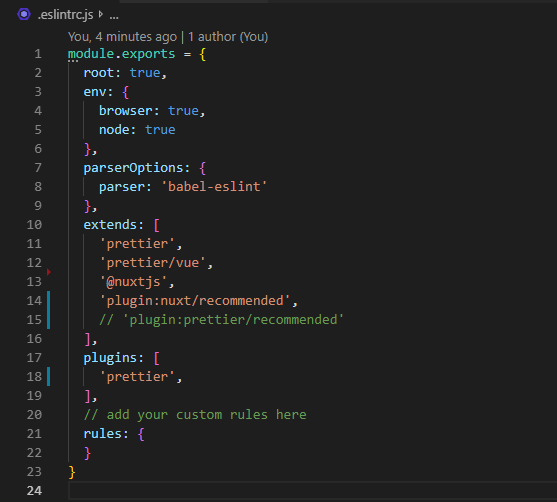
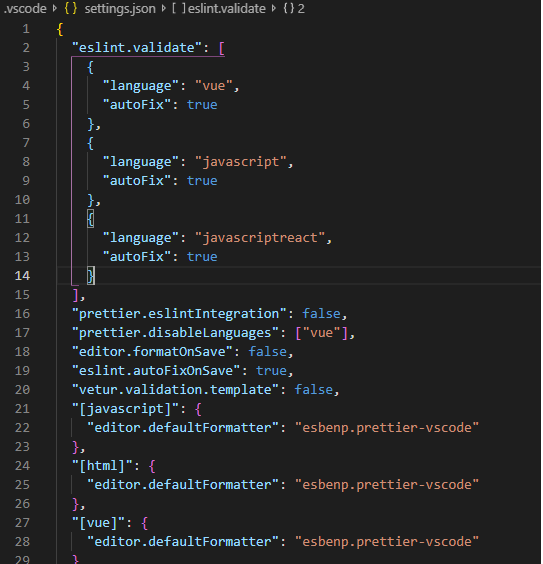
Not sure if its the right thing to do but 🤷♂
 LeanKhan
on 9 Aug 2019
LeanKhan
on 9 Aug 2019
@fedorovsky a new version of prettier ?
dbaeumer
on 9 Aug 2019
Some recommendation to better track down what is going wrong:
- first run eslint from the terminal out of the workspace folder you have open. That means if our workspace folder is under
/users/dirkb/myProjectrun eslint in the terminal with the cwd set to/users/dirkb/myProject. - ensure to use the local eslint version if installed by using
node_modules/.bin/eslint
If this run without problems provide me with a GitHub repository I can clone that demos the behaviour so that I can investigate
If it fails and the workspace folder has project folders (e.g. a client and server folder) or is some sort of mono repository try to run eslint from within the project folders. If this works setup the VS Code eslint.workingDirectories setting as described here https://github.com/microsoft/vscode-eslint. Best is to use the format with the changeProcessCWD property. Something like
"eslint.workingDirectories": [
{ "directory": "./client", "changeProcessCWD": true }
{ "directory": "./server", "changeProcessCWD": true }
]
If running eslint even fails in the project folder (e.g. client, server) then investigate if this is an eslint setup issue (missing plugin, wrong configuration, ....). It is very likely not an issue with the ESLint extension.
dbaeumer
on 9 Aug 2019
I'm guessing a lot of people are seeing this as a result of upgrading their create-react-app projects which uses ESLint ^6.
Thanks to the comments in this thread, we solved the ESLint plugins not loading issue by adding the following to the vscode workspace settings.json
"eslint.workingDirectories": [{ "directory": "./app", "changeProcessCWD": true }]
Note that the recommended install procedure for create-react-app is to use a sub directory. For our project we called the sub directory app. E.g.
npx create-react-app app
cd app
npm start
Of course as part of the initial setup we installed the vscode extension ESLint and ran .\node_modules\.bin\eslint --init
Oh, and for react projects you will need to add a react plugin preset to .eslintrc.json E.g.
"extends": [
"standard",
"plugin:react/recommended"
]
On a side note, while reviewing all the settings in vscode we re-ran .\node_modules\.bin\eslint --init and tested the setting eslint.autoFixOnSave. At that point we decided to remove the Prettier extension. The results so far are good and it makes onboarding developers that tiny bit easier.
For reference, our workspace settings.json file now looks like this (Note disabling formatOnSave for javascript because it conflicts with eslint.autoFixOnSave)
{
"eslint.workingDirectories": [{ "directory": "./app", "changeProcessCWD": true }],
"eslint.autoFixOnSave": true,
"editor.formatOnSave": true,
"[javascript]": {
"editor.formatOnSave": false
},
"editor.formatOnSaveTimeout": 4000
}
 hutch120
on 15 Aug 2019
hutch120
on 15 Aug 2019
Can no longer build my vue app with line 6 in place, commenting out removes the error from my vue build which is:
Module build failed (from ./node_modules/@vue/cli-plugin-eslint/node_modules/eslint-loader/index.js):
Error: Failed to load plugin prettier: Cannot find module 'eslint-plugin-prettier'
Referenced from: /Users/adamprocter/Documents/GitKraken/couchdocs/.eslintrc.js

 adamprocter
on 18 Aug 2019
adamprocter
on 18 Aug 2019
Have you tried the recipe here https://github.com/microsoft/vscode-eslint/issues/696#issuecomment-519936333 to track down what causes the problem?
dbaeumer
on 19 Aug 2019
Works with locally installed eslint 5.16.0;
Doesn't work with locally installed eslint >= 6;
Failed to load plugin 'react' declared in 'linters/.eslintrc': Cannot find module 'eslint-plugin-react'
Require stack:
- /path/to/file/__placeholder__.js
Referenced from: /path/to/file/.eslintrc
Happened while validating /path/to/file/index.js
This can happen for a couple of reasons:
1. The plugin name is spelled incorrectly in an ESLint configuration file (e.g. .eslintrc).
2. If ESLint is installed globally, then make sure 'eslint-plugin-react' is installed globally as well.
3. If ESLint is installed locally, then 'eslint-plugin-react' isn't installed correctly.
Consider running eslint --debug /path/to/file/index.js from a terminal to obtain a trace about the configuration files used.
 sshmyg
on 23 Aug 2019
sshmyg
on 23 Aug 2019
Please follow the information from 'hutch120'.
In short:
- If you have got folder per project (inc. package.json and .eslintrc) and many projects inside one folder (e.g. 'dev'), you can see described problem (eslint v6 failed).
- In this case create a new folder
dev/.vscode - Inside new folder create a file
settings.json(dev/.vscode/settings.json) - Finally write each folder name using react into
workingDirectoriesdirective like this:
"eslint.workingDirectories": [
"./template", // ... and other ones ...
]
Note: template is folder name with package.json having react dependency. Use you names!
(- Save the file.)
- Use last versions - update packages: eslint v6.2.2+, configs like airbnb ...
- Reload VS Code using [F1] -> write 'Reload Window' -> [Enter]
See also: https://marketplace.visualstudio.com/items?itemName=dbaeumer.vscode-eslint
ivo-urbanek
on 25 Aug 2019
@ivo-urbanek Works as expected, thks, but it's just work around rather than solution.
sshmyg
on 26 Aug 2019
@sshmyg Hope I'm not overstepping, but as far as I can tell using the option eslint.workingDirectories documented in the project Readme file is the recommended solution to get this extension working with ESLint ^6 as discussed in this very long thread, with highlights here, here and here. I've also added a few notes in this thread in relation to getting a create-react-app project working that I think is the correct way to configure this VSCode extension for that use-case. Hope this helps.
hutch120
on 26 Aug 2019
So, weirdly, I downgraded to [email protected], and now I get this exact same error for the downgraded version too..
And, setting working directory didn't work either. Here is my .settings.json
{
"json.schemas": [
{
"fileMatch": ["cosmos.config.json"],
"url": "http://json.schemastore.org/cosmos-config"
}
],
"eslint.workingDirectories": ["./", "./src", "./example"]
}
All files inside src are .ts|.tsx and all files inside example are .js files.
samrith-s
on 26 Aug 2019
I have xxx/gateway and xxx/gui in my repo (xxx), and I put the following config in xxx/.vscode/settings.json:
{
"eslint.workingDirectories": [
{
"directory": "GUI",
"changeProcessCWD": true
},
{
"directory": "gateway",
"changeProcessCWD": true
}
]
}
Basically it works for every ts and tsx file inside xxx/gateway/src and xxx/gui/src, but when I tried to run prettier-eslint format in xxx/gui/features/support/customFormatter.js, it said:
Failed to load plugin 'import' declared in 'CLIOptions'xxx/GUI/features/support/customFormatter.js:: Cannot find module 'eslint-plugin-import'
Require stack:
- /__placeholder__.js
And the most interesting thing is that, when I change the file name from customFormatter.js to customFormatter.ts, it just formats without error.
 linonetwo
on 26 Aug 2019
linonetwo
on 26 Aug 2019
@sshmyg Hope I'm not overstepping, but as far as I can tell using the option
eslint.workingDirectoriesdocumented in the project Readme file is the recommended solution to get this extension working with ESLint ^6 as discussed in this very long thread, with highlights here, here and here. I've also added a few notes in this thread in relation to getting acreate-react-appproject working that I think is the correct way to configure this VSCode extension for that use-case. Hope this helps.
Setting the working directories helped. Otherwise, I can confirm that eslint fails to load plugins when workspace root doesn't contain node_modules.
 bmakan
on 27 Aug 2019
bmakan
on 27 Aug 2019
As @hutch120 said, the ESLint working directory appears to be the underlying issue for many of these problems.
 agg23
on 29 Aug 2019
agg23
on 29 Aug 2019
I tried some of the solutions mentioned, it didn't help me
 gazedash
on 3 Sep 2019
gazedash
on 3 Sep 2019
@samrith-s Hi, short notes:
- Check name and path of your VS Code settings file. It's
.vscode/settings.json(not.settings.json) - File has to be out of project folder with package.json file.
- Check your folder names named in
workingDirectories. Maybe:
"eslint.workingDirectories": [ "./shopA", "./shopB", "./starter"]
In each of them you can find foldersrc. Try do not use just only./(in the list) - Remove eslint and take it back:
npm remove eslint
npm install -D eslint
Last note: @hutch120 it is not solution, you are right.
ivo-urbanek
on 3 Sep 2019
Try changing
"prettier.eslintIntegration": true
to
"prettier-eslint.eslintIntegration": true
in Settings (JSON) for VS Code.
Fixed the problems that I was having after upgrading to ESLint 6.x.
 2color
on 5 Sep 2019
2color
on 5 Sep 2019
same error happens in Atom. I don't really have any idea where to adjust the settings for prettier plugin in Atom? Maybe @2color you can give some pointers?
 afkatja
on 5 Sep 2019
afkatja
on 5 Sep 2019
@afkatja In Atom, you can go to the Preferences (Cmd + , on Mac) and add it to your settings.cson file.
samrith-s
on 5 Sep 2019
@ivo-urbanek Hey, did all of that. Still doesn't work. Going to try @2color's solution today or tomorrow, and hope it works! 😁
samrith-s
on 5 Sep 2019
@samrith-s thanks for your reply!
The config.scon in Atom's settings contains the following for prettier:
"prettier-atom":
formatOnSaveOptions:
enabled: true
prettierEslintOptions:
prettierLast: true
prettierOptions:
jsxBracketSameLine: true
printWidth: 100
trailingComma: "es5"
useEslint: true
Not sure what should be changed here?
afkatja
on 5 Sep 2019
@afkatja Afaik, you need to do:
"prettier-atom":
formatOnSaveOptions:
enabled: true
prettierEslintOptions:
prettierLast: true
prettierOptions:
jsxBracketSameLine: true
printWidth: 100
trailingComma: "es5"
useEslint: true
# Add these lines
"prettier-eslint":
eslintIntegration: true
Also, I think it'd be better suited to ask in the prettier-atom repository, since a lot of here don't use Atom regularly, and hence wouldn't be able to help you out as well as them! 😄
samrith-s
on 5 Sep 2019
I just started getting this error out of nowhere. Trying to follow along for how to fix... what do I need to do?
 kevflynn
on 6 Sep 2019
kevflynn
on 6 Sep 2019
Is @dbaeumer's post here about setting eslint.workingDirectories supposed to be the ultimate solution, or just a work-around until the issue can be resolved?
As an ultimate solution, it doesn't seem like the end of the world, but it does seem non-ideal, given it's one more thing to have to remember to manually do when setting up a workspace. The fact that we didn't previously need to do this makes it feel like a bug, from my perspective ... but I'm unclear if that's how the maintainers are viewing it.
 rhbecker
on 6 Sep 2019
rhbecker
on 6 Sep 2019
Agree with @rhbecker. Has this been reported to the ESLint maintainers since it was broken by ESLint 6? This used to work out of the box up until ESLint 5 and it's bothersome to have to configure working directories for every VSCode workspace that uses ESLint. Could this plugin implement default logic for workingDirectories if it isn't set, e.g. traverse the parent directories until it finds .eslintrc with root: true and use that as workingDirectory, or look for node_modules (npm root)?
marksamman
on 6 Sep 2019
Are you all committing your .vscode/settings.json?
We've been gitignoring it so each person can have their own settings. But if the workingDirectories is the fix for this issue, we'll need to start committing it so ESLint works in VSCode out of the box.
 StephenHaney
on 10 Sep 2019
StephenHaney
on 10 Sep 2019
@StephenHaney That defeats the entire purpose of having a settings.json file. 😄
That file is meant to contain settings for the workspace, so that the workspace behaves exactly the same on every machine.
samrith-s
on 10 Sep 2019
Aah - thanks for the explanation @samrith-s. I think I was thrown off by the auto-format on save setting, which seems like an individual preference. Now I see that anything available as a user setting is also available as a workspace setting. Cheers.
StephenHaney
on 10 Sep 2019
I got this link when I reported the issue to eslint: https://eslint.org/docs/user-guide/migrating-to-6.0.0#package-loading-simplification
"If you use a config file located outside of a local project (with the --config flag), consider installing the plugins as dependencies of that config file, and setting the --resolve-plugins-relative-to flag to the location of the config file."
However, when setting this as flag in the vscode plugin under eslint.options or eslint.lintTask.options exactly nothing happens and I still get the error.
 kurtextrem
on 14 Sep 2019
kurtextrem
on 14 Sep 2019
PSA to anyone has is having issues with monorepos:
vscode-eslint can pick up the wrong eslint package in a subproject if not explicitly given in the project settings:
[Info - 4:58:01 PM] ESLint server stopped.
[Info - 4:58:02 PM] ESLint server running in node v10.11.0
[Info - 4:58:02 PM] ESLint server is running.
[Info - 4:58:03 PM] ESLint library loaded from: /path/to/project/packages/components/node_modules/eslint/lib/api.js
[Info - 4:59:37 PM] ESLint library loaded from: /path/to/project/node_modules/eslint/lib/api.js
The components package has no reference to eslint in the package.json, however create-react-scripts has eslint as a dependency, and this vscode-eslint was using the eslint in the components package to run for files inside that directory, causing it to be unable to pickup plugins in the base of the repo.
The fix for my monorepo was to explicitly state the eslint.nodePath option to be the base node_modules of the repo:
$ cat .vscode/settings.json
{
"eslint.nodePath": "./node_modules"
}
 freshollie
on 15 Sep 2019
freshollie
on 15 Sep 2019
I am experiencing this as well with eslint v6.4.0. If you would like to use the github repo to debug please let me know. Right now I am getting this error in a local branch as I haven't merged it upstream yet which I would have to do for you to ue the repo.
Result Of Running $ npm ls --depth 0:
@4awpawz/[email protected] /Users/Jeff/Development/buster
├── [email protected]
├── [email protected]
├── [email protected]
├── [email protected]
├── [email protected]
├── [email protected]
├── [email protected]
├── [email protected]
├── [email protected]
├── [email protected]
├── [email protected]
├── [email protected]
├── [email protected]
├── [email protected]
└── [email protected]
Output Channel:
[Info - 8:39:21 AM] ESLint server stopped.
[Info - 8:39:23 AM] ESLint server running in node v10.11.0
[Info - 8:39:23 AM] ESLint server is running.
[Info - 8:39:28 AM] ESLint library loaded from: /Users/Jeff/Development/buster/node_modules/eslint/lib/api.js
[Error - 8:39:30 AM] ESLint stack trace:
[Error - 8:39:30 AM] Error: Failed to load config "standard" to extend from.
Referenced from: /Users/Jeff/Development/.eslintrc.json
at configMissingError (/Users/Jeff/Development/buster/node_modules/eslint/lib/cli-engine/config-array-factory.js:233:9)
at ConfigArrayFactory._loadExtendedShareableConfig (/Users/Jeff/Development/buster/node_modules/eslint/lib/cli-engine/config-array-factory.js:712:23)
at ConfigArrayFactory._loadExtends (/Users/Jeff/Development/buster/node_modules/eslint/lib/cli-engine/config-array-factory.js:617:25)
at ConfigArrayFactory._normalizeObjectConfigDataBody (/Users/Jeff/Development/buster/node_modules/eslint/lib/cli-engine/config-array-factory.js:547:25)
at _normalizeObjectConfigDataBody.next (<anonymous>)
at ConfigArrayFactory._normalizeObjectConfigData (/Users/Jeff/Development/buster/node_modules/eslint/lib/cli-engine/config-array-factory.js:491:20)
at _normalizeObjectConfigData.next (<anonymous>)
at createConfigArray (/Users/Jeff/Development/buster/node_modules/eslint/lib/cli-engine/config-array-factory.js:307:25)
at ConfigArrayFactory.loadInDirectory (/Users/Jeff/Development/buster/node_modules/eslint/lib/cli-engine/config-array-factory.js:400:16)
at CascadingConfigArrayFactory._loadConfigInAncestors (/Users/Jeff/Development/buster/node_modules/eslint/lib/cli-engine/cascading-config-array-factory.js:304:46)
[Error - 8:39:57 AM] ESLint stack trace:
[Error - 8:39:57 AM] Error: Failed to load config "standard" to extend from.
Referenced from: /Users/Jeff/Development/.eslintrc.json
at configMissingError (/Users/Jeff/Development/buster/node_modules/eslint/lib/cli-engine/config-array-factory.js:233:9)
at ConfigArrayFactory._loadExtendedShareableConfig (/Users/Jeff/Development/buster/node_modules/eslint/lib/cli-engine/config-array-factory.js:712:23)
at ConfigArrayFactory._loadExtends (/Users/Jeff/Development/buster/node_modules/eslint/lib/cli-engine/config-array-factory.js:617:25)
at ConfigArrayFactory._normalizeObjectConfigDataBody (/Users/Jeff/Development/buster/node_modules/eslint/lib/cli-engine/config-array-factory.js:547:25)
at _normalizeObjectConfigDataBody.next (<anonymous>)
at ConfigArrayFactory._normalizeObjectConfigData (/Users/Jeff/Development/buster/node_modules/eslint/lib/cli-engine/config-array-factory.js:491:20)
at _normalizeObjectConfigData.next (<anonymous>)
at createConfigArray (/Users/Jeff/Development/buster/node_modules/eslint/lib/cli-engine/config-array-factory.js:307:25)
at ConfigArrayFactory.loadInDirectory (/Users/Jeff/Development/buster/node_modules/eslint/lib/cli-engine/config-array-factory.js:400:16)
at CascadingConfigArrayFactory._loadConfigInAncestors (/Users/Jeff/Development/buster/node_modules/eslint/lib/cli-engine/cascading-config-array-factory.js:304:46)
[Error - 8:48:27 AM] ESLint stack trace:
[Error - 8:48:27 AM] Error: Failed to load config "standard" to extend from.
Referenced from: /Users/Jeff/Development/.eslintrc.json
at configMissingError (/Users/Jeff/Development/buster/node_modules/eslint/lib/cli-engine/config-array-factory.js:233:9)
at ConfigArrayFactory._loadExtendedShareableConfig (/Users/Jeff/Development/buster/node_modules/eslint/lib/cli-engine/config-array-factory.js:712:23)
at ConfigArrayFactory._loadExtends (/Users/Jeff/Development/buster/node_modules/eslint/lib/cli-engine/config-array-factory.js:617:25)
at ConfigArrayFactory._normalizeObjectConfigDataBody (/Users/Jeff/Development/buster/node_modules/eslint/lib/cli-engine/config-array-factory.js:547:25)
at _normalizeObjectConfigDataBody.next (<anonymous>)
at ConfigArrayFactory._normalizeObjectConfigData (/Users/Jeff/Development/buster/node_modules/eslint/lib/cli-engine/config-array-factory.js:491:20)
at _normalizeObjectConfigData.next (<anonymous>)
at createConfigArray (/Users/Jeff/Development/buster/node_modules/eslint/lib/cli-engine/config-array-factory.js:307:25)
at ConfigArrayFactory.loadInDirectory (/Users/Jeff/Development/buster/node_modules/eslint/lib/cli-engine/config-array-factory.js:400:16)
at CascadingConfigArrayFactory._loadConfigInAncestors (/Users/Jeff/Development/buster/node_modules/eslint/lib/cli-engine/cascading-config-array-factory.js:304:46)
[Error - 8:48:27 AM] ESLint stack trace:
[Error - 8:48:27 AM] Error: Failed to load config "standard" to extend from.
Referenced from: /Users/Jeff/Development/.eslintrc.json
at configMissingError (/Users/Jeff/Development/buster/node_modules/eslint/lib/cli-engine/config-array-factory.js:233:9)
at ConfigArrayFactory._loadExtendedShareableConfig (/Users/Jeff/Development/buster/node_modules/eslint/lib/cli-engine/config-array-factory.js:712:23)
at ConfigArrayFactory._loadExtends (/Users/Jeff/Development/buster/node_modules/eslint/lib/cli-engine/config-array-factory.js:617:25)
at ConfigArrayFactory._normalizeObjectConfigDataBody (/Users/Jeff/Development/buster/node_modules/eslint/lib/cli-engine/config-array-factory.js:547:25)
at _normalizeObjectConfigDataBody.next (<anonymous>)
at ConfigArrayFactory._normalizeObjectConfigData (/Users/Jeff/Development/buster/node_modules/eslint/lib/cli-engine/config-array-factory.js:491:20)
at _normalizeObjectConfigData.next (<anonymous>)
at createConfigArray (/Users/Jeff/Development/buster/node_modules/eslint/lib/cli-engine/config-array-factory.js:307:25)
at ConfigArrayFactory.loadInDirectory (/Users/Jeff/Development/buster/node_modules/eslint/lib/cli-engine/config-array-factory.js:400:16)
at CascadingConfigArrayFactory._loadConfigInAncestors (/Users/Jeff/Development/buster/node_modules/eslint/lib/cli-engine/cascading-config-array-factory.js:304:46)
 jeffschwartz
on 16 Sep 2019
jeffschwartz
on 16 Sep 2019
Running npm audit fix seems to have fixed it for me.
jeffschwartz
on 17 Sep 2019
@rhbecker actually standolne ESLint has the same issue. When you execute eslint in the terminal without changing into the right working directory the execution will fail with the same error as the extension does.
However I do see the fact that changing directories in a terminal is more natural then specifying working directories in a settings file. Although I have to say you always have to do this, the setting you set once :-)
I do have an item to detect working directories. See https://github.com/microsoft/vscode-eslint/issues/708. A PR to improve this is highly appreciated.
dbaeumer
on 17 Sep 2019
Try changing
"prettier.eslintIntegration": true
to
"prettier-eslint.eslintIntegration": true
in Settings (JSON) for VS Code.Fixed the problems that I was having after upgrading to ESLint 6.x.
This worked for me
 allyson7
on 20 Sep 2019
allyson7
on 20 Sep 2019
I added ` "eslint.workingDirectories": ["./dir-goes/here"] based on https://github.com/microsoft/vscode-eslint/issues/696#issuecomment-524833673 and it resolved.
 lucksp
on 24 Sep 2019
lucksp
on 24 Sep 2019
TL;DR
Try removing the"prettier.eslintIntegration": truesetting from bothsettings.jsonand.vscode/settings.json
Firstly thank you 🎉 @2color and @allyson7 for suggesting the same fix that worked for you. Unfortunately in my case, the setting was enabled in both user settings and the workspace settings which I wasn't aware of. Of course, didn't work for me. My bad.
My project setup might seem peculiar to most of the people. I have a monorepo setup with lerna and yarn workspaces with global typescript and typescript-eslint configuration at the root.
For me removing the setting "prettier.eslintIntegration": true from both settings.json and .vscode/settings.json did the trick. Even if yours is not the same setup give it a try.
One more thing to note is I don't have the setting
"prettier-eslint.eslintIntegration": trueneither did I installedprettier-eslint.
Looks like the problem is caused by the setting"prettier.eslintIntegration": truewhich is deprecated according to the docs.
If this is the case does it makes sense why the eslint command in the terminal works and not in the VS Code with the Prettier extension?
Although I am sad I had to go through all this because a setting was deprecated which in turn broke my setup. 😞
 pmithunish
on 25 Sep 2019
pmithunish
on 25 Sep 2019
I have the same problem after upgrading to version eslint 6.x:
Error: Cannot find module 'eslint-plugin-react'
I temporarily fixed this by rolling back to version 5
 undermuz
on 2 Oct 2019
undermuz
on 2 Oct 2019
This issue has become a catchall thread for a number of different problems that can trigger the same error. A few solutions are buried in here, and my case involved two at the same time. I hope the following summary helps folks:
Least invasive
From @jeffschwartz 's comment npm audit fix seems the least invasive, worth a try. If it works for you, great!
Subdirectories
If your workspace has multiple subdirectories with eslintrc.* a level or so down like this:
root/
-- backend/
---- .eslintrc
-- frontend/
---- .eslintrc
Then you need to specifically tell vscode-eslint to look in these subdirectories by setting the option eslint.workingDirectories. You will likely want this to sit in your workplaces' .vscode/settings.json file, like this:
...
"eslint.workingDirectories": [
"./backend",
"./frontend"
],
...
Look to the comments by @SMerdzhanov here, and @cassv24 here for more information. Or simply search "eslint.workingDirectories" on this page for all the different comments where it comes up (lots).
Upgrading to eslint@6* and Prettier integrations
In short, you should now be using prettier-eslint, as a devDependancy of your project with the VS Code Prettier extension.
The VS Code Prettier extention had the following settings option: "prettier.eslintIntegration": true which is now deprecated.
Remove or set to false the option "prettier.eslintIntegration": true in your user settings.json and in your workspace's .vscode/settings.json. You can replace it with prettier-eslint's equivalent option "prettier-eslint.eslintIntegration": true.
Hat tip goes to @2color and his comment here
_Incidentally prettier.tslintIntegration, and prettier.stylelintIntegration have also been deprecated. If you use either of these Prettier plugins, you may encounter similar issues._
 orionrush
on 2 Oct 2019
orionrush
on 2 Oct 2019
@orionrush thanks for providing this good summary.
dbaeumer
on 3 Oct 2019
Try change your nodejs version
you can do this with nvm (node version manager) its look like a node versions problem (try the stable version, or older) [sorry brazilian english kkkk ]: https://github.com/nvm-sh/nvm
 frederico-kluser
on 7 Oct 2019
frederico-kluser
on 7 Oct 2019
Hi guys, I had the same problem and I resolved following the steps here: https://github.com/prettier/prettier-vscode#vscode-eslint-and-tslint-integration
Try remove the eslint and tslint configs in settings.json to "eslint.autoFixOnSave": true and
"tslint.autoFixOnSave": true
 viniarruda
on 8 Oct 2019
viniarruda
on 8 Oct 2019
@orionrush tks, you saved my life!
It's been a while since I've been looking for a solution.
Most of the time I had to downgrade the eslint version to 5.4.0.
But your solution solved the problem, thank you very much for the solution and the explanation.
 GleidsonDaniel
on 8 Oct 2019
GleidsonDaniel
on 8 Oct 2019
Hi guys, I had the same problem and I resolved following the steps here: https://github.com/prettier/prettier-vscode#vscode-eslint-and-tslint-integration
Try remove the eslint and tslint configs in
settings.jsonto"eslint.autoFixOnSave": trueand
"tslint.autoFixOnSave": true
@viniarruda Thanks,It's resolve my problem!
 fanguyun214
on 16 Oct 2019
fanguyun214
on 16 Oct 2019
This issue has become a catchall thread for a number of different problems that can trigger the same error. A few solutions are buried in here, and my case involved two at the same time. I hope the following summary helps folks:
Least invasive
From @jeffschwartz 's comment
npm audit fixseems the least invasive, worth a try. If it works for you, great!Subdirectories
If your workspace has multiple subdirectories with
eslintrc.*a level or so down like this:root/ -- backend/ ---- .eslintrc -- frontend/ ---- .eslintrcThen you need to specifically tell vscode-eslint to look in these subdirectories by setting the option
eslint.workingDirectories. You will likely want this to sit in your workplaces'.vscode/settings.jsonfile, like this:... "eslint.workingDirectories": [ "./backend", "./frontend" ], ...Look to the comments by @SMerdzhanov here, and @cassv24 here for more information. Or simply search "eslint.workingDirectories" on this page for all the different comments where it comes up (lots).
Upgrading to
eslint@6*and Prettier integrationsIn short, you should now be using prettier-eslint, as a devDependancy of your project with the VS Code Prettier extension.
The VS Code Prettier extention had the following settings option:
"prettier.eslintIntegration": truewhich is now deprecated.Remove or set to false the option
"prettier.eslintIntegration": truein your usersettings.jsonand in your workspace's.vscode/settings.json. You can replace it withprettier-eslint's equivalent option"prettier-eslint.eslintIntegration": true.Hat tip goes to @2color and his comment here
_Incidentally
prettier.tslintIntegration, andprettier.stylelintIntegrationhave also been deprecated. If you use either of these Prettier plugins, you may encounter similar issues._
@orionrush Wah thanks awesome. Add eslint.workingDirectories in the settings.json work for me. Running well in node version 12.
 ekobayu
on 16 Oct 2019
ekobayu
on 16 Oct 2019
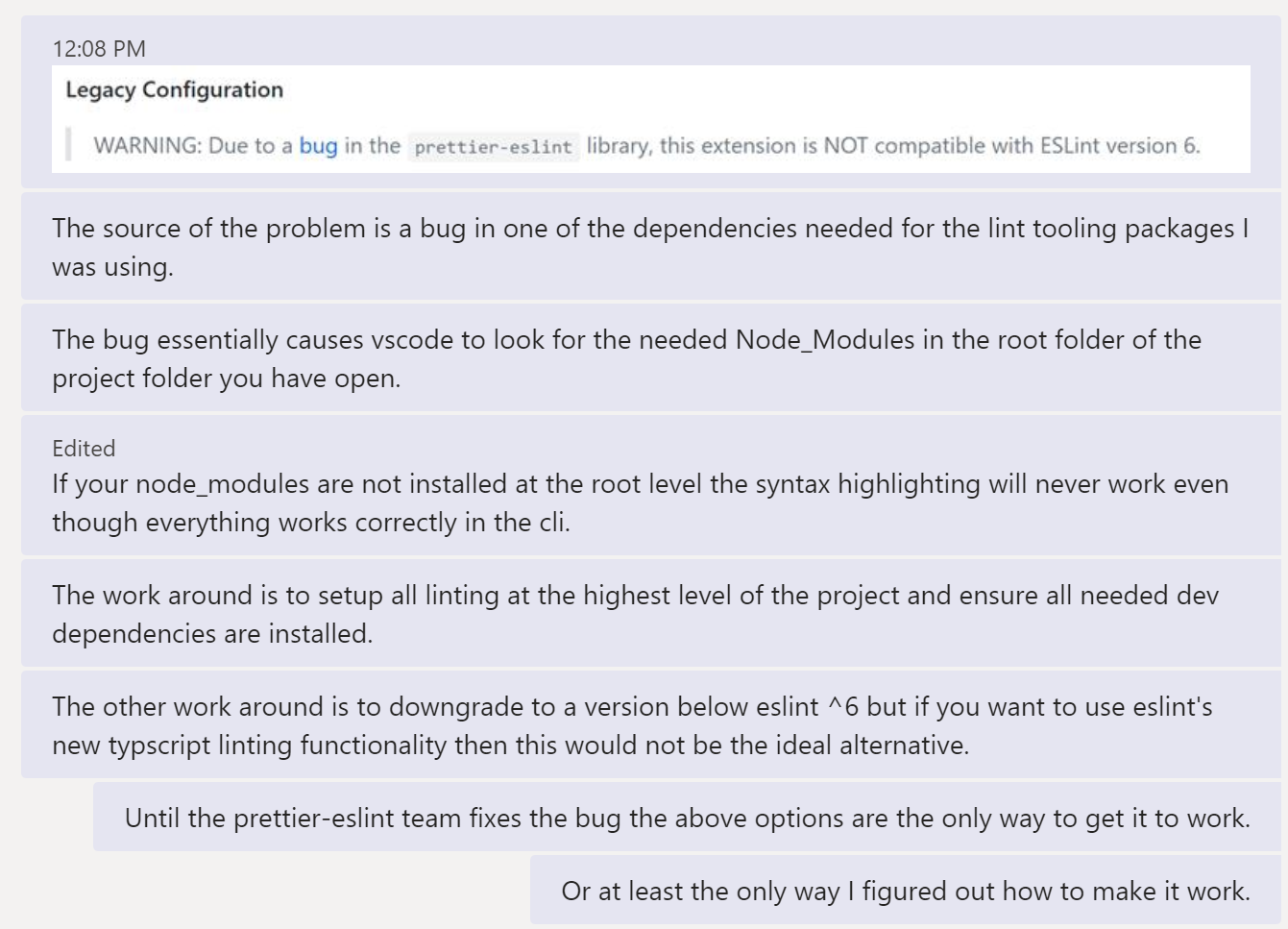
After working to resolve this issue for a day and change the below is what I came up with:
 chrisauinmotion
on 16 Oct 2019
chrisauinmotion
on 16 Oct 2019
And to be clear when I say "setup all linting at the highest level/root of the project" I mean your eslint, prettier and any other packages you may be using with eslint needs to be installed at the highest level of your project and saved in the dev dependencies. I also created one central eslintrc.json with all my needed configurations at the root of the project as well.
chrisauinmotion
on 16 Oct 2019
@chrisauinmotion
This isn’t my experience, believe I have it working in a setup similar to what you’re describing.
Did you try explicitly pointing VSCode to your subdirectories in your workplaces' .vscode/settings.json file? here is an example of what that looks like.
’’’
"eslint.workingDirectories": [
"./backend",
"./frontend"
],
’’’
It’s true though that it doesn’t work out of the box as we might like, and manually adding ‘eslint.workingDirectories‘ in your vscode settings.js file is a royal pain.
You mentioned that there is a bug in one of eslints ^6 dependencies? Is that bug described anywhere? Which dependency did you track to?
orionrush
on 17 Oct 2019
Memo for monorepo players:
- install all modules globally,
npm i -g ... - add the option to force vscode-eslint to use global path (
npm list -g | head -n 1) instead the local path (always 404 😂 )
// settings.json
{
"eslint.options": {
"resolvePluginsRelativeTo": "/usr/local/lib/node_modules"
}
}
Refs:
- https://eslint.org/docs/user-guide/migrating-to-6.0.0#-plugins-and-shareable-configs-are-no-longer-affected-by-eslints-location
- https://eslint.org/docs/developer-guide/nodejs-api#cliengine
 up9cloud
on 18 Oct 2019
up9cloud
on 18 Oct 2019
@up9cloud
I'm using a monorepo and the prior solution of setting working directories
worked fine for me.
All my configs now live in local dependencies and the workspace settings of
the project. No more global dependencies means that getting started is as
easy as running npm install/yarn. 🚀
On Fri, Oct 18, 2019, 08:50 up9cloud notifications@github.com wrote:
Memo for monorepo players:
- install all modules globally, npm i -g ...
- add the option to force vscode-eslint to use global path (npm list
-g | head -n 1) instead the local path it should 200 but 404 😂 .// settings.json
{
"eslint.options": { "resolvePluginsRelativeTo": "/usr/local/lib/node_modules" }}
Refs:
-
https://eslint.org/docs/user-guide/migrating-to-6.0.0#-plugins-and-shareable-configs-are-no-longer-affected-by-eslints-location—
You are receiving this because you are subscribed to this thread.
Reply to this email directly, view it on GitHub
https://github.com/microsoft/vscode-eslint/issues/696?email_source=notifications&email_token=AG4BSR6LFHHX6QIIWGX6VALQPFMC7A5CNFSM4H3ID3MKYY3PNVWWK3TUL52HS4DFVREXG43VMVBW63LNMVXHJKTDN5WW2ZLOORPWSZGOEBS6OZY#issuecomment-543549287,
or unsubscribe
https://github.com/notifications/unsubscribe-auth/AG4BSR7JCA7MHTQZSRMOGCDQPFMC7ANCNFSM4H3ID3MA
.
CodingDive
on 18 Oct 2019
@CodingDive
Yes. The keywork is working directories. That's why i choose using global! (too many directories need to set...)
The situation i met is: (https://github.com/microsoft/vscode-eslint/issues/696#issuecomment-508580721 mentioned)
$ cd the-real-mono-with-all-projects
$ tree -d -L 1
.
├── monorepo1
├── monorepo2
├── project3
├── project4
├── ...
└── shared-config
23 directories
$ code .
And those should work:
- always open one vscode per project (Your suggestion)
- open the projects root folder with ...
- adding all projects to working directories
- or forcing global (I prefer this)
up9cloud
on 23 Oct 2019
Unfortunately I do not really understand any of the suggested fixes and any tweaks I make to my vue don’t help. :(
adamprocter
on 23 Oct 2019
Unfortunately with Create React App setup, none of the suggestions worked either...
Thanks to @orionrush for all of the suggestions, but possibly because I am using CRA it changes something.
For all silly people like me, make sure the directory that is opened in VsCode is the one with .eslint config file.
Everything works, thanks again 👍
 ievgenk
on 25 Oct 2019
ievgenk
on 25 Oct 2019
@orionrush setting "eslint.workingDirectories" worked for me, thank you so much for your help!
 foxdonut
on 2 Nov 2019
foxdonut
on 2 Nov 2019
I just restarted VSCode after installed "eslint-plugin-vue" and everything works fine.
 desmartDev
on 3 Nov 2019
desmartDev
on 3 Nov 2019
I've noticed that I get many of the Eslint errors mentioned here lately when working with project folders within a VS Code Workspace. If I open my project folder directly and not within a Workspace, everything works fine. I'd say VS Code's Workspace feature needs more refinement to avoid directory issues like this.
 Seefer
on 12 Nov 2019
Seefer
on 12 Nov 2019
@Seefer please have a look at the eslint.workingDirectories settings which exactly serves the purpose of defining these project folder for eslint.
dbaeumer
on 13 Nov 2019
I too have a monorepo and I had one hell of a time trying to figure out where to put the settings.json file and how to format it. So to hopefully save some people the trouble here's my setup...

settings.json
{
"eslint.workingDirectories": [
"./client",
]
}
 mikeyamato
on 14 Nov 2019
mikeyamato
on 14 Nov 2019
I'am ok with [email protected];
first I see the above comments, when downgraded 5, then I realize did I spell wrongly about eslint:recommended, then upgrade to 6.6, I work for me.
 baixiaoji
on 18 Nov 2019
baixiaoji
on 18 Nov 2019
@mikeyamato try
{
"eslint.workingDirectories": [
{ "directory": "./client", "changeProcessCWD": true }
]
}
So all these workaround and fixes are nice, but is this ever going to be fixed in a plug-and-play way?
One of the amazing things about this plugin with eslint@5 is that it just always works automagically, no matter your application/workspace layout. That's a great experience. The fact that this is no longer something I don't have to think about bums me out :(
 Lakitna
on 18 Nov 2019
Lakitna
on 18 Nov 2019
Especially when people like @up9cloud or me have something like 20-30 projects in the same workspace.
 Dewep
on 18 Nov 2019
Dewep
on 18 Nov 2019
@dbaeumer I'm guessing your way is better, but why?
{
"eslint.workingDirectories": [
{ "directory": "./client", "changeProcessCWD": true }
]
}
mikeyamato
on 19 Nov 2019
I am currently working ontwo changes for the next 2.0 version of the extension:
- glob support for
eslint.workingDirectories - making changing the process cwd the default since it majorly helps with eslint 6.0.
I also looked into detecting project folders but I couldn't come up with a good solution which wouldn't require prompting for review. If someone has ideas I am happy to consider them.
dbaeumer
on 19 Nov 2019
@dbaeumer I would suggest either traversing parent directories to look for .eslintrc with "root": true, or using the parent directory of npm root, as a default when eslint.workingDirectories "directory" is not set.
marksamman
on 19 Nov 2019
@marksamman this is exactly what I want to avoid since it is not only looking for .eslintrc files. ESLint has so many different ways to be configured (including a property in a package.json) that I don't want to be in the boat of re-implementing this.
dbaeumer
on 19 Nov 2019
@marksamman this is exactly what I want to avoid since it is not only looking for .eslintrc files. ESLint has so many different ways to be configured (including a property in a package.json) that I don't want to be in the boat of re-implementing this.
Can't you use cosmiconfig to solve that problem for you?
 rfgamaral
on 20 Nov 2019
rfgamaral
on 20 Nov 2019
Eslint actually uses cosmiconfig as you can see in the cosmiconfig readme: https://github.com/davidtheclark/cosmiconfig#searchplaces
// ESLint searches for configuration in these places:
[
'.eslintrc.js',
'.eslintrc.yaml',
'.eslintrc.yml',
'.eslintrc.json',
'.eslintrc',
'package.json'
]
Even with a library I want to stay away from this since the version I might use and the one used by the eslint in your workspace might be different and produce different results. I was more hoping for suggestions on how to find this out using normal ESLint API.
dbaeumer
on 20 Nov 2019
@Seefer please have a look at the
eslint.workingDirectoriessettings which exactly serves the purpose of defining these project folder for eslint.
Some great tips and clarification in here. Thanks to all.
I must admit that my 'use case' for VS Code's Workspaces may not be as it's intended to be used. When the Workspace feature appeared I realised that the VS Code Extensions tools allowed you to enable or disable them on a Workspace basis so I was using it for that filtering capability.
I'm somewhat of a new-comer to Web development and I'm currently trying to skill up. Given a choice, I'd reach for ASP.NET Core as my default tech for a personal project. I'm comfortable in the C++ / C# language space so my initial choice of VS Code extensions was specific to making life in this world pain-free.
I then discovered a cool coding school / bootcamp outfit called Northcoders in my hometown of Manchester (UK) and am working towards enrolling with them to accelerate a career change. Northoders syllabus is Javascript / React-based so I switched focus to that ecosystem but ASP.NET Core is the tech that speaks to me on a language + framework level so I keep somewhat up to date with that too.
So I realised I could use the Workspace enable/disable ability for extensions so that there'd be less VS Code memory footprint and any potential clash between extensions with similar functionality while I was switching between ASP.NET Core and JS / React world.
My inexperience/naivety in this Web dev space is likely the reason I assumed that, even though I'm using Workspaces, I still only have one project folder in there and that extensions wouldn't need manual configuration to help them disambiguate between one project folder in a Workspace vs multiple project folder environments :)
It might even be the case that my concern over VS Code's ability to handle so many similar extensions meant for different languages and coding ecosystems is misplaced? If not then maybe there's potential for a VS Code feature to allow 'Extension sets' to be loaded based on project language/framework ecosystem?
Seefer
on 23 Nov 2019
my use case for this is I like to have some basic linting when I'm just messing around outside of any projects writing test JS in VS Code. Previously I had a global eslintrc in my home folder that had some basic rules enabled. The fact that this doesn't work anymore has actually proven to be a pretty big loss for me
 kufii
on 26 Nov 2019
kufii
on 26 Nov 2019
Honestly, this is kinda ridiculous. In the last 2 days I've lost about 3 hours fighting it, reinstalling my dependencies, deleting them one by one, nothing helped.
Fortunately the workaround (open Code in the folder with .eslintrc.json) works fine.
 bartekpacia
on 27 Nov 2019
bartekpacia
on 27 Nov 2019
The following worked for me
export NODE_PATH='npm root -g'
the quotation marks ' are actually ` tildes
 Naragod
on 27 Nov 2019
Naragod
on 27 Nov 2019
There is now a new Insider version of the extension that should help improve this. Please see https://github.com/microsoft/vscode-eslint/issues/815 on how to beta test it. Please be aware that this is a bigger rewrite of some functionality so other things might break :-)
dbaeumer
on 28 Nov 2019
Having eslint-config-prettier and eslint-plugin-prettier worked for me. I'm currently using a lando drupal recipe for development and I added these packages on the root folder of the lando install. Hope that helps.
 beto-aveiga
on 30 Nov 2019
beto-aveiga
on 30 Nov 2019
In case it helps anyone searching, the following (based on previous comments) fixed it for me in a lerna monorepo. ESLint is installed in the root project, and its config file is there too.
"eslint.workingDirectories": ["./"],
 robatwilliams
on 2 Dec 2019
robatwilliams
on 2 Dec 2019
In my case, I had the following folder structure:
front/
back/
shared/
I just had to add a .vscode/settings.json at the root of the project, with the following content:
{
"eslint.workingDirectories": ["./front", "./back", "./shared"]
}
This removes the mentioned error (for reference, I'm using eslint v6.7.2).
Not entirely happy with this though, as I have to manually add the projects to this setting file.
 MarceloPrado
on 4 Dec 2019
MarceloPrado
on 4 Dec 2019
@MarceloPrado the next version will improve this. I do want to point out that eslint in the terminal fails as well in this setup if not executed from one of the directories front, back and shared.
dbaeumer
on 5 Dec 2019
I'm not sure if the issue I'm currently having is related to this one but here's my file structure:
.
├── .vscode
│ └── settings.json
├── configs
│ └── .eslintrc.json
├── lerna.json
├── node_modules
├── package.json
├── packages
│ ├── angularjs-component
│ │ └── .eslintrc
│ └── core
├── README.md
└── yarn.lock
.vscode/settings.json
{
"eslint.enable": true,
"eslint.packageManager": "yarn",
"eslint.workingDirectories": [
{
"changeProcessCWD": true,
"directory": "./packages/core"
},
{
"changeProcessCWD": true,
"directory": "./packages/angularjs-component"
}
],
"typescript.tsdk": "node_modules/typescript/lib"
}
```
**`config/.eslintrc.json`**
{
"extends": [
"@rfgamaral/eslint-config-typescript-unified/airbnb",
"plugin:jest/recommended",
"plugin:jest/style"
],
"parserOptions": {
"ecmaVersion": 2020
},
"ignorePatterns": [
"/coverage",
"/dist",
"/node_modules",
"/.config.js"
],
"rules": {
"@typescript-eslint/explicit-function-return-type": [
"warn",
{
"allowExpressions": true,
"allowTypedFunctionExpressions": true,
"allowHigherOrderFunctions": true
}
],
"@typescript-eslint/no-unused-vars": "off",
"import/no-extraneous-dependencies": [
"error",
{
"devDependencies": [
"/__{mocks,tests}__//.{js,ts}",
"/*.test.{js,ts}",
"/jest.setup.{js,ts}"
]
}
],
"import/prefer-default-export": "off",
"prettier/prettier": "warn"
}
}
**`packages/angularjs-component/.eslintrc`**
```json
{
"root": true,
"extends": "../../configs/.eslintrc.json"
}
packages/angularjs-component/tsconfig.json
{
"extends": "../../configs/tsconfig.json",
"compilerOptions": {
"baseUrl": ".",
"outDir": "./dist",
"paths": {
"@tier-based-promotions/core": [
"../core/src/index.ts"
]
}
},
"exclude": [
"./coverage/**/*",
"./dist/**/*",
"./node_modules/**/*",
"./*.config.js"
]
}
And here's my issue...
When I run eslint directly in the CLI inside the packages/angularjs-component folder, everything is fine, everything works and I get no errors/warnings. The paths mapping are working, great :)
However, this extension is reporting me the following error: Unable to resolve path to module '@tier-based-promotions/core'. eslint(import/no-unresolved). It feels like it's ignoring my paths mapping in tsconfig.json.
For more context, my base .eslintrc.json file is using @rfgamaral/eslint-config-typescript-unified/airbnb, which is something I created for my projects. And I have this ESLint configuration with something like this:
"parserOptions": {
"project": "./tsconfig.json",
},
It seems that ESLit CLI is using this configuration properly (and reading tsconfig.json), while the ESLint extension for VS Code is not.
Thoughts?
rfgamaral
on 10 Dec 2019
These settings look good to me:
```
"eslint.workingDirectories": [
{
"changeProcessCWD": true,
"directory": "./packages/core"
},
{
"changeProcessCWD": true,
"directory": "./packages/angularjs-component"
}
],
````
Do you have a repository I can clone that demos this. Otherwise it is very hard to tell what is going on. The extension does use the ESLint npm module to do all the resolving and validating. So code wise it does the same as the eslint comment in the terminal. So it can only be a config / cwd issue.
dbaeumer
on 12 Dec 2019
@dbaeumer I don't have one for the moment and I'm kinda busy this sprint but I'll try to create one as soon as possible and post back. Thank you.
rfgamaral
on 12 Dec 2019
@dbaeumer Just remembered something that might be relevant to my issue... I'm using Windows 10 and my project is stored in the Windows filesystem. However, when I open the terminal inside VS Code I'm running WSL and that's where I have installed all my dependencies with yarn. I don't have node, npm, yarn or any other tool installed in Windows, only WSL.
rfgamaral
on 12 Dec 2019
@rfgamaral actually that shouldn't make a difference. But you never know :-)
dbaeumer
on 13 Dec 2019
With the VS code 1.41.0 this issue should be resolved for most people. From the release notes:
ESLint
Improvements to the ESLint extension:
- Better support for ESLint 6.x - In most cases, it shouldn't be necessary to configure working directories when using ESLint 6.x.
- Improved TypeScript detection - As soon as TypeScript is correctly configured inside ESLint, you no longer need additional configuration through VS Code's eslint.validate setting. The same is true for HTML and Vue.js files.
- Glob working directory support - Projects that have a complex folder structure and need to customize the working directories via eslint.workingDirectories can now use glob patterns instead of listing every project folder. For example, code-* will match all project folders starting with code-. In addition, the extension now changes the working directory by default. You can disable this feature with the new !cwd property.
- Improved Auto Fix on Save - Auto Fix on Save is now part of VS Code's Code Action on Save infrastructure and computes all possible fixes in one round. It is customized via the editor.codeActionsOnSave setting. The setting supports the ESLint specific property source.fixAll.eslint. The extension also respects the generic property source.fixAll.
I was able to verify that Eslint now works in my projects.
Lakitna
on 16 Dec 2019
With the VS code
1.41.0this issue should be resolved for most people.
[...]
I was able to verify that Eslint now works in my projects.
With plugins? It still fails on my machine if I don't configure eslint.workingDirectories.
ESLint Output-Channel:
[Info - 12:08:55 PM] ESLint server stopped.
[Info - 12:08:55 PM] ESLint server running in node v12.4.0
[Info - 12:08:55 PM] ESLint server is running.
[Info - 12:08:56 PM] ESLint library loaded from: /home/simon/Desktop/dev/work/asm-server/node_modules/eslint/lib/api.js
[Error - 12:08:56 PM]
Failed to load plugin 'prettier' declared in 'asm-server/.eslintrc.json': Cannot find module 'eslint-plugin-prettier'
Require stack:
- /home/simon/Desktop/dev/work/__placeholder__.js
Happened while validating /home/simon/Desktop/dev/work/asm-server/src/app.js
This can happen for a couple of reasons:
1. The plugin name is spelled incorrectly in an ESLint configuration file (e.g. .eslintrc).
2. If ESLint is installed globally, then make sure 'eslint-plugin-prettier' is installed globally as well.
3. If ESLint is installed locally, then 'eslint-plugin-prettier' isn't installed correctly.
Consider running eslint --debug /home/simon/Desktop/dev/work/asm-server/src/app.js from a terminal to obtain a trace about the configuration files used.
eslint --debug output:
Oops! Something went wrong! :(
ESLint: 6.7.2.
ESLint couldn't find the plugin "eslint-plugin-prettier".
(The package "eslint-plugin-prettier" was not found when loaded as a Node module from the directory "/home/simon/Desktop/dev/work".)
It's likely that the plugin isn't installed correctly. Try reinstalling by running the following:
npm install eslint-plugin-prettier@latest --save-dev
The plugin "eslint-plugin-prettier" was referenced from the config file in "asm-server/.eslintrc.json".
If you still can't figure out the problem, please stop by https://gitter.im/eslint/eslint to chat with the team.
Version: 1.41.0
Commit: 9579eda04fdb3a9bba2750f15193e5fafe16b959
Date: 2019-12-11T18:32:17.711Z
Electron: 6.1.5
Chrome: 76.0.3809.146
Node.js: 12.4.0
V8: 7.6.303.31-electron.0
OS: Linux x64 5.3.0-24-generic
 simon-lorenz
on 16 Dec 2019
simon-lorenz
on 16 Dec 2019
I do not use prettier, but it does work with all of eslint-plugin-import, eslint-plugin-sonarjs, and eslint-plugin-unicorn.
I've installed eslint-plugin-prettier too to try it out and things seem to be working fine for me.
As (poorly) mentioned before there are probably a bunch of cases where things will continue to not work but it's worth checking if you can use eslint@6 now. For the failing situations, we'll probably have to wait on the next fix. Either by the VScode team or @dbaeumer.
Lakitna
on 16 Dec 2019
For me with 1.41.0 it still doesn't work. I get no error but there is no linting whenever I open a root with many projects. However opening only one project folder (which has .eslintrc) it works. Using eslint 5.16.0. Also tried with 6 - same problem.
 mifi
on 16 Dec 2019
mifi
on 16 Dec 2019
I released version 2.0.4 of the extension which should improve this but it will still require some configuration work if the workspace is not a single project (e.g. the workspace root doesn't contain the package.json and .eslintrc file). The major reason why this can't be fixed in all cases is that ESLint itself (the npm module) is very sensitive to the current working directory for the module and plugin resolution, the .eslintrc and the .eslintignore file. Choosen an incorrect directory might make one of those fail. The new version therefore allows the following working directory settings (from the readme):
{ "mode": "location" }(@since 2.0.0): instructs ESLint to uses the workspace folder location or the file location (if no workspace folder is open) as the working directory. This is the default and is the same strategy as used in older versions of the ESLint extension (1.9.x versions).{ "mode": "auto" }(@since 2.0.0): instructs ESLint to infer a working directory based on the location ofpackage.json,.eslintignoreand.eslintrc*files. This might work in many cases but can lead to unexpected results as well.string[]: an array of working directories to use.
Consider the following directory layout:
root/
  client/
    .eslintrc.json
    client.js
  server/
    .eslintignore
    .eslintrc.json
    server.js
Then using the setting:
javascript
"eslint.workingDirectories": [ "./client", "./server" ]
will validate files inside the server directory with the server directory as the current eslint working directory. Same for files in the client directory. The ESLint extension will also change the process's working directory to the provided directories. If this is not wanted a literal with the!cwdproperty can be used (e.g.{ "directory: "./client", "!cwd": true }). This will use the client directory as the ESLint working directory but will not change the process`s working directory.{ "pattern": glob pattern }(@since 2.0.0): Allows to specify a pattern to detect the working directory. This is basically a short cut for listing every directory. If you have a mono repository with all your projects being below a packages folder you can use{ "pattern": "./packages/*/" }to make all these folders working directories.
In most cases { "mode": "auto" } or the pattern setting will be your friend now.
dbaeumer
on 16 Dec 2019
@simon-lorenz please see my comments in the previous post.
I will close the issue since in a more complex folder setup (e.g. mono repository) I couldn't find a way, without false positives, to detect a correct setup .It is comparable to the fact that eslint executed in a terminal usually requires to cd into the right directory. I am open for suggestions to further improve this though.
If you still see a problem after trying the new auto mode or pattern please open a new issue with steps on how to reproduce what you are experiencing. Best a GitHub repository to clone
dbaeumer
on 16 Dec 2019
For whom it might help, the only thing that has worked in my case was
"eslint.workingDirectories": [
    { "mode": "auto" }
],
 magom001
on 18 Dec 2019
magom001
on 18 Dec 2019
thanks to bartekpacia: https://github.com/microsoft/vscode-eslint/issues/696#issuecomment-559255716
Fortunately the workaround (open Code in the folder with .eslintrc.json) works fine.
it's working for me
 ProjectINT
on 2 Jan 2020
ProjectINT
on 2 Jan 2020
For whom it might help, the only thing that has worked in my case was
"eslint.workingDirectories": [
    { "mode": "auto" }
],
Working for me! Thanks!
 jamieeeeeeeee
on 9 Jan 2020
jamieeeeeeeee
on 9 Jan 2020
So, there has been a LOT of activity since I posted this well received comment relating to a create-react-app setup.
Since that comment I've had to revisit my vscode settings.json again and update as follows:
{
  "editor.formatOnSave": true,
  "[javascript]": {
    "editor.formatOnSave": false
  },
  "[typescript]": {
    "editor.formatOnSave": false
  },
  "eslint.workingDirectories": [
    {
      "mode": "auto"
    }
  ],
  "editor.codeActionsOnSave": {
    "source.fixAll": true
  },
  "editor.codeActionsOnSaveTimeout": 4000
}
The reason for "editor.formatOnSave": false is that it will try to format the code but appears to conflict with source.fixAll and if you don't include that line then the onsave event (re)formats the eslint-plugin-standard to something else.
Edit: If you use Typescript then also add a flag to stop built-in format on save for that.
hutch120
on 16 Jan 2020
Related issues
 kaelig
·
5Comments
dbaeumer
·
3Comments
kaelig
·
5Comments
dbaeumer
·
3Comments
 MuhammadJamaluddin
·
4Comments
MuhammadJamaluddin
·
4Comments
 greggman
·
7Comments
greggman
·
7Comments
 ravshansbox
·
6Comments
ravshansbox
·
6Comments
Most helpful comment
Hi there!
I ran into this today while updating our ESLint config repository (found here).
I've done some digging and found that it's probably an incompatibility between vscode-eslint and ESLint 6, but without more detailed error reporting from the extension I can't pinpoint the problem.
Here's some major things I noted while testing:
import,babel,react,react-hooks,jsx-a11yin my case), eslint just reports the first one and gives up.I hope this helps find the root cause! I'm going to continue trying to find a workaround to make ESLint 6 work, but so far the only thing I've found is to downgrade to ESLint 5.16.0